
5X Magnifying Glass with Clip for Reading
3.6Editor score
5X optical lens quality
Flexible gooseneck design
Lightweight clip on use
Finding the right magnifying glasses for computer monitors can transform your daily digital experience. Whether you are struggling with small text or need enhanced clarity for detailed work, the right tool reduces eye strain significantly. These devices come in various forms, from clip-on lenses to headset magnifiers, each offering unique benefits for different users.
We have carefully selected and evaluated ten leading products to ensure you find the perfect match for your setup. Our analysis covers optical quality, adjustability, comfort, and versatility to provide a comprehensive overview. By comparing these options side by side, you can make an informed decision that suits your specific visual requirements and workspace.
Each pick below highlights key features, pros, and cons to help you navigate the market with confidence. Prices and availability change frequently, so we recommend checking the latest details before making your final purchase. Our goal is to offer honest, detailed insights that empower you to choose a solution that enhances your productivity and comfort.
3.6Editor score

4.0Editor score
3.4Editor score
As an Amazon Associate we earn from qualifying purchases.
The following table provides a detailed side by side comparison of all ten products included in this guide. Each entry lists essential specifications to help you quickly identify the features that matter most for your specific viewing needs and preferences.


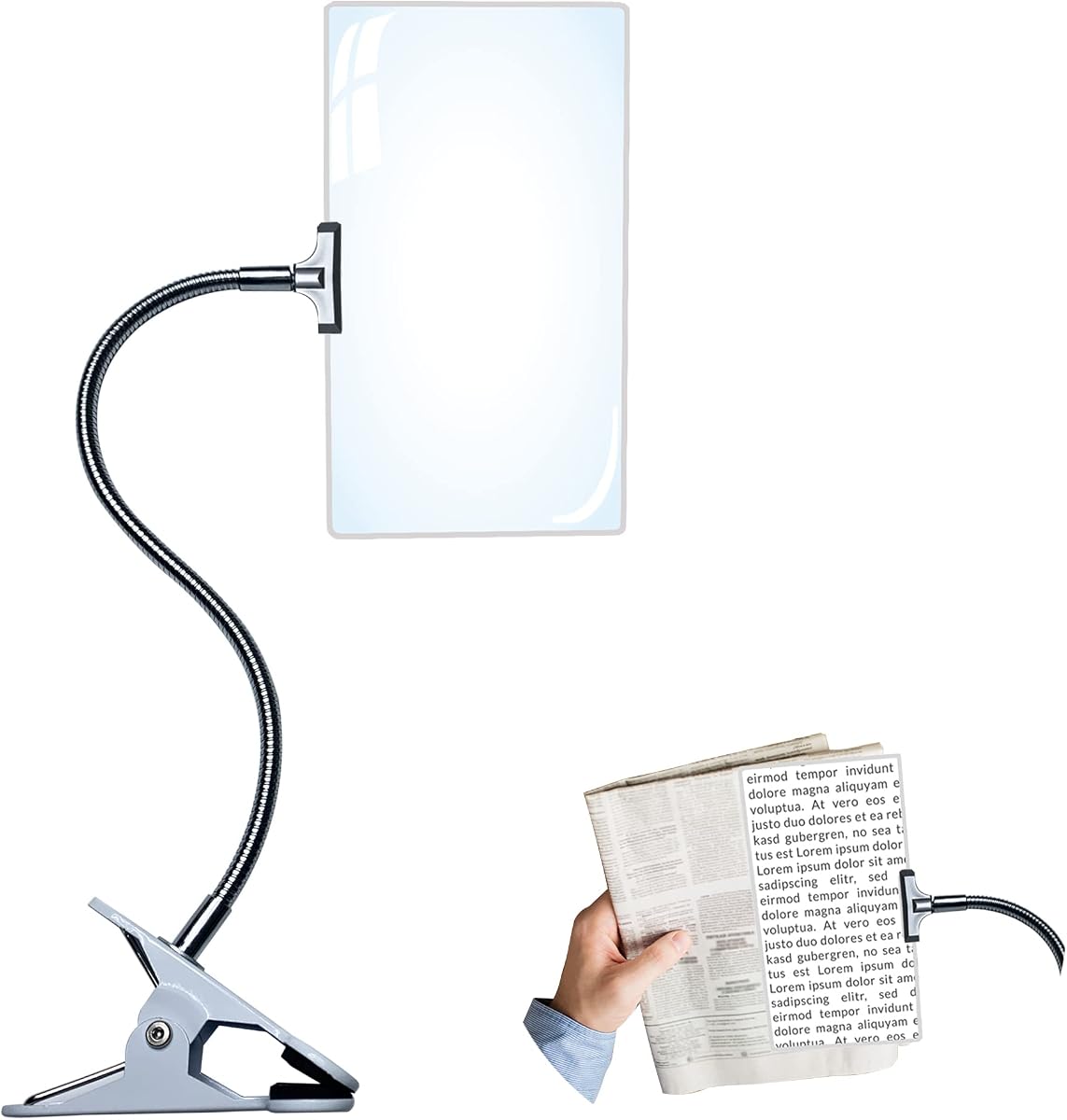
This 5X magnifying glass stands out as a top choice for those needing a large viewing area. The 10×6 inch lens provides ample space for checking tiny hobby materials or reading small print without frequent repositioning. Its optical grade PVC lens ensures crystal clear images with minimal distortion, making it a solid option for daily tasks.
We may earn a commission when you buy through this link, at no additional cost to you.
The flexible gooseneck allows for 360-degree adjustment, enabling you to position the lens exactly where you need it. This adaptability is crucial for users who work in varied environments or need to switch between tasks quickly. The lightweight design at just 3.5 ounces means it can be used for extended periods without causing arm fatigue.
While the rating is moderate, the practical benefits of the large area and adjustability often outweigh this in real-world use. The detachable clip feature adds versatility, allowing the magnifier to be used as a handheld tool when necessary. This dual functionality makes it a practical addition to any workspace.
Ideal for crafters, hobbyists, and seniors who need a reliable tool for detailed work. If you prioritize a large viewing area and flexibility, this model offers exceptional value. It is a robust choice for those who need consistent magnification without the bulk of heavier alternatives.
The detachable clip allows the user to switch between desktop mounting and handheld use seamlessly.
Optical grade PVC material ensures that images remain clear and undistorted during extended use.
We may earn a commission when you buy through this link, at no additional cost to you.
This 21-inch screen magnifier is designed specifically for enhancing the viewing experience on laptop screens. It magnifies images by 3 to 5 times, which is particularly useful for seniors or those with visual impairments. The 3D HD acrylic lens material provides a clear and immersive view, reducing the discomfort often associated with long-term screen focus.
We may earn a commission when you buy through this link, at no additional cost to you.
One of its standout features is the adjustable angle design, allowing users to switch between standing and lying positions comfortably. This flexibility is essential for users who may have difficulty sitting upright for long periods. The lightweight and collapsible design makes it easy to transport, ideal for travel or varying home settings.
However, it performs best in low light environments, as backlighting can reduce visibility. Users should also avoid direct sunlight or reflective surfaces to prevent glare. Despite this, the HD acrylic Fresnel lens offers good durability and scratch resistance, ensuring longevity even with regular use.
This magnifier is perfect for movie lovers, gamers, and seniors who need help reading small fonts. Its simple setup and lack of power requirements make it a convenient choice for daily use. If you are looking for a passive screen enhancer, this model offers strong benefits.
The spiral pattern on the lens enhances the 3D effect for a more engaging viewing experience.
Adjustable angles from 0 to 90 degrees allow for personalized positioning based on user preference.
We may earn a commission when you buy through this link, at no additional cost to you.
This screen magnifier is crafted with high definition optical technology to deliver clear and crisp visuals. The wooden frame bracket not only adds an elegant touch but also ensures durability and environmental friendliness. It is designed to work with a wide range of laptops, tablets, and mobile phones, making it a versatile tool for multiple devices.
We may earn a commission when you buy through this link, at no additional cost to you.
The device features six branch points with four pivot points that can rotate over 180 degrees. This allows for a variety of placement options, whether you are reading a book, viewing a laptop screen, or examining musical scores. The adjustable angles ensure that users can find the most comfortable position for extended use without strain.
While specific rating data is not available, the design suggests a focus on user comfort and visual protection. The product aims to prevent radiation harm and protect eyes from close viewing distances, which is beneficial for heavy screen users. Its stylish appearance also makes it a thoughtful gift choice for friends or family.
Ideal for anyone who uses multiple devices and needs a reliable magnification solution. The flexibility in positioning and high-quality lens make it a strong contender for daily work or leisure. If you need a solution that adapts to different scenarios, this magnifier offers excellent utility.
Compatible with 14 to 21-inch laptops and phones, covering most standard screen sizes.
The rotating pivot points allow for customized angles that suit different user heights and desks.
We may earn a commission when you buy through this link, at no additional cost to you.
This headset magnifier offers an impressive range of magnification powers from 0.75X to 4.0X. The interchangeable lens design allows you to switch between magnifications easily using a simple click and release system. This feature is invaluable for tasks that require different levels of detail, such as sewing or watch repair.
We may earn a commission when you buy through this link, at no additional cost to you.
The three LED lights provide excellent illumination with adjustable brightness levels. This ensures that you have enough light to see fine details without straining your eyes. The rechargeable built-in lithium battery charges via USB Type-C, eliminating the need for constant battery replacements and saving money over time.
The comfortable design features a rubber-wrapped nose bridge that spreads pressure evenly. This reduces the load on the nose and prevents fatigue during long sessions. However, note that these are not for vision correction, so users should use them solely for magnification tasks.
Best suited for hobbyists, crafters, and professionals who need hands-free precision. The combination of clear lenses and strong lighting makes it a reliable tool for detailed work. If you require high magnification and lighting in one package, this model is a top choice.
Five optical lenses let you choose the perfect power for any task from reading to detailed repair.
USB rechargeable battery ensures long-lasting use without the hassle of buying replacement batteries.
We may earn a commission when you buy through this link, at no additional cost to you.
This magnifying glass offers four different lenses with magnification powers ranging from 1.5X to 5.0X. Each lens has a fixed focal length, so you may need to adjust the distance to the object for optimal clarity. The lenses are made of high-definition acrylic resin, ensuring they are durable and scratch-resistant.
We may earn a commission when you buy through this link, at no additional cost to you.
The LED light system includes an adjustable direction feature, allowing you to illuminate the work area precisely. This is particularly helpful for tasks that require precise lighting, such as modeling or jewelry making. The battery indicator light ensures you know when to charge, and the Type-C cable provides quick and easy charging.
The ergonomic frame design is lightweight and comfortable for extended use. The silicone-coated nose bracket and adjustable headband prevent slipping and reduce pressure on the head. This makes it suitable for those who need to wear a magnifier for long periods without discomfort.
Ideal for detailed craft work, hobbies, and professional tasks requiring high magnification. The range of lenses and comfortable design make it a versatile addition to any toolkit. If you need powerful magnification with integrated lighting, this product delivers solid performance.
Adjustable LED direction allows you to focus light exactly where you need it for detailed work.
High hardness lenses resist scratches and wear, ensuring long-term usability and clarity.
We may earn a commission when you buy through this link, at no additional cost to you.
These magnifying glasses provide a steady 200% magnification, which is equivalent to 2X power. The polycarbonate lens is durable and lightweight, making it comfortable for extended use. The design is hands-free, allowing you to keep both hands available for tasks like needlework or circuit repair.
We may earn a commission when you buy through this link, at no additional cost to you.
Bright LED lights are built into both sides of the frame to enhance visibility. This ensures that you have sufficient illumination to work in low-light conditions without straining your eyes. The USB rechargeable battery charges quickly, usually within 1.5 hours, providing efficient power usage.
A unique feature of this model is the blue light blocking technology. This helps protect your eyes from harmful blue light emitted by electronic devices and artificial lighting. This is particularly beneficial for users who spend long hours in front of screens or under bright lights.
Perfect for seniors and hobbyists who need reliable, hands-free magnification. The combination of comfort, light, and eye protection makes it a practical choice. If you prioritize eye health and convenience in a compact magnifier, this option is highly recommended.
Built-in blue light blocking helps reduce eye strain and headaches from artificial lighting.
Two bright LEDs on the frame ensure consistent illumination across the viewing area.
We may earn a commission when you buy through this link, at no additional cost to you.
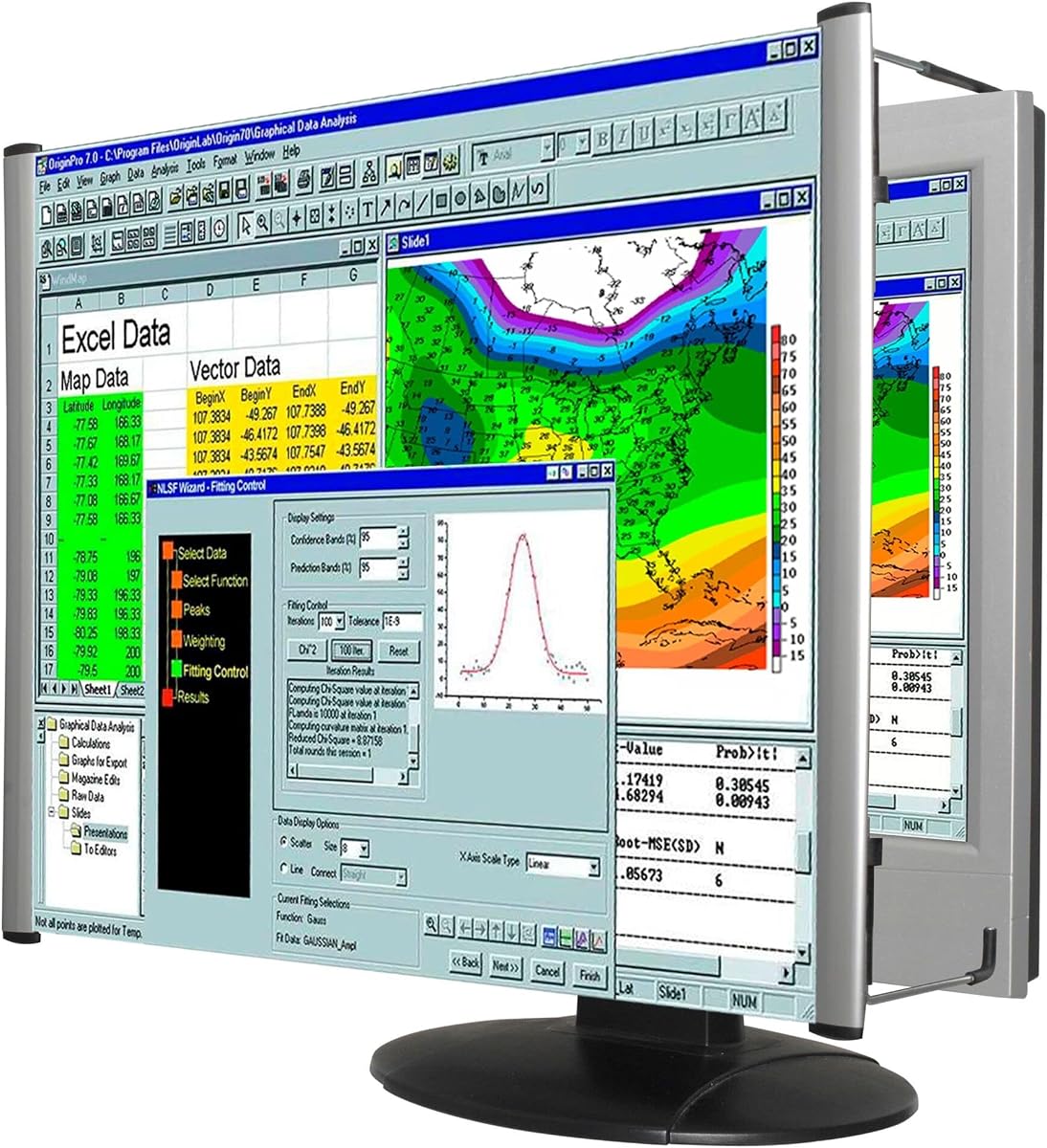
The Kantek LCD Monitor Magnifier Filter is designed for 22-inch widescreen monitors with 16:9 or 16:10 aspect ratios. It features an adjustable magnification feature that allows you to tailor the viewing experience to your needs. The Fresnel lens includes an antiglare coating to reduce reflections and improve readability.
We may earn a commission when you buy through this link, at no additional cost to you.
This filter is lightweight and fully assembled, making it easy to install on your monitor. It installs quickly without requiring any tools, which is convenient for office settings where setup time is valuable. The design aims to reduce visual fatigue by making text and images larger and easier to read.
While the rating is moderate, the specific design for office monitors provides a targeted solution. It is ideal for users who need a screen magnifier without the bulk of external devices. The antiglare coating helps maintain clarity even in bright environments.
Best for office workers who need a simple, effective screen magnification solution. Its compatibility and ease of use make it a practical choice for daily work. If you need a dedicated monitor filter, this model offers reliable performance.
The antiglare coating on the Fresnel lens ensures clear visibility even in bright office lighting.
Fully assembled and lightweight design allows for quick and tool-free mounting on monitors.
We may earn a commission when you buy through this link, at no additional cost to you.
This large clip-on magnifier features a high-definition lens that provides up to 5x magnification. The bendable hose design allows you to change the lens angle and height easily, ensuring you can position it exactly where needed. It is suitable for reading, handwork, and repair tasks.
We may earn a commission when you buy through this link, at no additional cost to you.
The desktop stable design sits securely on your desk, giving you a convenient setup for home or office use. It takes up little space, making it ideal for workspaces where desk real estate is limited. The large lens ensures that small text and fine details are easier to see without distortion.
With a rating of 4.6, users appreciate its reliability and clarity. The alloy spring clamp provides a secure grip on monitors or books. It is a helpful tool for seniors who need assistance with small print and detailed work.
Ideal for users who need a robust, portable magnification solution for various tasks. The adjustability and high magnification make it a versatile tool. If you want a sturdy clip-on option, this model is highly recommended.
The bendable hose lets you position the lens at any angle for comfortable viewing.
An alloy spring clamp ensures the magnifier stays in place during use.
We may earn a commission when you buy through this link, at no additional cost to you.
This magnifying glass features a 10×6 inch lens that provides a full-page view, making it easy to read books or sew without strain. The 4X magnification enlarges the viewing area significantly, which is particularly beneficial for those with low vision. The flexible gooseneck allows for 360-degree adjustment to find the perfect angle.
We may earn a commission when you buy through this link, at no additional cost to you.
The Fresnel lens is made of plastic, which is lightweight and resistant to breakage. This makes it safer and more durable than glass lenses, especially in environments where it might be dropped. The hands-free clip ensures the magnifier stays stable on a desk or bed without worrying about it falling off.
While the rating is moderate, the design addresses specific needs for seniors and visually impaired users. The large viewing area and stability make it a useful tool for daily tasks. It serves well for reading, sewing, and crafts without causing wrist or hand fatigue.
Best for seniors and users with low vision who need a stable, large magnifier. The clip-on design and flexible neck add significant convenience. If you need a reliable tool for low vision support, this model is a strong candidate.
The large lens allows you to view entire pages of text without constant movement.
The plastic Fresnel lens is lightweight and resistant to breakage for safer use.
We may earn a commission when you buy through this link, at no additional cost to you.
The Kantek MAXVIEW is a premium screen magnifier designed for 21.5 to 22-inch widescreen monitors. It features a patented design that is lightweight and elegant compared to conventional heavy glass lenses. The optical grade acrylic Fresnel lens includes a light tint to enhance contrast and readability.
We may earn a commission when you buy through this link, at no additional cost to you.
Magnification is adjustable by moving the magnifier closer or farther from the display. The greater the distance, the larger the image will appear, providing flexible viewing options. It is fully assembled and designed for general office use in normal ambient light environments.
While the design is premium, it is not intended for the visually impaired due to insufficient magnification levels. Also, intense lighting in the perimeter can cause reflections within the Fresnel grooves, so users should manage lighting carefully. For standard office tasks, it offers a refined solution.
Ideal for professionals who need a high-quality monitor filter with adjustable magnification. The patented design and optical clarity make it a standout choice. If you prioritize a lightweight and effective screen solution, this model is a top premium option.
Move the magnifier closer or farther from the display to control the size of the image.
The light tint on the optical grade acrylic lens helps enhance contrast for better readability.
We may earn a commission when you buy through this link, at no additional cost to you.
Selecting the right magnifying glasses for computer monitors involves considering several key factors that affect performance and comfort. This guide outlines the essential aspects to look for to ensure you make a well-informed decision.
Magnification power determines how much larger the text or image appears to your eyes. Products range from 1.5X to 5X, with higher values providing more detail but requiring closer viewing distances. Choose a power that matches your specific needs, ensuring it provides enough size for comfort without causing eye strain.
The lens material significantly impacts clarity and durability. Optical grade PVC and acrylic Fresnel lenses are common, offering lightweight options with minimal distortion. Look for lenses that are scratch-resistant and provide clear images to ensure a comfortable viewing experience over long periods.
Adjustability is crucial for finding the most comfortable viewing angle. Features like goosenecks, pivot points, and height adjustments allow you to customize the position. A flexible design ensures that you can use the magnifier in various scenarios, from reading a book to examining detailed screen content.
Hands-free designs, such as clip-on or headset models, are ideal for tasks requiring both hands to be free. These options reduce fatigue and allow for more natural use during extended periods. Ensure that the device is stable and secure so it does not slip or shift during use.
Built-in lighting can enhance visibility in low-light conditions. LED lights with adjustable brightness levels help illuminate the work area without causing glare. Consider models with rechargeable batteries to avoid frequent battery replacements and ensure long-lasting power for your tasks.
Ensure the magnifier is compatible with your specific screen size and type. Some models are designed for laptops, while others target desktop monitors. Check the dimensions and aspect ratio requirements to ensure a proper fit that does not obstruct your view or keyboard usage.
The weight of the magnifier affects how comfortable it is to use over time. Lightweight materials reduce pressure on the nose, hands, or head. Look for ergonomic designs with cushioned nose bridges or adjustable straps to ensure the device remains comfortable during long sessions.
Simple installation processes save time and effort. Look for models that are fully assembled or require minimal setup. A tool-free installation ensures you can start using the magnifier immediately without needing additional equipment or technical skills.
To get the best results, start by adjusting the magnifier to a comfortable distance from your eyes or screen. For clip-on models, ensure the clamp is securely attached to your monitor or desk without damaging the surface. Use the adjustable features to align the lens with your line of sight for optimal clarity.
Clean the lenses regularly with a soft, lint-free cloth to remove fingerprints and dust. Avoid using harsh chemicals that might scratch the surface. For models with LED lights, ensure the battery is fully charged before use to maintain consistent brightness throughout your tasks.
Store the magnifier in a protective case when not in use to prevent scratches and damage. Keep the device away from extreme temperatures or direct sunlight to maintain the integrity of the materials. Regularly check the moving parts like goosenecks or clamps to ensure they remain functional and secure.
For reading small text on a monitor, a magnification power between 2X and 4X is generally sufficient. This range provides enough enlargement to reduce eye strain without requiring you to sit too close to the screen. It is best to test different levels to find the most comfortable setting for your needs.
Many standard screen magnifiers are designed for mild to moderate visual strain rather than severe impairment. For significant visual impairments, specialized software or hardware designed for low vision users may be more effective. Always check product specifications to ensure they meet your specific visual requirements.
Clip-on magnifiers can be used on most monitors as long as the edge is suitable for clamping. However, you should check the size constraints and ensure the monitor thickness allows for a secure grip. Be careful not to damage the monitor edges or screen when attaching the device.
To clean the lenses, use a microfiber cloth to gently wipe away dust and fingerprints. Avoid using household glass cleaners or abrasive materials that could scratch the surface. If needed, lightly dampen the cloth with water, but ensure no moisture touches the electronic components if present.
Fresnel lenses are thinner and lighter than traditional acrylic lenses, often using concentric rings to focus light. Acrylic lenses provide high clarity and durability but may be thicker. The choice depends on your preference for weight versus optical quality and scratch resistance.
Many modern LED magnifiers come with rechargeable batteries that use USB charging cables. This eliminates the need to buy disposable batteries, saving money and reducing waste. Always check the product details to confirm if a rechargeable battery is included with your purchase.
To reduce glare, position the magnifier at an angle that avoids direct light reflection. Use the built-in tint or antiglare features if available. Adjusting room lighting to avoid bright lights directly behind or in front of the screen can also help minimize glare during use.
Most magnifiers are designed to be ambidextrous, meaning they can be used by both left and right-handed users. However, clip-on models may require specific placement to accommodate handedness. Check for models with adjustable angles or detachable lenses for greater flexibility in positioning.
In conclusion, the ten products featured in this guide offer a range of options for anyone looking to enhance their viewing experience on computer monitors. From the budget-friendly clip-on lenses to premium adjustable filters, there is a solution for every need and preference.
When choosing the right magnifier, prioritize features that directly impact your comfort and usability. Consider factors like lens quality, adjustability, and lighting to ensure the device meets your specific requirements. Investing in a high-quality tool can significantly reduce eye strain and improve productivity.
Remember that prices and availability can change over time, so it is wise to check current listings before making your purchase. By selecting the right magnifying glasses for your computer monitor, you can enjoy clearer vision and a more comfortable digital experience in the long term.