
VSD M18 Macro Pad
4.4Editor score
18 programmable keys
Customizable LCD visuals
RGB light ring
This guide compares the top ten macro pads for streaming to help creators choose the best device for OBS control, scene switching, and workflow automation
Streaming requires precise control over software and audio while you focus on content. A dedicated macro pad simplifies complex tasks into single taps, reducing errors and keeping your flow smooth during live sessions or recording.
We evaluated ten real products based on key count, customization depth, software compatibility, and build quality. Each entry includes verified specs, ratings, and practical use cases to help you find the right tool for your setup.
Every pick highlights unique strengths like LCD screens, RGB lighting, or audio control. Prices and availability change frequently, so check current listings before buying. Use these insights to upgrade your desk with a reliable streaming companion.
4.4Editor score

4.8Editor score

4.9Editor score
The following table compares all ten products side by side. Review key specs like programmable keys, visual feedback, audio features, and software support to see which device fits your streaming workflow best.



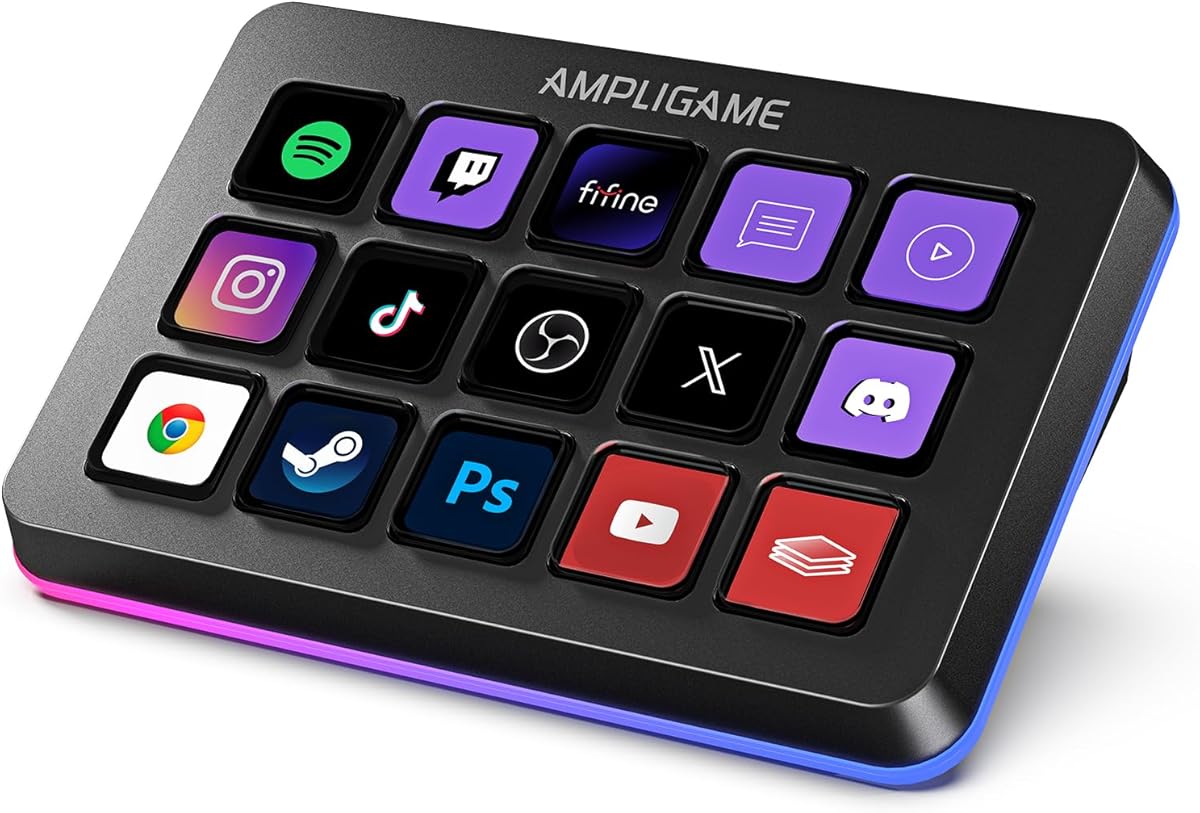


The VSD M18 Macro Pad is a strong budget option for streamers needing many shortcuts. With 18 programmable keys and LCD visuals, it balances cost and features effectively. Ratings reflect solid performance for daily streaming tasks.
We may earn a commission when you buy through this link, at no additional cost to you.
Its standout feature is the 18 keys including 15 LCD visual keys plus 3 physical buttons. You can program single actions or multi-step sequences. The keys accept JPG, PNG, and GIF images for clear function labels. USB sound board triggers work well for OBS scenes.
Trade-offs include limited Linux support, which may affect open-source users. The software requires setup time for advanced macros. However, the RGB ring and sturdy build offset these for most desktop setups.
Buyers seeking affordable streaming control with high key count should choose this. It suits beginners or those expanding from standard keyboards. Verify plugin needs before purchase.
Each LCD key accepts JPG, PNG, and GIF images to mark functions clearly. This reduces confusion during live streams and helps identify actions quickly.
An adjustable RGB surround light ring adds ambiance. It supports auto color cycle modes and custom tones via firmware upgrades for streaming setups.
We may earn a commission when you buy through this link, at no additional cost to you.
The Stream Dock N1 stands out for its vertical layout, saving desk space while keeping shortcuts accessible. With 15 LCD keys and three modes, it fits diverse workflows. High ratings confirm reliability and user satisfaction.
We may earn a commission when you buy through this link, at no additional cost to you.
Three modes include left-hand shortcut, calculator, and numeric keypad. You can drag files, browsers, and apps to keys for one-click access. Icons support GIFs for unique styles. The plugin market offers ready-made integrations.
Ergonomics favor left-hand use, which may need adjustment. Plugin reliance means some setup work. Still, the space efficiency and mode flexibility make it ideal for compact desks.
Streamers with limited desk space or needing calculator functions will appreciate this. It suits users wanting a desktop companion beyond macros. Check mode suitability for your dominant hand.
The vertical layout saves valuable desktop space compared to traditional horizontal stream controllers. This design expands shortcut keys without cluttering the desk.
Switch between left-hand shortcut, calculator, and numeric keypad modes. This versatility meets varied needs from quick access to mathematical tasks.
We may earn a commission when you buy through this link, at no additional cost to you.
The VSD M18 Deck offers one-touch operation for instant task execution. Its 18 customizable keys and multi-hotkey macros streamline complex workflows. Ratings highlight efficiency for gamers and content creators.
We may earn a commission when you buy through this link, at no additional cost to you.
You can assign individual or series of actions to keys. The Operation Follow feature runs multiple steps sequentially. LCD keys support images and animations for recognition. High-grade materials ensure stable performance.
Similarity to other VSD models may limit uniqueness. Software setup adds initial effort. However, the macro depth and durability justify the choice for repetitive tasks.
Content creators needing rapid sequence triggers should consider this. It fits workflows like video editing or game combos. Verify software compatibility with your OS.
Efficiency is at your fingertips with one-touch operation. Instantly launch macros, input text, or switch OBS scenes with a single click for speed.
The one-click multi-hotkey feature allows simultaneous or sequential macro execution. This is a game-changer for complex workflows like music production.
We may earn a commission when you buy through this link, at no additional cost to you.
The VSD Mini Macro Pad excels for users prioritizing portability. With 6 LCD keys and dual side RGB bars, it keeps the desk clean. Ratings suggest it suits beginners or secondary setups.
We may earn a commission when you buy through this link, at no additional cost to you.
Its compact design saves desk space while retaining full macro functions. Side light bars add ambiance. The open-source SDK allows personalized adaptation for Linux users. USB power ensures continuous supply.
The key count is lower than full decks, limiting complex workflows. Software installation is mandatory. Still, the size and visual effects appeal to minimalist setups.
Buyers wanting a travel-friendly or secondary controller should pick this. It fits secondary streaming stations. Confirm software needs match your technical comfort.
Designed in mini portable size, it saves desk space while retaining full macro customization. This makes it ideal for secondary streaming stations.
Two customized side RGB light bars add immersive visual effect. They support automatic color cycling for stylish desktop ambiance.
We may earn a commission when you buy through this link, at no additional cost to you.
The VSD N4 Pro blends streaming control with audio management. It features 10 LCD keys, 4 RGB knobs, and a touch bar. Ratings emphasize its value for studio-like setups.
We may earn a commission when you buy through this link, at no additional cost to you.
You can trigger sound effects and adjust audio with one tap. It works as a USB soundboard sending commands to the computer. The stand offers a 60-degree viewing angle for comfort.
The price is higher than budget options, justifying extra features. Audio output relies on PC sound. Still, the knob integration and plugin ecosystem stand out for creators.
Streamers focusing on sound effects and audio mixing will benefit. It suits setups needing more than macro keys. Check audio command compatibility.
It works as a professional USB soundboard for streamers. Trigger sound effects and adjust audio atmosphere with one tap without needing extra hardware.
The foldable 60-degree ergonomic stand ensures comfortable viewing for long sessions. It aids easy storage when not in use.
We may earn a commission when you buy through this link, at no additional cost to you.
The Fifine D6 RGB macro-Keyboard emphasizes visual feedback. With 15 programable buttons and a glowing RGB ring, it enhances desk aesthetics. Ratings confirm its appeal for gaming and streaming.
We may earn a commission when you buy through this link, at no additional cost to you.
You can see the application on the touchscreen and press to control directly. Folders help generate different programs for scenes. The 9 controllable RGB modes match gaming aura preferences.
Setup requires firmware and software updates for full use. The layout is standard, not space-saving. However, the visual richness and folder system improve efficiency.
Streamers valuing RGB aesthetics and organized scenes should choose this. It suits users wanting visual cues. Ensure updates are applied before initial use.
After setting your keys, see the application on the touchscreen and press to control directly. This visual feedback streamlines your workflow.
There is a glowing RGB ring around the controller with 9 different changeable modes. This brightens your gaming setup and gives viewers a vivid impression.
We may earn a commission when you buy through this link, at no additional cost to you.
The TreasLin VSDinside N1 offers 18 keys and supports dynamic animated icons. This unique feature transforms interfaces beyond static images. Ratings indicate satisfaction for creators wanting personalization.
We may earn a commission when you buy through this link, at no additional cost to you.
Three modes allow switching between shortcuts, calculator, and numeric functions. You can create dedicated scenarios for daily, work, or live use. The marketplace provides thousands of free and premium options.
Spotify integration requires a premium account, limiting free users. Software dependency means setup is required. However, the animation support is rare at this price.
Streamers wanting unique, animated interfaces will love this. It suits creators focused on visual branding. Check account requirements for third-party apps.
The N1 supports dynamic animated icons beyond static images. You can use favorite animations to create custom icon scenes for the device.
Customize scenarios like Daily, Work, Live, and Media modes. Each sets up quick controls tailored to specific tasks and software needs.
We may earn a commission when you buy through this link, at no additional cost to you.
The Streonor S15 includes three non-touch status display panels for at-a-glance info. This helps monitor system performance while working. Ratings highlight its practicality for streaming and editing.
We may earn a commission when you buy through this link, at no additional cost to you.
Action flows let you trigger multiple commands with one key. You can create dedicated layouts for different scenarios. Plugins and icon packs allow deep personalization.
Linux is not supported, limiting OS choices. Setup notes advise disconnecting similar software. However, the status panels are unique for monitoring tasks.
Streamers needing system monitoring alongside macros should pick this. It suits users who value real-time data. Confirm OS compatibility before purchase.
The S15 includes 3 non-touch status display panels for real-time information. Display weather, CPU temperature, or memory usage while working.
Use software to build action flows that trigger multiple commands with one key. This reduces repetitive steps across complex projects efficiently.
We may earn a commission when you buy through this link, at no additional cost to you.
The Streonor S10 brings together 10 LCD keys, a touchscreen, and knobs for demanding workflows. Ratings place it as a top choice for streamers needing precise adjustments.
We may earn a commission when you buy through this link, at no additional cost to you.
Knobs handle volume, microphone levels, and timeline adjustments. The touchscreen accesses supported info and controls. This central controller reduces window switching during sessions.
The price is higher than standard decks. Some third-party apps need active accounts. Still, the all-in-one nature and touchscreen make it a flagship tool.
Power users needing audio mixing and precise control will appreciate this. It suits complex setups. Verify app requirements before purchase.
Use the LCD keys and access supported information through the touchscreen. Knobs assign to volume, mic levels, and timeline adjustments for precision.
Assign several actions to one key and trigger them in sequence. This helps reduce repetitive steps across complex projects.
We may earn a commission when you buy through this link, at no additional cost to you.
The Elgato Stream Deck MK.2 is the industry standard for stream controllers. With 15 customizable LCD keys and powerful plugins, it leads in compatibility. Ratings confirm its reliability and ease of use.
We may earn a commission when you buy through this link, at no additional cost to you.
It supports instant control of apps like OBS, Twitch, and Spotify. Hotkey actions streamline editing workflows. Visual feedback ensures commands are executed successfully without checking screens.
The price is higher than budget options, but the ecosystem is unmatched. It lacks knobs or audio mixing. Still, it remains the top pick for pure streaming reliability.
Professional streamers needing maximum compatibility should choose this. It suits those prioritizing stability. Check current bundles for added value.
Powerful plugins include Elgato 4KCU, OBS, Twitch, YouTube, and Philips Hue. This supports instant control of apps, tools, and platforms.
You get visual feedback so you know your command has been executed. This prevents mistakes during critical streaming or editing moments.
We may earn a commission when you buy through this link, at no additional cost to you.
Choosing the right macro pad involves balancing key count, visual customization, software support, and budget. This guide outlines the main factors to consider for your setup.
The number of programmable keys determines how many shortcuts you can map at once. Larger pads offer more flexibility but take up desk space, while compact ones suit tighter setups.
Look for a key count that matches your typical workflow needs.
LCD screens with custom icons help identify actions quickly during streams. Some models support GIF animations for dynamic feedback, while others use static images or physical buttons.
Customizable visuals reduce errors when switching scenes or launching apps.
The provided software defines how easy it is to assign actions. Some have large plugin marketplaces for app integrations, while others require manual configuration.
Check if your favorite streaming apps are supported out of the box.
Some macro pads include soundboards or audio knobs for mixing sound effects and volumes. This centralizes control when streaming or recording audio.
Prioritize audio features if you manage sound effects live.
Durability matters for long sessions. Plastic builds are lighter, while metal or sturdy plastic adds stability. Portable models are useful if you travel to events.
Assess how much the device moves after installation.
Many devices offer RGB lighting to match your desk theme. While not essential, they enhance visual appeal for camera-facing setups.
Choose customizable RGB if aesthetics matter for your stream.
Ensure the device supports Windows and macOS. Some models lack Linux support, which may limit open-source workflows.
Verify system requirements match your computer's OS.
Prices range from compact budget options to premium models with extra features. Higher costs often bring better build and larger plugin libraries.
Balance features with your total budget for the best value.
Set up the macro pad by installing the provided software and connecting via USB or USB-C. Ensure the software detects the device before assigning any shortcuts. Start by mapping simple tasks like launching OBS or muting your microphone.
Customize key icons using images or GIFs to identify functions quickly. Create scenes or folders for different activities such as streaming, editing, or gaming. Organize layouts so you can switch contexts instantly during live sessions.
Keep the device clean by wiping the keys with a dry cloth. Avoid spills and store in a dry place if it is portable. Update the software regularly to access new plugins and maintain performance.
A macro pad for streaming is a programmable controller that lets you assign shortcuts to keys. It simplifies complex tasks like switching scenes or launching apps with one touch.
Yes, most macro pads require dedicated software for configuration. This software lets you assign functions and customize icons. Some models offer plugin marketplaces for app integration.
Yes, a macro pad can replace keyboard shortcuts entirely for streaming tasks. However, it complements rather than replaces a full keyboard for typing and general input.
Popular apps like OBS, Twitch, YouTube, and Discord are widely supported. Check the device's plugin list to confirm compatibility with your preferred software.
Most macro pads let you assign JPG, PNG, or GIF images to LCD keys. Use the provided software to drag and drop images for each shortcut.
Most models support macOS, though software details may vary. Verify compatibility in the product specs before buying if you use a Mac.
Some high-end macro pads include soundboards or audio controls. These send audio commands to your computer but do not usually output sound directly.
Use a dry cloth to wipe keys and surfaces. Avoid moisture to prevent damage to electronics. Store in a cool, dry place when not in use.
The VSD M18, Elgato MK.2, and Streonor S10 lead in budget, reliability, and premium features. Each suits different workflow needs from basic scene switching to full studio control.
Prioritize what matters most for your setup, whether it is key count, audio features, or visual feedback. Your choice depends on how you manage streaming tools and aesthetics.
Check current prices and availability before deciding as offers change. Use these comparisons to upgrade your desk with a reliable streaming companion.