
Upgraded Computer Speakers for Desktop PC
4.2Editor score
USB plug and play connection
Compatible with macOS systems
Single cable for power and audio
This guide compares the top ten external speakers for MacBook users to help you choose the best audio setup for your desktop or laptop workflow.
Enhancing your MacBook audio experience requires the right external speakers. A good setup delivers clear dialogue, rich bass, and reliable connectivity without cluttering your workspace with unnecessary cables or adapters.
We evaluated ten diverse models based on sound quality, connectivity options, and design compatibility with Apple devices. Each product was assessed for its ability to integrate seamlessly into a modern MacBook external speakers setup.
Every pick highlights specific strengths like USB-C support, Bluetooth versatility, or space-saving designs. Please note that availability and pricing can change quickly, so verify details before purchasing to ensure you get the best deal today.
4.2Editor score

4.4Editor score
4.5Editor score
The following table provides a side by side comparison of all ten selected speakers to help you quickly identify the right model for your specific MacBook external speakers setup needs.




The Creative Pebble V3 stands out as the top choice for MacBook users seeking a balanced blend of performance and convenience. With a high rating of 4.4 stars, it delivers clear dialogue and robust audio suitable for both work and entertainment.
We may earn a commission when you buy through this link, at no additional cost to you.
Its USB-C connectivity ensures a direct plug-and-play experience with modern MacBooks, eliminating the need for dongles. The built-in gain switch allows you to push volume levels further when needed, while the Bluetooth 5.0 option offers flexibility for wireless listening.
While the compact design means bass extension is physically limited compared to larger systems, the 45-degree elevated drivers ensure sound is directed straight at your ears. This placement improves vocal clarity and imaging significantly.
For most MacBook owners, the Pebble V3 offers the best combination of setup simplicity and audio quality. It is an excellent choice for those who want a tidy desk without sacrificing sound performance or connectivity options.
The Clear Dialog audio processing enhances spoken words during video calls or streaming without affecting background music quality.
Support for both USB-C wired connections and Bluetooth 5.0 wireless streaming ensures compatibility with all MacBook configurations.
We may earn a commission when you buy through this link, at no additional cost to you.
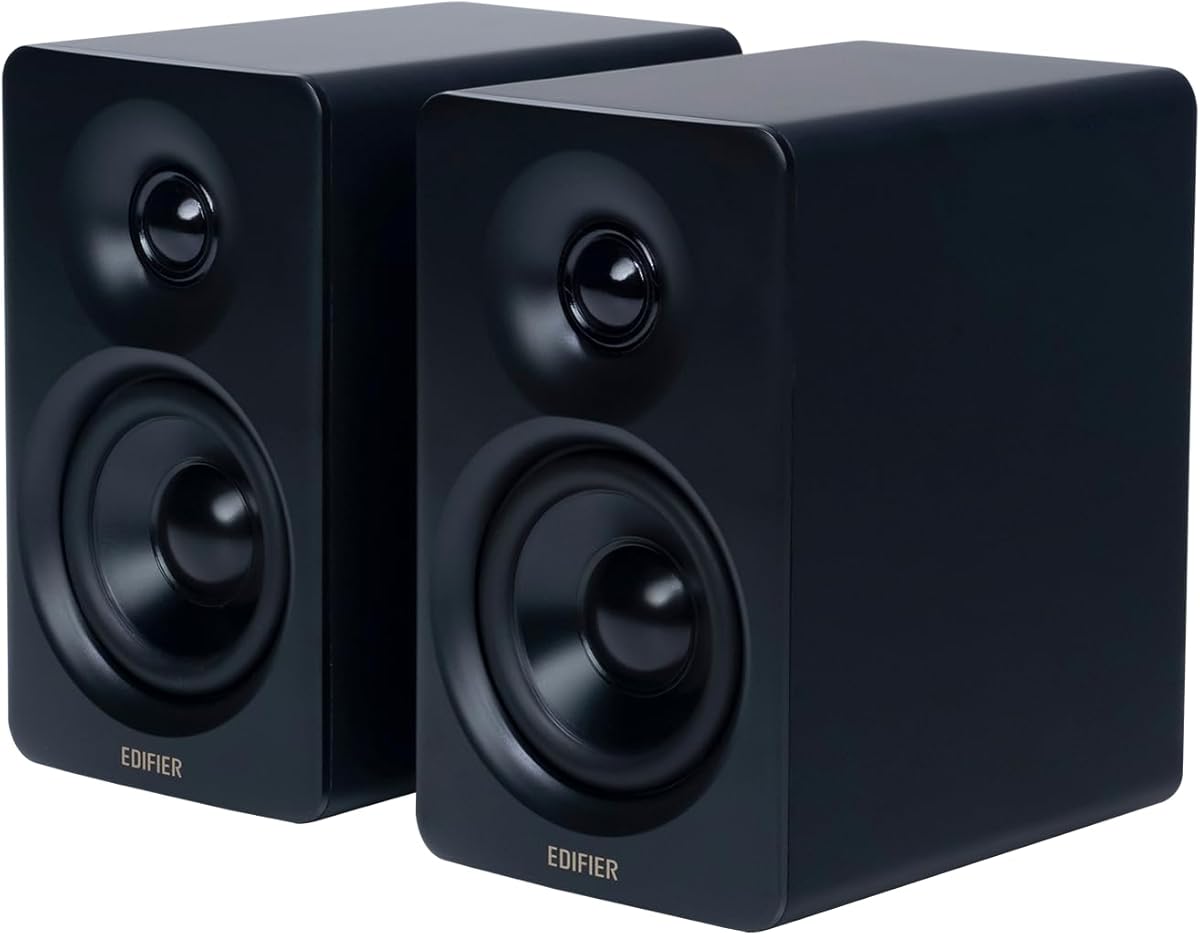
The Edifier M60 represents the pinnacle of audio fidelity for MacBook users who demand studio-grade performance. Its 4.5-star rating reflects exceptional build quality and sound precision suitable for critical listening and professional tasks.
We may earn a commission when you buy through this link, at no additional cost to you.
With a massive 66W RMS output and Hi-Res Audio certification, these speakers reproduce music and movies with incredible detail. The bundled aluminum stands elevate the drivers to ear level, optimizing the listening position for better imaging.
The touch-sensitive control panel offers a modern user experience, allowing easy volume and power adjustments. While the premium price reflects these high-end features, the included hardware and sound quality justify the investment for audiophiles.
If you are looking to transform your MacBook into a high-fidelity entertainment center, the M60 is the definitive choice. It excels in every category from power to connectivity, making it the best premium option available.
Certified for Hi-Res Audio, the M60 delivers precise sound reproduction ideal for music creation and critical listening sessions.
Bluetooth 5.3 with LDAC codec support allows wireless streaming of high-resolution audio files directly from your device.
We may earn a commission when you buy through this link, at no additional cost to you.
The Upgraded Computer Speakers offer an incredibly affordable entry point for MacBook users needing basic audio enhancement. Despite the low cost, they maintain a solid 4.2-star rating by delivering clear sound and easy connectivity.
We may earn a commission when you buy through this link, at no additional cost to you.
Setup is as simple as plugging the USB cable into your laptop, as no drivers or complex configurations are required. The soundbar form factor fits neatly under or in front of your screen, keeping your desk organized.
While they lack the premium features of higher-end models, the dual 3W drivers provide adequate volume for small to medium rooms. The bass enhancement adds a bit of depth to media playback without overwhelming the clarity.
For students or casual users on a tight budget, these speakers provide the best value. They prove that you do not need to spend a fortune to get a functional and decent sounding external audio solution for your MacBook.
The USB plug-and-play design ensures immediate functionality with macOS without requiring additional software installation or drivers.
The compact soundbar footprint minimizes desk clutter while delivering stereo sound suitable for daily computing tasks.
We may earn a commission when you buy through this link, at no additional cost to you.
These speakers distinguish themselves with a unique clip-on monitor design that saves significant desk space. With a 4.2-star rating, they provide a practical solution for users who want to free up their desktop surface area.
We may earn a commission when you buy through this link, at no additional cost to you.
The adaptive channel switching ensures that left and right audio remain correct regardless of whether the speakers are mounted on the top or bottom of the monitor. This feature is particularly useful for versatile setups.
Inclusion of a USB-C adapter makes these compatible with newer MacBooks that lack traditional USB-A ports. The touch controls on the front provide convenient access to volume adjustments without touching your keyboard.
Ideal for tight desks or dual monitor setups, these speakers maximize vertical space efficiently. While the clamp mechanism requires careful installation, the space-saving benefits make them a strong contender for organized workspaces.
The clip-on mount attaches securely to the monitor edges, keeping speakers elevated and freeing up valuable desk space.
G-sensor technology automatically adjusts audio channels to match the orientation of the speakers on your monitor.
We may earn a commission when you buy through this link, at no additional cost to you.
Amazon Basics speakers deliver straightforward performance with a solid 4.4-star rating. They are designed for users who prioritize reliability and simplicity over advanced features or wireless connectivity options.
We may earn a commission when you buy through this link, at no additional cost to you.
Powered directly by USB, these speakers draw power from your MacBook, eliminating the need for external power adapters. The 3.5mm aux input provides a backup wired connection option if USB audio fails or is unavailable.
The in-line volume control knob offers convenient access without needing to adjust system settings constantly. The metal finish and blue LED lights add a touch of style to the basic design.
For those seeking a no-fuss, dependable audio solution, these speakers are an excellent choice. They provide consistent sound quality and ease of use, making them a safe bet for general office or home tasks.
USB power combined with a 3.5mm aux input offers flexibility for connecting to various MacBook models and peripherals.
The in-line volume control allows for quick audio adjustments directly from the cable without touching the computer.
We may earn a commission when you buy through this link, at no additional cost to you.
The Logitech Z207 offers exceptional versatility with a strong 4.4-star rating. It bridges the gap between traditional wired speakers and modern wireless convenience, catering to diverse MacBook usage scenarios.
We may earn a commission when you buy through this link, at no additional cost to you.
Logitech's Easy-Switch technology allows seamless transitions between your MacBook and other devices like smartphones. You can pause audio on one device and play on another without manually re-pairing or adjusting system settings.
A passive radiator enhances the bass response despite the compact size of the speakers. The built-in headphone jack on the speaker itself provides direct listening options without unpairing Bluetooth connections.
For households with multiple devices, the Z207 simplifies audio sharing significantly. Its balanced feature set makes it an attractive option for MacBook users who need to switch between work and entertainment frequently.
Easy-Switch technology lets you toggle between your MacBook and phone instantly by simply pausing and playing audio.
The passive radiator design improves low-frequency performance, adding punch to music and movie soundtracks.
We may earn a commission when you buy through this link, at no additional cost to you.
The Edifier MR3 is a Hi-Res Audio certified monitor designed for precise audio reproduction. With a 4.5-star rating, it appeals to MacBook users involved in video editing or music production who need accurate sound.
We may earn a commission when you buy through this link, at no additional cost to you.
Balanced TRS and RCA inputs ensure clean signal transmission to minimize noise and interference. The MDF cabinet construction helps reduce vibrations, delivering a neutral and detailed sound profile.
You can fine-tune the audio response using the EDIFIER ConneX mobile app, which offers detailed EQ adjustments. This customization allows you to tailor the sound to your specific room acoustics or preferences.
For creative professionals using a MacBook for production work, the MR3 provides the accuracy needed for mixing. Its ability to switch between modes like Monitor and Music adds versatility for general entertainment too.
The flat frequency response ensures you hear audio exactly as it was recorded, ideal for editing and mixing tasks.
The companion app allows for precise sound adjustments, giving you full control over the speaker's output characteristics.
We may earn a commission when you buy through this link, at no additional cost to you.
The FUNLOGY Speaker is a compact solution for MacBook users with minimal desk space. Its 4.2-star rating highlights its effectiveness in delivering clear audio from a very small footprint.
We may earn a commission when you buy through this link, at no additional cost to you.
The unique 30-degree tilt design directs sound towards your ears, improving clarity even when speakers are placed close to the monitor. The included volume dial offers a tactile way to manage audio levels.
With a total output of 14W, these speakers deliver surprising volume and clarity for their size. The gold-plated AUX input helps minimize signal noise, ensuring a clean connection to your MacBook.
If you prefer a tiny, neat setup without compromising too much on sound quality, these speakers are a great fit. They are ideal for portable setups or secondary displays where space is at a premium.
The 30-degree tilt optimizes sound delivery to ear level, enhancing the listening experience in confined spaces.
A dedicated volume dial on the speaker body provides immediate access to audio adjustments without using software settings.
We may earn a commission when you buy through this link, at no additional cost to you.
The Dell Speakerphone SP3022 is a specialized device designed for business communication. With a 4.2-star rating, it excels in professional settings where clear meetings are more important than multimedia playback.
We may earn a commission when you buy through this link, at no additional cost to you.
Full duplex audio allows multiple people to speak simultaneously without cutting off, a crucial feature for effective conference calls. The Microsoft Teams and Zoom certifications ensure seamless integration with corporate software.
LED lights clearly indicate call status and mute states, adding a layer of convenience for busy users. The device connects via USB-A or USB-C, making it compatible with various MacBook configurations.
For MacBook users whose primary need is high-quality conferencing and remote collaboration, this speakerphone is the ideal solution. It simplifies meeting workflows and ensures professional audio quality for your calls.
Designed specifically for Teams and Zoom, the speakerphone ensures high reliability and clear audio during critical business meetings.
Visual LED indicators keep you informed of call states and mute status without needing to check your screen constantly.
We may earn a commission when you buy through this link, at no additional cost to you.
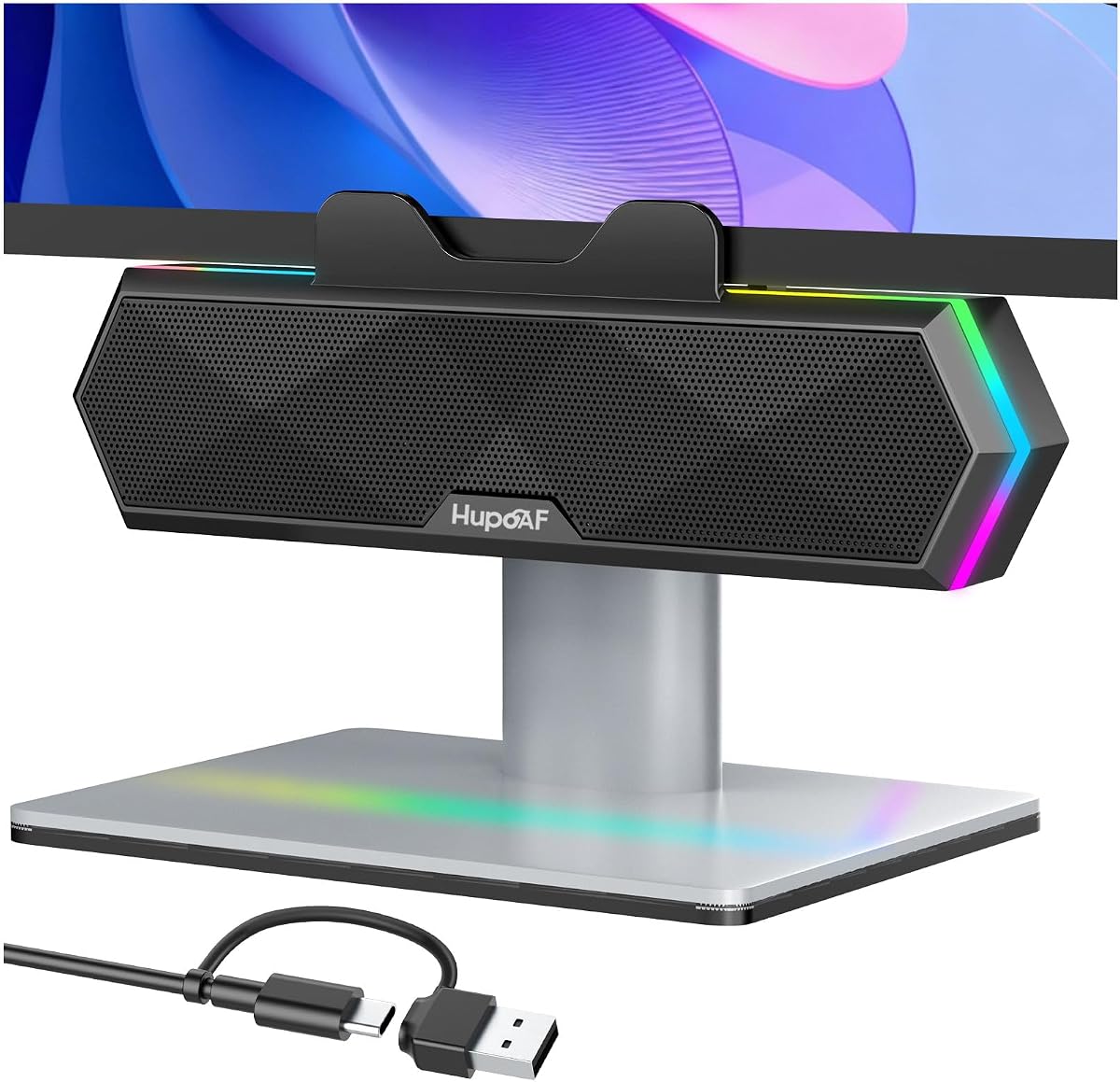
These speakers stand out with vibrant RGB lighting and a clip-on design. Boasting a 4.6-star rating, they combine aesthetic appeal with reliable performance for MacBook users who value visual customization.
We may earn a commission when you buy through this link, at no additional cost to you.
The six dynamic RGB lighting modes allow you to match the speaker's look to your gaming rig or personal style. You can turn the lights off completely for a distraction-free work environment if needed.
Sound-wise, the dual ultra-magnetic drivers provide crisp highs and deep bass. The clip-on mount secures them firmly to the monitor, freeing up desk space while keeping audio close to your listening position.
If you want your setup to look dynamic and modern, these speakers are the perfect choice. They offer a unique blend of style and substance, making them a standout option for gaming and entertainment setups.
The RGB lighting modes let you personalize your desk aesthetic, adding a vibrant touch to your MacBook setup.
Dual magnetic drivers ensure that despite the aesthetic features, the sound quality remains powerful and detailed.
We may earn a commission when you buy through this link, at no additional cost to you.
Selecting the right external speakers for your MacBook requires considering connectivity, space, and audio quality to ensure a seamless setup.
Connectivity is the most critical factor when connecting external speakers to a MacBook. Newer models rely heavily on USB-C ports, so ensure your speakers have native USB-C support or include an adapter. Bluetooth offers wireless freedom but may introduce latency for video editing.
Always check your specific MacBook model's available ports to confirm compatibility before purchasing. A mismatch might require additional dongles that add cost and clutter to your desk setup.
MacBook users often work in compact environments where desk real estate is limited. Look for clip-on monitor speakers or compact soundbars that save space without compromising sound quality. The physical footprint should fit naturally into your existing workflow.
Measure your workspace before buying to ensure the speakers do not block the keyboard or screen. A design that complements your aesthetic can also enhance your overall work environment.
Determine whether you need speakers for music, voice calls, or multimedia. For high-fidelity audio, look for models with passive radiators and high wattage RMS ratings. For calls, prioritize speakers with clear dialogue processing or integrated microphones.
Higher wattage generally translates to louder sound and better bass response. However, room size matters, so a powerful speaker might be overkill for a small home office.
USB-powered speakers are convenient as they draw energy directly from your MacBook without needing a wall outlet. However, some high-power models require separate AC adapters. Consider your desk layout and availability of power strips.
Speakers with USB-C power support are becoming standard for modern setups. Ensure your laptop can handle the power draw without affecting its battery life significantly.
Having multiple input options like USB-C, Bluetooth, and 3.5mm aux increases flexibility. This allows you to connect your MacBook alongside other devices like phones or gaming consoles easily. Versatility extends the lifespan of the speakers as devices change.
Check for features like gain switches or built-in DACs if you are an audiophile. These small additions can significantly impact the clarity and depth of your audio playback.
Features like RGB lighting, touch controls, or app-based EQ adjustments add convenience and customization. Decide which features add value to your experience versus those that are mere gimmicks. Useful controls like hardware volume knobs are often preferred over software adjustments.
For business users, certifications like Microsoft Teams or Zoom can streamline meetings. These ensure the speaker works optimally with corporate communication tools without extra configuration.
Stick with reputable brands known for audio quality and reliable customer support. Well-established companies often provide better warranties and firmware updates for Bluetooth speakers. Reading recent reviews helps gauge long-term reliability and build quality.
Consider the availability of replacement parts or customer service responsiveness. A good support network ensures you can resolve any issues quickly without prolonged downtime.
Prices for MacBook external speakers vary widely from budget-friendly options to high-end premium models. Determine your budget early and focus on the features that matter most to your specific use case. A higher price does not always guarantee better value for casual users.
Look for sales or bundles that include necessary cables or stands. Sometimes a mid-range model with extra accessories offers better value than a premium model missing key components.
To start using your speakers, connect them securely to your MacBook's available ports or pair them via Bluetooth. Navigate to System Settings on your Mac to select the speakers as the default audio output device for sound to play correctly.
Regularly clean the speaker grilles with a soft, dry cloth to prevent dust buildup. This simple maintenance step helps maintain clear sound quality and prevents blockages that might muffle audio output over time.
Avoid placing speakers directly on vibrating surfaces to reduce distortion. Using the included stands or a stable surface ensures that the audio remains crisp and the physical hardware lasts longer under daily use.
It depends on your MacBook model. Newer MacBooks often have USB-C ports, so if your speakers are USB-A, you will need a USB-C to USB-A adapter. Many modern speakers now include USB-C adapters or support USB-C natively.
Yes, most Bluetooth speakers work with MacBooks for video calls. However, ensure your speakers support high-quality codecs to minimize latency. For professional meetings, verify compatibility with platforms like Zoom or Teams.
USB speakers draw power from your laptop, which will slightly reduce battery life. To avoid this during travel, plug your MacBook into a power outlet. Otherwise, the drain is usually negligible for short sessions.
Check System Settings to ensure the correct output device is selected. Restart your computer and unplug the speakers. If issues persist, update your macOS drivers and check volume controls on both the Mac and the speakers.
While no speakers are exclusively tuned for MacBook audio, high-quality Bluetooth and USB-C speakers offer excellent compatibility. Models with adaptive sound processing work well with macOS audio output settings.
Connecting multiple sets directly is complex but possible using third-party apps or aggregate audio devices in macOS settings. Most users prefer a single high-quality set for simplicity and better sound balance.
Muffled sound often results from incorrect output selection or outdated drivers. Verify your Mac sends audio to the right device. Adjust EQ settings in System Settings or use the speaker's control panel to enhance clarity.
Wireless speakers may introduce slight latency which affects gaming timing. For competitive gaming, wired USB-C connections are preferred. If using Bluetooth, ensure the latest standards like Bluetooth 5.0 are supported.
We hope this guide has helped you narrow down the best external speaker options for your MacBook external speakers setup. From budget-friendly picks to premium choices, each model offers unique benefits suited to different needs.
When making your decision, prioritize connectivity that matches your ports and sound quality that meets your usage habits. Whether you need clarity for calls or power for media, there is a perfect match in this list.
Remember that prices and availability fluctuate often so check the latest deals before finalizing your purchase. Your chosen speaker should enhance your daily workflow and bring joy to your listening experience for years.