ID-COOLING AM-120-SLIM
4.8Editor score
Ultra-Slim 15mm Design
High Airflow & Static Pressure
Quiet & Reliable Operation
Compare the top 10 low profile case fans for compact builds. We review airflow, noise, and static pressure to help you choose the best slim cooling solution.
Low profile case fans are essential for small form factor builds where space is at a premium. These slim fans deliver strong cooling performance while fitting into tight chassis constraints that standard fans cannot accommodate effectively.
We evaluated ten top-rated models based on airflow efficiency, acoustic noise levels, and static pressure capabilities. Each product was assessed for compatibility with common ITX cases and low-profile cooling solutions to ensure practical real-world usability.
Every pick highlights unique strengths like PWM control or silent operation to guide your decision. Please note that prices fluctuate frequently so verify current listings before purchasing to ensure you get the best value available today.
4.8Editor score

4.9Editor score

4.8Editor score
This side-by-side comparison highlights the critical specifications of each model. Look closely at airflow metrics and noise levels to determine which fan fits your specific thermal requirements.



The Noctua NF-A12x15 PWM stands out as the top choice for low profile cooling due to its exceptional balance of silence and performance. With a stellar 4.9 rating from users, it consistently delivers reliable cooling for ITX builds and low-profile CPU coolers. Its award-winning A-series design ensures airflow is optimized without generating excessive noise.
We may earn a commission when you buy through this link, at no additional cost to you.
Key strengths include the Flow Acceleration Channels which reduce noise while maintaining pressure. The Advanced Acoustic Optimisation frame further dampens vibration effectively. You get a 4-pin PWM connection for precise motherboard control allowing speeds up to 1850 RPM when needed. The included accessories like extension cables add significant value.
Trade-offs exist primarily in the price and the signature brown color which may not suit all builds. However the performance justifies the cost for users prioritizing reliability. The MTTF exceeds 150000 hours ensuring long-term operation without degradation.
This fan is ideal for anyone building a silent HTPC or a compact gaming PC. We recommend it as the gold standard for slim cooling solutions where quality matters most. It remains the safest bet for long-term satisfaction.
The fan operates at under 24 decibels ensuring it stays virtually silent during normal use.
The AAO frame system optimizes airflow paths to minimize turbulence and acoustic annoyance.
We may earn a commission when you buy through this link, at no additional cost to you.
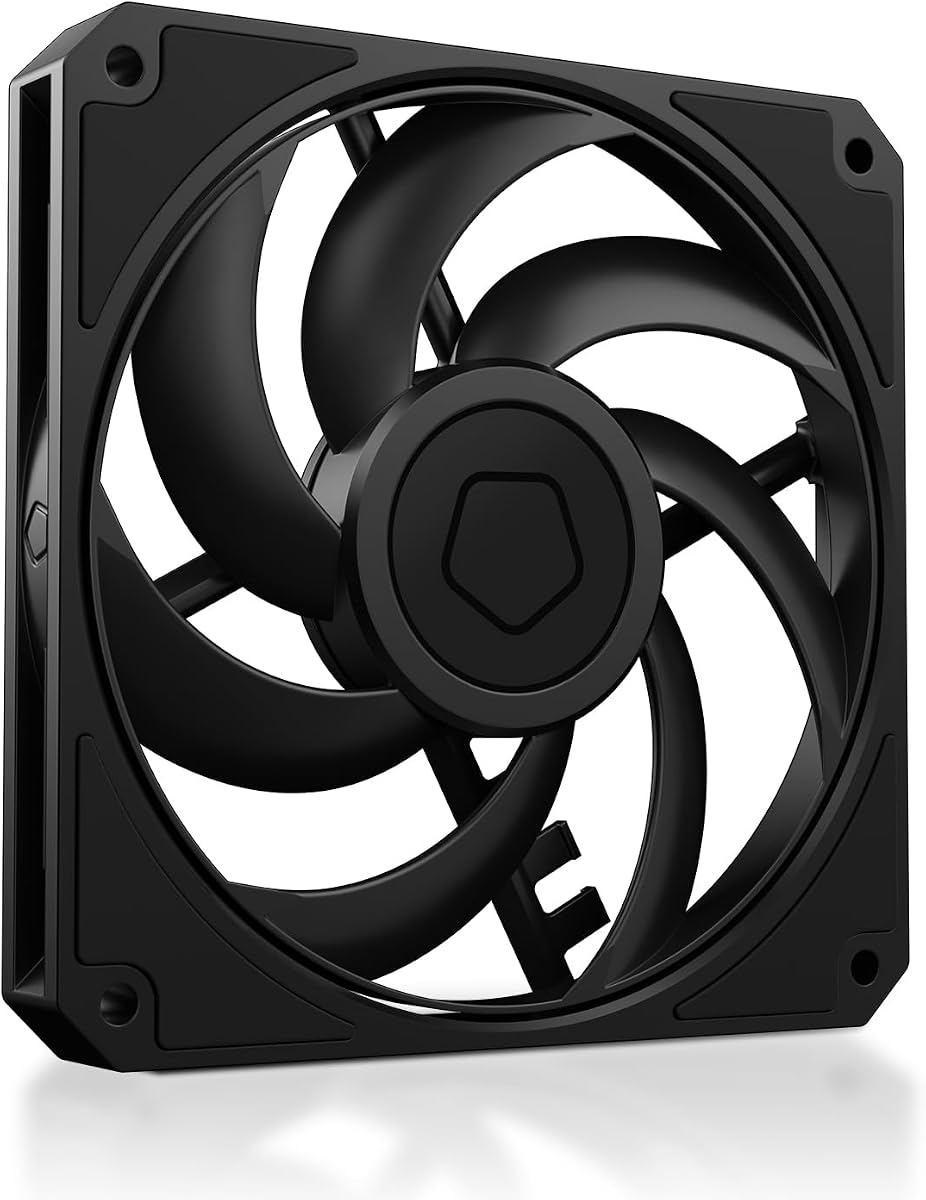
The ID-COOLING AM-120-SLIM offers incredible value for builders on a tight budget. Rated 4.8 by users, it provides high static pressure and airflow that rivals more expensive competitors. This makes it perfect for small form factor cases where space is strictly limited to 15mm thickness.
We may earn a commission when you buy through this link, at no additional cost to you.
Its standout feature is the massive 59.6 CFM airflow which is rare for a slim fan. The PWM control allows speeds from 500 to 2500 RPM giving you full control. The hydraulic bearing reduces friction ensuring quieter operation compared to basic sleeve bearings found in cheaper models.
At maximum speed it can be louder than premium options but PWM throttling handles this easily. The build quality is functional rather than premium but holds up well over time. It is a practical solution when every dollar counts.
We recommend this fan for budget-focused SFF builds or secondary cases. It provides excellent performance without breaking the bank making it a smart alternative to Noctua. Verify the noise tolerance before running it at full speed constantly.
Delivers up to 59.6 CFM which is exceptional for a 15mm thin chassis fan.
Supports automatic speed adjustment based on system temperature for optimal balance.
We may earn a commission when you buy through this link, at no additional cost to you.
The Noctua NF-A12x15 PWM chromax.Black.swap combines top-tier performance with a modern all-black look. It shares the same premium internals as the brown version but adds self-adhesive anti-vibration pads. This allows you to match the fan to your black PC build without sacrificing cooling quality.
We may earn a commission when you buy through this link, at no additional cost to you.
Performance remains at the top with Flow Acceleration Channels and Advanced Acoustic Optimisation frame. It supports semi-passive operation meaning it stops completely at zero percent PWM for silent standby. The 1850 RPM max ensures it can push air through tight radiators or heatsinks.
The customizable pads are fun but may peel over time with heat exposure. The price is higher than standard models but you pay for the aesthetic flexibility and reliability. It is a solid upgrade for those who hate the classic brown Noctua look.
We suggest this for builders wanting a premium black aesthetic with proven cooling. It fits perfectly in ITX cases with black coolers. Check the adhesive quality on your specific units as batches may vary slightly.
Includes colored anti-vibration pads to match any case interior theme easily.
Stops entirely at low loads for absolute silence when cooling is not needed.
We may earn a commission when you buy through this link, at no additional cost to you.
The ARCTIC P12 Slim PWM PST offers a three-pack solution ideal for full case builds. Rated 4.6 by users it provides reliable cooling with a focus on static pressure. At only 15mm height it fits where standard fans cannot making it great for tight chassis.
We may earn a commission when you buy through this link, at no additional cost to you.
It guarantees efficient cooling even with increased air resistance due to pressure optimization. The 4-pin connector allows speed control via PWM PST to minimize noise. Upgraded engine technology increases performance compared to previous Arctic models significantly.
Noise levels can be noticeable when running at 2100 RPM continuously. While reliable it lacks the MTTF claims of Noctua so expect standard fan longevity. However the price per unit in a three-pack is very competitive.
We recommend this for builders needing multiple slim fans for radiator cooling. It is cost-effective and performs well in radiator setups. Ensure your motherboard has enough headers for daisy chaining if using multiple fans.
Designed specifically to push air through restrictive radiators efficiently.
Buying a three-pack reduces overall cost compared to single units.
We may earn a commission when you buy through this link, at no additional cost to you.
This specific model of the Noctua NF-A12x15 PWM matches the premium quality of the top choice. With a 4.8 rating it delivers superior quiet cooling through Flow Acceleration Channels. It is ideal for space-restricted applications like HTPCs or ITX builds.
We may earn a commission when you buy through this link, at no additional cost to you.
The 4-pin PWM version enables automatic speed control directly via headers. It comes with a Low-Noise Adaptor to reduce max speed to 1400 RPM. The included Y-cable lets you run two fans on one header saving ports.
Consistency is key here as you get Noctua reliability. The brown color might not suit dark builds but performance is solid. It is slightly less customizable than the chromax version but functionally identical.
We suggest this for standard builds needing reliable airflow without color matching. It is a safe choice for silent enthusiasts. Check if you need the extra Y-cable functionality before purchasing.
Includes Y-cable for dual fan setup on single motherboard header.
Supplied adapter allows throttling to 1400 RPM for quieter operation.
We may earn a commission when you buy through this link, at no additional cost to you.
The Noctua NF-A12x15 FLX simplifies setup with a 3-pin connection instead of PWM. Rated 4.8 it offers three fixed speeds via supplied adapters to tune performance. This is perfect for older motherboards without PWM headers or simple power setups.
We may earn a commission when you buy through this link, at no additional cost to you.
It maintains the award-winning A-series design with Flow Acceleration Channels. Maximum noise is around 23.9 decibels ensuring quiet operation. The 1850 RPM max can be dropped to 950 RPM for near-silent use using adaptors.
The lack of PWM means you cannot control it via software on modern boards easily. You are limited to the three preset speeds which may not be enough for some users. However reliability remains high with over 150000 hour MTTF.
We recommend this for legacy systems or simplified power supply setups. It is great for cases without PWM support on headers. Ensure your board supports 3-pin connections before buying.
Offers 1850 1400 and 950 RPM options for flexibility without PWM.
Included adapters reduce noise effectively without needing digital control.
We may earn a commission when you buy through this link, at no additional cost to you.
For 9cm coolers the Noctua NF-A9x14 HS-PWM is the go-to solution. Rated 4.8 it delivers superior cooling with its AAO frame system. At 14mm thin it fits low-profile CPU coolers like NH-L9 series perfectly.
We may earn a commission when you buy through this link, at no additional cost to you.
It spins up to 2500 RPM for max cooling when required. Wide PWM range allows it to stand still at zero percent for passive operation. The chromax.black.swap edition gives you a clean black look easily.
Smaller size means less total airflow than 120mm options so balance is needed. It is loud at max speed but throttling handles this well. It is a niche but essential fan for specific coolers.
We suggest this for ITX builds using 92mm air coolers. It is reliable and quiet at normal loads. Verify your CPU cooler supports 14mm fans before installing.
Fits tight clearance on low-profile coolers requiring 92mm size.
RPM range from 500 to 2500 for versatile thermal tuning.
We may earn a commission when you buy through this link, at no additional cost to you.
The be quiet! Pure Wings 3 is designed for quiet case cooling. With a 4.7 rating it emphasizes German Engineering for reliability. The frame is optimized for peak performance on radiators but works as case fan too.
We may earn a commission when you buy through this link, at no additional cost to you.
Seven airflow-optimized blades reduce noise while ensuring performance. It operates at very low minimum RPM for quiet operation when idle. The rifle bearing offers 80000 hours life which is decent for the price.
Performance data is less explicit than other brands here. Static pressure might not match ARCTIC or Noctua models but noise is minimal. It is a solid choice for standard 120mm non-slim use if you can find the slim version.
We recommend this for users prioritizing silence over raw speed. It fits well in standard cases or low-profile setups. Check specific thickness requirements for your case before buying.
Operates with very low minimum RPM ensuring near silence at idle.
Long life rifle bearing gives reliable operation for 80000 hours.
We may earn a commission when you buy through this link, at no additional cost to you.
The Thermalright TL-C12015 offers 52 CFM airflow in a slim 15mm profile. Rated 4.7 it uses an S-FDB bearing to keep noise low. It fits low profile CPU Air Coolers and case slots perfectly.
We may earn a commission when you buy through this link, at no additional cost to you.
Four vibration-absorbing pads reduce friction and noise effectively. It supports 4pin PWM control for speed management up to 1500 RPM. The 24.1dBA noise level is good for silent operation.
Max speed is lower than ID-COOLING but ensures better silence. It is a balanced option for those wanting low noise without premium cost. It is ideal for downward coolers requiring specific flow.
We suggest this for balanced builds needing decent static pressure. It is quiet and reliable for daily use. Check if your cooler specifically requires 15mm depth before installing.
Four absorbing pads reduce vibration and friction effectively.
Superior bearing extends service life and reduces noise.
We may earn a commission when you buy through this link, at no additional cost to you.
The ARCTIC P14 Slim PWM PST is rare 140mm fan at 16mm thickness. Rated 4.6 it provides huge airflow for low profile setups. It is suitable for heat sinks and radiators that need large fans.
We may earn a commission when you buy through this link, at no additional cost to you.
It guarantees efficient cooling even with increased air resistance. The 4-pin connector allows PWM PST speed control for minimum noise. Engine technology improvements increase performance over older P models.
The 140mm size is tricky for some cases but great for larger radiators. It is quiet at normal speeds but loud at 1800 RPM. Verify mount holes are compatible before purchasing for cases.
We recommend this for larger SFF builds needing high volume. It is cost-effective and efficient. Confirm your case has a 140mm slim mount slot.
Rare 140mm slim fan delivering huge volume in thin frame.
Optimized for static pressure to overcome radiator resistance.
We may earn a commission when you buy through this link, at no additional cost to you.
Choosing the right slim fan requires balancing thermal needs with physical constraints. This guide details the key factors to consider for a successful build.
The most critical factor is the thickness which is typically 15mm or 16mm. You must measure your case clearance and cooler clearance. Standard fans are 25mm so ensure your chassis explicitly supports 15mm profiles.
Always check the total stack height including mounting screws and frame thickness.
If you are mounting the fan on a radiator or heatsink prioritize static pressure. This is the ability to push air through resistance. For open case ventilation airflow is the priority metric for cooling.
Fans with optimized frames usually score higher in static pressure metrics.
PWM fans use four pins and offer precise speed control down to zero. DC fans use three pins and voltage throttling. Ensure your motherboard supports the connector type you choose for control.
PWM is preferred for modern systems to reduce noise effectively.
Noise is measured in decibels (dB). Look for ratings under 25dB for quiet operation. Be aware that max speed often increases noise significantly so check average idle noise.
Acoustic optimization frames help reduce turbulence noise.
A wide RPM range lets you tune performance. Look for 500 to 2000 RPM range for flexibility. Higher max RPM means better cooling but more noise.
Adjust speeds based on thermal load to maintain silence.
Bearing types like rifle or hydraulic improve lifespan. MTTF indicates expected operational hours. Higher quality bearings reduce vibration and noise over time.
Sleeve bearings are cheaper but wear out faster.
Ensure the fan includes screws and anti-vibration mounts. These dampen vibration which helps reduce noise. Accessories like extension cables add value.
Check compatibility with standard 120mm screws for ease.
Color matters for visible builds. Options like black swap allow matching to case interior. Some models come with colored vibration pads for customization.
Brown Noctua fans stand out while black blends in better.
Install the fan ensuring airflow direction matches your case layout. Generally airflow moves from front to back or bottom to top. Use the arrows on the fan frame to confirm orientation before screwing it in place.
Connect the fan to a compatible 4-pin PWM header on your motherboard for control. Use BIOS or software to set fan curves. Aim for quiet at idle and high under load.
Clean dust regularly using compressed air. Do not spin the fan blades manually as it damages bearings. Dust accumulation reduces airflow and increases noise.
Not necessarily. 15mm fans are specialized for tight spaces but 25mm fans typically move more air for same diameter. Use 15mm only when you lack depth clearance.
Yes using a Y-splitter cable. This saves motherboard ports. Ensure the total power draw does not exceed header limits usually around 1 Amp.
Noctua fans use premium materials and bearings with high MTTF. They undergo acoustic optimization for superior silence. The price reflects this long-term reliability and quiet performance.
Most slim performance fans do not include RGB lighting. Focus is on airflow and silence. RGB slim fans are rare and may sacrifice cooling for aesthetic LEDs.
PWM stands for Pulse Width Modulation. It controls speed by sending pulses. This allows precise control and allows the fan to stop completely when idle.
Use compressed air to blow dust out of the blades. Hold the blade steady to prevent spinning. Avoid wet wipes as moisture can damage the electronics inside the hub.
The Noctua NF-A12x15 PWM is widely considered the quietest. It uses acoustic optimization to minimize noise. The ID-COOLING model is also quiet at lower speeds.
We have reviewed ten top models ranging from budget options to premium silent performers. The Noctua NF-A12x15 PWM stands out as the best overall choice for performance.
Prioritize static pressure if you are cooling radiators and noise levels for living room builds. Always check your case dimensions against fan thickness carefully.
Prices fluctuate frequently so check current listings before purchasing. Verify current stock and reviews to ensure you get the best value available today.