
TP-Link ER605
4.4Editor score
Five Gigabit Ports
VPN Support Up to 20 Connections
USB WAN Port for 4G Backup
This guide compares the top load balancing routers for 2026, evaluating performance, security, and WAN failover capabilities to help you choose the best
Load balancing routers are essential for businesses and power users who need reliable internet connectivity. These devices manage multiple internet connections simultaneously, ensuring that traffic is distributed efficiently across available links to prevent bottlenecks and downtime.
We evaluated ten leading models based on their port configurations, security features, and ease of management. Our analysis focuses on real-world performance metrics, including throughput, failover speed, and compatibility with various internet service providers and network setups.
Each pick highlights specific strengths such as budget friendliness, advanced VPN support, or high-speed multi-gigabit capabilities. Please note that prices and availability can change frequently, so check current listings before making a final decision on your network hardware.
4.4Editor score

4.5Editor score

4.0Editor score
The following table provides a side-by-side comparison of the top load balancing routers available this year, highlighting key specifications and unique features for each model.




The Omada ER7412-M2 stands out as the top choice for businesses needing robust multi-gigabit performance. With a rating of 4.5 stars, it delivers exceptional reliability and advanced features that cater to demanding network environments.
We may earn a commission when you buy through this link, at no additional cost to you.
Its standout strength lies in the two 2.5G WAN/LAN ports which allow for significantly higher throughput compared to standard gigabit models. The device supports load balancing across up to eleven WAN ports, maximizing your available bandwidth effectively.
While the interface is powerful, it may require some networking knowledge to configure fully. However, once set up, the integration with Omada access points and switches provides a unified management experience that simplifies long-term administration.
This router is ideal for medium to large businesses that need scalable solutions. If you prioritize speed and security alongside a cohesive network ecosystem, the ER7412-M2 is the definitive recommendation for your infrastructure.
The inclusion of 2.5G ports ensures you can utilize faster internet plans without bottlenecks at the gateway.
Integrated DPI and IPS/IDS features protect your network from modern threats without needing external appliances.
We may earn a commission when you buy through this link, at no additional cost to you.
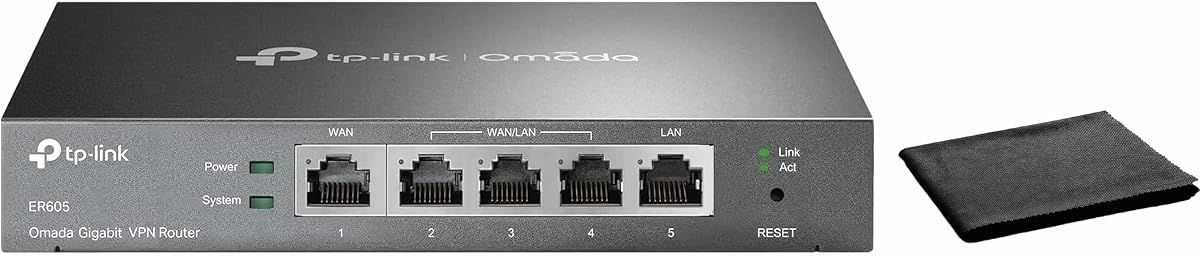
For small offices or home users seeking value, the TP-Link ER605 offers the best balance of cost and functionality. It holds a strong 4.4 rating due to its consistent performance and essential business features.
We may earn a commission when you buy through this link, at no additional cost to you.
This device excels in providing five gigabit ports which allow for versatile WAN and LAN configurations. The USB WAN port is a critical feature for mobile broadband backup ensuring you stay connected even if your primary line fails.
While it lacks the multi-gigabit speed of higher-end models, it handles typical business traffic with ease. The interface is intuitive enough for IT managers to set up load balancing without extensive training or documentation review.
Buy this router if you need reliable connectivity without breaking the budget. It is an excellent starting point for implementing a redundant internet setup in small to medium-sized environments.
You get enterprise-grade failover capabilities at a consumer-friendly price making it accessible for most businesses.
The mix of WAN and LAN ports gives you the flexibility to adapt to different network topologies easily.
We may earn a commission when you buy through this link, at no additional cost to you.
The Alta Labs Route10 is engineered for environments where speed and control are paramount. While it has a 4.0 rating due to its niche appeal, it delivers unmatched performance for those who need true 10Gbps routing.
We may earn a commission when you buy through this link, at no additional cost to you.
Powered by a quad-core Qualcomm processor, this router handles heavy encryption and traffic shaping without latency. The integrated PoE+ output is a unique feature that allows you to power access points directly from the router ports.
Since it does not broadcast Wi-Fi, you will need to pair it with dedicated access points. This separation is often preferred in professional setups to allow for more flexible wireless coverage planning and management.
Choose this device if you have a fiber connection capable of multi-gigabit speeds. It is the best choice for advanced users who need maximum throughput and granular control over their network traffic.
Prepare your network for future bandwidth demands with hardware that supports up to 10Gbps wired routing.
Saving power adapters and injectors simplifies the physical setup of your wired network infrastructure.
We may earn a commission when you buy through this link, at no additional cost to you.
The TP-Link ER7206 is designed for businesses with growing network demands and a need for high client capacity. Its 4.5 rating reflects its stability and ability to manage large numbers of connected devices efficiently.
We may earn a commission when you buy through this link, at no additional cost to you.
A key feature is the support for up to 100 VPN tunnels which is crucial for distributed teams connecting to a central office. The inclusion of an SFP port allows for direct fiber connections adding flexibility to your WAN options.
While it excels in the Omada ecosystem, it can operate in standalone mode too. However, you get the most value when using it with other SDN devices for centralized control over your entire network infrastructure.
This router is perfect for mid-sized offices expanding their digital footprint. If you anticipate adding many devices or branches, the ER7206 provides the scalability and management tools you need.
The ability to handle 700 clients ensures your network remains responsive even during peak usage times.
Support for hundreds of VPN tunnels secures remote connections without compromising overall network performance.
We may earn a commission when you buy through this link, at no additional cost to you.
For enthusiasts and those who need deep control over their network software, the Cudy R700 is a standout option. It maintains a 4.4 rating thanks to its flexibility and support for the popular OpenWRT operating system.
We may earn a commission when you buy through this link, at no additional cost to you.
This device allows you to install custom packages and configurations which is rare at this price point. The hardware supports automatic failover and load balancing out of the box ensuring your business stays online even if one ISP fails.
The learning curve for OpenWRT can be steep for beginners. However, if you enjoy tinkering or need specific firewall rules that standard routers do not support, this device offers the freedom to customize your network environment.
Consider the R700 if you want professional-grade control without enterprise pricing. It is an excellent choice for home labs or small offices where software flexibility is more important than raw throughput.
Running OpenWRT gives you access to a vast community of tools to tailor your network to your exact needs.
Built-in support for WireGuard and OpenVPN ensures secure connections without needing extra software installation.
We may earn a commission when you buy through this link, at no additional cost to you.
The TL-R470T+ offers a straightforward approach to load balancing for smaller networks. With a 4.2 rating, it proves that you do not need the latest hardware to achieve basic reliability and failover capabilities.
We may earn a commission when you buy through this link, at no additional cost to you.
Its four 100M WAN ports make it suitable for connections that do not exceed gigabit speeds. This makes it an ideal choice for cafes or small offices where cost is a primary concern and internet plans are moderate.
Because it lacks gigabit ports, it may become a bottleneck for high-speed fiber connections. However, for environments where simplicity is key, the interface provides all the necessary tools to manage multiple ISPs effectively.
This router is best for budget-conscious users with slower internet speeds. If you need a no-frills device to manage two or more lines without complex features, this model is a reliable solution.
Get automatic backup connectivity without complex setup requirements that often deter small business owners.
Lightning protection adds a layer of physical security to your device without extra cost or effort.
We may earn a commission when you buy through this link, at no additional cost to you.
The TL-R480T+ is designed for basic multi-line setups where port flexibility is more important than speed. Its 4.2 rating indicates consistent performance for entry-level users needing simple redundancy.
We may earn a commission when you buy through this link, at no additional cost to you.
With configurable WAN and LAN ports, you can adapt the device to your specific cabling needs. This flexibility makes it useful for retrofitting into existing networks where port assignment is tricky.
It lacks advanced security or high-speed options found in newer models. However, for a low-cost solution to keep a small network running, it performs its core function of distributing traffic across lines effectively.
This is a good pick for small workshops or home offices on a tight budget. If you need to combine two internet lines and want a simple device to do the job, this fits the bill.
The ability to swap ports between WAN and LAN allows for adaptable network layouts without extra switches.
Achieve basic internet reliability without investing in expensive enterprise hardware for minimal needs.
We may earn a commission when you buy through this link, at no additional cost to you.
The ER-605 balances simplicity and functionality well for small offices needing reliable dual WAN capabilities. Its 4.3 rating reflects solid performance and user-friendly management tools like cloud monitoring.
We may earn a commission when you buy through this link, at no additional cost to you.
The cloud monitoring feature allows you to check status remotely which is great for distributed management. The SPI firewall provides a necessary layer of security for basic business protection against common threats.
While it does not offer the depth of higher-tier models, it covers the essentials well. The bandwidth management ensures that critical applications remain prioritized even when multiple users are active on the network.
This router is a good fit for small teams needing easy management. If you want to keep an eye on your network health from anywhere without a complex setup, this model works effectively.
Access your network status from anywhere using the cloud monitoring app for quick issue resolution.
Essential firewall features protect your network without requiring extensive technical knowledge to configure.
We may earn a commission when you buy through this link, at no additional cost to you.
The EdgeRouter 4 is highly rated at 4.6 by enthusiasts who value flexibility and quiet operation. Its fanless design makes it suitable for noise-sensitive environments like home offices or studios.
We may earn a commission when you buy through this link, at no additional cost to you.
With an SFP port, you can connect to fiber networks directly. This versatility combined with a robust feature set allows you to build almost any network topology you can imagine using standard tools.
While it requires more technical skill to configure than plug-and-play routers, the control you gain is significant. You can script custom traffic rules and deeply customize the interface to suit specific business needs.
This router is for those willing to invest time in learning. If you enjoy networking and want a device that can grow with your technical skills, the EdgeRouter 4 is a fantastic choice.
The fanless design means no noise interference making it perfect for quiet office spaces.
Direct SFP support lets you take advantage of faster fiber optic connections without extra converters.
We may earn a commission when you buy through this link, at no additional cost to you.
The Omada Fusion 2.5G features a unique touchscreen interface that simplifies on-site diagnostics significantly. Its 4.7 rating highlights the user-friendly design and robust performance of its quad-core CPU.
We may earn a commission when you buy through this link, at no additional cost to you.
Five 2.5G ports ensure you have plenty of bandwidth for high-speed local and wide area networking. The touchscreen lets you run speed tests and check health scores without needing to log into a web interface.
It is designed for businesses that value ease of use alongside power. The license-free cloud management makes it accessible for small IT teams looking to manage devices remotely without extra software costs.
Choose this router if you want the latest interface technology. The touchscreen and Bluetooth setup make deployment much faster than traditional web-based configurations for modern business networks.
Use the touchscreen to run tests and troubleshoot issues directly on the device without a laptop.
2.5G ports prepare your network for faster internet plans and internal file transfers.
We may earn a commission when you buy through this link, at no additional cost to you.
Selecting the right load balancing router involves considering several factors including port types, security needs, and management interfaces. This guide breaks down the key elements to help you make an informed decision.
Check the number and type of WAN ports to ensure you can connect all your internet lines. Some routers offer 2.5G or 10G ports which are necessary if you have fiber plans exceeding standard gigabit speeds.
Look for a router with enough physical ports to cover your current needs and some future growth.
Ensure the router supports automatic failover so that traffic switches instantly when a primary line fails. This feature is critical for businesses that cannot afford downtime during internet outages.
Test the failover time to confirm it meets your availability requirements.
Consider whether you prefer a cloud-based or local management system. Cloud tools allow remote access but may require subscriptions, whereas local interfaces keep control on-premises.
Choose the interface type that matches your team’s skills and location needs.
Review the number of supported VPN tunnels and protocol options like WireGuard or IPsec. Businesses with remote staff will need robust tunneling features to secure connections.
Ensure the device supports the protocols your organization currently uses for remote access.
Look for built-in firewalls and intrusion prevention systems to protect against threats. A router with strong security reduces the need for additional security hardware in small setups.
Check if the device includes features like DoS protection and URL filtering.
If you already use specific access points or switches, check if the router integrates well with them. Seamless integration simplifies management and can offer advanced features across the whole network.
Stick to the same ecosystem to reduce configuration complexity.
Evaluate the CPU power and throughput ratings to ensure the router can handle your traffic load. Overloading a router can lead to latency and dropped packets during peak times.
Choose a model with processing power that exceeds your maximum expected usage.
Consider both the upfront cost and any recurring fees for features like cloud management. Some devices have one-time costs while others charge for software licenses over time.
Calculate the total cost of ownership before purchasing to avoid surprises.
Start by connecting each internet line to a separate WAN port. Configure the load balancing rules in the web interface to ensure traffic is distributed evenly or based on priority.
Regularly update the firmware to keep security patches current and maintain performance. Check logs for any connection drops to diagnose issues before they impact users.
Place the router in a well-ventilated area to prevent overheating. Dust can clog vents and reduce efficiency, so clean the exterior gently every few months.
A load balancing router does not increase the speed of a single line but distributes traffic across multiple lines. This can increase your total available bandwidth if you have multiple subscriptions.
If one connection fails, the router detects the drop and automatically routes traffic to the remaining active connections. This ensures that your network stays online with minimal disruption.
Yes, but gaming requires low latency which might be affected by routing logic. Ensure the router supports QoS to prioritize gaming traffic over other downloads.
You can use these routers with most standard plans but they work best with multiple subscriptions for load balancing. Some providers may require static IPs for certain configurations.
Most standard business routers support between 20 and 100 tunnels depending on the model. Check the specs if you have many remote users connecting simultaneously.
Cloud managed routers often have better security update schedules and monitoring tools. However, you must secure the cloud portal with strong passwords to avoid unauthorized access.
The Omada ER7412-M2, TP-Link ER605, and Alta Labs Route10 stand out as top choices depending on your specific needs. Each offers a unique balance of performance and price for different scenarios.
Focus on finding a router that matches your required port speeds and management preferences. If you need high reliability without a steep learning curve, a model with cloud monitoring is worth considering.
Always check current pricing and availability before finalizing your purchase to ensure you get the best deal. Prices for networking hardware can fluctuate based on supply and demand.