
RedThunder One Handed Gaming Keyboard RGB Backlit 35 Keys Portable Mini Gaming Keypad Ergonomic Game Controller for PC Gamer
4.4Editor score
35 Keys Anti-Ghosting
Macro Recording Functionality
RGB Backlit Modes
Discover the top left handed gaming keyboards ranked by performance, ergonomics, and features to help you find the perfect one-handed setup for your gaming
Finding the right left handed gaming keyboard can transform your setup and enhance comfort during long sessions. These devices cater specifically to users who prefer keeping their mouse on the right side while accessing essential keys with their left hand. Whether you need a full numpad or a compact macro pad, the market now offers diverse options tailored for ergonomic efficiency and competitive edge.
This guide compares ten highly rated products ranging from affordable mini keypads to premium programmable devices with advanced magnetic switches. We evaluated each option based on build quality, responsiveness, customization capabilities, and overall user experience to ensure you get reliable performance. Our analysis highlights key differences in layout, connectivity, and special features that matter most for gamers and professionals alike.
Each pick in this list showcases distinct strengths designed to meet specific gaming styles and workflow requirements. You will find detailed insights into switch types, ergonomic designs, and software support to help you make an informed decision. Please note that product availability and pricing may change over time, so always check the current details before purchasing your next device.
4.4Editor score

4.6Editor score

4.6Editor score
Explore this comprehensive side-by-side comparison of the top ten left handed gaming keyboards available today. Each product offers unique features tailored to different needs, from budget-friendly options to high-end programmable devices. We break down key specifications to help you identify the perfect match for your gaming or productivity setup.


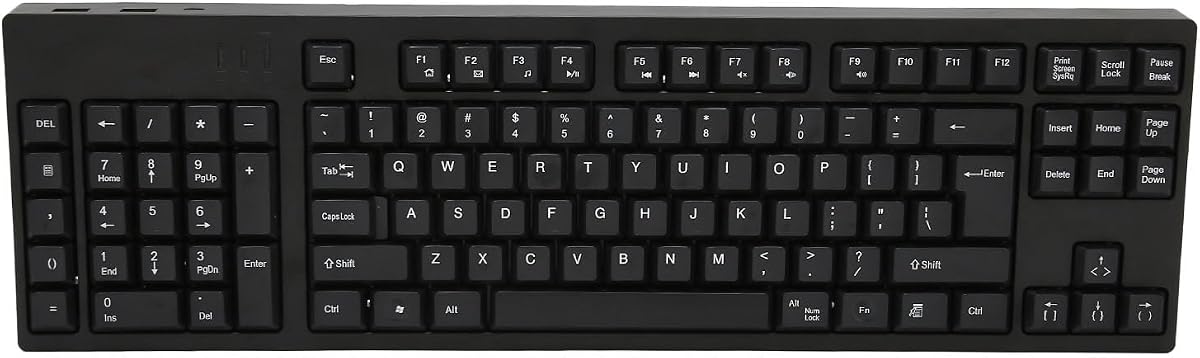

The RK ROYAL KLUDGE L98 stands out as a premier choice for those seeking a dedicated left handed layout without sacrificing standard functionality. Its unique design relocates the numpad to the left side freeing up mouse space for right handed users while maintaining full keyboard utility. This thoughtful arrangement enhances ergonomics and reduces clutter on your desk significantly.
We may earn a commission when you buy through this link, at no additional cost to you.
Key strengths include its robust gasket mount structure which delivers a soft and cushioned typing experience that minimizes vibrations during intense gaming. The keyboard features five internal sound dampening layers ensuring a quiet and satisfying acoustic profile. Additionally its tri mode connectivity allows seamless switching between wired and wireless modes for versatile usage across devices.
While the device offers exceptional performance it does come with a price point that may be higher than basic options. Users might also need a short adjustment period to adapt to the reversed numpad placement though most find it improves workflow quickly. These minor trade-offs are outweighed by the superior build quality and unique layout benefits.
This keyboard is ideal for gamers and professionals who value ergonomic design and premium build quality in their setup. Its massive battery life and hot-swappable switches allow for long-term customization and reliability. We recommend this model for anyone looking to upgrade their left handed gaming experience with a feature-rich and comfortable device.
Relocating the numpad to the left allows right handed users to keep their mouse closer for faster reflexes and less wrist strain.
Gasket mounting and PBT keycaps provide a durable and comfortable typing feel that outperforms many standard mechanical keyboards.
We may earn a commission when you buy through this link, at no additional cost to you.
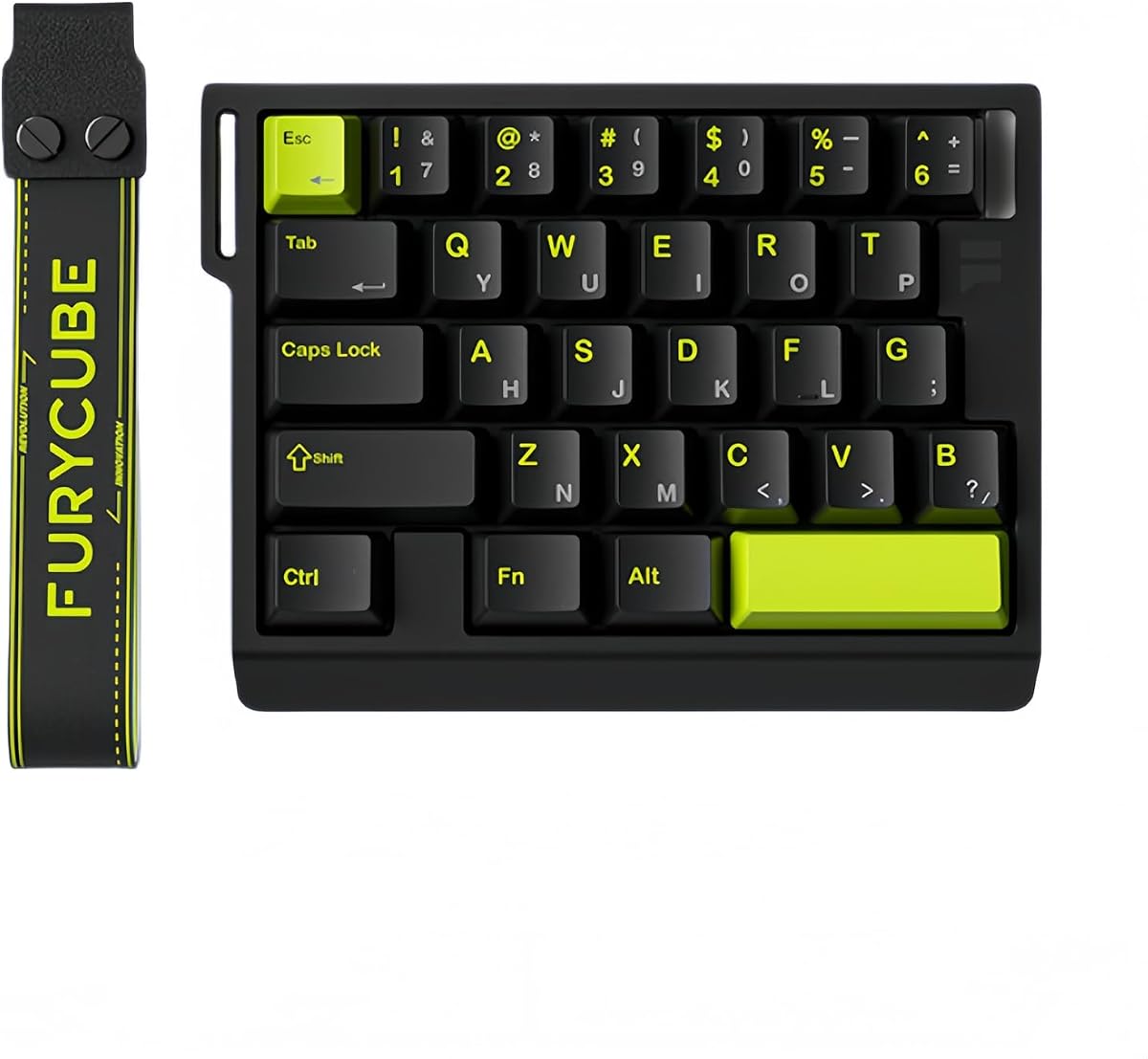
The RedThunder One Handed Gaming Keyboard offers an accessible entry point for gamers seeking a compact left handed solution without breaking the bank. With thirty five keys and anti-ghosting technology it ensures reliable input during intense gaming sessions. Its small form factor makes it easy to transport and fits well on limited desk spaces.
We may earn a commission when you buy through this link, at no additional cost to you.
Key strengths include its macro recording capabilities that allow users to program complex commands for quick access. The RGB backlighting adds a stylish touch with multiple modes to customize your aesthetic. An ergonomic wrist rest is included to help reduce fatigue during extended play which is a thoughtful addition at this price level.
Despite its advantages it lacks wireless connectivity which limits mobility compared to more modern options. The software support is also basic and may not appeal to users wanting deep customization. These limitations are expected given the budget focus but still impact the overall versatility for advanced users.
This keypad is best suited for casual gamers or those needing a secondary device for specific titles on a tight budget. It delivers solid performance and essential features without unnecessary complications. We recommend it for anyone prioritizing affordability and portability in a left handed gaming setup.
Priced significantly lower than premium options it makes one handed gaming accessible to a wider audience without compromising core functionality.
Its compact size and light weight make it perfect for LAN parties or users with limited desk real estate.
We may earn a commission when you buy through this link, at no additional cost to you.
The AZERON Keyzen represents the pinnacle of one handed gaming devices with its advanced Hall Effect joystick and fully mappable keys. This device is designed for serious gamers who demand precision and customization. The adjustable ergonomic structure ensures it fits a wide range of hand sizes comfortably supporting long gaming sessions.
We may earn a commission when you buy through this link, at no additional cost to you.
Its standout feature is the Hall Effect joystick which provides drift-free analog control ideal for FPS and strategy games. Combined with Cherry MX switches users get a tactile and reliable typing experience. The modular build allows for future upgrades ensuring the device remains relevant as technology evolves.
The main drawback is the high cost which may be prohibitive for casual users. Setting up the extensive customization options also requires time and patience. However for competitive players these trade-offs are acceptable for the performance gains and ergonomic benefits provided by the device.
We recommend this keypad for professional gamers and enthusiasts seeking a top-tier one handed solution. Its robust construction and deep customization make it a long-term investment. If you prioritize control and comfort over budget this device delivers unmatched value in its category.
The Hall Effect thumbstick allows for 360-degree movement and analog control that mimics traditional controllers for smoother gameplay.
Adjustable parts and palm rests allow users to tailor the device to their specific hand shape and size for maximum comfort.
We may earn a commission when you buy through this link, at no additional cost to you.
The AZERON Gaming Keypad is a powerful tool designed to replace standard keyboards with a focus on left handed precision. Its Hall Effect thumbstick eliminates drift and supports full analog movement for compatible games. The keypad features thirty programmable inputs allowing for deep customization to suit individual play styles.
We may earn a commission when you buy through this link, at no additional cost to you.
Key strengths include its advanced software which offers fine-tuned settings for the thumbstick and lighting. The 3D printed construction ensures a comfortable fit for various hand sizes. Each button connects independently without matrices reducing latency and improving reliability during critical moments.
The main drawback is the complexity of setup which may overwhelm casual users. The price is also significantly higher than standard options. However for those seeking maximum control and customization these factors are justified by the performance and adaptability of the device.
This device is recommended for competitive gamers who need precise analog input and deep key mapping. Its modular design ensures it can adapt to new needs over time. We suggest it for users who value customization and ergonomics over simplicity.
The Hall Effect thumbstick enables smooth analog movement that enhances gameplay in simulation and FPS titles significantly.
Each button is individually connected ensuring no input loss or ghosting during complex key combinations.
We may earn a commission when you buy through this link, at no additional cost to you.
The AJAZZ AK029 is engineered specifically for competitive FPS players seeking lightning-fast response times. Its magnetic switches offer ultra-precise actuation with Rapid Trigger technology ensuring instant key resets. The eight KHz polling rate minimizes latency allowing for seamless control during high-speed movement.
We may earn a commission when you buy through this link, at no additional cost to you.
Key strengths include advanced SOCD and DKS technologies which enable complex movement techniques like counter-strafing. The compact twenty nine key layout maximizes mouse space for wider flicks. Its acoustic structure provides a satisfying typing feel that reduces noise without sacrificing performance.
The limited key count may not suit users needing extensive macro capabilities. Additionally it lacks wireless connectivity which might inconvenience some setups. However for pure competitive performance these trade-offs are acceptable given the speed advantages provided by the magnetic switches.
We recommend this keypad for players focused on maximizing reaction time and movement precision. Its specialized features cater to high-level gaming needs. For those seeking a reliable and fast one handed solution this model is a strong contender.
Instant key reset technology ensures faster response times essential for competitive titles requiring quick reflexes.
The mini layout frees up desk space for large mouse movements critical for precision aiming.
We may earn a commission when you buy through this link, at no additional cost to you.
The Ergonomic Left Handed Keyboard is tailored for professionals who spend hours typing and require a specialized layout. Its patented natural shape structure reduces shoulder strain and improves posture significantly. The inclusion of a left numpad supports efficient data entry for accounting and business tasks.
We may earn a commission when you buy through this link, at no additional cost to you.
Key strengths include its focus on health and comfort with features that eliminate RSI risks. Multimedia hotkeys provide quick access to functions without switching windows. The device is designed for reliability and durability ensuring long-term performance in office environments.
It lacks gaming-specific features such as RGB lighting or high-speed switches which may not appeal to gamers. The design is also utilitarian rather than visually flashy. However for productivity focused users the ergonomic benefits are the primary selling point of this device.
This keyboard is best suited for office workers and accountants who prioritize comfort over gaming performance. Its layout supports efficiency and health during long workdays. We recommend it for those seeking a practical left handed solution for professional use.
The natural_A shape key structure is designed to reduce back and shoulder strain improving posture during extended use.
Full numpad placement on the left ensures efficient data entry for business and accounting tasks.
We may earn a commission when you buy through this link, at no additional cost to you.
The Keychron C0 HE 8K is a versatile one handed keypad designed for users who work across multiple systems. It features magnetic switches with Rapid Trigger technology for low latency input and customizable actuation. The thirty five key layout balances essential keys with compact design for better desk space management.
We may earn a commission when you buy through this link, at no additional cost to you.
Key strengths include its web-based configurator which allows customization without installing software. This makes it compatible with both Windows and macOS seamlessly. The RGB lighting adds a touch of style while remaining functional for key visibility.
The lack of wireless mode limits flexibility for multi-device setups. Additionally on-board storage for profiles is limited compared to competitors. However the ease of setup and cross-platform compatibility make it a strong choice for users who value convenience.
We recommend this device for content creators and gamers who switch between systems frequently. Its simplicity and performance make it ideal for streamlined workflows. For those prioritizing setup ease over advanced storage features this is a solid option.
Customization happens directly in the browser making it easy to remap keys across different operating systems.
Magnetic switches detect key travel in real time for instant reset and precise control during rapid inputs.
We may earn a commission when you buy through this link, at no additional cost to you.
This Left Handed Keyboard provides a straightforward solution for designers and business users needing a full layout on the left. Its one hundred nine key design ensures all standard keys are accessible without compromising mouse space. The ergonomic layout reduces wrist strain making it comfortable for long design sessions.
We may earn a commission when you buy through this link, at no additional cost to you.
Key strengths include its simplicity and ease of use with no drivers required for setup. The durable ABS construction ensures longevity in daily use. Additional USB interfaces allow you to connect other peripherals directly through the keyboard.
The use of Micro USB is less convenient than modern USB-C connections. It also lacks advanced features like macros or lighting options. For basic professional tasks however the reliable build and ergonomic design offer great value.
We recommend this device for users who need a dependable and ergonomic left handed keyboard for work. Its plug and play nature makes it ideal for quick deployments. For those prioritizing function over features this is a practical choice.
The design relieves right hand fatigue allowing the left hand to handle numerical input efficiently.
No drivers or complicated steps needed ensuring immediate usability upon connection.
We may earn a commission when you buy through this link, at no additional cost to you.
The FKZ M30HE is a specialized gaming keypad designed for e-sports players needing precision and speed. Its magnetic switches offer adjustable actuation points allowing users to fine-tune sensitivity. The eight KHz polling rate ensures near-zero latency for responsive inputs during competitive play.
We may earn a commission when you buy through this link, at no additional cost to you.
Key strengths include hot swap support which lets you change switches easily for customization. The RGB lighting is north-facing for better visibility during gameplay. The web driver allows for easy remapping and macro creation without installing extra software.
The limited number of keys may restrict advanced macro configurations. Build materials are basic compared to higher-end models. For competitive gamers however the speed and adjustability outweigh the cosmetic compromises.
We recommend this for players focused on reaction time and customization flexibility. Its features are tailored for high-performance needs. If you need a specialized tool for e-sports this provides solid functionality.
Swappable switches allow users to change tactile feel without buying a new keyboard entirely.
Programming happens online making it easy to manage settings across different machines.
We may earn a commission when you buy through this link, at no additional cost to you.
The A4tech Ergonomic Left Handed Keyboard focuses on health and productivity for professionals. Its patented natural design reduces strain on the shoulder and back improving posture during long workdays. The layout supports left handed numpad use which enhances typing efficiency for data entry.
We may earn a commission when you buy through this link, at no additional cost to you.
Key strengths include eight multimedia hotkeys that provide quick access to essential functions without interrupting workflows. The wired USB connection ensures reliable input for business tasks. This model is built for durability and comfort in office environments.
It lacks gaming features like RGB lighting or high-speed response times. The design is functional rather than stylish which may not fit all setups. However for health-focused users the ergonomic benefits make it a worthwhile investment.
We recommend this device for professionals prioritizing comfort and health over gaming features. Its reliable performance and ergonomic support make it a solid choice for daily office use. For those seeking a comfortable left-handed solution this delivers consistent value.
The layout reduces shoulder strain improving posture and decreasing the risk of repetitive stress injuries.
Eight hotkeys offer quick access to controls without disrupting your current workflow.
We may earn a commission when you buy through this link, at no additional cost to you.
Choosing the perfect left handed gaming keyboard involves considering several key factors to ensure compatibility with your needs and preferences.
An ergonomic design is essential for reducing strain during long gaming sessions. Look for adjustable palm rests and angled layouts that support natural hand positioning.
Prioritize keyboards with customizable angles and rests to prevent wrist fatigue and ensure comfort.
Mechanical switches offer durability and tactile feedback but Hall Effect magnetic switches provide higher precision and lower latency. Consider your gaming style when selecting a switch.
For competitive FPS choose magnetic switches with Rapid Trigger for fastest reaction times.
Decide between wired and wireless connectivity based on your need for mobility versus stability. Wireless options offer flexibility while wired options ensure zero lag.
Check for tri-mode connectivity if you need to switch between devices regularly for maximum versatility.
Software support allows for macro recording and key remapping which are crucial for complex gameplay. A good web-based configurator simplifies settings management.
Ensure the device supports robust customization tools to match your specific skill needs.
Premium materials like aluminum or 3D printed frames ensure longevity and stability. High-quality keycaps resist wear over time.
Look for durable construction with replaceable parts to extend the device life.
Compact layouts save desk space for mouse movement while full layouts provide more key options. Choose based on your available workspace.
Measure your desk to ensure the keypad fits comfortably without crowding your mouse area.
RGB lighting adds visual appeal and can help identify keys in low-light environments. Per-key customization offers greater flexibility.
Select lighting modes that complement your setup and help with key recognition during games.
Budget options provide basic functionality while premium models offer advanced features and better build quality. Determine your budget before shopping.
Balance cost against necessary features to ensure you get value for your investment.
Start by connecting the keyboard via USB or Bluetooth and configuring settings through the provided software. Adjust key mappings and lighting to suit your preferences.
Regularly clean the keys with compressed air to remove dust and debris. Wipe the surface with a microfiber cloth to maintain the aesthetic and hygiene.
For optimal longevity avoid excessive pressure on keys and store the device in a dry cool environment when not in use.
Using a left handed gaming keyboard improves ergonomics by freeing up right side space for your mouse. This allows for faster reflexes and reduces strain on your wrist and shoulder during long sessions.
Magnetic switches offer higher precision and adjustable actuation points which are ideal for competitive gaming. They provide rapid trigger capabilities that reduce input latency significantly.
While not mandatory dedicated layouts improve comfort and efficiency by placing frequently used keys within easy reach of your left hand.
Most keypads include software or web-based tools to record and assign macros to keys. Follow the manual instructions to map commands effectively.
Many models offer cross-platform support but check compatibility before purchasing. Some brands provide specific drivers or configurators for macOS.
Hall Effect technology uses magnetic sensors to detect key presses which reduces wear and provides precise control. It is especially useful for analog movement features.
We highlighted top picks like the RK ROYAL KLUDGE L98 for comfort and the AZERON Keyzen for premium performance to help you find the best fit.
Prioritize ergonomics and responsiveness based on your gaming style to ensure a comfortable and competitive setup.
Check current availability and pricing before purchasing to ensure you get the best deal on your chosen device.