
Weilisi Desk Ring Light
4.5Editor score
360-degree rotating ring design
Metal C-clamp desk mount
10 brightness levels included
Streaming has become a dominant form of entertainment and communication, requiring creators to invest in quality equipment to stand out. Among the most critical tools is proper lighting, which ensures your face is clearly visible and professionally lit during broadcasts. A good key light eliminates harsh shadows and provides consistent illumination that keeps viewers engaged throughout your session.
We evaluated ten leading options based on performance, versatility, and value. Our analysis focused on output quality, ease of control, and build durability. Whether you stream from a compact desk or a dedicated studio space, finding the right balance between power and practicality is essential for long-term success.
Each pick below highlights specific strengths like smart integration or portability. We detail what makes them suitable for different setups and workflows. Please note that availability and pricing fluctuate frequently, so verify current details before purchasing to ensure you get the best deal available today.
4.5Editor score

4.5Editor score
4.7Editor score
As an Amazon Associate we earn from qualifying purchases.
This side-by-side comparison summarizes the key specifications and unique advantages of each selected lighting solution to help you make an informed decision for your streaming setup.



The Elgato Key Light stands out as a top contender for serious streamers seeking professional-grade illumination. With a rating of 4.5 stars, it delivers powerful 2800 lumens of light that can be adjusted from a subtle glow to full brightness. Its standout quality lies in its ability to maintain consistent color accuracy across the entire range.
We may earn a commission when you buy through this link, at no additional cost to you.
Its control via Wi-Fi and a desktop app allows for seamless integration into existing streaming workflows. Users can fine-tune settings without reaching for the panel, which is ideal during live broadcasts. The 160 OSRAM LEDs ensure low heat generation, making it safe for extended sessions without overheating.
While the price is higher than many alternatives, the build quality and reliability justify the investment for professionals. The requirement for a stable Wi-Fi connection can be a limitation for users with unreliable internet, but the performance benefits usually outweigh this minor inconvenience.
This light is best suited for streamers who prioritize image quality and ease of use. Whether you are on Twitch or YouTube, the Elgato Key Light ensures your face is evenly lit and free from harsh shadows, enhancing viewer engagement significantly.
The high lumen count allows you to light up an entire room if needed, providing flexibility for various camera angles and backgrounds.
Control your lighting remotely through the app, enabling you to switch presets quickly before going live without disrupting your flow.
We may earn a commission when you buy through this link, at no additional cost to you.
The Logitech Litra Glow is an excellent choice for beginners or those on a tight budget who still demand quality light. It received a 4.5 rating for its ability to deliver natural skin tones using TrueSoft technology. This makes it particularly effective for video conferencing and casual streaming where looking your best is key.
We may earn a commission when you buy through this link, at no additional cost to you.
Its frameless diffuser radiates wide, soft light that eliminates harsh shadows effectively. The mount attaches easily to monitors, saving desk space and keeping the setup clean. Being USB powered means you can run it off your laptop or a power bank, adding to its portability.
While it lacks the raw power of studio lights, it is sufficient for small spaces and webcam use. The color temperature options are somewhat limited compared to premium models, but they cover the essentials for most home office environments without causing eye strain.
Streamers looking for a plug-and-play solution will appreciate the simplicity. It is perfect for Zoom meetings, gaming streams, or podcasting where high-intensity lighting is not strictly required but quality is still desired.
The full-spectrum LED light ensures that colors appear accurate on camera, which is crucial for makeup tutorials or product showcases.
By mounting directly to your monitor, it frees up valuable desk real estate for other peripherals like microphones or cameras.
We may earn a commission when you buy through this link, at no additional cost to you.
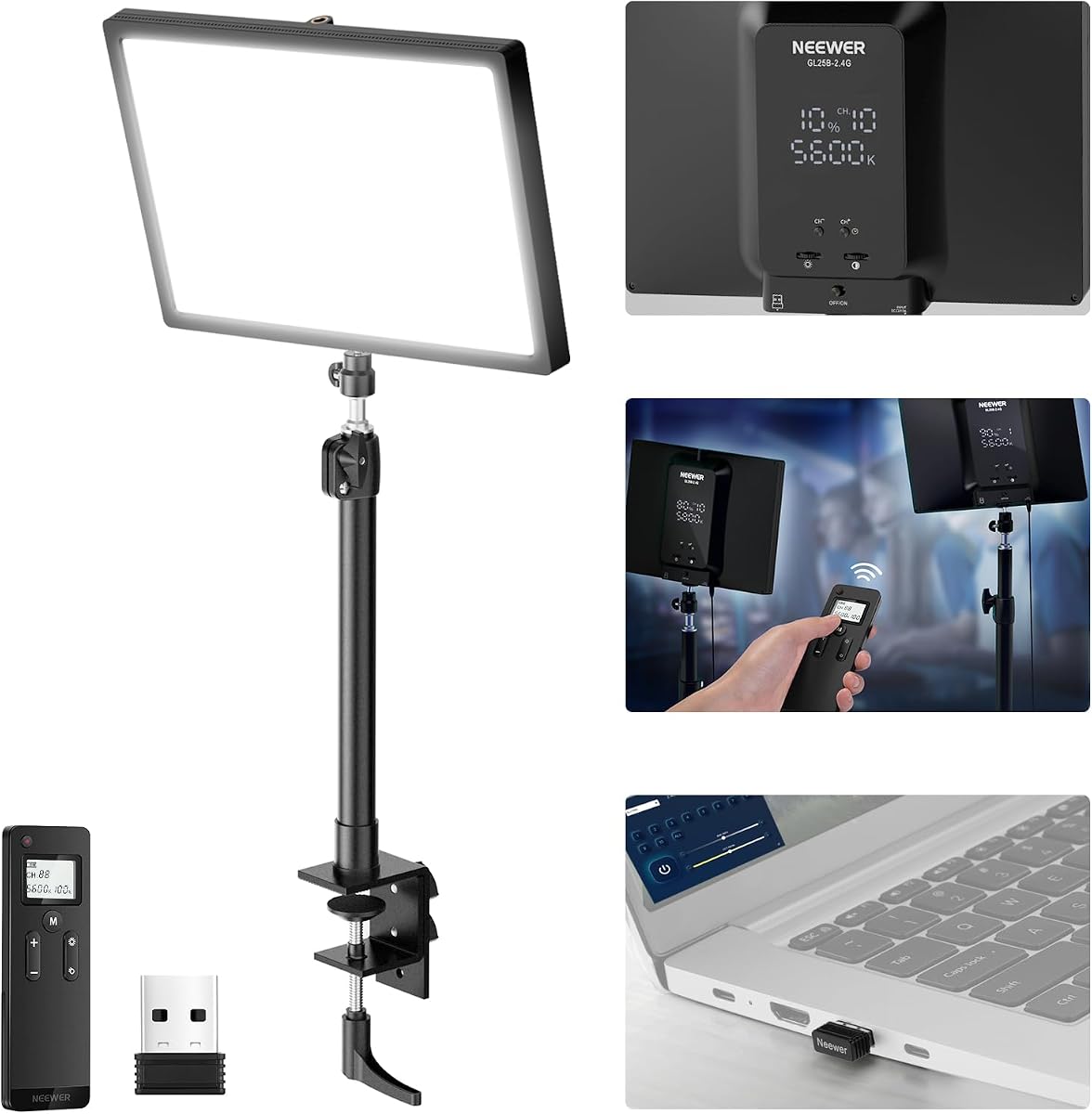
The NEEWER GL25B offers a premium experience with professional features at a competitive price point. Rated 4.7 stars, it stands out for its high CRI of 98+, ensuring that colors are rendered faithfully on camera. The large panel provides ample light coverage suitable for multi-person streams or detailed work.
We may earn a commission when you buy through this link, at no additional cost to you.
Its controlless cooling system ensures zero noise during operation, which is critical for audio recording and live streaming. The included 2.4G remote allows for quick adjustments without reaching for the light. You can also control it via PC using the dedicated app for precise settings management.
The only trade-off is the need for a dedicated power source rather than USB, which limits portability slightly. However, for a fixed setup, the robust construction and silent performance make it a reliable partner. The adjustable stand adds flexibility for positioning at various heights and angles.
This light is ideal for content creators who need high-quality illumination without noise interference. Whether you are filming tutorials or gaming, the soft glow and accurate colors will enhance your video quality significantly.
With a CRI of 98+, skin tones and product colors look natural and vibrant, reducing the need for post-production color correction.
The fanless design eliminates background noise, ensuring your audio remains crystal clear even when the light is running at full power.
We may earn a commission when you buy through this link, at no additional cost to you.
The Elgato Key Light Air MK.2 is designed for creators who need portability and style. With a rating of 3.8, it offers 2100 lumens of bright light in a slim 15-inch panel. Its edge-lit design provides anti-glare illumination that flatters complexions effectively for on-camera presentations.
We may earn a commission when you buy through this link, at no additional cost to you.
One of its standout features is the flexible power system, allowing connection via USB-C or a battery bank using a MagSafe ring. This makes it versatile for mobile setups. It also integrates with Stream Deck for automated lighting changes with a single keypress.
The brightness is lower than the flagship model, which might be insufficient for large rooms. Additionally, the battery ring is often sold separately, adding to the cost. However, its sleek design and modern features make it a strong contender for laptop creators.
It is a great choice for those who travel or stream from smaller spaces. The touch controls on the panel are responsive, and the app support ensures you can adjust settings remotely when needed.
Automate your lighting scenes directly through Stream Deck, allowing instant changes during live streams without touching the device.
Use the MagSafe battery ring to run the light wirelessly, giving you the freedom to move around without being tethered to an outlet.
We may earn a commission when you buy through this link, at no additional cost to you.
The Weilisi Ring Light brings versatility to the desk with its rotating and tilting design. With a 4.5 rating, it provides uniform light that minimizes shadows. The 360-degree rotation allows you to direct the light exactly where you need it for optimal visibility.
We may earn a commission when you buy through this link, at no additional cost to you.
The telescoping stand and extendable pole offer height adjustments to suit different desk setups. It clamps securely to the desk edge, freeing up surface area for other items. The 10 brightness levels and 3 color temperatures give you enough control to find the right ambiance.
Its output is moderate, so it works best for close-up content like video calls or reading. The design is functional and practical, though it may not replace a professional studio light. However, for the price, it offers excellent value for small spaces.
Ideal for home offices or students who need a reliable light for meetings and recording. The stability of the C-clamp ensures it stays in place during adjustments, making it a user-friendly option.
Rotate and tilt the head freely to avoid glare or direct light at specific angles for better video framing.
The metal C-clamp is sturdy and prevents slipping, ensuring your light stays secure even during vigorous adjustments.
We may earn a commission when you buy through this link, at no additional cost to you.
The NiceVeedi 2-Pack Kit provides two lights, offering flexibility for fill lighting and backlighting. With a 4.4 rating, it includes tripod stands and a remote for easy management. The color range from 2800K to 6500K allows you to match room lighting effectively.
We may earn a commission when you buy through this link, at no additional cost to you.
Each panel is equipped with 356 LED beads for stable output and high CRI. The USB power option makes it convenient to power from laptops or power banks, enhancing portability. The included storage bag helps keep components organized.
While the setup requires more space than a desk clamp, the versatility is unmatched for multi-light setups. The tripod stands are lightweight but durable, allowing you to position lights anywhere. However, managing two cables might be a slight inconvenience.
This kit is perfect for small studios or creators who want to expand their lighting setup affordably. It supports various use cases like photography and video recording, making it a practical investment.
Use one light as a key and the other as a fill to reduce shadows and create a professional three-point lighting effect.
The lightweight design and included bag make it easy to transport for on-location shoots or travel streaming setups.
We may earn a commission when you buy through this link, at no additional cost to you.
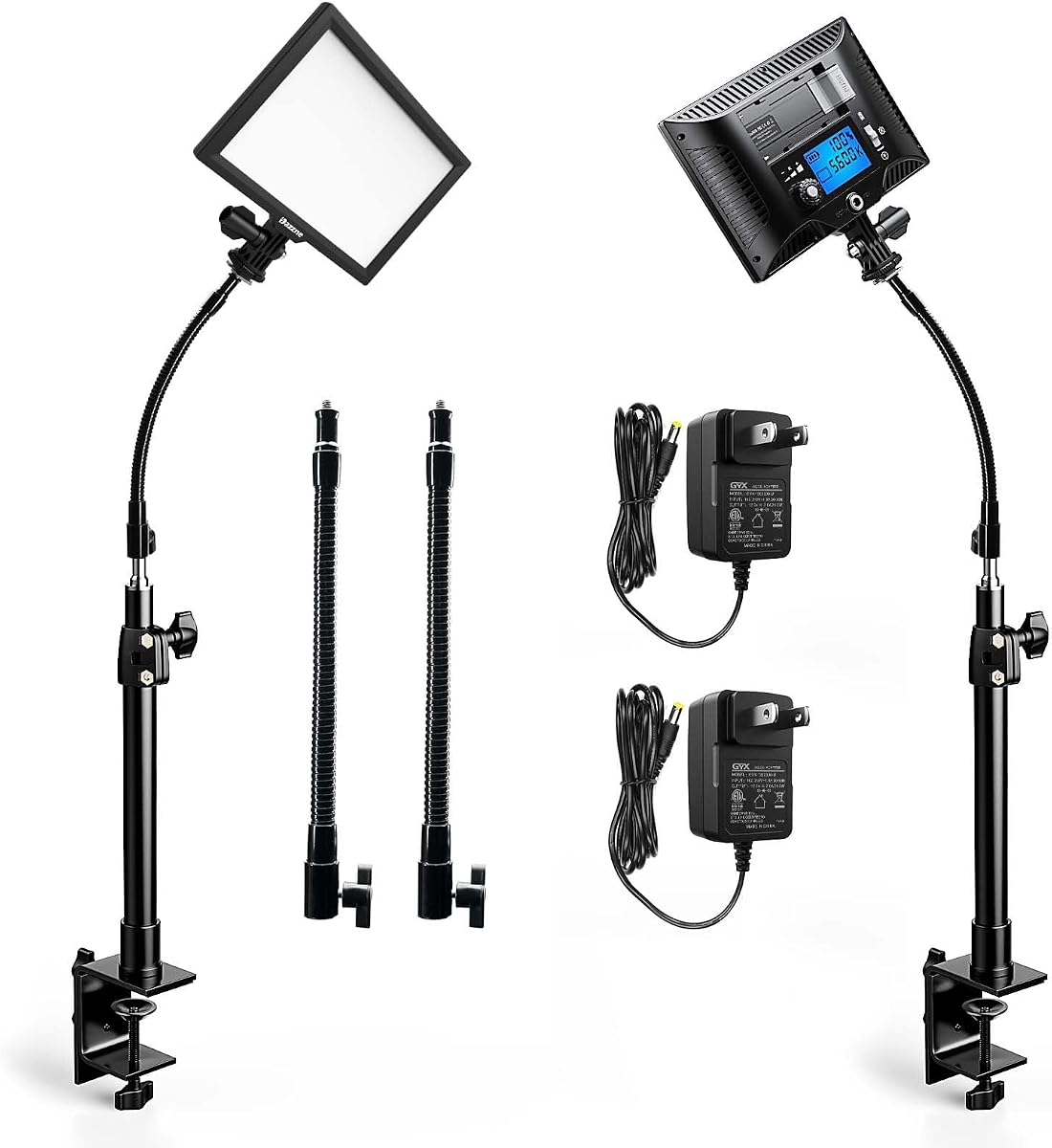
This 2-pack LED key light set features unique gooseneck tubes that allow precise positioning. With a 4.8 rating, it is highly rated for its adjustable nature. The LCD screen displays brightness and color temperature, making it easy to monitor settings during use.
We may earn a commission when you buy through this link, at no additional cost to you.
The gooseneck tubes provide multiple angle options, ideal for small desks where traditional stands might be bulky. The panel uses 118 LED beads for flicker-free illumination. The memory function remembers your last settings for quick startup.
The limited height might not suit tall setups, but for desktop use, it is excellent. The C-clamp mount saves space and keeps the desk clean. This design is best for users who need to direct light around tight spaces or obstacles.
It is a smart choice for podcasters or streamers with limited desk space. The flexibility allows you to adjust the light angle frequently without moving the entire stand, ensuring optimal lighting at all times.
The bendable gooseneck tubes let you angle the light to avoid reflections on glasses or screens during your stream.
With the memory function, the light turns on exactly where you left it, saving time and effort before recording.
We may earn a commission when you buy through this link, at no additional cost to you.
The Godox ES45 is designed for comfort during long streaming sessions. With a 4.4 rating, it uses an edge-lit OLED panel to provide glare-free light. The magnetic remote attaches to the back of the panel, charging automatically and staying secure when not in use.
We may earn a commission when you buy through this link, at no additional cost to you.
It reduces eye fatigue, making it ideal for gamers and streamers who sit for hours. The wireless control allows adjustments without interrupting the flow. The stand is sturdy and extends securely to desks up to two inches thick.
While the price is higher, the convenience of the charging remote and eye comfort justify it. The expandable control system allows you to link multiple units for a full studio effect. It blends functionality with aesthetic design.
Perfect for creators focused on content quality and viewer comfort. The remote is intuitive, and the diffused light ensures a professional look without harsh shadows.
The glare-free panel reduces strain, allowing you to stream longer without feeling tired or uncomfortable in front of the camera.
Snap the remote back when done to charge, ensuring you always have a fully charged controller ready for your next stream.
We may earn a commission when you buy through this link, at no additional cost to you.
This 2-pack key light set offers a dual-panel setup with gooseneck tubes for precise lighting. With a 4.4 rating, it provides high CRI illumination and memory settings. The LCD screen ensures accurate display of brightness and temperature for precise control.
We may earn a commission when you buy through this link, at no additional cost to you.
The desktop brackets clamp securely, freeing up desk space. The gooseneck tubes allow you to adjust angles easily without moving the entire fixture. It is designed to provide continuous illumination for various professional uses like podcasting and video recording.
The trade-off is the need for separate power sources, which can create cable clutter. However, the dual setup provides lighting versatility that single units cannot match. It is suitable for users needing fill lights alongside their key light.
Ideal for creators building a comprehensive lighting kit. The flexible tubes ensure you can direct light exactly where it is needed for optimal video quality.
Having two lights lets you create more depth in your video by illuminating different parts of your set or background.
The high-definition LCD provides clear feedback, so you can match lighting to the mood of your stream instantly.
We may earn a commission when you buy through this link, at no additional cost to you.
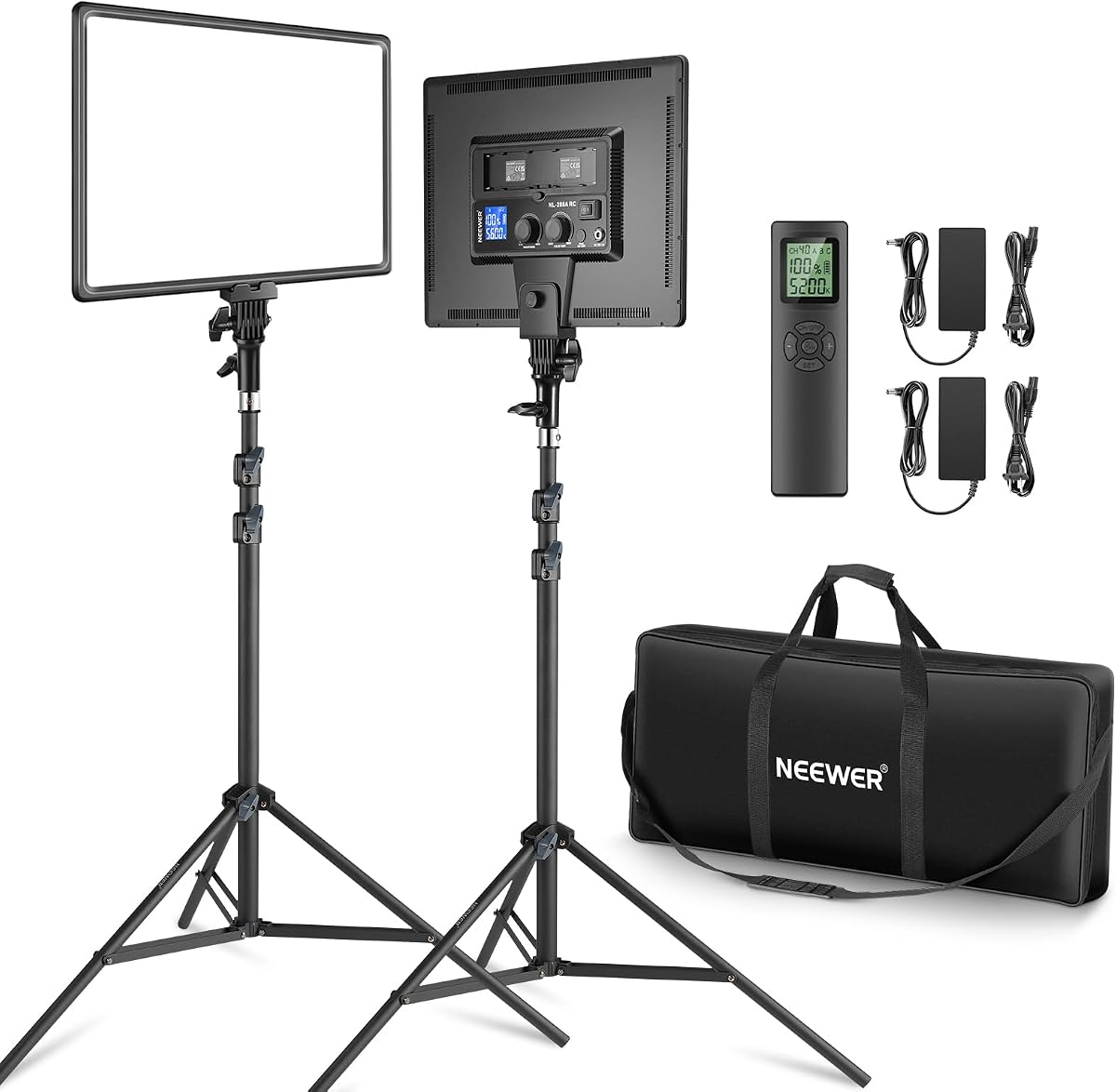
The Neewer 18 Kit offers powerful illumination with 45W per panel and 4800 lux brightness. Rated 4.6, it supports battery operation for on-the-go shooting. The two aluminum alloy tripods provide stable support for professional setups.
We may earn a commission when you buy through this link, at no additional cost to you.
It allows control of up to four groups and channels, making it scalable for larger productions. The bi-color range lets you match any lighting environment. It is designed for durability and high-quality output for YouTube and TikTok creators.
Battery support adds mobility, though batteries are sold separately. The weight is higher than desk lamps, so it requires a sturdy stand. However, the power and versatility make it a strong option for serious content production.
This kit is great for those needing high-intensity lighting for large sets. The remote control simplifies adjustments, ensuring you maintain consistent lighting throughout your session.
The 45W power delivers bright light suitable for large rooms or low-light conditions where other units might struggle.
Control multiple lights with a single remote, allowing synchronized changes for seamless transitions during live broadcasts.
We may earn a commission when you buy through this link, at no additional cost to you.
Selecting the right streaming light requires considering several technical and practical factors to ensure it meets your specific content needs.
Brightness measured in lumens or lux determines how much light the panel can emit. Higher lumen counts allow you to light larger areas or overcome ambient light in a room. For professional streams, 2000 lumens or more is recommended to ensure you remain visible and clear.
Look for adjustable brightness to control the intensity according to your environment. A dimmable light allows you to reduce glare and eye strain during long sessions without sacrificing quality.
Color temperature affects the mood of your video. A wider range allows you to switch between warm amber for cozy vibes and cool blue for a modern look. Ensure the light supports values between 2800K and 6500K for maximum flexibility.
Consistent color temperature is vital to avoid shifting skin tones. Choose a light with stable LEDs that maintain their hue over time to keep your look professional.
CRI indicates how accurately colors appear under the light. High CRI ensures your face and products look natural on camera. Aim for a CRI of 90 or higher to avoid washed-out or distorted colors.
A high CRI is essential for product showcases and tutorials where color accuracy matters. It enhances the overall professionalism of your content.
Mounting options determine where you can place the light. Desk clamps save space, while tripods offer height flexibility. Choose a setup that fits your room layout and desk size effectively.
Ensure the mount is sturdy to prevent vibrations that might shift your light. Adjustable arms help position the light at the correct angle for even illumination.
Power supply affects portability and setup. Some lights use USB for convenience, while others require AC adapters for higher power. Consider if you need to run off a battery or laptop.
For mobile streaming, battery support is a valuable feature. Check if batteries are included or must be purchased separately.
Control features like remote or app integration allow you to adjust settings without interrupting your stream. Touch panels are convenient, but remotes offer distance control.
Look for smart home compatibility or streaming deck support for advanced automation. These features can streamline your workflow significantly.
Build quality impacts durability. Metal casings and good heat dissipation ensure longevity. Fanless designs are preferred for silent operation.
Check reviews for heat performance during long sessions. A light that runs hot might damage your skin or equipment over time.
Balance the cost with the features offered. Premium lights offer better build and features, but budget options often suffice for beginners. Consider the total cost of any required accessories.
A higher initial investment may pay off in longevity. Assess whether the price matches the performance for your specific needs.
Position your light at a 45-degree angle to your face to minimize shadows under your eyes. Keep the light slightly above eye level to ensure a flattering angle for your viewers.
Adjust the color temperature to match your room's ambient lighting. This helps your camera balance white balance automatically, resulting in a natural look.
Clean the diffuser panel regularly with a soft cloth to prevent dust buildup. Dust can cause uneven lighting spots, so maintaining cleanliness is crucial for consistent quality.
A key light is the primary source of illumination in a lighting setup. It is usually the brightest light and shapes the subject's features and mood for the camera.
Yes, a key light ensures your face is well-lit and reduces graininess from low light. It is one of the most important tools for professional streaming quality.
A range of 3200K to 5600K is ideal for most indoor setups. It allows you to match daylight or warm indoor lighting comfortably.
Keep the light about 3 to 5 feet away. Too close can cause glare, while too far reduces the intensity needed for clear video.
Phone lights are not bright enough for streaming. They lack the output and color consistency required for professional on-camera presentation.
Desk lights save space, but stands offer flexibility. Choose based on your available room and whether you need to move the light often.
Most lights connect via USB or Wi-Fi apps. Follow the manual to install the software and link the device to your network.
We reviewed ten top-rated lights ranging from premium studio panels to budget-friendly desk options. The Elgato Key Light and NEEWER GL25B offer excellent performance for different needs.
Prioritize brightness and color accuracy to ensure your content stands out. A high CRI and adjustable temperature will help you look professional in any setting.
Prices and availability can change frequently, so check current deals before buying. Investing in the right light is a smart step to elevating your streaming quality.