
ORICO 5.25 Trayless Hot Swap Mobile Rack CD-ROM 3.5 inch Internal SATA Hard Drive SSD Adapter-1106SS
4.1Editor score
Tool-free mounting process
Stainless steel construction
Hot swapping support
Hot Swap SATA Mobile Racks are essential for technicians who need quick access to data drives without shutting down servers or PCs. They provide a secure way to manage storage while maintaining system uptime during critical operations or maintenance windows.
We evaluated ten leading models based on build quality, ease of installation, drive compatibility, and thermal management features. Our selection includes options for various bay sizes and drive types to suit different IT environments.
Each pick highlights specific strengths such as tool-less designs, cooling systems, or security features. Note that pricing fluctuates frequently, so always verify current costs before finalizing your purchase decision online.
4.1Editor score

4.4Editor score

5.0Editor score
As an Amazon Associate we earn from qualifying purchases.
The following table provides a side-by-side comparison of all ten reviewed products highlighting their key specifications and unique features for easy decision making.




The StarTech HSB100SATBK is the clear top pick for reliability with its high insertion rating and shock absorbing features that protect drives.
We may earn a commission when you buy through this link, at no additional cost to you.
Its trayless design allows for quick drive swaps without opening the chassis making it ideal for maintenance tasks or drive migrations.
The lockable bay provides physical security for sensitive drives while the aluminum build ensures heat dissipation and long term durability.
System administrators needing a single secure and easy-to-use mobile rack will find this model worth the investment for frequent access.
Internal rubber shock absorbers protect drives from vibration and minor impacts during insertion or removal.
The lockable drive bay keeps drives safe from unauthorized access without sacrificing quick swap functionality.
We may earn a commission when you buy through this link, at no additional cost to you.
The ORICO 1106SS offers the most budget-friendly entry point while still delivering essential hot swap and tool-free mounting features.
We may earn a commission when you buy through this link, at no additional cost to you.
Its stainless steel construction provides good heat dissipation for passive cooling and the power switch adds convenient control over drive states.
While it lacks advanced cooling or locking mechanisms it works well for home labs or occasional use cases on a tight budget.
Casual users and home technicians looking for an inexpensive way to add removable drive capability will appreciate its simplicity.
This unit delivers core hot swap functionality without extra bells or whistles that drive up the cost.
Stainless steel ensures durability and decent passive cooling for internal drives during extended operation.
We may earn a commission when you buy through this link, at no additional cost to you.
The ICY DOCK MB326SP-1B is the top premium pick delivering six drive bays with active cooling and excellent build quality.
We may earn a commission when you buy through this link, at no additional cost to you.
Its ExpressTray system and Active Power Technology ensure drives are stable and powered only when installed improving efficiency and safety.
Three-speed fan control allows users to balance noise and cooling based on workload while individual LEDs show drive status clearly.
Data centers or users needing maximum density in a single bay will find this enclosure unmatched for performance and manageability.
APT only powers the drive when installed reducing energy use and heat when bays are empty.
Dual upgradeable fans with three-speed control keep multiple drives cool even under heavy loads.
We may earn a commission when you buy through this link, at no additional cost to you.
ICY DOCK MB522SP-B is ideal for 2.5 inch drives offering compact docking with LED status lights and Active Power Technology.
We may earn a commission when you buy through this link, at no additional cost to you.
The door-less design and tool-less mechanism make swapping drives fast and easy without tools or extra enclosures for storage.
APT ensures power is only used when drives are present which helps reduce heat in smaller chassis or tight spaces.
Users working with laptop or small form factor SSDs will find this dual bay dock perfect for quick data transfers.
The door-less design removes barriers for ultra quick drive insertion and removal in tight spaces.
APT powers individual drives only when installed saving power and reducing unnecessary heat generation.
We may earn a commission when you buy through this link, at no additional cost to you.
The StarTech HSB220SAT25B features an open-top aluminum design that aids passive cooling while offering two drive bays in one slot.
We may earn a commission when you buy through this link, at no additional cost to you.
It includes necessary cables and a screw kit plus individual eject buttons and LEDs for easy drive management and status checks.
Though the open design can collect dust it provides excellent heat dissipation for high performance drives without extra fan noise.
Technicians managing multiple small drives in 3.5 bays will value its balanced combination of features and ease of use.
The open-top aluminum construction allows heat to escape naturally without requiring additional cooling fans.
Includes all necessary cables and screws so installation is straightforward and ready right out of the box.
We may earn a commission when you buy through this link, at no additional cost to you.
The Kingwin mobile rack adds physical security with a key lock feature making it suitable for shared or public work environments.
We may earn a commission when you buy through this link, at no additional cost to you.
Constructed with high quality ABS and metal it maintains stable drive temperatures and provides a secure connection for hot swaps.
LED indicators show drive activity and power status while the tray-less design allows for rapid tool-free drive installation removal.
Security conscious users needing quick access to 2.5 drives will appreciate the added layer of physical protection and reliability.
The built-in key lock prevents unauthorized access to drives installed in the hot swap cage.
ABS and metal construction balances strength with thermal management for consistent operation.
We may earn a commission when you buy through this link, at no additional cost to you.
The ICY DOCK ExpressCage MB324SP-1B offers four bays with adjustable cooling and durable trays suited for busy IT environments.
We may earn a commission when you buy through this link, at no additional cost to you.
Its three-speed fan control gives users flexibility to balance noise and cooling while locking latches secure connectors for reliability.
Heavy-duty ABS trays ensure drives stay stable even during vibration or frequent swapping without risking connection integrity.
Users needing four drive capacity in one bay without full six drive density will find this model highly practical and reliable.
Three-speed fan control allows tailoring airflow to workload and noise tolerance levels.
Locking latches for SATA and power connectors prevent accidental disconnection during drive swaps.
We may earn a commission when you buy through this link, at no additional cost to you.
Rosewill RSV-SATA-Cage-34 uniquely converts three 5.25 bays into four 3.5 or 2.5 drive bays maximizing storage density in older chassis.
We may earn a commission when you buy through this link, at no additional cost to you.
A rear exhaust fan ensures adequate airflow for multiple drives while the steel construction provides structural integrity and long-term use.
Support for SAS 6Gbps adds versatility for enterprise drives though it does require more physical space than single-bay models.
Organizations with legacy cases needing high drive density will find this converter solution a practical way to expand storage capacity.
Turns three optical drive bays into four hot-swap hard drive bays for better space utilization.
A dedicated rear exhaust fan maintains safe temperatures across all installed drives during operation.
We may earn a commission when you buy through this link, at no additional cost to you.
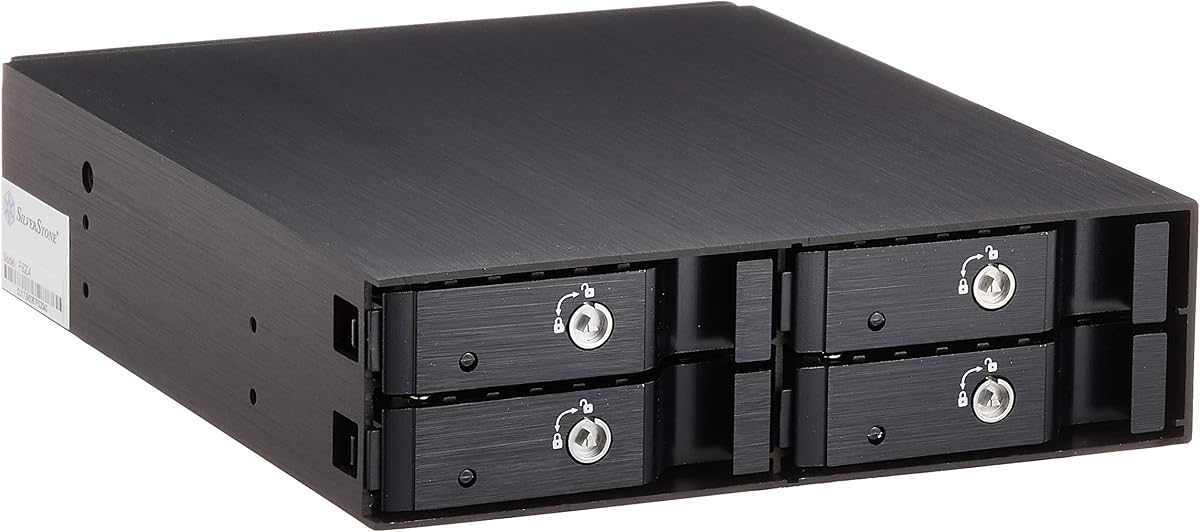
The Silverstone SST-FS204B stands out for its premium aluminium finish and individual drive locks offering both style and security.
We may earn a commission when you buy through this link, at no additional cost to you.
Four 2.5 inch bays plus a built-in fan ensure ample space and cooling for SSDs or SAS drives in one slot.
Each bay has its own status LED for quick monitoring and individual metal locks provide enhanced security for sensitive data.
Builders and enterprises wanting aesthetics without sacrificing functionality will appreciate this stylish and secure hot swap solution.
Each drive bay has its own metal key lock preventing unauthorized access to specific drives.
An aluminium body with hairline brushed finish gives a professional look matching high-end chassis.
We may earn a commission when you buy through this link, at no additional cost to you.
The LYNICESHOP 5-Bay rack turns three optical bays into five hot-swap positions with dual power for enhanced stability and safety.
We may earn a commission when you buy through this link, at no additional cost to you.
Its aluminum alloy construction supports durability while the integrated fan maintains optimal temperatures for all installed drives.
The space-saving layout delivers high density without needing a full chassis upgrade ideal for expanding existing systems easily.
Cost-conscious users wanting five drive bays in one enclosure will find this model a practical and reliable option overall.
Dual power supplies enhance operational safety and stability during hot swaps under load.
Uses three optical bays to provide five drive slots for more storage in limited space.
We may earn a commission when you buy through this link, at no additional cost to you.
Choosing the right Hot Swap SATA Mobile Rack depends on several key factors that match your specific storage needs and system constraints.
First determine how many drives you need to store and whether they are 2.5 or 3.5 inch sizes. Single bay racks fit one drive per slot while multi-bay units convert optical bays into multiple drive slots.
Choose a capacity that aligns with your storage demands without consuming more chassis space than necessary.
Check whether your case has available 5.25 inch optical bays or 3.5 inch drive bays since racks are designed for specific slots. Some models convert multiple optical bays into more drive bays.
Ensure your case can physically accommodate the rack dimensions and that it fits your chassis correctly before buying.
Tool-less racks allow drive insertion and removal without screwdrivers saving time and reducing risk of hardware damage. Look for models with sliding trays or push-in mechanisms.
Prioritize tool-less designs if you swap drives frequently to maximize convenience and ease of use daily.
Hot swap racks can trap heat so ventilation is critical. Units with built-in fans or open aluminum bodies maintain safe drive temperatures during extended use.
Active cooling fans are essential for multi-bay units or high-performance drives that generate more heat during operation.
Metal or aluminum construction offers better durability and heat dissipation than plastic. Shock absorbers and robust hinges improve longevity and protect drives from vibration.
Invest in higher quality materials for critical environments where drive reliability and physical protection are top priorities.
If data security matters consider racks with lockable bays or individual drive locks. These prevent unauthorized access to removable drives during or after installation.
Locking mechanisms are valuable in shared offices or data centers where physical drive theft is a risk.
Confirm whether your drives use SATA or SAS interfaces and that the rack supports the correct connector types. Some models support both or provide adapters for different standards.
Choose a rack matching your drive interfaces to ensure compatibility and avoid connection issues or hardware mismatches.
Individual LED indicators for power and activity help monitor drive status quickly without software tools. These show if a drive is active or if there is a problem.
Look for models with clear status lights to simplify troubleshooting and routine checks during maintenance or updates.
First ensure your computer has an available drive bay that matches the rack size before attempting installation. Mount the rack securely to the chassis frame using the provided screws or brackets.
Insert drives carefully into the bays making sure connectors align and locks click into place before powering on the system. Always eject drives properly before removal to prevent data corruption.
Regularly inspect connectors and cables for dust or wear and clean fans and vents to maintain cooling performance. Keep firmware and drivers updated for compatibility with new drive models.
Most Hot Swap SATA Mobile Racks do not require special drivers because they use standard SATA or SAS interfaces recognized by modern operating systems. Your OS will detect connected drives automatically.
Yes hot swap racks support live drive insertion and removal without shutting down the system. Ensure your OS supports hot plugging and eject drives safely to prevent data loss or corruption.
Most hot swap mobile racks support both SSD and HDD drives if they match the required size and interface type. Check model specs for drive dimensions and connector compatibility before purchasing.
Capacity varies from one to six or more drives depending on the model and chassis bay configuration. Single bay racks hold one drive while multi-bay units convert optical bays into multiple slots.
No a major benefit of hot swap racks is accessing drives from the front of the case without opening the chassis. This speeds up maintenance and reduces downtime for repairs.
Without 5.25 bays consider using a PCIe slot adapter or external USB docking station instead. Some modern cases omit optical bays so alternative solutions may be necessary for drive expansion.
Our top picks highlight the StarTech 3.5in model for reliability the ORICO unit for value and the ICY DOCK 6-Bay for premium multi-drive needs.
Prioritize cooling build quality and bay compatibility when deciding since these factors most impact long term performance and drive safety.
Always check current pricing and availability on retailer sites as deals change frequently for these essential storage accessories.