
Moread 4K DisplayPort to HDMI Adapter
4.6Editor score
Supports up to 4K 30Hz
Gold plated connectors for stability
Five year warranty included
This guide compares the top HDMI output to input adapter for laptop options to help you choose the right converter for your specific display and connection
Finding the right HDMI output to input adapter for laptop ensures seamless connectivity for presentations and entertainment. A quality adapter supports high resolution and stable signals without lag or flicker during use.
We evaluated ten top rated products based on compatibility, build quality, and performance metrics. Our analysis covers USB C, DisplayPort, and VGA conversions to meet diverse setup requirements effectively.
Each pick highlights key features and real world performance details for informed decisions. Prices and availability change frequently so verify current offers before purchasing to ensure the best value for your needs.
4.6Editor score

4.6Editor score

4.5Editor score
This side by side comparison highlights the key specifications and performance capabilities of each adapter to help you select the perfect match for your laptop and display setup needs.




The Anker USB C to HDMI Adapter stands out as a reliable choice for connecting laptops to external displays. It supports crisp 4K video at 60Hz and features a sturdy aluminum casing that handles heat well during use.
We may earn a commission when you buy through this link, at no additional cost to you.
This adapter delivers vivid video streaming and presentations without lag when paired with compatible USB C devices. The reinforced braided nylon cable ensures longevity and resists daily wear and tear from frequent plugging.
Users should note that this device does not support charging or Power Delivery through the same port. This limitation means you need a separate charging solution if you plan to use the adapter for extended sessions.
For anyone seeking a dependable way to extend their laptop display to a TV or monitor this adapter offers excellent value. Its ease of use and solid performance make it a top recommendation for professionals and students alike.
The adapter supports video up to 4K resolution ensuring sharp visuals for work or entertainment on external screens.
Lightweight aluminum casing allows for greater heat dissipation while the braided cable resists damage from daily use.
We may earn a commission when you buy through this link, at no additional cost to you.
The BENFEI 4K DisplayPort to HDMI Adapter is designed for users who need to connect a laptop or desktop with a DisplayPort to an HDMI display. It supports up to 4K resolution at 30Hz and 1080p at 60Hz for clear visuals.
We may earn a commission when you buy through this link, at no additional cost to you.
Built-in advanced IC chips ensure superior stability during signal conversion. The gold plated connector resists corrosion and improves transmission performance while the latches provide a secure connection that won't easily slip out.
This adapter cannot transmit signals from an HDMI source to a DisplayPort monitor so direction matters when purchasing. It is ideal for presentations or extending desktops but check your device ports to ensure compatibility with DisplayPort output.
For budget conscious buyers looking for reliable connectivity this adapter offers a compact and effective solution. Its design fits easily into pockets and ensures smooth video output for work presentations or entertainment setups.
Built-in advanced IC chip converts DisplayPort signal to HDMI signal ensuring stable performance during use.
The lightweight gadget tucks into pockets easily making it perfect for presentations or traveling with a laptop.
We may earn a commission when you buy through this link, at no additional cost to you.
The Moread 4K DisplayPort to HDMI Adapter offers impressive performance for its price point with support for resolutions up to 4K at 30Hz and 1080p at 120Hz. It also supports uncompressed digital surround sound for immersive audio experiences.
We may earn a commission when you buy through this link, at no additional cost to you.
The DisplayPort locking connector with latches prevents accidental disconnection and provides a secure connection during use. Gold plated connectors resist corrosion and abrasion ensuring signal transmission performance remains consistent over time.
While this adapter cannot transmit signals from HDMI sources to DisplayPort monitors it works well with most DP equipped computers and GPUs. Users should note it is passive and only supports docking stations that have DP dual mode.
With an unconditional five year warranty this adapter provides long-term satisfaction and reliable customer service. It is a top choice for users needing a durable and affordable solution for connecting laptops to HDMI displays.
Supports video resolutions up to 4K at 30Hz and 1080p at 120Hz with uncompressed digital surround sound audio.
Reinforced ABS housing and durable gold-plated connectors withstand repeated plugging and bending for long lasting use.
We may earn a commission when you buy through this link, at no additional cost to you.
The Highwings USB C to HDMI Adapter delivers clear 4K pictures at 60Hz for compatible USB C laptops and tablets. It works with older HDMI screens as well and features a braided nylon jacket designed for frequent plug-in use.
We may earn a commission when you buy through this link, at no additional cost to you.
Plug and play functionality ensures no drivers or installation are needed to turn your USB-C port into an HDMI port. The 24K gold-plated connectors and flexible strain relief ensure long-term reliability and signal integrity.
Users must verify their device supports DP Alt Mode before purchasing since not every USB-C port sends video. The chip may become warm during high-resolution transmission which is normal but requires proper ventilation for best results.
For those seeking a reliable adapter for home office setups this model offers excellent value with a twenty-four-month warranty. It keeps you connected without extra setup steps and supports standard video output needs effectively.
Get clear 4K picture at 60Hz from a compatible USB-C laptop or tablet for sharp and fluid visuals.
SR flexible strain relief and braided nylon jacket are designed for frequent plug-in use and long-term reliability.
We may earn a commission when you buy through this link, at no additional cost to you.
The Anker HDMI Switch simplifies media viewing by allowing you to switch between two HDMI sources with a single button press. It supports resolutions up to 4K at 60Hz for cinematic experiences without unplugging cables.
We may earn a commission when you buy through this link, at no additional cost to you.
Manual button switching is supported while automatic signal detection is not available for this model. It integrates devices like laptops and game consoles to TV screens and VR headsets seamlessly for various entertainment needs.
To guarantee a 4K60 display users should ensure HDMI cables are shorter than 3.3 feet and combined length does not exceed 6.5 feet. It supports one display at a time so simultaneous dual output is not an option.
For users managing multiple devices this switch offers a tidy solution for quick transitions. It is ideal for home entertainment setups where manual switching is acceptable and space-saving design is preferred.
Dive directly into your chosen media with a single button for hassle-free transitions without unplugging cables.
Turn your viewing sessions into cinematic experiences with support for resolutions up to 4K at 60Hz.
We may earn a commission when you buy through this link, at no additional cost to you.
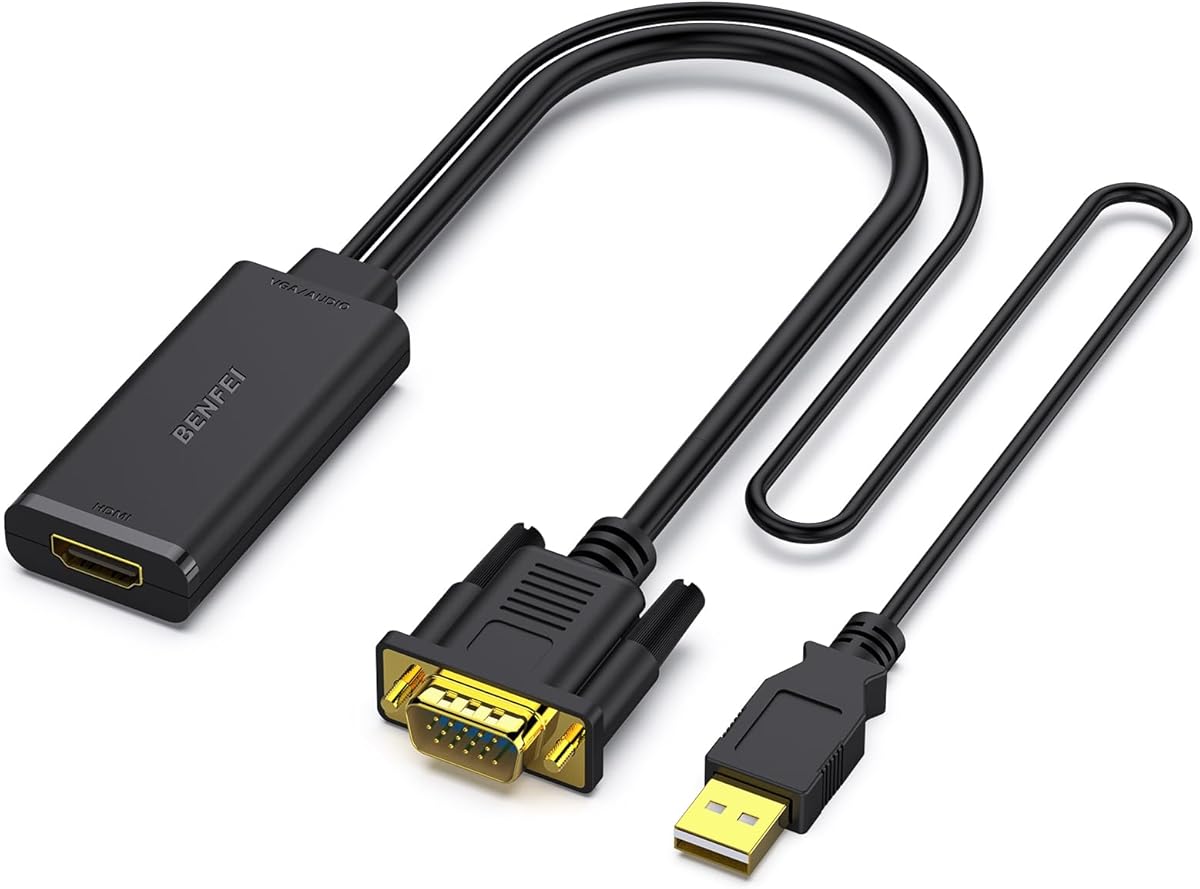
The BENFEI VGA to HDMI Adapter bridges the gap between older devices with VGA ports and modern HDMI displays. It converts analog VGA signals to digital HDMI signals to support video up to 1080p resolution.
We may earn a commission when you buy through this link, at no additional cost to you.
An integrated USB cable embeds audio along with video over HDMI for complete sound support. This setup allows digital USB audio to be configured from the Sound menu in Windows for output to the connected display.
This adapter cannot transmit signals from HDMI sources to VGA monitors so directionality is critical for correct usage. It fits easily into bags for business presentations and extends desktop screens to TVs or projectors effectively.
For users with older laptops or desktops this adapter provides a practical way to upgrade displays. Its compact design and audio support make it a reliable tool for presentations and media playback.
The BENFEI compact-designed portable VGA to HDMI adapter connects devices easily and fits into pockets or bags.
Integrated USB cable embeds audio along with the video over HDMI for complete sound support on displays.
We may earn a commission when you buy through this link, at no additional cost to you.
This USB C to HDMI Multiport Adapter expands your laptop port with HDMI video output PD charging and a USB-A port. It supports mirroring or extending screens to 4K Ultra HD or Full HD 1080p video directly to HDTVs.
We may earn a commission when you buy through this link, at no additional cost to you.
The adapter can charge laptops and tablets with support for up to 100W input and 87W safe output while allowing video output on other ports. Slim aluminum body provides better heat dissipation and portable design for travel.
The USB 3.0 port supports data transfer speeds up to 5 Gbps allowing quick file transfers. All ports can be used simultaneously making it a versatile solution for home-theater entertainment and office use.
For users needing more than just video this hub offers a compact solution. Just ensure your laptop USB-C port supports Power Delivery protocol for charging benefits and check compatibility before buying.
Mirrors or extends screens to 4K Ultra HD or Full HD 1080p video directly to HDTVs or projectors for clear visuals.
Supports maximum data transfer speed of 5 Gbps allowing easy transfer of large files in no time.
We may earn a commission when you buy through this link, at no additional cost to you.
The Mini HDMI to HDMI Adapter adopts HDMI 2.1 standards delivering stunning 8K resolution at 60Hz with backward compatibility for 4K at 144Hz. It fits perfectly with DSLR cameras Raspberry Pi Zero and laptops with Mini HDMI ports.
We may earn a commission when you buy through this link, at no additional cost to you.
Gold-plated connectors effectively resist oxidation ensuring nearly zero signal loss over time. High-quality aluminum alloy housing enhances heat dissipation and electromagnetic interference shielding while tested to withstand 10,000 plug cycles for reliability.
No drivers are required for this adapter ensuring true plug and play functionality. Its compact design fits into pockets easily making it an ideal companion for business presentations and outdoor photography use cases.
This value pack includes two adapters for flexible use in different scenarios. It is perfect for users managing multiple devices like cameras and laptops needing high definition output without bulky setups.
Adopts advanced HDMI 2.1 standards delivering stunning 8K resolution at 60Hz with backward compatibility for lower rates.
Features 24K gold-plated connectors that effectively resist oxidation and corrosion ensuring nearly zero signal loss.
We may earn a commission when you buy through this link, at no additional cost to you.
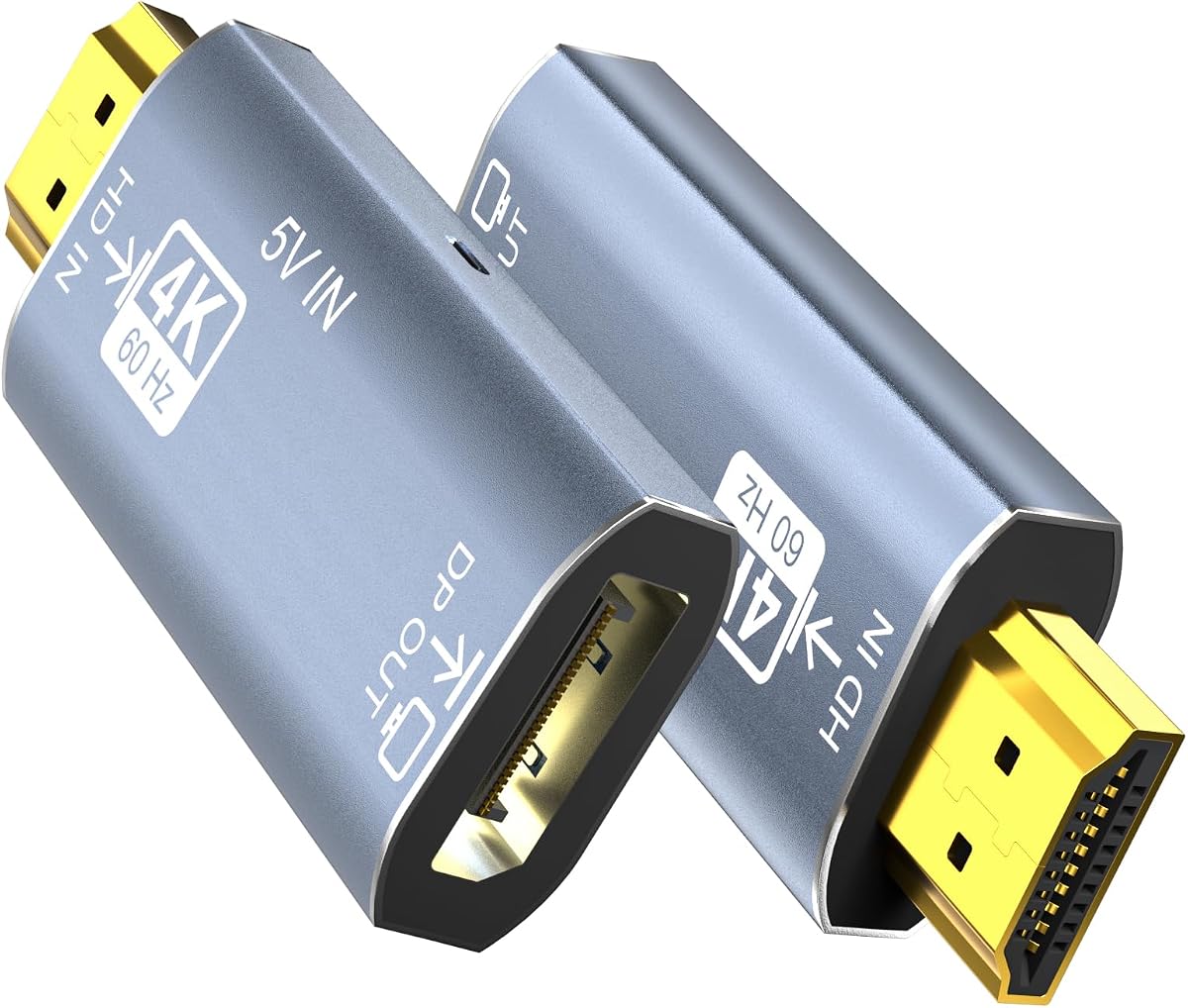
This BENFEI HDMI to DisplayPort Adapter connects devices with HDMI ports to monitors with DisplayPort inputs for expanded display options. It converts HDMI 2.0b signals to DisplayPort 1.4 signals supporting resolutions up to 4K at 60Hz.
We may earn a commission when you buy through this link, at no additional cost to you.
Braided nylon cable ensures extra durability while user-friendly non-slip design makes plugging and unplugging easier. Premium aluminum alloy casing provides better heat insulation and fits snugly with HDMI ports for stable signal transfer.
To provide sufficient voltage for chipset the USB cord of the adapter must be connected with external power supply before use. It works with consoles like PS5 Xbox One and laptops for gaming and media viewing.
For gamers and professionals needing higher refresh rates this adapter supports 2K at 144Hz and 1080P at 165Hz. It is a specialized tool for expanding your display setup beyond standard HDMI monitor availability.
Fully compatible with HDMI 2.0b input and DisplayPort 1.4 output supporting resolutions up to 4K at 60Hz.
Braided nylon cable for extra durability and premium aluminium alloy casing for better heat insulation during use.
We may earn a commission when you buy through this link, at no additional cost to you.
This active HDMI to DisplayPort adapter is engineered to connect an HDMI output source directly to a DP input display monitor for multi-screen setups. It delivers crisp images at 4K 60Hz without HDR support for standard definition monitors.
We may earn a commission when you buy through this link, at no additional cost to you.
Premium aluminum alloy housing provides excellent heat dissipation during continuous operation while ensuring precise color accuracy through advanced industrial chipset. It supports zero lag video processing for immersive gaming and simulator experiences effectively.
Plug the included USB power cable into a 5V/1A source before use to activate the conversion chip. Use premium DP 1.2 or above cables to achieve optimal resolution and avoid signal degradation during transmission.
For remote workers or content creators this adapter offers a reliable way to expand extra display screens. It allows seamless mirroring or extending desktops across Windows macOS and Linux systems without software installation needs.
Engineered to connect HDMI output source directly to DP input display monitor for ideal dual monitors setup.
Pure hardware-level decoding design offers true driver-free plug and play operation across Windows macOS and Linux.
We may earn a commission when you buy through this link, at no additional cost to you.
Selecting the right adapter depends on your specific ports and resolution needs. Understanding these factors helps ensure reliable connectivity and high quality video performance.
Check your laptop or device ports to determine if it uses USB C, DisplayPort, or VGA outputs. The adapter must match the source port type for signal transmission to occur without issues.
Ensure your device supports video output standards like DP Alt Mode for USB C to avoid buying incompatible adapters that only work for data.
Identify the resolution your external monitor supports such as 4K or 1080p and choose an adapter that matches or exceeds it. Higher refresh rates like 60Hz are important for smooth video and gaming.
Remember that passive adapters may not support higher 4K refresh rates while active converters often provide broader compatibility for gaming and work.
Confirm whether the adapter is uni-directional or bi-directional before purchasing to avoid signal issues. Most converters work only one way from source to display so choose accordingly.
Using the wrong direction results in no signal errors so always match the adapter input to your laptop output source port.
Some active adapters require external USB power to function properly while passive ones draw power from the port. Verify if your setup can accommodate the extra power requirement for stable performance.
If you need charging while using HDMI look for multiport adapters that support Power Delivery to keep your laptop powered during use.
Look for adapters with reinforced connectors such as gold-plated contacts and braided nylon cables that resist wear and tear. Sturdy housings made from aluminum help dissipate heat during extended use effectively.
Check for warranty length as manufacturers with longer coverage periods often stand behind their product reliability and build quality standards.
Prefer adapters that offer true plug and play functionality without requiring driver installation for hassle-free setup. This ensures you can start working or watching immediately after connecting cables.
Drivers can complicate setup on different operating systems so hardware level decoding simplifies the experience across devices.
Ensure the adapter supports audio pass-thru if your display has speakers to maintain seamless sound and video output together. Some adapters may require separate audio connections depending on the type.
Check specifications for audio channels supported especially if you use surround sound setups or external speakers with your monitor.
Consider the cable length included with the adapter to ensure it reaches your display without stretching or bending excessively. Some adapters come with short connectors while others include longer cables.
Keep the cable straight and avoid tight bends which can degrade signal quality over time especially at higher resolutions like 4K.
First connect the adapter to your laptop port and then plug your HDMI cable into the adapter to link your display. Turn on your external monitor or TV and select the correct input source to see your screen.
If you use an active adapter ensure you plug the USB power cable into a working power source before starting use. Proper power connection prevents signal dropouts and ensures the chip functions correctly.
Store your adapter in a soft pouch when not in use to protect connectors from dust and damage. Regularly check connectors for debris and wipe them gently to maintain strong electrical contact over time.
An adapter converts your laptop signal into a format compatible with HDMI displays. It allows you to connect laptops to monitors TVs and projectors for presentations or entertainment use cases.
Not all USB C ports support video output so check your device for DP Alt Mode. Without this feature the adapter will not transmit video signals to your display properly.
These adapters are designed to send signals from laptop to display only. They are uni-directional and cannot work in reverse from monitor to laptop input port.
Passive adapters work without external power and rely on source signal strength while active ones require power for higher resolutions. Choose active for demanding tasks like gaming or 4K support.
Most modern HDMI adapters pass audio along with video but check specs if using older VGA types. Some may require separate USB cables for audio output to work correctly.
No signal usually means incompatible ports or lack of required power. Verify your device supports video output and check cable connections and power sources carefully.
Only multiport adapters with PD support allow charging while using HDMI. Standard single port adapters do not pass power so you need separate charger.
Connect the adapter then go to display settings in Windows or macOS to choose extend mode. This lets you use both screens with different content simultaneously.
The Anker USB C to HDMI Adapter leads the list for overall performance and reliability for most users. The Moread DisplayPort and Highwings USB C models offer strong alternatives for specific port needs and high resolution support.
When choosing an adapter prioritize compatibility with your laptop ports and the resolution of your display. Consider whether you need extra features like audio passthrough or charging support for your daily work.
Always verify current prices and availability before purchase to ensure you get the best value for your budget. These adapters are affordable tools that significantly expand your laptop display capabilities and productivity.