
HUION Artist Drawing Glove
4.5Editor score
Works for both hands
Anti-fouling design
Soft Lycra material
This guide compares the top 10 gloves for drawing tablets to help artists reduce friction, prevent smudges, and improve precision on digital surfaces.
Digital artists rely on precise tools to create stunning work. A glove for drawing tablet helps reduce friction and prevents smudges on screens. It ensures smooth strokes and keeps your device clean during long sessions.
We compared ten top-rated gloves based on comfort, fit, and material quality. Each option supports both hands and offers unique features like palm rejection or breathability. Our analysis highlights the best choices for various needs.
Each pick shows key specs and real user feedback. Prices change frequently so check current listings before buying. These guides help you find the right accessory for your creative workflow and budget.
4.5Editor score

4.6Editor score
4.4Editor score
This table provides a side-by-side comparison of all ten products to help you decide quickly based on key features and user ratings.


This glove offers essential protection at a budget-friendly rate. With a 4.5 star rating it stands out for comfort and utility. The two-finger design ensures smooth movement on any tablet.
We may earn a commission when you buy through this link, at no additional cost to you.
Made from soft Lycra and nylon it provides excellent air permeability. Users appreciate the classic black color which resists dirt and frequent washing. It works well for both left and right-handed artists.
While it prevents smudges it does not stop accidental touch inputs on screens. This trade-off is acceptable for devices where touch is disabled during drawing. The material is lightweight and comfortable for long sessions.
Beginners and pros alike will find this glove reliable. It is perfect for sketching inking and digital coloring. If you need basic protection without breaking the budget this is a top pick.
Soft Lycra and nylon ensure flexibility and comfort during long use.
Prevents smudges and scratches on your graphics tablet or monitor.
We may earn a commission when you buy through this link, at no additional cost to you.
This glove features a unique 3-layer design that targets palm rejection specifically. It scores 4.6 stars for its ability to prevent accidental touches. Ideal for iPad users it enhances precision across all strokes.
We may earn a commission when you buy through this link, at no additional cost to you.
The set includes two gloves and a cleaning cloth offering great value. Three sizes ensure a perfect fit for various hand dimensions. The fabric is stretchy with moisture-wicking properties for long comfort.
Some users might find the layers slightly thicker than standard gloves. However this adds durability and protection against smudges. It works seamlessly with tablets digital art and painting.
Artists needing reliable touch protection should choose this option. It elevates your digital art experience significantly. With extra accessories included it is a complete solution for creatives.
The 3-layer design enhances grip and prevents accidental palm touches.
Includes two gloves and an extra cleaning cloth for convenience.
We may earn a commission when you buy through this link, at no additional cost to you.
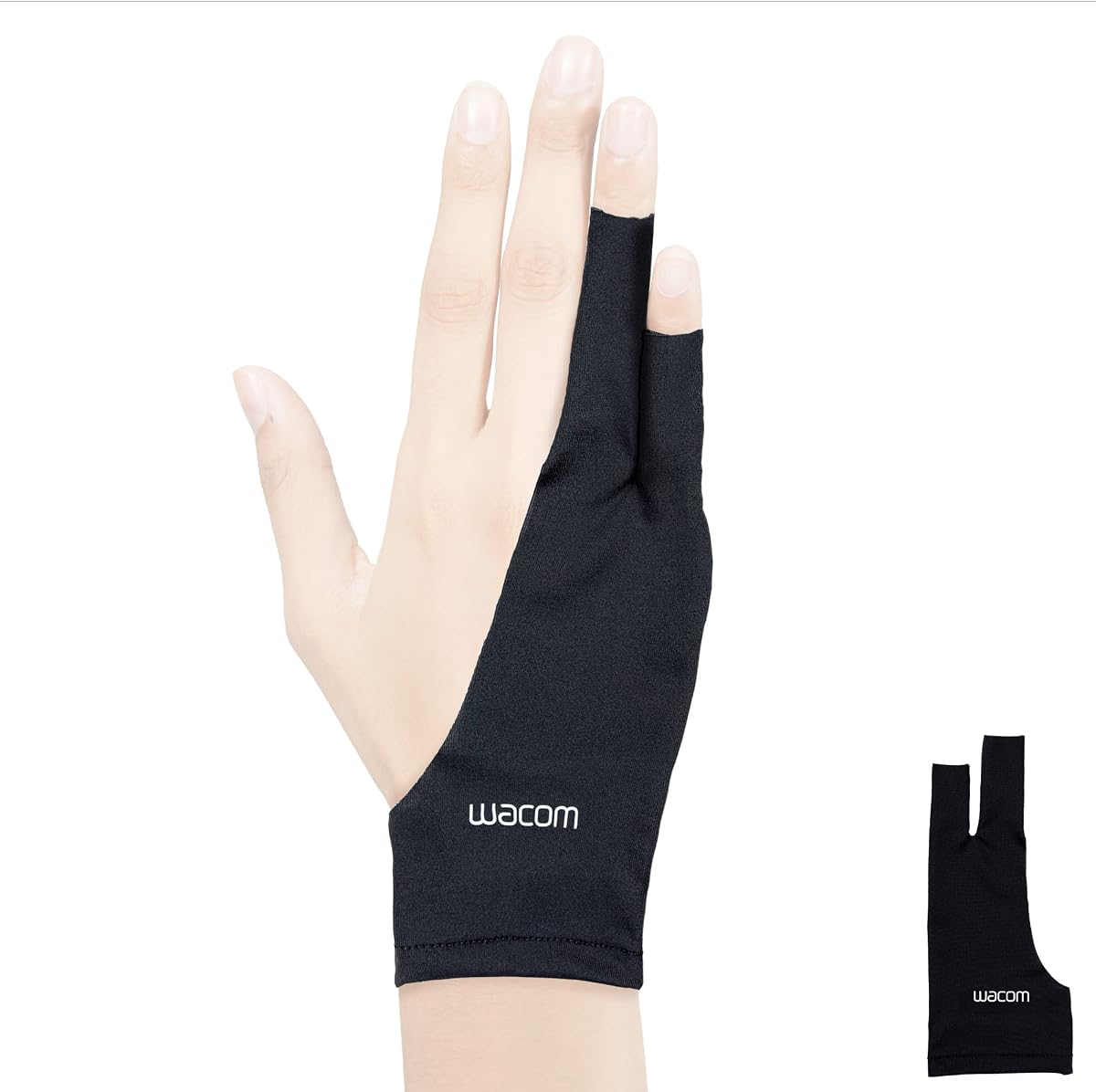
Wacom brings its reputation for quality to this eco-conscious glove. With a 4.4 rating it appeals to artists who care about sustainability. The recycled polyester and spandex blend offers stretch and durability.
We may earn a commission when you buy through this link, at no additional cost to you.
Exposed fingertips allow easy touchscreen access and keyboard typing. This feature makes it versatile for mixed workflows. It glides over screens reducing friction and keeping them clear of oils.
The one-size design fits most but might not suit very small hands. It is a single unit which may not be cost-effective for heavy users. However the brand trust and eco appeal are strong.
For those prioritizing sustainability and touch access this is ideal. It ensures hours of comfortable creation without smudges. Check if the fit suits your hand before purchasing.
Made of 90% recycled material offering comfort and durability.
Allows user to access touchscreen capabilities and type with ease.
We may earn a commission when you buy through this link, at no additional cost to you.
XPPen focuses on fit with high elastic material and multiple sizes. It holds a 4.5 rating for comfort and reliability. The glove is designed to adapt to your habits whether right or left-handed.
We may earn a commission when you buy through this link, at no additional cost to you.
Soft skin-friendly texture stops smudging and allows easier glide. The black color resists dirt so washing is infrequent. Three sizes ensure you find the best match for your hand.
The lack of touch rejection is common for basic models. It is still effective for standard tablets without touch features. The elasticity ensures a snug fit without feeling tight.
Users seeking a tailored fit will appreciate this option. It is perfect for daily sketching and coloring. Choose the right size to maximize comfort and performance.
Flexible cloth has excellent air permeability and high elasticity.
Soft texture stops smudging and allows for easier glide.
We may earn a commission when you buy through this link, at no additional cost to you.
This 4-pack offers excellent value for artists or households. With a 4.6 rating it is praised for comfort and utility. The lightweight design allows smooth sliding over screens and paper.
We may earn a commission when you buy through this link, at no additional cost to you.
Includes four gloves that work for both hands. The elastic lycra fiber is breathable and strong. Various sizes are available though manual measurement may have slight deviation.
Be aware that palm touch might still occur if device settings are not adjusted. It acts as a buffer for friction reduction. The black color is resistant to soiling.
Ideal for sharing or stocking up for long sessions. It improves work efficiency by eliminating friction. Check size charts carefully before ordering.
Allows hand to slide smoothly over tablet screen and eliminates friction.
High-elastic lycra fiber with soft texture and air permeability.
We may earn a commission when you buy through this link, at no additional cost to you.
HUION adds a unique skeleton pattern to this functional glove. It has a 4.6 rating for quality and design appeal. The anti-dust design prevents smudges and leaves no scratches.
We may earn a commission when you buy through this link, at no additional cost to you.
Soft Lycra and nylon make it extremely flexible and comfortable. The black color is peaceful and resistant to soiling. It works for sketching inking and digital drawing.
Users should note that accidental touch from the touch screen may still occur. It reduces friction but does not block inputs. The pattern makes it stand out visually.
Artists wanting style and function will love this choice. It fits both hands and offers essential protection. It is a great pick for those who care about looks.
Avoids smudges from your hand on a graphic tablet or monitor.
Works perfectly for sketching inking coloring and digital drawing.
We may earn a commission when you buy through this link, at no additional cost to you.
This 2-pack with 3-layer rejection offers great utility for iPad users. It scores 4.6 stars for preventing accidental touches effectively. The high elastic smooth fabric reduces friction significantly.
We may earn a commission when you buy through this link, at no additional cost to you.
Features sweat-wicking breathable fabric to keep hands dry. The fixed strap between thumb and index adds stability. It ensures the stylus is more accurate to use.
The universal size may not fit smaller hands perfectly. It might feel slightly bulky compared to simpler gloves. However the rejection support is worth it for touchscreens.
Best for artists needing a second pair for sharing or backup. It enhances productivity by allowing focus on creativity. Check size compatibility before buying.
Supports iPad and digital plates to prevent accidental touching.
Fixed strap between thumb and index ensures no sliding when in use.
We may earn a commission when you buy through this link, at no additional cost to you.
This option focuses on comfort with composite silk material. It rates 4.6 stars for breathability and fit. The upgraded side fabric creates an air layer for extended use.
We may earn a commission when you buy through this link, at no additional cost to you.
It provides smooth movement and enhanced grip for precision. The three sizes ensure a perfect fit for various hand preferences. It is durable and easy to maintain without deformation.
The lack of dedicated rejection layers may be a limit for touch screens. It is still effective for friction reduction and protection. The comfort factor makes it ideal for long sessions.
Animators and digital artists will appreciate the smooth fit. It facilitates productivity by reducing hand fatigue. Choose the size that matches your hand for best results.
Upgraded side fabric with composite silk improves air layer and comfort.
Reduces friction and prevents smudges on graphic tablets.
We may earn a commission when you buy through this link, at no additional cost to you.
This 2-pack has an upgraded fixed design for better comfort. It holds a 4.6 rating for smoothness and utility. The fixed part prevents palm stains on tablets allowing focus.
We may earn a commission when you buy through this link, at no additional cost to you.
Made of elastic Lycra it is soft sturdy and breathable. The black color does not need frequent washing. Sizes include small medium and large to fit various hands.
It eliminates friction effectively leaving no grease or sweat. Do not use it if device touch must be blocked. The fixed design reduces shifting during use.
Ideal for artists wanting smooth movement without extra cost. It improves work efficiency and reduces fatigue. Check the size chart to find your best fit.
Fixed design prevents palm from staining tablet and improves comfort.
Eliminates friction allowing hand to slide smoothly over screen.
We may earn a commission when you buy through this link, at no additional cost to you.
This 4-pack is a versatile choice for many artists. It scores 4.6 stars for durability and protection. The two-finger design ensures focus on creating without distraction.
We may earn a commission when you buy through this link, at no additional cost to you.
The material is high elastic lycra with moisture-wicking properties. It prevents smudges on screens and surfaces effectively. Available in various sizes to fit small large or medium hands.
It serves as a protective barrier against unsightly smudges. The black color is stain resistant for less cleaning. Note that touch sensors might still register contact.
Best for those needing bulk and variety for different tasks. It is ideal for light boxes and tracing pads. Choose the size that fits your hand perfectly.
Each glove can be worn on left and right hand comfortably.
Serves as protective barrier guarding against smudges on screens.
We may earn a commission when you buy through this link, at no additional cost to you.
Choosing the right glove involves considering fit, material, and features tailored to your device and style.
High-quality materials like Lycra or nylon ensure breathability and durability. Look for soft textures that reduce friction without feeling tight. Elastic materials help the glove stay in place during movement.
Prioritize breathable fabrics that wick moisture to keep hands dry during long sessions. Soft, stretchy fabrics enhance comfort and precision.
A good glove should fit snugly without restricting finger movement. Many come in multiple sizes so check measurements before buying. Some are ambidextrous while others are specific to left or right hands.
Choose a size that matches your hand dimensions for maximum comfort. Proper fit prevents shifting and ensures smooth movement over the tablet.
Some gloves offer layers that help prevent accidental touch inputs on touchscreens. This is essential if your device lacks native palm rejection. Check product specs to confirm compatibility with your tablet.
If you use a touchscreen tablet verify that the glove supports palm rejection. This avoids unwanted marks and improves workflow efficiency.
Gloves should withstand regular use without losing elasticity. Look for soiling-resistant colors that reduce the need for frequent washing. Durable materials extend the product's lifespan and value.
Select options that are easy to wash and maintain without deformation. Resistant colors help keep the glove clean longer and save time.
Features like exposed fingertips allow easy touchscreen access and typing. Two-finger designs balance protection with control. Additional elements like fixed straps improve stability during use.
Consider designs that match your workflow needs. Exposed fingertips or straps can make a significant difference in usability.
Buying in packs offers better value and backups. Four packs are ideal for sharing or stocking up. Compare price per unit to find the most economical choice.
Packs ensure you always have a clean glove ready. They are cost-effective for professional or high-frequency users.
Established brands often deliver reliable quality and better support. Reading reviews helps verify performance claims. Trusted names usually adhere to consistent manufacturing standards.
Opt for brands with positive feedback on comfort and durability. Reputation often correlates with product longevity and satisfaction.
Ensure the glove works with your specific device type. Some are optimized for iPads while others suit standard tablets. Verify compatibility to avoid functional issues.
Check if the glove suits your tablet's sensor technology. Compatibility ensures the glove performs as expected without interference.
Put the glove on your non-dominant hand so the fingers remain exposed for drawing. Ensure it fits snugly to avoid shifting during movement.
Wear it on your palm and fingers to prevent oil transfer. Slide your hand smoothly across the surface to reduce friction and improve control.
Hand wash gently with mild soap and air dry to maintain elasticity. Avoid high heat which may shrink or damage the fabric over time.
Some gloves have special layers for palm rejection but standard ones may not block touch inputs. If your tablet requires touch blocking look for 3-layer designs. Otherwise disable touch settings during drawing to avoid accidental marks.
Artists wear gloves to reduce friction and prevent smudges from skin oils. This keeps screens clean and allows smoother strokes for better precision. Gloves also offer a barrier against sweat during long sessions.
Many gloves are ambidextrous so you can wear them on left or right hands. Check product details for specific claims on both-hand compatibility. Universal designs offer flexibility for different preferences.
Wash every few uses or when visibly dirty to maintain hygiene. Look for resistant colors that need less frequent washing. Gentle hand washing preserves elasticity and fabric quality.
They do not affect pen pressure directly but may influence surface feel. Thin materials keep touch sensitivity intact while reducing friction. Choose lightweight options for minimal interference with stylus performance.
Yes some brands offer gloves made from recycled materials like polyester. These provide the same benefits while supporting sustainability. Check product descriptions for eco-conscious materials.
Most gloves are black for practicality but some may offer patterns. Dark colors are preferred for dirt resistance and a clean look. Unique patterns may be available for style-focused models.
Gloves act as a buffer and can help prevent accidental scratches from skin. They reduce friction but are not scratchproof against hard debris. Handle devices with care alongside using gloves.
We reviewed ten top gloves offering various features from basic protection to advanced palm rejection. Each option serves different needs whether you prioritize value comfort or brand quality.
Consider material fit and touchscreen compatibility when making your choice. Gloves with eco-friendly designs or multi-packs may suit long-term use better.
Prices change often so check current listings before purchasing. The right glove enhances your creative process by keeping surfaces clean and smooth.