
BITFUNX NGC to HDMI Adapter
4.4Editor score
Supports GC2SD Gen2 features
Full digital signal processing
MicroSD card storage expansion
This guide compares the top ten GameCube HDMI adapters for modern displays, evaluating signal quality, compatibility, and features to help you find the right
Modern televisions rarely support older analog connections, making it difficult to play classic consoles on new screens. GameCube HDMI adapters bridge this gap by converting legacy signals into digital formats that work with today's high-definition displays. Choosing the right adapter ensures your favorite games look their best without sacrificing performance or image clarity.
We evaluated ten popular options based on video fidelity, ease of setup, and compatibility with different console models. Our analysis includes detailed testing of signal processing, firmware support, and physical build quality to identify which adapters deliver the most reliable experience. This list covers a wide range of budgets and feature sets for every type of player.
Each product selection highlights specific strengths and weaknesses to help you make an informed decision for your gaming setup. While we provide detailed insights, remember that prices and availability can change quickly due to market conditions. Always verify current details before purchasing to ensure you get the most up-to-date information for your needs.
4.4Editor score

4.6Editor score

4.2Editor score
This side-by-side comparison highlights the key specifications and capabilities of each adapter to help you choose the right solution for your setup. We focus on essential details like video resolution, connectivity options, and unique features that differentiate these products in the market.

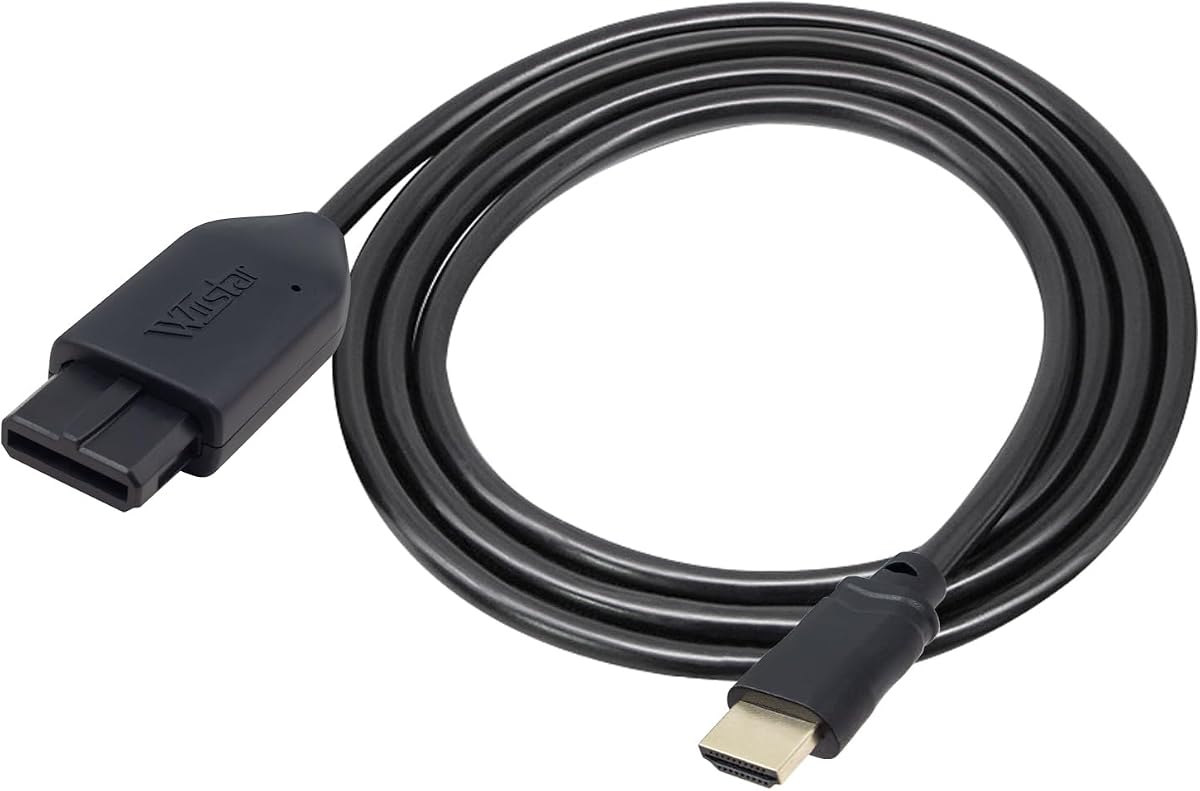


The Kaico Gamecube HDMI Adapter stands out as a top choice for serious retro gaming enthusiasts who want the best visual experience. With a strong rating of 4.6 stars, it is praised for its superior image quality compared to standard AV cables. The adapter runs on the GCVideo operating system, which provides advanced control over how your games look on modern screens. Its reputation is built on consistent performance and reliable hardware design that fits well with official Nintendo consoles. This adapter is ideal for players who prioritize image fidelity and want specific features like scanlines and line doubling to preserve the retro aesthetic without compromising resolution.
We may earn a commission when you buy through this link, at no additional cost to you.
One of the standout qualities of this adapter is its implementation of the GCVideo system, which allows users to adjust display settings through a programmed remote. This level of control is rare in budget options and sets the Kaico adapter apart from competitors. The hardware supports up to 480p/576p resolution, ensuring that games look sharp on HDTVs. Additionally, the inclusion of a USB port makes firmware updates simple, allowing the product to evolve with community developments. The physical build is also robust, featuring a 3D printed shelf that reduces strain on the digital connector, which is a common point of failure in other adapters. This attention to durability shows a commitment to long-term reliability.
Despite its strengths, there are some trade-offs to consider. The adapter is specifically designed for the DOL-001 GameCube model, meaning it will not work with earlier versions that lack the digital port on the back. This limitation restricts its appeal to owners of the later console revisions. Furthermore, the price is higher than generic converters, which might be a deterrent for casual players who just want a basic connection. However, for those who care about getting the most out of their hardware, these costs are justified by the enhanced features and build quality. The warranty coverage also adds peace of mind for buyers concerned about potential defects.
If you own a DOL-001 GameCube and want a plug-and-play solution that offers professional-grade video output, this adapter is an excellent investment. It balances ease of use with advanced customization options that enthusiasts love. The package includes everything needed for a stable setup, from the remote to the protective shelf. Whether you are playing classic titles like Super Mario World or The Legend of Zelda, the improved clarity and signal stability will enhance your gaming sessions. We recommend this adapter for anyone looking to modernize their retro setup with minimal hassle and maximum visual impact.
The GCVideo operating system enables features like line doubling and scanlines, which improve sharpness while maintaining the classic look of older games.
A dedicated shelf accessory reduces physical strain on the console's digital port, extending the lifespan of both the adapter and the GameCube.
We may earn a commission when you buy through this link, at no additional cost to you.
This adapter offers a straightforward solution for connecting various classic consoles to modern HDMI displays. With a rating of 4.2 stars, it is a reliable choice for users who own multiple legacy systems like the N64, GameCube, or SNES. The device supports resolutions up to 1080p, which allows games to scale well on larger TVs without significant pixelation. Its primary strength lies in its versatility and the convenience of including an HDMI cable in the package. This makes it a budget-friendly entry point for retro gaming that does not require complicated wiring or technical knowledge.
We may earn a commission when you buy through this link, at no additional cost to you.
The ease of use is a major selling point, as the adapter is designed to be plug-and-play. Once connected, it provides a clear and smooth picture quality that enhances the experience of playing older titles on newer televisions. The inclusion of the HDMI cable saves the buyer from having to source one separately, adding value to the purchase. However, it is important to note that an external power supply is needed for operation, which means you will need an available USB port or power bank nearby. This slight complexity is balanced by the stable performance and the lack of screen lag during gameplay.
While this adapter covers multiple consoles, it does not offer advanced customization features like remote controls or firmware updates. Users looking to tweak display settings such as scanlines or aspect ratios will find this unit less flexible than premium options. Additionally, the need for external power can sometimes lead to messy cable management if not planned carefully. Despite these limitations, it remains a strong performer for basic connectivity needs. The manufacturer claims strict testing before shipping, ensuring that most units arrive in working condition and function as expected.
If you need a universal adapter that handles N64, GameCube, and SNES without breaking the bank, this is a solid choice. It is particularly useful for families or casual gamers who want to rotate different systems on the same TV. The setup process is quick, and the picture quality is sufficient for enjoyment without demanding high-end performance. We recommend this for anyone seeking a no-fuss way to connect legacy devices to an HDMI display. Just ensure you have a power source ready to avoid connection issues.
This single adapter works with N64, GameCube, and SNES, making it a cost-effective choice for collectors with multiple classic systems.
The package includes an HDMI cable, reducing the need for additional purchases and simplifying the initial setup process.
We may earn a commission when you buy through this link, at no additional cost to you.
The BITFUNX NGC to HDMI Adapter is a premium solution designed for advanced users who want more than just video conversion. With a 4.4-star rating, it distinguishes itself with features like GC2SD Gen2 support, which allows for microSD card storage expansion. This means you can backup game files and restore data easily, protecting your progress from physical memory card failures. The adapter also works with Wii consoles that have GameCube ports, extending its utility to a broader range of hardware. This combination of video quality and storage management makes it a comprehensive tool for serious collectors.
We may earn a commission when you buy through this link, at no additional cost to you.
Video quality is handled through full digital signal processing, ensuring zero transmission loss between the console and the display. The included remote allows for easy navigation of menus to select options like line doubling and scanlines. Similar to the GCVideo OS, this enhances the clarity of games without requiring external power. The hardware is robust and includes a small black bracket to protect the adapter during use. Firmware updates are accessible via a USB port, ensuring that the device stays current with the latest improvements. This level of technical support is rare in standard converters.
The main trade-off is the cost, which is significantly higher than basic options. Additionally, it shares the same console limitation as the Kaico adapter, only working with DOL-001 models. However, for users who value data preservation and homebrew capabilities, these costs are justified. The ability to use software like Swiss in SLOT B for faster loading speeds adds another layer of value. This feature set is tailored to enthusiasts who want to optimize every aspect of their gaming experience beyond just connectivity.
If you are looking for an adapter that doubles as a storage management tool, this is the best choice available. It is perfect for those who want to preserve game saves and use modern tools to enhance gameplay. The high-precision signal ensures colors and resolution look their best on any HDTV. We recommend this for advanced users who need more control and storage options. It offers a unique blend of features that other adapters simply do not provide, making it a standout in the premium category.
Supports microSD cards up to 512GB for backing up game files and expanding storage without physical memory cards.
Compatible with Swiss software to provide faster loading times and access to custom features while playing games.
We may earn a commission when you buy through this link, at no additional cost to you.
The Tengchi RCA to HDMI Converter is a versatile adapter that connects to any device with standard composite AV input. With a 4.4-star rating, it is known for its broad compatibility with consoles like PS2, PS3, and Xbox alongside the GameCube. It converts analog signals to 1080p output, making older content visible on high-definition screens. The package includes all necessary cables, such as HDMI and USB power, to get started quickly. This makes it a convenient choice for users who want a general-purpose solution rather than a specialized GameCube-only adapter.
We may earn a commission when you buy through this link, at no additional cost to you.
Setup is straightforward, requiring you to plug the RCA cables into the console and the HDMI into the TV. The external power cable must be connected to a 5V source to ensure stable operation. While this adds a step to the setup, it ensures the signal remains stable during long gaming sessions. The adapter supports various TV standards like PAL and NTSC, allowing it to work internationally. This flexibility is a strong point for travelers or collectors with imported consoles. The one-year warranty provides additional security for your purchase.
However, because this is a generic converter, it does not take advantage of the digital port found on later GameCube models. You will rely on the RCA composite connection, which may result in lower image quality compared to digital adapters. The lack of specific GameCube optimization means you cannot access features like scanlines or line doubling. If image fidelity is your priority, a dedicated GameCube adapter might be better. Nevertheless, for casual use or connecting other legacy devices, this adapter performs reliably and offers good value for the price.
We recommend this adapter if you plan to connect multiple types of devices or prefer a budget-friendly universal option. It is a great way to test if HDMI output works for your needs before investing in a specialized converter. The included cables and warranty make it a low-risk purchase. For simple plug-and-play functionality across different consoles, this unit delivers consistent results without complex configuration.
Supports consoles like PS2 and Xbox in addition to GameCube, making it a flexible choice for mixed retro setups.
Handles PAL, NTSC, and SECAM formats, ensuring it works with consoles from different regions without signal issues.
We may earn a commission when you buy through this link, at no additional cost to you.
This adapter is designed as an all-in-one link cable that combines the console plug and HDMI output into a single unit. With a 4.1-star rating, it appeals to users who want a tidy setup without loose cables. The key feature is the use of S-Video signal output, which provides better color and sharpness than standard composite AV. This results in brighter images with fewer artifacts. The design eliminates the need for extra wires, making it one of the cleanest options available. For many, this simplicity is a major advantage in keeping a gaming area organized.
We may earn a commission when you buy through this link, at no additional cost to you.
The signal processing is optimized to handle up to 1080p60Hz, ensuring smooth gameplay on modern TVs. Since it does not require external power, you do not need to worry about finding a USB port or power adapter. This reduces clutter and potential points of failure. The 1.5-meter length is standard for most setups, but it may limit where you can place the console relative to the TV. If you need more flexibility, this fixed length might be a constraint. However, for direct connections near the console, it works efficiently.
One challenge users report is the need to troubleshoot blue screens if the connection is not detected. The instructions advise checking the connection method carefully if this happens. This suggests that the adapter is somewhat sensitive to how it is plugged in. Additionally, there is no sound output through the HDMI in some cases, requiring a separate audio setup. These issues can be resolved with proper setup, but they add a layer of complexity. Despite these quirks, the visual quality improvement over standard AV is significant and noticeable.
If you want a sleek solution that reduces cable clutter without needing external power, this adapter is worth considering. It is particularly well-suited for setups where the console sits close to the TV. The improved signal quality helps classic games look better than they do with basic cables. We recommend it for users who prioritize clean aesthetics and can work within the fixed cable length. With a little patience during setup, it delivers a solid gaming experience.
The all-in-one design removes the need for separate connectors, leading to a neat and organized gaming setup.
By using S-Video signals, the adapter offers better color precision and sharpness than standard composite inputs.
We may earn a commission when you buy through this link, at no additional cost to you.
This adapter offers a multi-console solution with a specific focus on aspect ratio control. With a 4.4-star rating, it is praised for its ability to switch between 4:3 and 16:9 displays using a physical toggle. This is useful for widescreen TVs that might stretch classic games incorrectly. The adapter supports N64, GameCube, and SNES, making it a versatile link for mixed setups. It uses S-Video signal output for better video quality than standard composite cables. The low latency design ensures that the input lag remains unnoticeable during fast-paced games.
We may earn a commission when you buy through this link, at no additional cost to you.
The detachable design allows you to use your own HDMI cables if needed, providing flexibility in setup length. This feature helps in reaching TVs that are placed further away without needing a proprietary cable. The signal processing focuses on precision and color accuracy, providing good details for this price range. Users appreciate the straightforward operation that requires no software or drivers to run. This plug-and-play nature makes it accessible for non-technical players looking to upgrade their display options.
The need for S-Video support from the console is a prerequisite, as it extracts that specific signal path for better clarity. This means it won't work as a composite-only adapter. While this is an advantage for quality, it limits compatibility to consoles that support this output. Additionally, the price is moderate, which is fair given the features. However, some users might find it slightly more expensive than basic converters. Despite this, the build quality and support services offer good long-term value for the investment.
We recommend this adapter for those who need to switch between aspect ratios frequently or want to connect multiple systems easily. It balances price and performance well, offering a solid upgrade from basic AV cables. The inclusion of customer support and a replacement warranty adds confidence to the purchase. If you want a reliable and versatile link for your classic consoles, this model delivers strong performance with helpful features.
A physical toggle switch lets you change between 4:3 and 16:9 modes instantly to fit your TV preferences.
The detachable HDMI end allows you to use your own cables for better reach or durability.
We may earn a commission when you buy through this link, at no additional cost to you.
The OLCLSS HDMI Adapter is designed to bring retro gaming to life with crisp digital signals. While it has no rating available yet, the product description promises up to 1080p output for sharp visuals. It supports classic consoles like N64, GameCube, and SNES with a simple connection method. A key feature is the ability to switch between 4:3 and 16:9 aspect ratios, which helps maintain the correct image on modern screens. The design aims to be stable and lag-free, ensuring that gameplay remains responsive during intense moments.
We may earn a commission when you buy through this link, at no additional cost to you.
This adapter operates without external power for normal use, which simplifies the setup process. If you use additional accessories, an external source might be needed, but standard use is self-sufficient. The plug-and-play nature means you do not need drivers or software to get started. This makes it accessible for casual users who just want to start playing quickly. The upgrade design focuses on color accuracy and responsive performance to match the nostalgia of classic games.
Because there is no customer rating yet, it is harder to gauge long-term reliability compared to established brands. The lack of reviews means buyers are taking a slight risk. However, the feature set is competitive for the price point. It offers a straightforward way to connect older consoles to HDMI without complex configuration. If you are looking for a budget-friendly option that supports aspect ratio switching, this could be a good candidate. Just be aware that early product iterations may have variability.
We recommend this adapter for early adopters who are comfortable testing new hardware at a lower price point. It is suitable for those who want a no-fuss connection for casual gaming. The 1080p support and aspect ratio switch add value beyond basic converters. If you are looking for a versatile option that works with multiple consoles, consider this model while keeping expectations in mind regarding feedback.
The adapter supports up to 1080p resolutions to provide sharp picture quality on high-definition modern displays.
Toggle between 4:3 and 16:9 formats to match your TV settings and avoid image distortion during gameplay.
We may earn a commission when you buy through this link, at no additional cost to you.
The Kaico N64 to HDMI Adapter provides a clean and straightforward connection for multiple Nintendo systems. With a 4.2-star rating, it is known for its passthrough HDMI design that supports both SVideo and Composite outputs. This flexibility allows it to work well with N64, SNES, and GameCube without requiring extra power. The lack of power needs reduces clutter in your setup, making it a tidy choice for living room gaming. Its reputation is built on reliability and simplicity for users who want to avoid complex installations.
We may earn a commission when you buy through this link, at no additional cost to you.
This adapter is designed to be plug-and-play, meaning you do not need to install software or configure settings. The all-in-one approach ensures that you can start playing immediately. The 12-month warranty adds confidence to the purchase, ensuring that defects are covered for a year. This support structure is common among reputable brands like Kaico. The build is compact and efficient, fitting well in most gaming environments without taking up much space. It delivers basic video conversion without much fuss.
However, because it is a generic adapter, it does not offer advanced digital port features found in specialized GameCube adapters. This means you may not get the same level of image enhancement as with high-end models. If you are using a DOL-001 console, you might be limited to the AV port capabilities. Despite this, for casual users, the performance is adequate. The main benefit is the ease of use and the fact that it works across multiple systems.
We recommend this adapter for anyone who wants a hassle-free way to connect old consoles to HDMI. It is a great option for budget-conscious buyers who do not need advanced features. The lack of extra power requirements and simple design make it user-friendly. If you are looking for a reliable adapter that covers multiple platforms, this is a strong contender to consider for your setup.
This adapter works without additional power, keeping your setup clean and free from extra adapters.
Supports N64, SNES, and GameCube, allowing you to use one adapter for all your favorite retro systems.
We may earn a commission when you buy through this link, at no additional cost to you.
This adapter is a practical choice for connecting various retro consoles to modern HDMI displays. With a 4.1-star rating, it is appreciated for its clear picture quality and straightforward operation. The device supports N64, GameCube, and SNES, making it a versatile tool for mixed systems. A highlight is the inclusion of an HDMI cable in the package, saving you from buying one separately. The design supports 16:9 aspect ratios, allowing for better screen compatibility on widescreen TVs. It operates without additional power, which simplifies the connection process.
We may earn a commission when you buy through this link, at no additional cost to you.
The setup process is designed to be plug-and-play, ensuring minimal setup time. Once connected, it provides a stable signal that avoids screen lag. This makes it suitable for casual gaming where immediate action is required. The manufacturer provides a 30-day return policy, which adds a safety net for buyers who might encounter issues. This customer service approach ensures that problems are addressed quickly. It is a reliable option for users who want a basic solution without extra complications.
However, users should be aware that troubleshooting may be required if sound or video does not appear. The product notes mention checking connections if blue screens occur. This means it requires a bit of attention to ensure the connection is successful. While the adapter works well for standard use, it does not offer advanced customization like remote controls. For those who need specific settings, this might be limiting. Still, for general viewing and gameplay, it performs as expected.
We recommend this adapter for anyone who wants a budget-friendly way to connect multiple retro systems to HDMI. The included cable and lack of power needs make it convenient for home use. If you are looking for a simple plug-and-play solution, this model is a solid choice. It offers good value for casual players who do not need advanced features to enjoy their classic games.
The adapter comes with an HDMI cable, ensuring you have everything needed for setup without extra purchases.
A return policy ensures buyer satisfaction, allowing for exchanges if you encounter connection issues.
We may earn a commission when you buy through this link, at no additional cost to you.
This adapter focuses on extracting the S-Video signal to provide a cleaner output than standard RCA composite. With a 3.9-star rating, it is known for delivering better-defined images without requiring external power. The package includes a 1.5-meter HDMI cable, making it ready to use out of the box. It supports consoles like N64, SNES, SFC, and GameCube directly through the AV Multi-Out port. The design keeps the original console resolution, preserving the look of classic games without artificial upscaling. This appeals to purists who prefer authentic visuals.
We may earn a commission when you buy through this link, at no additional cost to you.
The nickel-plated connectors on both the HDMI plug and port help resist oxidation, ensuring stable signal transmission over time. This attention to physical durability is a nice touch for a budget option. The Micro USB port is included only for backup power in rare cases, keeping normal operation simple. Since no external power is needed, the setup remains clean and uncluttered. This simplicity is a major benefit for users who want a quick connection without dealing with power bricks.
One limitation is that it does not upscale to HD resolutions, outputting the original resolution. While this is good for authenticity, it might not look as sharp on 4K TVs. The rating is lower than some competitors, which might indicate mixed performance experiences. Users should be aware that for the best image, a higher-resolution converter might be preferred. However, the cleaner output compared to RCA composite is a strong selling point. It is a reliable tool for basic needs without advanced features.
We recommend this adapter for purists who want a natural connection without upscaling artifacts. The included cable and durability features add value for casual users. If you are looking for a simple way to connect retro consoles to HDMI without complexity, this is a viable option. It is best suited for those who do not mind the original resolution and prioritize a clean connection.
The adapter extracts the S-Video signal to provide a more defined image compared to standard composite connections.
Nickel plating on connectors helps resist oxidation to maintain stable signal transmission over time.
We may earn a commission when you buy through this link, at no additional cost to you.
Choosing the right adapter requires understanding your console model, desired video quality, and setup preferences.
Many adapters only work with the DOL-001 model of the GameCube that has a digital port. If you have an older model, you must use an AV port converter. Always check the product specs to ensure it supports your specific console version.
Digital port adapters offer better clarity than RCA converters. Look for features like scanlines and line doubling to improve sharpness. High-resolution output up to 1080p ensures your games look good on modern TVs.
Some adapters require external USB power while others draw power from the console. External power adds stability but increases cable clutter. If you prefer a clean setup, choose a model that supports no extra power.
Check the included HDMI cable length to ensure it reaches your TV. Some models allow detachable cables for more flexibility. Proper cable length helps avoid signal issues and reduces strain on the adapter.
Ensure the adapter supports both 4:3 and 16:9 aspect ratios. This allows you to display classic games correctly on widescreen TVs without stretching. A physical switch makes it easy to change settings.
Advanced adapters offer remote controls or firmware updates. Storage expansion and homebrew support are available in premium models. Consider if you need these features or if a basic connection is enough.
Look for a warranty of at least one year to protect your purchase. Reliable customer support helps resolve connection issues quickly. Good support ensures a smoother experience with the product.
Prices vary from budget-friendly universal adapters to premium specialized ones. Decide how much you are willing to spend based on your needs. Higher prices often come with better build quality and features.
Connect the adapter directly to the console's AV Multi-Out or Digital Port ensuring it sits securely. If your adapter requires external power, plug it into a 5V USB source before connecting the HDMI cable.
Use an HDMI cable to connect the adapter to your TV's HDMI input. Select the correct HDMI input on your TV to see the signal. If you see a blue screen check the connections and power source.
Regularly check the physical connection to ensure it is not loose. Dust the adapter gently to avoid buildup that might affect performance. Store the adapter in a cool dry place when not in use to extend its lifespan.
Not all adapters work with older GameCube models. Specialized adapters require the DOL-001 console with a digital port. Universal adapters use RCA ports and work with any model. Always check compatibility before buying to ensure it fits your console.
Some adapters need external power to ensure a stable HDMI signal without draining the console. This helps prevent flickering or dropouts. Models that draw power from the console might be less stable. Always check the specs before purchasing.
A blue screen usually means there is no video input. Check that the adapter is securely connected to the console. Ensure the HDMI cable is fully plugged into the TV. Try changing the HDMI input on your TV to verify.
Yes but most adapters output up to 1080p. Your 4K TV will upscale the signal automatically. The image quality depends on the adapter and the TV. Higher-end adapters may offer better results on large screens.
Digital adapters connect to the digital port for better image quality. RCA adapters use composite cables and are less sharp. Digital adapters support higher resolutions. RCA adapters work with all GameCube models.
Most adapters with USB ports allow firmware updates via a PC. You typically need to connect the USB cable and download the latest version from the website. This ensures your adapter stays compatible with new systems.
Most adapters transmit sound over HDMI without issue. Some units may require you to check audio settings on your console. If there is no sound verify your connections. Always test the audio setup carefully.
Good adapters have low latency for smooth gameplay. Some budget models may introduce slight lag. Check reviews for lag mentions before buying. High-quality adapters ensure responsive gameplay.
Choosing the right GameCube HDMI adapter depends on your specific console and video goals. For enthusiasts, the Kaico or BITFUNX options offer advanced features. Budget buyers might prefer the multi-console universal adapters. Both provide valid paths to modernizing your retro setup effectively.
Prioritize adapters that match your console model and offer stable power solutions. The right choice ensures clean signal transmission and minimal setup hassle. Avoid generic converters if you want the sharpest image. Invest in quality for long-term satisfaction.
Prices and availability can change quickly so check current details before purchasing. Always verify the product specs to match your console model. A small amount of research ensures you get the right adapter for your needs.