
TV Antenna for Smart TV Indoor,TV Antenna for Local Channels
4.2Editor score
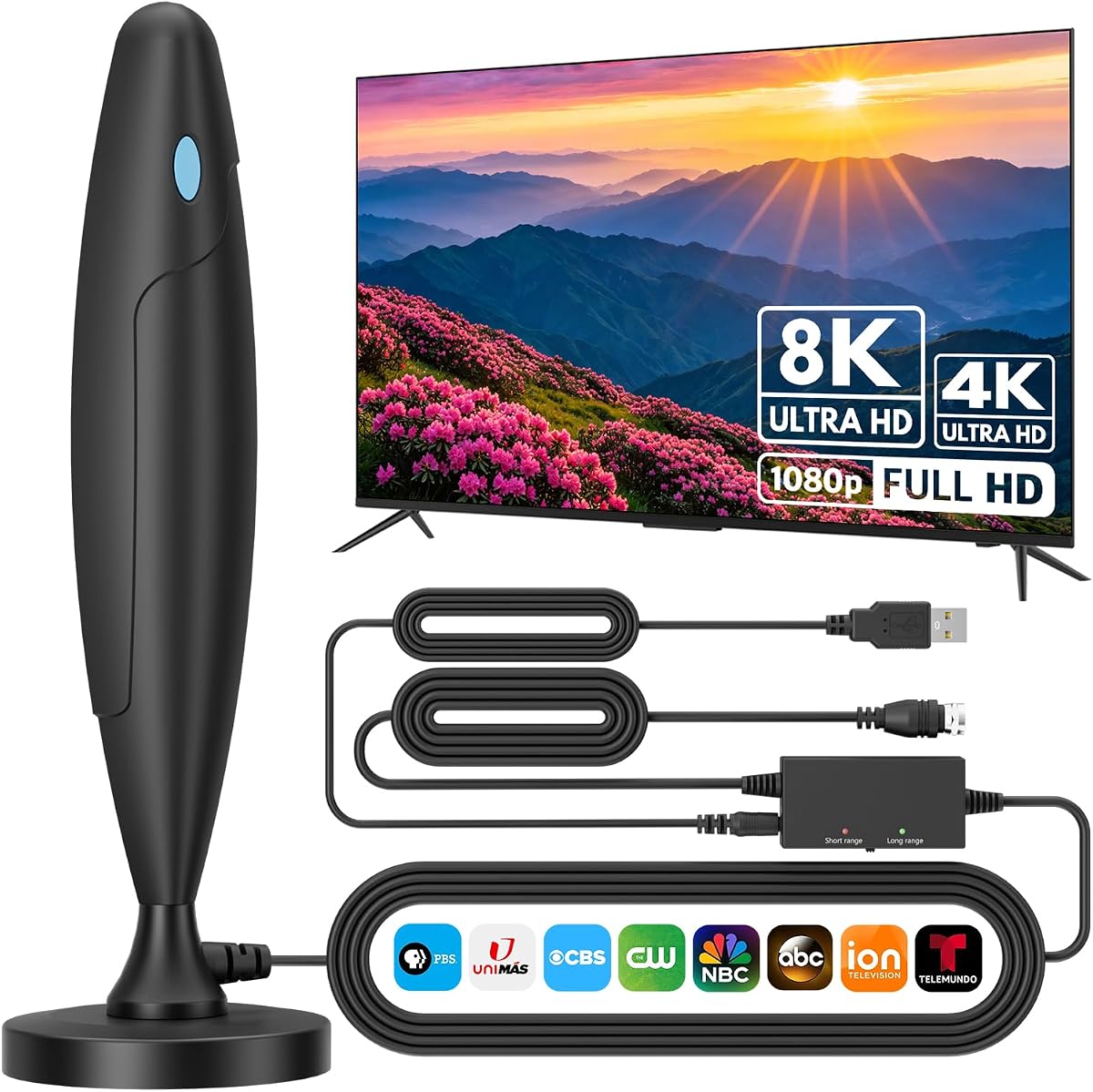
Access free local HD channels
Upgraded Smart IC chip
Long and short range modes
This guide compares the top 10 Freeview Box models for 2026, focusing on performance, compatibility, and value for free over-the-air television viewing.
Finding the right Freeview Box can transform how you watch television without expensive subscriptions. Modern digital boxes support high-resolution video, diverse media formats, and easy recording features for a seamless experience.
We evaluated ten top-rated devices based on technical specifications, user feedback, and real-world performance. Our comparison covers everything from basic analog converters to advanced 4K streaming hubs.
Each pick below highlights key strengths and potential limitations to help you choose wisely. Remember that prices fluctuate frequently, so check current listings before making your final purchase decision today.
4.2Editor score

4.0Editor score
This side-by-side comparison breaks down the technical capabilities and unique features of each Freeview Box model to help you identify the best fit for your specific needs.




This Infomir MAG544w3 delivers premium performance with its powerful chipset. It stands out as a top choice for users seeking reliable 4K streaming and smooth operation.
We may earn a commission when you buy through this link, at no additional cost to you.
Its dual-band Wi-Fi and HDMI 2.1 ensure modern connectivity. The Linux ecosystem provides security while the eight-channel audio supports immersive home theater setups.
However, it is optimized for specific operator applications. This limits general use compared to open Android boxes but ensures stability for approved services.
Buy this if you need professional-grade reliability. It is ideal for setups prioritizing performance over budget flexibility.
Dual-band Wi-Fi and Ethernet support ensure stable streaming.
Supports 2160p and Dolby Digital Plus for immersive viewing.
We may earn a commission when you buy through this link, at no additional cost to you.
This antenna offers an affordable entry into free local television. It simplifies getting HD channels without subscriptions using advanced filtering technology.
We may earn a commission when you buy through this link, at no additional cost to you.
The smart chip enhances signal gain to reduce interference. Users can switch modes based on tower distance to optimize reception quality effectively.
Reception depends heavily on your proximity to broadcast towers. Proper placement near a window is essential for best results in most areas.
Choose this for cost-effective local viewing. It is perfect for supplementing other streaming setups without monthly costs.
IC chip removes cellular interference for clearer pictures.
Select short or long range based on your distance.
We may earn a commission when you buy through this link, at no additional cost to you.
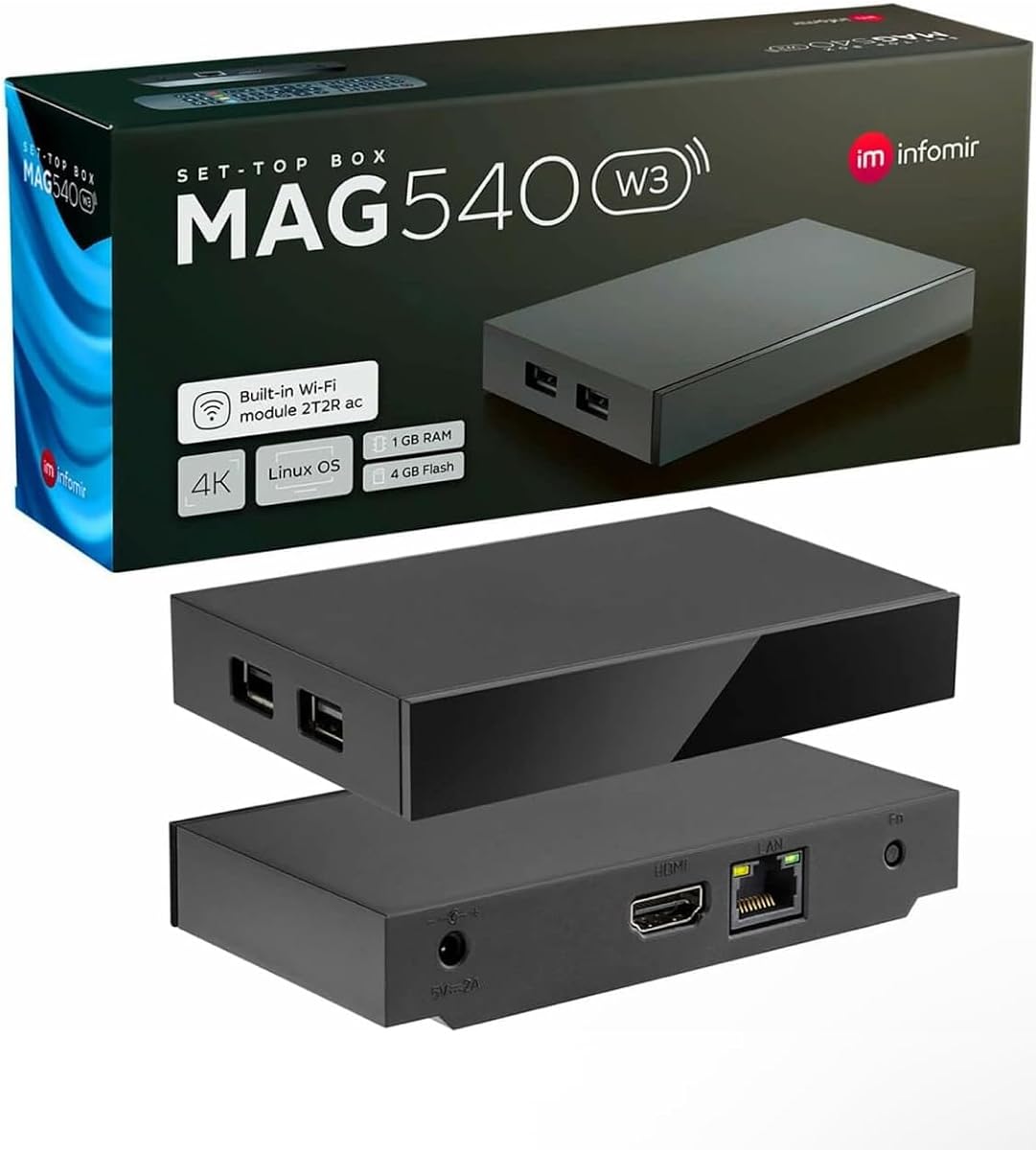
The MAG 540W3 builds on previous success with upgraded CPU power. It aims to deliver high-performance streaming for demanding 4K entertainment needs.
We may earn a commission when you buy through this link, at no additional cost to you.
This model supports modern WiFi connectivity ensuring flexible placement. Users benefit from smoother operation due to the enhanced ARM Cortex-A35 processor.
Details on specific OS features remain limited in data. This suggests a focus on hardware stability over complex software ecosystems for operators.
Select this for robust performance. It fits users needing a reliable high-quality streaming box for professional setups.
ARM Cortex-A35 provides faster processing for apps.
Wireless options ensure easy integration into home networks.
We may earn a commission when you buy through this link, at no additional cost to you.
This box converts over-the-air signals for analog and digital TVs. It adds significant value by enabling program recording on external USB storage.
We may earn a commission when you buy through this link, at no additional cost to you.
Features like timing start and shut down offer convenience. The HDMI output ensures high-quality playback for modern displays.
You must supply an external hard drive for storage. Without this, the recording features remain inactive for your usage.
Buy this if you want to save shows. It is great for analog TV owners upgrading to digital.
Record shows to USB drive for later viewing.
Schedule automatic power on and off times.
We may earn a commission when you buy through this link, at no additional cost to you.
The iView 3300STB offers versatility for analog TVs and media. Its ClearQAM compatibility allows viewing unscrambled cable channels easily.
We may earn a commission when you buy through this link, at no additional cost to you.
You can play music and photos directly via USB. The built-in clock helps manage your viewing schedule effectively.
Region locking limits use to USA Canada and Mexico. Firmware issues may require contacting support for resolution.
Choose this for flexible cable TV viewing. It works well for homes with clear cable signals.
Access local cable channels without extra decoder.
Play files up to 4TB from external drive.
We may earn a commission when you buy through this link, at no additional cost to you.
This compact box hides easily behind your TV. It simplifies your setup by drawing power directly from a USB port.
We may earn a commission when you buy through this link, at no additional cost to you.
A 2-in-1 remote lets you learn TV commands. It reduces the need for multiple remotes in your home.
Cables are included so you can plug and play. It works with projectors and monitors seamlessly.
Buy this for space-saving convenience. It is ideal for minimalists who value clean setups.
Tiny size fits neatly behind any display unit.
Run on TV USB power instead of wall outlet.
We may earn a commission when you buy through this link, at no additional cost to you.
Safety is a key feature with this antenna model. Built-in surge and lightning protection protect your TV from electrical damage.
We may earn a commission when you buy through this link, at no additional cost to you.
The magnetic base allows flexible placement options easily. It stays secure without needing additional mounting brackets or holes.
Stable images free from pixelation are standard here. Users appreciate the reliability during stormy weather conditions.
Select this for peace of mind. It is best for homes needing extra electrical safety.
Isolated structure prevents electric shock risks.
Strong magnets hold antenna firmly on metal.
We may earn a commission when you buy through this link, at no additional cost to you.
This device handles basic digital signal conversion needs. It allows older TVs to receive modern Over The Air broadcasts easily.
We may earn a commission when you buy through this link, at no additional cost to you.
DVR functionality adds some recording capability for users. The universal design fits most standard signal requirements well.
Detailed features are not extensively listed in data. You may find setup requires manual configuration for specific modes.
Buy this for straightforward conversion needs. It works well for simple viewing upgrades.
Converts signals to compatible formats for older sets.
Handles general signal types across different regions.
We may earn a commission when you buy through this link, at no additional cost to you.
This model offers updated firmware for better performance. It shares core features with its predecessor but includes refinements.
We may earn a commission when you buy through this link, at no additional cost to you.
ClearQAM compatibility ensures cable channel availability. Recording functions help you save favorite shows for later.
Region restrictions apply to USA Canada and Mexico only. Check local compatibility before purchasing for specific needs.
Choose this for updated reliability. It is good for existing iView users seeking upgrades.
Updated version resolves previous performance issues.
ClearQAM feature adds unscrambled cable viewing.
We may earn a commission when you buy through this link, at no additional cost to you.
Mediasonic offers a durable metal case build. The front display shows channel numbers and time even in standby.
We may earn a commission when you buy through this link, at no additional cost to you.
Clear QAM allows watching unencrypted cable channels. It supports external hard drives up to 2TB for storage.
It does not support ATSC 3.0 or TIVO systems. This limits compatibility with newer broadcast standards.
Buy this for durable analog conversion. It is great for homes needing cable channel access.
Metal casing provides heat protection and durability.
Shows info easily without turning on TV.
We may earn a commission when you buy through this link, at no additional cost to you.
Selecting the ideal device requires understanding several critical factors including output resolution and connectivity options.
Look for devices that support at least 1080p to ensure clear picture quality on modern TVs. Advanced models offer 4K support for future-proofing your entertainment setup against high-resolution content.
Prioritize high resolution for better visual experience.
Check for HDMI output to connect directly to your display without extra adapters. Dual-band Wi-Fi or Ethernet ports ensure stable streaming and reduce buffering during high-definition viewing sessions.
Choose models with flexible wired and wireless connections.
If you plan to record shows, confirm USB storage support. Most boxes require an external hard drive up to 2TB or 4TB to save programs for later playback.
Ensure USB compatibility matches your recording needs.
Over-the-air boxes need a compatible antenna to capture local signals. Verify if an antenna is included or sold separately to avoid extra costs after purchase.
Always check antenna compatibility before buying.
For cable users, ClearQAM support allows watching unencrypted channels without a separate decoder. This feature saves money if your cable provider uses unencrypted local feeds.
Look for ClearQAM if you use cable signals.
Many devices double as media players for photos and music files. Support for common formats like MP4 or MP3 lets you enjoy personal content directly from USB drives.
Select models with wide file format support.
Metal cases offer better heat dissipation than plastic alternatives. This extends the lifespan of the device and ensures consistent performance during long viewing sessions.
Prioritize durable materials for longevity.
A versatile remote with learning features reduces clutter by replacing multiple controllers. This convenience improves usability for all family members in the home.
Choose remotes with smart learning capabilities.
Start by connecting the device to your TV via HDMI cable. Ensure the antenna is plugged into the coaxial input before powering on the unit.
Run a channel scan from the menu to detect available local broadcasts. Save favorite channels to your list for quick access during viewing.
Keep firmware updated to maintain optimal performance. Regularly clean dust from ventilation grilles to prevent overheating issues.
Most do not require a subscription for over-the-air channels. You only need an antenna to capture free local broadcasts like ABC or NBC.
Many models support recording via USB hard drives. Check specific product specs for recording capacity limits and required file formats.
Use a converter box with composite outputs. These allow connection to older CRT TVs using RCA cables instead of HDMI.
Range depends on location and tower distance. Some antennas offer modes for short range within 35 miles or long range up to 250 miles.
Some support ClearQAM for unencrypted cable channels. Check compatibility before purchasing if you rely on cable signals.
Try moving the antenna higher near a window. Switch modes or re-scan channels after adjusting its position for better reception.
Updates vary by brand and model. Some offer frequent improvements while others provide them infrequently through manufacturer support.
Most devices use a standard USB power adapter. Compact models may draw power directly from your TV's USB port.
We found the Infomir MAG544w3 leads in performance while budget antennas offer great value. Select based on your specific streaming or recording priorities.
Prioritize resolution and connectivity options to match your home theater setup. Ensure you have the necessary external hardware like antennas or drives.
Verify current pricing and availability before purchase. Prices change regularly so checking listings ensures you get the best deal available now.