
Dell Wired Mouse MS116
4.6Editor score
Simple plug-and-play wired connection
Reliable Dell branding quality
Affordable entry-level option
This guide compares the top external mice for Dell laptops featuring wireless options, ergonomic designs, and precise tracking for enhanced productivity and
Finding the right external mouse for your Dell laptop can significantly enhance your daily computing experience. Whether you need precision for design work or comfort for long sessions, the right device matters.
We evaluated ten top-rated models based on connectivity, battery life, ergonomics, and overall performance. Each product offers unique features tailored to different user needs and budgets.
Each pick highlights key strengths and potential trade-offs to help you decide. Note that prices and availability change frequently, so verify details before purchasing.
4.6Editor score

4.9Editor score

4.5Editor score
The following comparison table breaks down the core specifications of each model to help you quickly identify the best fit for your specific workflow and budget requirements.






The Dell Advanced Wireless Compact Mouse – MS510 stands out as the top pick for Dell laptop users seeking a seamless, reliable, and feature-rich external mouse. With an impressive 4.9 rating, this model combines long battery life and versatile connectivity to enhance your daily workflow.
We may earn a commission when you buy through this link, at no additional cost to you.
Its standout features include dual-mode connectivity supporting both 2.4GHz wireless and Bluetooth 5.0, allowing instant pairing via Microsoft Swift Pair on Windows 10 and above. The mouse offers adjustable DPI settings ranging from 1000 to 4000, ensuring precision on high-resolution screens. Users appreciate the 36-month battery life, which means you rarely need to swap batteries, and Dell's Peripheral Manager software helps optimize performance across your workspace.
While it is slightly more expensive than basic options, the trade-off is justified by the advanced features and durability. The requirement for AA batteries is a minor inconvenience for many who prefer rechargeable models, but the longevity offsets frequent changes. The mouse is built to last and includes a one-year advanced exchange service for added peace of mind.
If you want a mouse that integrates well with Dell systems while offering high performance, this is the ideal choice. It suits professionals and power users who value productivity and reliability. We highly recommend this model for anyone looking to upgrade their current setup with a premium experience.
The mouse supports both 2.4GHz wireless and Bluetooth 5.0, enabling easy switching between devices without hassle.
With up to 36 months of use per battery and advanced exchange service, this mouse ensures uninterrupted productivity.
We may earn a commission when you buy through this link, at no additional cost to you.
The Dell Wireless Gaming Mouse MS5120W is a versatile option that blends gaming performance with everyday utility for Dell laptop owners. Rated 4.6, it delivers a 4000 DPI sensor and 7 buttons, making it suitable for both creative tasks and gaming sessions.
We may earn a commission when you buy through this link, at no additional cost to you.
This mouse features the same dual-mode connectivity as the MS510, supporting 2.4GHz wireless and Bluetooth 5.0. Its 4000 DPI sensor allows for precise cursor control, which benefits graphic designers and gamers alike. The Dell Peripheral Manager software enables efficient customization of the seven buttons, while the 36-month battery life minimizes interruptions. Advanced Exchange Service ensures that if a fault occurs within three years, you receive a replacement quickly.
One trade-off is that the design leans towards gaming aesthetics, which may not suit minimalists. Additionally, like other models in this range, it relies on AA batteries instead of rechargeables. However, the performance and reliability make these minor drawbacks acceptable for most users.
Ideal for users who demand high precision and versatility, this mouse offers excellent value. Whether you are editing photos or playing games, the 4000 DPI sensor ensures smooth tracking. We recommend this for those who want a powerful, long-lasting peripheral that adapts to various tasks.
The 4000 DPI sensor enables precise cursor movement, ideal for detailed graphics work or competitive gaming.
Seven buttons can be customized via Dell Peripheral Manager, and the Advanced Exchange Service ensures quick replacements.
We may earn a commission when you buy through this link, at no additional cost to you.
The Dell Wired Mouse MS116 is the perfect budget-friendly choice for users who prioritize simplicity and reliability. With a solid 4.6 rating, this mouse offers essential functionality without the cost or complexity of wireless models.
We may earn a commission when you buy through this link, at no additional cost to you.
As a wired mouse, it requires no batteries and connects directly via USB, ensuring a consistent connection with no lag. The plug-and-play design means you can start using it immediately without software installation. Dell's reputation for quality ensures durability, and the ergonomic black form fits comfortably for general use.
The main limitation is the lack of wireless freedom and advanced features like programmable buttons. However, for basic tasks and stationary setups, this is rarely an issue. The affordability makes it an excellent backup or office staple.
This mouse is ideal for users on a tight budget or those who prefer a simple, no-frills device. If you want dependable performance without extra features, the MS116 delivers. We recommend it for schools, offices, and anyone needing a straightforward, reliable peripheral.
The wired USB connection eliminates the need for batteries, ensuring continuous operation without interruptions.
Plug-and-play functionality allows immediate use without any software or configuration required.
We may earn a commission when you buy through this link, at no additional cost to you.
The VssoPlor Wireless Mouse offers a stylish and practical solution for laptop users seeking quiet operation and portability. Rated 4.5, it combines a sleek black and gold finish with whisper-quiet clicks for discreet office or library use.
We may earn a commission when you buy through this link, at no additional cost to you.
Its intelligent sleep mode conserves battery by entering auto-sleep after five minutes of inactivity, ensuring extended usage. The 2.4GHz wireless connection provides a stable link up to 10 meters with strong anti-interference. The compact design fits easily in bags, making it ideal for travelers.
While the build is lightweight, it may feel less premium than higher-end models. The lack of Bluetooth limits pairing flexibility, but for single-device use, the 2.4GHz works well. The quiet clicks are a significant benefit for shared workspaces.
This mouse is perfect for professionals who value silence and portability over advanced customization. If you want an affordable, quiet mouse that looks good, this is a solid choice. We recommend it for casual users and remote workers.
Silent clicking technology ensures a quiet experience, perfect for libraries or shared workspaces.
Intelligent sleep mode extends battery life by powering down when the mouse is not in use.
We may earn a commission when you buy through this link, at no additional cost to you.
The Logitech M510 Full Size Ambidextrous is praised for its comfort and productivity features. With a 4.6 rating, this mouse offers a contoured shape that supports the hand during long work sessions, reducing strain and fatigue.
We may earn a commission when you buy through this link, at no additional cost to you.
Its standout features include side-to-side scrolling and zoom capabilities, which are ideal for navigating spreadsheets and web pages. The two-year battery life significantly reduces maintenance. The Logitech Unifying receiver stays in your laptop, allowing easy addition of other wireless devices. The Back/Forward buttons enhance navigation efficiency.
One drawback is the size, which may feel bulky for users with smaller hands. Additionally, it uses AA batteries, which some may prefer to avoid. However, the ergonomic benefits and long life outweigh these issues for most.
This mouse suits users who spend hours on their laptop and value comfort. If you want a comfortable, reliable device with productivity-enhancing features, the M510 is an excellent investment. We recommend it for office workers and power users.
The contoured shape with soft rubber grips reduces hand strain during extended usage.
Side scrolling and zoom controls streamline navigation through documents and web pages.
We may earn a commission when you buy through this link, at no additional cost to you.
The Logitech M185 Compact Ambidextrous is a reliable travel companion that outperforms touchpads. With a 4.4 rating, it offers a compact size ideal for small workspaces and laptops on the go.
We may earn a commission when you buy through this link, at no additional cost to you.
Its ambidextrous design makes it suitable for left or right-handed users. The nano USB receiver stays in the laptop, ensuring a strong connection up to 33 feet. A one-year battery life means minimal maintenance. Notably, plastic parts include certified recycled content, appealing to eco-conscious users.
The mouse lacks extra buttons, limiting advanced navigation. However, for basic tasks, it is highly effective. The compact size may feel small for large hands, but comfort remains good for most.
This mouse is ideal for travelers and those needing a spare or office device. If you want portability and reliability without complexity, the M185 is a great choice. We recommend it for students and business travelers.
Its compact size fits easily in laptop bags, making it perfect for on-the-go productivity.
Backed by a 3-year limited warranty and made from recycled plastics, ensuring sustainability and trust.
We may earn a commission when you buy through this link, at no additional cost to you.
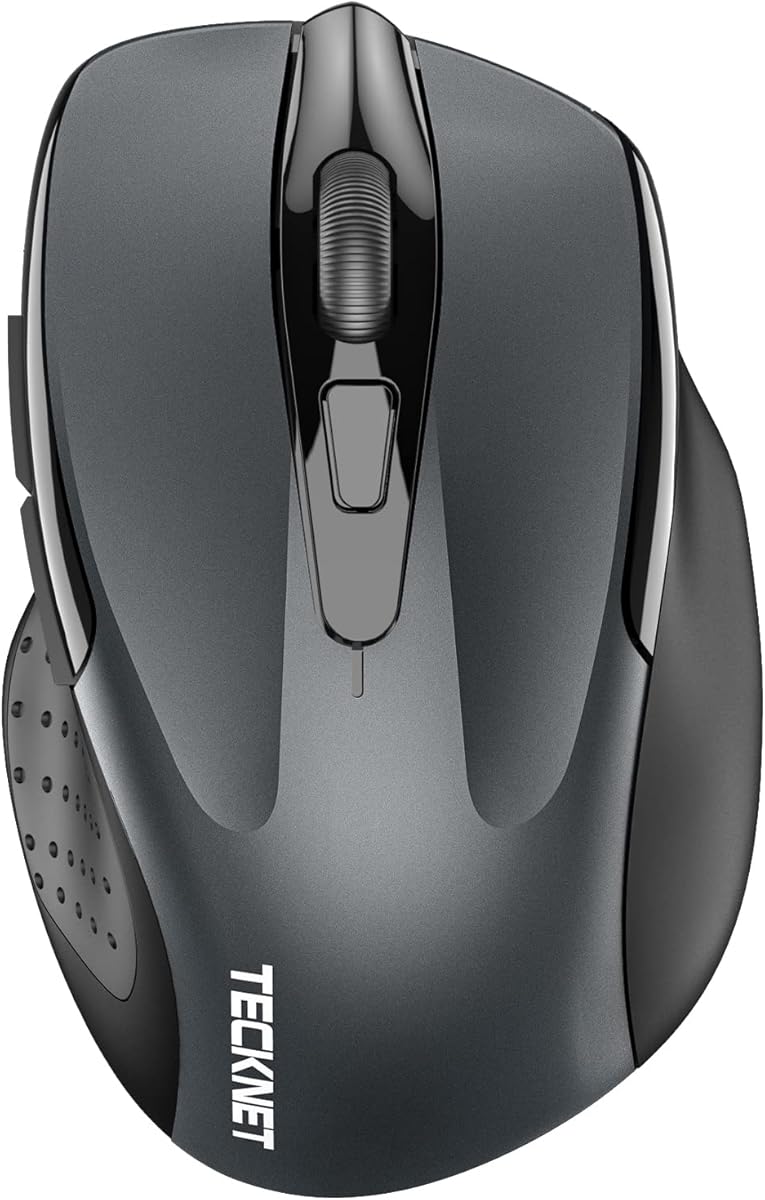
The TECKNET Compact Ambidextrous Wireless Mouse brings a splash of style with its mint green design. Rated 4.6, it is an ideal choice for those who appreciate unique aesthetics without sacrificing functionality.
We may earn a commission when you buy through this link, at no additional cost to you.
It offers a 49-foot wireless range and 3 adjustable DPI levels for flexible performance. The quiet clicks prevent disturbing others, and the compact form fits small to medium hands well. TECKNET provides 36 months of warranty support upon registration.
The color choice may not suit every workspace, and the feature set is basic. However, the reliability and comfort make up for it. The price is very competitive for the value offered.
This mouse is perfect for users seeking a stylish, affordable option. If you want something different and functional, this TECKNET model stands out. We recommend it for home users and those who like colorful peripherals.
The mint green color adds a personalized touch to your workspace while maintaining a clean look.
With a 49-foot range, you have freedom to use the mouse comfortably across your room.
We may earn a commission when you buy through this link, at no additional cost to you.
The Logitech M330 Silent Plus Full Size is a standout for noise-sensitive environments. With a 4.5 rating, it delivers a quiet experience without compromising performance, making it perfect for shared offices or libraries.
We may earn a commission when you buy through this link, at no additional cost to you.
SilentTouch technology reduces over 90% of clicking sounds, ensuring a distraction-free workspace. The contoured shape provides comfort for right-handed users, and the 18-month battery life reduces maintenance. It works with most systems and includes a USB receiver for easy setup.
The right-handed only design limits use for left-handed individuals, and the lack of Bluetooth may be a drawback for some. However, the comfort and noise reduction are compelling benefits for many.
This mouse is ideal for professionals who prioritize a quiet environment. If you want reliable, silent performance and ergonomic comfort, the M330 is highly recommended. We suggest it for office workers and parents with kids.
SilentTouch technology ensures minimal noise during clicks, perfect for quiet environments.
The contoured shape with soft grips ensures comfort during long working hours.
We may earn a commission when you buy through this link, at no additional cost to you.
The TECKNET Wireless Mouse with Bluetooth 5.0 supports seamless multi-device switching. Rated 4.5, it is a versatile option for users managing multiple computers or devices simultaneously.
We may earn a commission when you buy through this link, at no additional cost to you.
It connects via Bluetooth or USB A, allowing easy switching between two devices with a single button press. The 4800 DPI sensor offers six adjustable levels for precision. Silent clicks benefit quiet environments, and the 36-month support adds reliability.
Note that side buttons and the scroll wheel are not silent, which may be a minor distraction. Also, side buttons don't work on macOS. However, for general use, it is highly functional.
This mouse is ideal for multitaskers needing flexibility across devices. If you want Bluetooth connectivity and silent performance, this TECKNET model delivers. We recommend it for professionals and remote workers.
Switch effortlessly between two devices using Bluetooth or USB connections.
With 4800 DPI and six adjustable levels, you get precise control for detailed work.
We may earn a commission when you buy through this link, at no additional cost to you.
The TECKNET Wireless Mouse Rechargeable offers modern convenience with its built-in battery. With a 4.6 rating, it combines silent operation and multi-device support for versatile use.
We may earn a commission when you buy through this link, at no additional cost to you.
A full charge takes just two hours and provides three months of daily use. Like other TECKNET models, it supports Bluetooth 5.0 and USB, letting you switch between devices. The 6 DPI levels ensure precision, and the silent clicks suit quiet environments.
The mouse is designed for small to medium hands, so those with larger hands may find it slightly tight. You must remember to charge it periodically, but the stability reminder helps. The lack of AA batteries is a plus for eco-friendliness.
This mouse is perfect for users who prefer rechargeable peripherals. If you want sustainability and convenience, this model is a strong choice. We recommend it for students and casual users.
Charging takes just two hours, providing months of use without needing disposable batteries.
Silent clicking and multi-device support make this ideal for shared or multi-system environments.
We may earn a commission when you buy through this link, at no additional cost to you.
Selecting the right external mouse involves considering several key factors that affect performance, comfort, and usability. This section outlines the most important aspects to evaluate before making your purchase.
Most modern mice offer wireless connectivity via Bluetooth, 2.4GHz USB, or both. Bluetooth frees up USB ports and works directly with many laptops, while 2.4GHz wireless often provides a more stable connection. Choose dual-mode options if you switch between devices frequently.
Look for models with Bluetooth 5.0 or higher and strong 2.4GHz signals for best performance.
Battery life is crucial for uninterrupted use. Wireless mice typically range from 12 months up to 36 months depending on usage. Rechargeable models are convenient and eco-friendly but require charging. Ensure the mouse indicates low battery to avoid surprises.
Prioritize models with long battery life or rechargeable features to reduce maintenance.
Comfort is key for long work sessions. Look for ergonomic shapes that fit your hand size, such as contoured or ambidextrous designs. Soft rubber grips can reduce strain. If you work many hours daily, investing in an ergonomic mouse pays off in reduced fatigue.
Choose an ergonomic shape that fits your hand comfortably for prolonged use.
DPI (dots per inch) determines cursor sensitivity. Higher DPI values allow faster movement across screens, suitable for multitasking or gaming. Adjustable DPI lets you switch between precision and speed. Ensure the sensor tracks well on various surfaces.
Select a mouse with adjustable DPI settings to match your screen resolution and workflow needs.
Extra buttons can boost productivity by providing quick shortcuts for copy-paste, back-forward navigation, or app switching. Check if software is included to customize these buttons. While basic mice have standard buttons, power users benefit from programmable options.
Ensure the mouse supports button customization if you need enhanced workflow efficiency.
A sturdy build ensures longevity. Look for mice made with high-quality materials and reputable brands. Warranty coverage indicates manufacturer confidence. Reliable mice resist wear and tear, making them better long-term investments.
Choose models from trusted brands with solid warranties to ensure durability.
Ensure the mouse works seamlessly with your OS, whether Windows, macOS, or Linux. Most modern mice support multiple systems. Check if extra features like side buttons work on macOS, as some are limited. Plug-and-play functionality simplifies setup.
Verify OS compatibility, especially if you use macOS, to avoid feature limitations.
If you work in quiet spaces, consider silent click technology. Silent mice reduce distraction for yourself and others. Not all buttons may be silent, so check specifications. This feature is valuable for libraries, offices, or home use with family nearby.
Look for SilentTouch or quiet click technology if noise is a concern in your environment.
Begin by pairing the mouse via Bluetooth or plugging in the USB receiver. Ensure your laptop's Bluetooth settings are enabled if using wireless modes. Install any companion software to customize buttons and DPI settings for optimal performance.
Keep the sensor lens clean by wiping gently with a microfiber cloth. Store the mouse in a protective case when traveling to avoid scratches or damage. Check battery levels regularly or charge as needed to prevent unexpected interruptions.
Periodically update your mouse firmware through the manufacturer's website or app. Adjust DPI based on your workflow; higher for navigation and lower for detailed tasks. Proper care extends the mouse's lifespan and ensures consistent performance.
The Dell Advanced Wireless Compact Mouse – MS510 stands out as the best overall due to its dual-mode connectivity, long battery life, and seamless integration with Dell systems. It offers high precision and customizable features suited for diverse users.
Wireless mice provide greater freedom of movement and declutter desk space, making them ideal for mobile use. However, wired mice guarantee zero latency and no battery concerns, which can be preferred for stationary or gaming setups.
Yes, all listed mice are compatible with standard USB-A or Bluetooth ports on Dell laptops. Ensure your laptop has Bluetooth enabled or available USB ports for the receiver. Most models are plug-and-play with no extra adapters needed.
Battery life varies from around one year up to 36 months depending on usage and model. Rechargeable options offer convenience and sustainability. Check the product specs for exact estimates based on daily use hours.
Most listed mice support both Windows and macOS. However, some features like side buttons may not function fully on Mac systems. Verify compatibility notes before purchasing if you switch between operating systems regularly.
Some models like the Logitech M185 and M510 offer ambidextrous designs for left or right-handed use. Others are right-handed specific. Choose ambidextrous models for balanced comfort if you prefer non-dominant hand use.
For standard laptops, 1600 DPI is generally sufficient. Higher DPI up to 4000 or more benefits larger or high-resolution displays. Adjustable DPI settings allow flexibility depending on your specific screen size and task requirements.
Most work out of the box without software. For advanced features like button customization or DPI adjustment, companion apps may be needed. Installation is straightforward and typically available from the manufacturer's website.
Choosing the right external mouse for your Dell laptop involves balancing performance, comfort, and budget. Our top picks like the Dell MS510 offer outstanding versatility, while budget options like the MS116 provide reliable basic functionality.
Prioritize features that match your daily needs, such as connectivity options, battery life, or ergonomic comfort. Whether you need silent operation or high DPI for precision, there is a suitable model in this roundup.
Remember that prices and availability can change, so check current listings before buying. Investing in a quality mouse enhances productivity and comfort significantly for Dell users.