
EPOMAKER Ajazz AK820 Pro Wireless Mechanical Keyboard with TFT Display&Knob
4.7Editor score
75% compact layout
TFT screen interface
Gasket mount design
This guide compares the top ten Epomaker keyboards including gaming and wireless options with detailed specs and expert recommendations for every user.
Epomaker keyboards have become a leading choice for enthusiasts seeking premium builds at accessible prices. Their unique designs combine innovative features like smart screens and high-capacity batteries with the tactile satisfaction of mechanical switches. Whether you need a full-size layout for productivity or a compact model for portability, the brand offers diverse options to suit every desk.
Our team evaluated ten distinct models based on build quality, typing experience, connectivity options, and customization potential. We analyzed battery life, polling rates, switch types, and acoustic performance to determine which boards deliver the best value. This list covers full-size, 96 percent, and 75 percent layouts to ensure there is a perfect match for your specific workflow.
Each pick highlights unique strengths such as gasket mounting, hot-swappable sockets, and software capabilities. While we focus on core specifications, remember that specific prices and availability can fluctuate over time. We recommend verifying the latest deals before purchasing to ensure you get the most bang for your buck on your next mechanical keyboard upgrade.
4.7Editor score
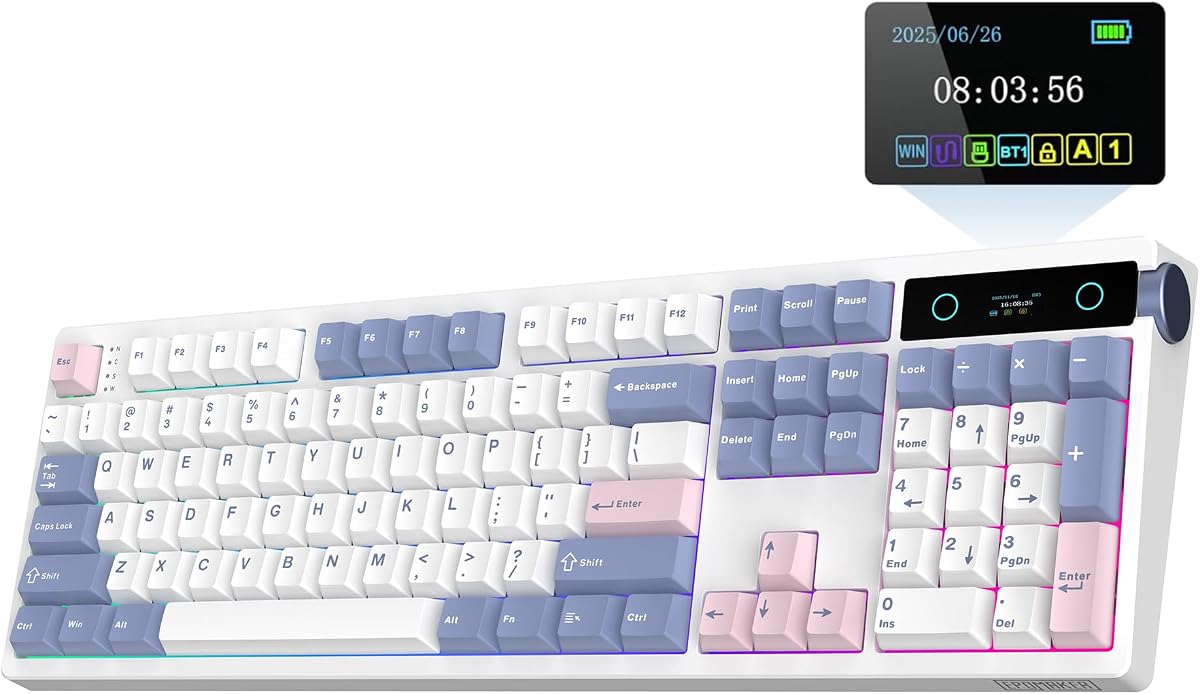
4.7Editor score
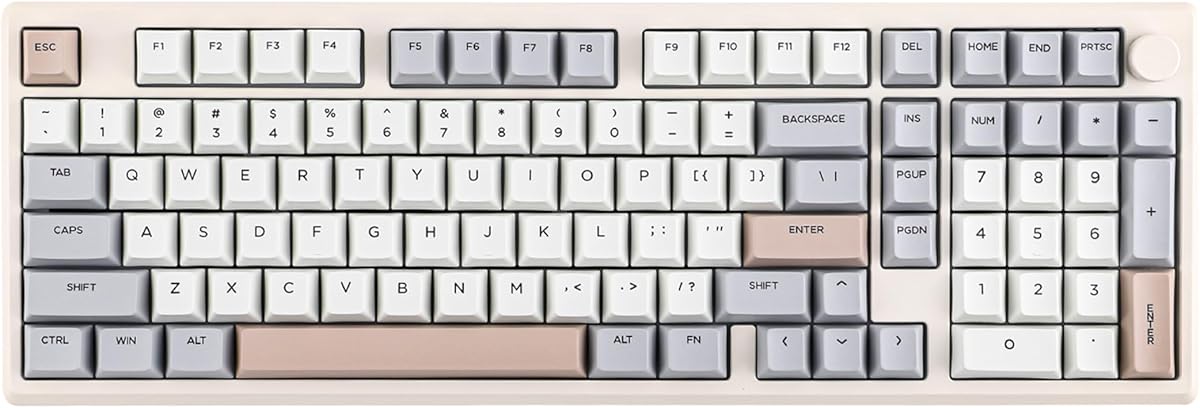
4.5Editor score
This table provides a side-by-side comparison of all ten Epomaker keyboards reviewed in this guide. You can quickly compare key specifications such as battery capacity, layout size, and special features to identify which model aligns best with your needs.


The EPOMAKER TH108 PRO stands out as the top choice for users seeking a premium full-size experience. It earns an Editor's Choice badge due to its perfect blend of utility and customization. The integrated smart screen and rotary knob provide immediate feedback and control without cluttering your workspace.
We may earn a commission when you buy through this link, at no additional cost to you.
Its 10000mAh battery ensures weeks of wireless use, making it ideal for mobile workers. The five-layer gasket mount system delivers a deep thocky sound that enthusiasts love. Hot-swap support allows you to change switches easily, keeping the board fresh as your preferences evolve.
The main trade-off is its size and weight which may overwhelm smaller desks. However the stability it provides during intense typing or gaming sessions justifies the bulk. The software supports extensive customization for macros and key mappings across operating systems.
Buy this keyboard if you need a full numpad and maximum battery life. It is perfect for power users who want a single device for work and gaming. The screen adds a unique touch that enhances daily productivity significantly.
The screen displays battery levels and time while supporting custom GIFs for personal flair.
Five layers of foam dampen vibration to create a soft and quiet typing environment.
We may earn a commission when you buy through this link, at no additional cost to you.
The F75 MAX offers a brilliant compromise between size and functionality for modern desk setups. Its 75 percent layout keeps arrow keys and function rows while freeing up mouse space. The TFT screen adds a high-tech layer of control that is rare in this price range.
We may earn a commission when you buy through this link, at no additional cost to you.
The Gasket-Mount structure isolates the PCB to reduce harsh bottom-outs significantly. Factory-lubed switches provide a smooth linear experience right out of the box. The software allows you to map macros and change backlight effects seamlessly.
It is slightly less portable than smaller boards due to the screen bezel. Yet the ergonomics and sound quality make up for this minor inconvenience. The RGB lighting is bright and customizable for gaming aesthetics.
This model is ideal for gamers who need macro keys but limited desk real estate. It suits programmers and streamers who want a stylish peripheral. The sound profile is creamy enough for long office hours without being distracting.
The 75 percent layout retains essential keys while maximizing available mouse movement space.
The TFT screen allows for dynamic GIFs and battery monitoring without opening software.
We may earn a commission when you buy through this link, at no additional cost to you.
The Galaxy100 brings a premium industrial feel to the Epomaker lineup with its aluminum shell. It supports QMK and VIA which gives advanced users deep control over macros and layers. This makes it a top pick for those who prioritize software flexibility over raw gaming specs.
We may earn a commission when you buy through this link, at no additional cost to you.
Its typing sound is deep and muted thanks to multiple layers of dampening material. The linear switches are pre-lubed for a smooth experience without needing extra tools. The volume knob allows quick adjustments without interrupting your workflow.
The price is higher than other options but justified by the build materials. The weight ensures it stays stable on your desk during frantic typing. RGB lighting is bright and visible from many angles due to south-facing LEDs.
Choose this board if you want a durable device that looks professional. It is perfect for office environments or high-end home offices. The aluminum case resists scratches and feels robust against daily wear and tear.
QMK/VIA support allows for deep customization and layer management without proprietary software.
The aluminum shell provides a premium tactile feel and protects internal components effectively.
We may earn a commission when you buy through this link, at no additional cost to you.
The TH108 V2 PRO refines the original model with better software and a refined user interface. It keeps the beloved screen and knob features that make it a standout for productivity. The multi-device support ensures you can switch between PC and laptop with ease.
We may earn a commission when you buy through this link, at no additional cost to you.
Its performance is tuned for elite gaming with low latency and high polling rates. The factory-lubed switches deliver a consistent feel across all keys. The sound profile is creamy and relaxing which suits long coding sessions well.
You will need to install software to unlock the full potential of the device. The weight helps with stability but makes it less portable than smaller boards. The screen adds a unique flair that sets it apart from competitors.
This keyboard fits users who need a full keyboard without compromising on features. It is a strong choice for hybrid workers who game and write. The V2 improvements make it a more refined and complete package.
Easy shortcuts allow you to toggle between connected devices without lag or confusion.
High polling rates ensure every keystroke is registered instantly during competitive matches.
We may earn a commission when you buy through this link, at no additional cost to you.
The TH99 PRO compresses the full-size experience into a tighter 96 percent footprint. It keeps the numpad and number row which is vital for data entry. The 10000mAh battery offers unmatched endurance for a board of this size.
We may earn a commission when you buy through this link, at no additional cost to you.
Its gasket mount design provides a soft and bouncy feel that reduces fatigue. The screen and knob function similarly to the larger models for convenience. It connects via Bluetooth 2.4GHz or cable for versatile setups.
Some users might find the keys slightly closer together than standard layouts. However the stability and battery life make this a great travel workstation. The RGB lighting remains vibrant even with the smaller frame.
Buy this if you need a numpad but want to save desk space. It works well for accounting or spreadsheet heavy work. The battery means you rarely need to plug it in during daily use.
The 96 percent layout retains essential keys while reducing width for better mouse movement.
The 10000mAh battery provides weeks of use on a single charge for wireless freedom.
We may earn a commission when you buy through this link, at no additional cost to you.
The TH108 is a reliable full-size board focused on sound and battery life. It skips the screen to offer a lower price point while keeping premium features. The gasket mount delivers a deep creamy sound that appeals to typists.
We may earn a commission when you buy through this link, at no additional cost to you.
Hot-swap sockets let you experiment with different switch types freely. The 10000mAh battery ensures long wireless operation for travel or office work. RGB lighting is customizable via the provided driver software.
It lacks the smart screen found on the PRO models but costs less. The build is sturdy enough for daily heavy use. The acoustic profile is tuned to sound rich and deep without being harsh.
Choose this if you want great sound without paying for extra features. It is a solid pick for office users who value quiet operation. The battery life helps it last through long meetings or gaming sessions.
Five layers of foam create a creamy sound that is pleasing and non-intrusive.
Hot-swap sockets allow you to swap switches easily to suit your typing preference.
We may earn a commission when you buy through this link, at no additional cost to you.
The G84 HE brings magnetic Hall Effect technology to the mainstream market. It allows you to adjust actuation depth to milliseconds which is great for competitive gaming. The 8K polling rate ensures zero input lag in wireless mode.
We may earn a commission when you buy through this link, at no additional cost to you.
SOCD logic helps with fast movement and counter-strafing in shooters. The switches have no physical contact to wear out over time. Custom software lets you save profiles for different games instantly.
The feel is different from traditional switches and may take practice. However the precision offered is unmatched in this price category. The battery is strong enough to support daily wireless sessions.
This board is perfect for competitive FPS players seeking an edge. It suits gamers who need rapid response times. The adjustable actuation lets you tailor the board to your specific reflexes.
You can set actuation points from 0.1mm to 3.3mm for precise control.
The 8K polling rate and zero dead zone ensure instant input for fast games.
We may earn a commission when you buy through this link, at no additional cost to you.
The TH99 is an affordable entry into the 96 percent layout space. It keeps the numpad while saving desk space for mouse movement. The gasket mount offers a premium feel at a budget friendly price.
We may earn a commission when you buy through this link, at no additional cost to you.
Its 8000mAh battery provides days of use on a single charge. The lighting is bright and customizable via the driver software. It supports Windows Mac and Android for broad compatibility.
It lacks the screen found on the PRO version but is cheaper. The lighter weight makes it easier to transport. The sound is smooth and pleasant for daily typing tasks.
Buy this if you need a compact board without breaking the bank. It is great for students or general office use. The battery life ensures you can work wirelessly for long periods.
The 96 percent layout saves space while keeping essential numpad functionality intact.
An 8000mAh battery supports multiple days of use without frequent charging.
We may earn a commission when you buy through this link, at no additional cost to you.
The AK820 Pro delivers high-end features at a very accessible budget. It includes a TFT screen and knob which is rare for this price range. The 75 percent layout is perfect for saving desk space.
We may earn a commission when you buy through this link, at no additional cost to you.
Gasket mounting ensures a soft and quiet typing experience. The screen allows for battery monitoring and simple visual effects. It switches between modes easily for mobile and desktop use.
The battery is smaller than larger models but sufficient for daily use. It is lightweight which makes it easy to move between rooms. The build quality exceeds expectations for the price tag.
This is the best pick for budget buyers wanting modern features. It suits students and entry-level users. The screen adds a fun touch that enhances usability without costing extra.
High-end features like screens are available at a very low entry price point.
The lightweight design makes it easy to carry between offices or classrooms.
We may earn a commission when you buy through this link, at no additional cost to you.
The F99 offers a solid gasket mount experience in a compact form. It supports hot-swap switches so you can upgrade the feel later. The 96 percent layout keeps the numpad while saving space.
We may earn a commission when you buy through this link, at no additional cost to you.
Its battery life is strong enough for weekly wireless use. The RGB lighting is bright and simple to control via driver. The gasket mounting provides a soft and responsive feel.
It lacks the screen features of other models to save cost. The build is simple and effective for standard tasks. It is a great choice for those wanting sound customization.
Buy this if you need a simple board with gasket benefits. It is ideal for daily office typing or light gaming. The value is high considering the included features and battery.
The gasket mount provides a soft thud that is satisfying and professional.
Hot-swap PCB allows you to change switches easily to customize your typing feel.
We may earn a commission when you buy through this link, at no additional cost to you.
Selecting the right keyboard depends on your specific workflow and layout preferences.
Epomaker offers full-size 96 percent and 75 percent layouts. Full-size boards include a numpad for data entry which is essential for spreadsheets. Compact boards save desk space but may lack function keys depending on the model.
Choose full-size for office work and compact for gaming setups with large mice.
Wireless boards rely on battery capacity for uninterrupted use. Models like the TH108 PRO have 10000mAh batteries that last weeks on a charge. Smaller boards often have 4000mAh batteries which still last days for daily use.
Prioritize high capacity batteries if you use your keyboard wirelessly for long periods.
Most models feature hot-swap PCBs that allow you to change mechanical switches. This is useful if you want to try linear tactile or clicky switches. Ensure the model supports the pin type you prefer.
Hot-swap capability extends the life of your keyboard by allowing easy future upgrades.
Many Pro models include smart screens and rotary knobs. The screen displays battery levels and time and supports custom GIFs. The knob acts as a volume dial and controls screen settings.
These features add convenience for managing audio and system info quickly.
Gasket mounting isolates the PCB to reduce harsh impact sounds. It creates a softer and more flexible typing experience. This design is standard in most modern Epomaker keyboards.
Look for gasket mounting if you want a quiet and premium typing feel.
Most boards offer tri-mode connectivity via Bluetooth 2.4GHz and cable. Bluetooth is ideal for connecting to tablets or multiple laptops. The 2.4GHz mode offers lower latency for gaming.
Ensure the keyboard supports the devices you own to maximize usability.
Epomaker uses web-based or desktop software for macros and RGB. Some models support QMK/VIA for deep customization without software. Check if the software is cross-platform for Mac and Windows.
Software quality determines how easy it is to create custom keymaps.
Some boards use aluminum shells for durability and weight while others use ABS plastic. Aluminum is more premium and heavy which keeps the keyboard stable. Plastic is lighter for easier transport.
Choose aluminum for a fixed desk and plastic if you move your setup often.
Start by pairing your keyboard via Bluetooth or the wireless receiver. Press the function key combinations to toggle between devices easily. This allows you to switch between PC and Mac without reconnecting cables.
Use the dedicated software to configure RGB lighting and macros. The screen and knob models allow you to change settings without opening menus. This adds convenience to your daily workflow.
Keep your keyboard clean by brushing away dust from keycaps. The PBT keycaps resist grease and shine over time. For deep cleaning remove keycaps and wipe the case gently with a damp cloth.
Most modern Epomaker boards support hot-swappable switches allowing you to change switch types easily. However always verify the specifications for specific models before purchase to ensure this feature is included for your needs.
Yes most Epomaker keyboards support Mac OS through specific software or key mapping. Many models include dedicated Mac modifier keys to ensure compatibility and ease of use on Apple devices.
The G84 HE is ideal for competitive gaming due to its Hall Effect switches and high polling rate. For general gaming the TH108 PRO offers a great balance of performance and features.
Batteries last between 150 and 200 hours on a single charge depending on RGB usage. Models like the TH108 PRO have larger batteries that support extended wireless use without frequent charging.
Yes most models allow wired use while charging via the included USB-C cable. This ensures you do not lose functionality when the battery runs low during important tasks.
Most keyboards come with pre-lubed linear switches for a smooth typing experience. Some models offer tactile options so check the product details to see what is included.
Yes the software provided by Epomaker is free to download and use on Mac and Windows. It offers advanced customization options for macros and lighting without any subscription fees.
Most Epomaker keyboards come with a standard manufacturer warranty covering defects. Check the specific retailer policy for detailed terms and duration of the warranty included.
We have reviewed ten top models ranging from the TH108 PRO to the compact AK820 Pro. Each offers unique benefits for sound battery life and customization. The choice depends on your layout preference and feature needs.
Prioritize the gasket mount and hot-swap features for a premium feel. If you need a screen the PRO series is ideal. For budget buyers the F99 and AK820 offer great value.
Prices and availability may change so verify details before buying. We recommend checking the latest deals to secure the best offer for your next keyboard.