
NETGEAR PR60X
4.2Editor score
10G Multi-Gigabit Port
Cloud Managed Access
High Security VPN
This guide compares the top Dual Wan Router models for reliability and speed, helping you choose the right device for seamless network failover and load
Finding a reliable Dual Wan Router is essential for businesses and power users who cannot afford downtime. These devices manage multiple internet connections to ensure continuous access even when one line fails.
We analyzed ten top-rated models based on port variety, security features, and real-world performance. Each product offers unique capabilities ranging from budget-friendly options to enterprise-grade solutions.
Every pick highlights specific strengths like VPN support or multi-gigabit speeds. Remember that prices and availability change frequently, so verify current details before making your final purchase decision.
4.2Editor score

4.4Editor score

4.4Editor score
This side-by-side comparison highlights key specifications across all ten selected Dual Wan Router models. Use this table to quickly identify which device matches your specific bandwidth and security requirements.



The TP-Link ER605 stands out as the top choice for users seeking reliable dual WAN functionality without breaking the bank. Its high rating reflects consistent performance in keeping networks connected even when primary lines fail.
We may earn a commission when you buy through this link, at no additional cost to you.
With five gigabit ports and USB WAN support, this router offers exceptional flexibility for small offices. The advanced security features protect data while multiple VPN protocols ensure secure remote access for teams.
While it lacks built-in Wi-Fi and requires manual updates, these trade-offs are acceptable given its price point. The focus remains on wired stability and robust security rather than wireless convenience.
Businesses needing a stable backbone for internet connectivity will find this device ideal. Its balance of features and cost makes it a standout recommendation for most dual WAN use cases.
Multiple ports allow you to connect various ISPs and LAN devices seamlessly. This flexibility ensures you can scale your network as your internet needs grow.
Advanced firewall policies and DoS defense keep your network safe from threats. These built-in tools reduce the need for additional security hardware.
We may earn a commission when you buy through this link, at no additional cost to you.
The Peplink B-One is designed for enterprise branch offices that need both wired and wireless redundancy. Its dual WAN architecture ensures uninterrupted connectivity even during primary internet outages.
We may earn a commission when you buy through this link, at no additional cost to you.
SpeedFusion technology optimizes bandwidth across connections to maintain smooth video calls. The router adapts easily to Starlink, cable, or fiber configurations for versatile deployment options.
Although it is pricier than basic routers, the reliability justifies the investment for businesses. Automatic updates and robust design reduce maintenance headaches significantly.
Organizations needing a single device for Wi-Fi and WAN redundancy should consider this model. It excels in environments where uptime and seamless transitions are critical.
This proprietary tech combines multiple connections for smoother performance. It ensures video calls stay clear even when one link weakens temporarily.
Integration with satellite internet simplifies remote site connectivity. You can load balance Starlink with traditional broadband easily.
We may earn a commission when you buy through this link, at no additional cost to you.
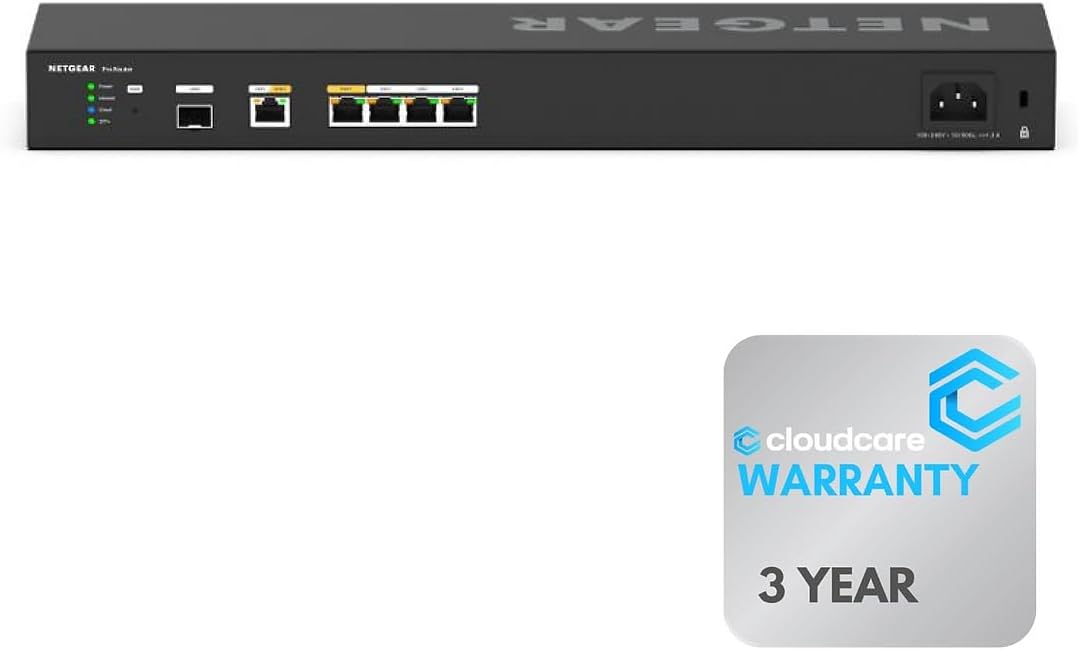
The NETGEAR PR60X is a powerhouse for organizations requiring multi-gigabit speeds and cloud management. Its high-performance hardware supports 10G ports for future-proofing network backhauls.
We may earn a commission when you buy through this link, at no additional cost to you.
Failover and load balancing ensure reliable connectivity while up to 32 VLANs offer network segmentation. Integrated VPN capabilities secure remote access with ease for distributed teams.
While the cost is high, it delivers enterprise-grade features suited for SMEs. The complexity in setup is manageable for IT professionals managing large networks.
Network admins needing robust security and high-speed capabilities should choose this router. It remains a top choice for scalable professional environments.
10G ports allow for future-ready bandwidth needs. This ensures your network handles heavy data loads without bottlenecks.
NETGEAR Insight enables monitoring from anywhere anytime. This simplifies maintenance for remote or distributed IT teams.
We may earn a commission when you buy through this link, at no additional cost to you.
The Cudy R700 offers remarkable flexibility for tech-savvy users thanks to OpenWRT support. It connects up to five ISPs with automatic failover, making it great for home labs or small offices.
We may earn a commission when you buy through this link, at no additional cost to you.
Security features like SPI firewall and domain filtering protect the network perimeter effectively. Built-in diagnostic tools help troubleshoot connectivity issues rapidly without external software.
While it lacks the brand polish of larger vendors, the features exceed expectations for its cost. Users comfortable with custom setups will appreciate the deep control options.
Enthusiasts needing maximum control at a low price point should buy this router. It balances professional capabilities with consumer affordability perfectly.
Full OpenWRT support unlocks custom firewall rules and VLANs. This allows for professional-grade network management without high costs.
Built-in Ping and traceroute tools simplify troubleshooting. You can identify network issues quickly without logging into external devices.
We may earn a commission when you buy through this link, at no additional cost to you.
The Omada ER707-M2 delivers high-bandwidth aggregation with 2.5G WAN ports and SFP support. Its capacity for over 500,000 concurrent sessions ensures stability under heavy load.
We may earn a commission when you buy through this link, at no additional cost to you.
Cloud access via the Omada app allows centralized management across multiple sites. A five-year warranty provides long-term confidence for business infrastructure planning.
While it fits best within the Omada ecosystem, it offers robust features for growing networks. The USB port adds flexibility for local storage or LTE backups.
Businesses expanding their network scale should consider this router for its capacity. It handles high session counts with ease and reliability.
2.5G ports allow faster WAN connections for high throughput. This ensures your network keeps pace with modern data demands.
A five-year warranty backed by technical support offers peace of mind. It shows the manufacturer's confidence in the hardware durability.
We may earn a commission when you buy through this link, at no additional cost to you.
The ASUS RT-BE88U leads in cutting-edge features with WiFi 7 technology and 10G ports. It is built to handle demanding network applications and future bandwidth needs effectively.
We may earn a commission when you buy through this link, at no additional cost to you.
AI WAN detection helps establish always-on internet by optimizing connections automatically. Commercial-grade security powered by Trend Micro ensures safety for sensitive devices.
While expensive, it is an investment for high-performance home or office networks. Users needing the latest tech will appreciate its robust capabilities.
Tech enthusiasts wanting future-proofing should buy this device. It offers unmatched speed and security for modern demanding environments.
WiFi 7 tech boosts throughput significantly for all connected devices. This ensures smooth performance even during heavy streaming or gaming.
AI tools optimize connection choices automatically for stability. This reduces manual configuration and keeps your internet running smoothly.
We may earn a commission when you buy through this link, at no additional cost to you.
The ASUS ExpertWiFi EBG15 focuses on small business needs with three WAN ports and commercial-grade security. Its IPS intrusion prevention system blocks malicious traffic effectively.
We may earn a commission when you buy through this link, at no additional cost to you.
Management via the mobile app simplifies setup and maintenance tasks for IT staff. USB WAN backup ensures you maintain reliable connectivity even if main lines drop.
While user ratings are lower, the features provide solid value for specific business use cases. It is ideal for offices needing dedicated wired management.
Small business owners seeking dedicated security should consider this router. It offers robust protection without complex enterprise pricing.
Commercial-grade security features protect against advanced threats. IPS helps prevent intrusion without needing additional software.
The mobile app allows quick management from anywhere. This makes troubleshooting faster for busy office managers.
We may earn a commission when you buy through this link, at no additional cost to you.
The D-Link DSR-250V2 is tailored for agencies needing compliance with NDAA standards. It extends corporate networks to remote homes with strong encryption and robust security features.
We may earn a commission when you buy through this link, at no additional cost to you.
Automatic failover minimizes disruptions for crucial tasks like video calls. Its lifetime warranty offers long-term confidence for organizational infrastructure.
Although user ratings are lower, compliance needs often outweigh these concerns in government sectors. It remains a reliable choice for secure remote access.
Government contractors should choose this router for its compliance and security. It ensures safe access to corporate resources from anywhere.
Meeting NDAA standards ensures the device is safe for government use. This is critical for agencies under strict regulatory requirements.
Built-in VPN features support hybrid teams efficiently. Teams can access resources securely without complex setups.
We may earn a commission when you buy through this link, at no additional cost to you.
This version of the NETGEAR PR60X adds rack-mountable design for professional server rooms. Its six 10G ports deliver maximum speed for enterprise environments.
We may earn a commission when you buy through this link, at no additional cost to you.
Insight cloud management simplifies control for IT teams across multiple locations. The added warranty coverage offers extra peace of mind for large purchases.
While costly, it optimizes space and performance in professional setups. It is ideal for businesses needing organized, high-speed network infrastructure.
IT managers needing rack mounting should buy this device. It ensures professional organization alongside robust network performance.
This design saves space in server rooms efficiently. It organizes equipment better than desktop models.
The warranty provides all-in-one protection for your investment. It ensures long-term reliability without extra service costs.
We may earn a commission when you buy through this link, at no additional cost to you.
The Linksys LRT224 provides essential dual WAN support for basic business needs. It offers reliable failover and load balancing without complex configuration requirements.
We may earn a commission when you buy through this link, at no additional cost to you.
With up to 50 IPsec tunnels, it supports secure remote access for teams. The firewall throughput ensures consistent performance for daily operations.
Although it lacks modern multi-gigabit features, it remains a solid workhorse for standard needs. Users wanting simplicity will appreciate its straightforward operation.
Small offices with standard needs should consider this router. It delivers dependable connectivity without unnecessary complexity.
This router covers all essential business routing needs. It supports failover without advanced technical configuration.
Linksys offers a trusted name in networking hardware. This ensures you get a product that is widely supported.
We may earn a commission when you buy through this link, at no additional cost to you.
Selecting the right Dual Wan Router requires understanding your specific bandwidth and security needs. This guide outlines the critical factors to consider before making your purchase.
The number and type of ports determine how many internet lines you can connect. Look for routers with at least two dedicated WAN ports for effective failover.
Ensure there are enough LAN ports for your devices or consider models with SFP support for fiber connections.
Fast failover ensures minimal downtime if your primary internet line drops. Enterprise-grade routers switch automatically within seconds to maintain workflow.
Check the product specifications for failover time claims to guarantee uninterrupted connectivity.
A robust firewall and VPN support are essential for protecting sensitive business data. Look for features like intrusion prevention and encrypted tunnels.
Enterprise models often include NDAA compliance or advanced encryption standards for added safety.
Your router must handle the combined speed of all your internet connections efficiently. High-end models support multi-gigabit throughput to prevent bottlenecks.
Select a device that exceeds your total bandwidth requirements to ensure smooth performance.
A user-friendly interface simplifies configuration and ongoing maintenance of your network. Cloud management options allow you to monitor from anywhere.
Mobile apps can be a significant advantage for troubleshooting without needing physical access to the device.
Choose a router that grows with your business needs over time. Support for VLANs and advanced QoS policies helps manage increasing traffic.
Future-proof models with high session counts ensure longevity as your network expands.
Reliable warranty coverage protects your investment from hardware failures. Check the duration of support services before buying.
A lifetime or multi-year warranty indicates manufacturer confidence and reduces long-term costs.
Established brands often provide better firmware updates and community support. Research user reviews to gauge real-world reliability.
A trusted brand ensures access to compatible accessories and software updates for years.
Connect your primary and backup internet lines to the designated WAN ports on the router. Configure load balancing or failover settings through the web interface to prioritize connection usage.
Regularly update the firmware to patch security vulnerabilities and improve performance. Check manufacturer release notes for new features that enhance network management.
Keep the router in a well-ventilated area to prevent overheating during high usage. Periodically restart the device to clear logs and maintain optimal operation speeds.
A Dual Wan Router ensures business continuity by switching to a backup connection if the primary one fails. This prevents downtime for critical applications and keeps employees productive.
Yes, most Dual Wan Routers support connections from different ISPs simultaneously. This allows you to load balance bandwidth or switch providers without changing hardware.
For speeds above 1Gbps, you need at least Cat6 or Cat6a cables. Older cables may bottleneck performance and prevent the router from reaching advertised speeds.
It is useful for remote workers or home offices where internet downtime impacts productivity. Most casual users may find a standard router sufficient unless they need extreme reliability.
Load balancing distributes traffic across multiple connections to maximize available bandwidth. This improves performance by utilizing all active internet lines efficiently.
Active downloads might drop briefly depending on the router settings. However, modern failover systems reconnect quickly to minimize disruption to ongoing tasks.
Yes, many modern models like Peplink B-One support Starlink integration directly. This allows you to use satellite internet as a primary or backup connection easily.
Many of these routers include advanced firewall capabilities suitable for small to medium businesses. However, large organizations may still prefer dedicated external hardware for deeper security.
The TP-Link ER605 and NETGEAR PR60X stand out as top choices for reliability and speed respectively. Each model offers unique strengths tailored to different business and personal requirements.
Prioritize features like failover speed and port capacity based on your specific usage patterns. Investing in the right router ensures your network remains secure and always accessible.
Remember that current pricing may differ from historical data. Always verify availability and latest model features before finalizing your purchase decision.