
Bluetooth 1D&2D Barcode Scanner, 3-in-1 Bluetooth & USB Wired & 2.4G Wireless QR Barcode Reader
4.3Editor score
Supports 1D and 2D
Multiple connection types
Affordable pricing point
This guide compares the top ten barcode scanners for iPad to help you find the best wireless 1D or 2D reader for retail inventory and mobile work tasks.
Finding the right barcode scanner for iPad can transform how you manage inventory or check out customers. A good device needs reliable Bluetooth connectivity, long battery life, and the ability to read damaged codes quickly without dropping signals during busy shifts.
We evaluated ten real models based on their scanning speed, connection stability, and compatibility with iOS apps. Each product was analyzed for its sensor type, battery capacity, and physical design to ensure they meet the demands of professional mobile scanning environments.
Each pick shows specific strengths like compact size or long range to help you decide. Remember that stock levels and availability change frequently so check the current listings before placing your order to ensure you get the model you need now.
4.3Editor score
4.9Editor score

4.5Editor score
The table below provides a side-by-side overview of each scanner key specifications and capabilities to help you compare features at a glance and choose the model that fits your workflow needs.


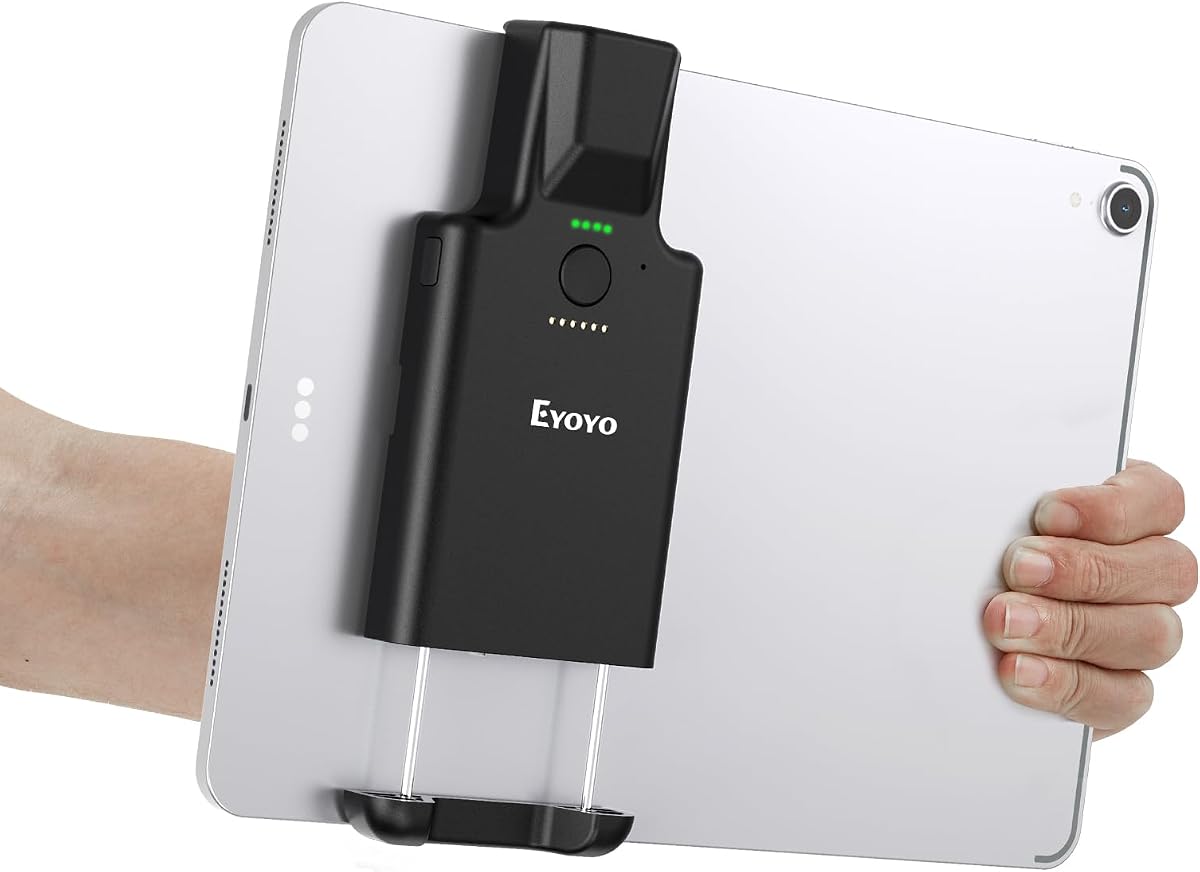
This Eyoyo model stands out as the top choice for iPad users because it clips directly to your device. It received a high rating of 4.9 stars from verified buyers who praised its reliability and convenience.
We may earn a commission when you buy through this link, at no additional cost to you.
The vertical retractable clip fits a range of tablet sizes and ensures your iPad stays steady while you scan. You can work hands-free without holding both devices which speeds up checkout and inventory tasks significantly.
While it costs more than basic models the added convenience of the clip and the long battery life justify the investment. The only limitation is the lack of a 2.4G wireless option which some users might prefer for specific setups.
If you need a scanner that integrates smoothly with your iPad workflow and offers robust scanning capabilities this model is the clear recommendation. It balances portability and performance better than any other option on this list.
The clip mechanism allows you to attach the scanner directly to the iPad which eliminates the need to hold two separate devices.
With a 3000mAh battery you can work for hours without worrying about recharging even with heavy daily usage patterns.
We may earn a commission when you buy through this link, at no additional cost to you.
This budget-friendly scanner offers impressive performance for its low price point. It handles both 1D and 2D codes reliably and received a 4.3 rating from users who value cost-effectiveness without sacrificing core functionality.
We may earn a commission when you buy through this link, at no additional cost to you.
It supports three connection modes including Bluetooth and 2.4G wireless which gives you flexibility in how you connect to your iPad. The scanning speed of up to 350 times per second ensures quick data entry during busy periods.
The main trade-off is that it lacks the premium build quality of higher-end models and does not include a tablet clip. However for basic scanning tasks it provides excellent value and meets the needs of small business owners.
If you are looking for an affordable option that can handle barcode tasks without breaking the bank this model is a strong contender. It delivers solid performance and connectivity options that are essential for mobile work.
At a very low price point this scanner offers 2D capability which is rare in this price range making it a great entry-level tool.
You can switch between Bluetooth 2.4G and wired modes easily which helps when you need to adapt to different work environments.
We may earn a commission when you buy through this link, at no additional cost to you.
This Inateck scanner is designed for users who need maximum range and durability. It holds a 4.5 rating and is built to withstand drops and harsh conditions while maintaining a stable Bluetooth connection over long distances.
We may earn a commission when you buy through this link, at no additional cost to you.
The standout feature is its one hundred fifteen foot range which allows you to move freely around a warehouse without losing connection to your iPad. The battery life is also exceptional with 180 days of standby on a single charge.
While it is limited to 1D codes it excels in environments where long range and ruggedness are more important than reading QR codes. The TPU case adds extra protection that prevents damage from accidental drops on concrete floors.
If you need a premium tool that can handle tough conditions and offers unparalleled wireless range this scanner is the best choice. It is ideal for large facilities where moving around during inventory counts is necessary.
The extended range ensures you can scan items from across the room without needing to stand close to your iPad device.
Built with a thick TPU case it survives multiple drops from significant heights making it reliable for industrial settings.
We may earn a commission when you buy through this link, at no additional cost to you.
This NETUM scanner is known for its wide compatibility and robust battery life. It received a 4.4 rating from users who appreciate its ability to store thousands of codes offline and connect via multiple wireless protocols.
We may earn a commission when you buy through this link, at no additional cost to you.
It supports both Bluetooth and 2.4G wireless connections which gives you flexibility in how you link to your iPad. The built-in storage allows you to collect up to 100000 barcodes even when you are out of range.
The scanner requires you to scan specific setting codes from the manual to configure it which can be a minor hurdle for new users. However once set up it provides reliable performance and strong decoding capabilities for various code types.
If you need a versatile tool that can store data locally and work with many devices this model is a solid choice. It balances features and reliability well for general inventory management tasks.
The ability to store 100000 codes ensures you do not lose data if your connection drops during a warehouse count.
Support for multiple connection modes allows you to switch between wireless and wired options based on your current needs.
We may earn a commission when you buy through this link, at no additional cost to you.
This mini scanner is perfect for users who need extreme portability. It weighs only 35 grams and fits easily in a pocket making it ideal for staff moving around stores or libraries without carrying extra gear.
We may earn a commission when you buy through this link, at no additional cost to you.
It offers vibration mode which is useful in quiet environments like libraries where beeps would be distracting. The battery life is impressive with a standby time of up to 10 days even with daily use.
The main limitation is that it only supports 1D codes and cannot read QR codes or screen codes. If you need to scan modern digital barcodes this model might not meet your needs but it excels at simple tasks.
If you need a lightweight and unobtrusive scanner for basic 1D work this model is an excellent choice. It is designed for comfort and quiet operation which makes it great for extended shifts.
At just 35 grams this scanner causes no hand fatigue even during long periods of scanning items throughout the day.
The vibration mode allows you to confirm a scan without making noise which is essential in quiet retail spaces.
We may earn a commission when you buy through this link, at no additional cost to you.
This desktop scanner offers a hands-free solution that can be used with an iPad via USB. It received a 4.6 rating from users who value the convenience of scanning without holding the device in their hands.
We may earn a commission when you buy through this link, at no additional cost to you.
It features auto-sensing technology that activates when an item passes through the beam which speeds up checkout lines. The omnidirectional reading ensures that codes are captured from any angle without needing precise aiming.
Since it is a desktop model it is not portable and lacks wireless connectivity. This limits its use to fixed workstations but for checkout counters or libraries it provides unmatched convenience and efficiency for frequent scanning.
If you need a stationary scanner for a fixed spot where speed is key this model is highly recommended. It simplifies the scanning process by removing the need to pick up a handheld device repeatedly.
The ability to scan without holding the scanner increases throughput at checkout counters and reduces physical strain on staff.
Scanning from any angle means you do not need to position items precisely which saves time during busy periods.
We may earn a commission when you buy through this link, at no additional cost to you.
This NetumScan model comes with a charging dock which keeps your device powered and ready to use. It holds a 4.1 rating and is designed specifically for iPhone and iPad users looking for a compact and functional tool.
We may earn a commission when you buy through this link, at no additional cost to you.
The charging dock acts as both a receiver and a charger which reduces cable clutter and ensures the scanner is always ready. It supports both 2D and 1D codes and offers vibration mode for quiet operation.
The battery is smaller than some competitors but the dock mitigates this by keeping it charged. Some users noted connection issues but the overall functionality remains solid for retail and library tasks.
If you want a scanner with an integrated charging solution and solid 2D capabilities this model is worth considering. It balances portability with essential features needed for general inventory management.
The dock ensures the scanner stays charged without needing extra cables which simplifies your daily workflow significantly.
Built for iOS devices it offers stable pairing with iPad which reduces frustration during setup and daily use.
We may earn a commission when you buy through this link, at no additional cost to you.
This NetumScan model is known for its robust build and intuitive button design. It received a high 4.9 rating from users who appreciate the smart dual-button control that prevents accidental power offs during use.
We may earn a commission when you buy through this link, at no additional cost to you.
The dedicated scan button ensures you do not turn off the device when you are trying to scan quickly. The included dock keeps the device charged and organized which reduces cable clutter at your workstation.
While the battery is smaller than some handheld models the dock makes up for it by providing easy recharging. The CMOS sensor ensures quick and accurate reads of 2D codes on paper or screens.
If you need a reliable scanner with a focus on usability and build quality this model is an excellent option. It addresses common issues like accidental power offs and provides a solid user experience.
The dual-button layout separates power from scanning which prevents accidental shutdowns when handling the device quickly.
The CMOS sensor handles 2D codes reliably ensuring you can read modern barcodes on paper or screens easily.
We may earn a commission when you buy through this link, at no additional cost to you.
This scanner comes with a base and supports both 2.4G wireless and Bluetooth. It has a 3.8 rating and offers decent features like offline storage for 50000 QR codes and an ergonomic grip for comfort.
We may earn a commission when you buy through this link, at no additional cost to you.
The base provides a convenient place to store the scanner when not in use and helps keep it charged. The offline storage feature is useful if you need to collect data without being connected to your iPad.
However some users found the setup process more complex than other models. The lower rating reflects some connectivity issues though it remains a functional tool for basic scanning tasks.
If you need a scanner with offline storage capabilities and a base this model is worth considering. It offers a good balance of features though you may need to spend time on initial setup.
The ability to store 50000 codes ensures you can collect data without losing connection to your iPad device.
The included base keeps the scanner organized and ensures it is ready to use without needing to search for it.
We may earn a commission when you buy through this link, at no additional cost to you.
This KUIIYER scanner offers a high-resolution sensor and waterproof build. It received a 4.3 rating from users who appreciate the auxiliary light and the durability of the shell for daily use.
We may earn a commission when you buy through this link, at no additional cost to you.
The 800 by 600 pixel sensor allows for precise scanning of barcodes on screens or paper. The IP54 rating ensures protection against dust and water splashes which is useful in various environments.
The built-in light helps with scanning in low-light areas and the durable shell protects against drops. It is a solid budget option that delivers on durability and scanning accuracy.
If you need an affordable and rugged scanner that handles 2D codes well this model is a strong candidate. It provides essential features at a competitive price point for small businesses.
The 800 by 600 pixel sensor ensures precise scanning even on low contrast or damaged codes.
The IP54 rating and drop proof design ensure the scanner lasts in various work environments.
We may earn a commission when you buy through this link, at no additional cost to you.
Choosing the right scanner involves evaluating several factors to ensure it meets your specific needs and integrates well with your workflow.
Different scanners offer Bluetooth 2.4G wireless or wired connections. Bluetooth is most convenient for mobile use with an iPad but 2.4G can offer more stable connections in busy environments. Wired options are reliable but limit mobility.
Choose Bluetooth for most iPad tasks but consider 2.4G if you need consistent performance in crowded wireless spaces.
1D scanners read traditional barcodes like UPC and EAN while 2D scanners can read QR codes and PDF417. Modern tasks often require reading digital barcodes on screens which only 2D models can do.
Ensure you select a 2D model if you need to read QR codes or screen codes as 1D scanners cannot handle these formats.
Battery capacity varies significantly from 650mAh to 3000mAh. Higher capacity means longer usage between charges which is crucial for all-day shifts. Consider how many hours you need to scan without interruption.
Look for at least a 2000mAh battery if you plan on scanning for many hours without needing to recharge.
Wireless range determines how far you can move from your device while scanning. Some models offer up to 115 feet while others have shorter ranges. A longer range gives you freedom to move around warehouses or stores.
Select a model with a longer range if your workflow requires moving far from your iPad or computer.
Offline storage allows you to store barcodes locally when you are not connected to your iPad. This is useful for inventory counts where you might be out of Bluetooth range. Capacity ranges from 50000 to 130000 codes.
Choose a scanner with offline storage if you anticipate working in areas with weak Bluetooth signals.
Durability is key for devices used in warehouses or retail floors. Look for drop protection ratings and rugged materials. Some models survive drops from 6 feet while others are more fragile.
Prioritize durability if you work in environments where the scanner might be dropped or exposed to dust and water.
Comfortable grips and lightweight designs reduce hand fatigue. Mini models weigh as little as 35 grams while others are bulkier. Consider how long you will be holding the scanner daily.
Choose a lightweight model if you plan on scanning for long periods without putting it down.
Ensure the scanner works with your iPad and any specific software you use. Some scanners are optimized for iOS while others are generic. Check if it supports your specific operating system version.
Verify compatibility with your iPad and software before purchasing to avoid connection issues.
To start using your scanner pair it with your iPad through Bluetooth settings. Once connected you can open any compatible app and scan barcodes directly into the text field. For wired connection simply plug the USB cable into the iPad.
For optimal performance keep the scanner clean and avoid dropping it on hard surfaces. If the scanner supports offline storage you can store data locally when out of range and upload it later when connected again.
Maintain battery health by avoiding deep discharge cycles and using the provided charger. Store the device in a dry place when not in use to prevent dust buildup on the scanning window.
Most modern Bluetooth scanners work with most iPad apps but compatibility depends on the app supporting keyboard input. Check the product description to ensure it supports iOS and your specific inventory software before buying.
1D scanners read traditional linear barcodes like UPC while 2D scanners can read QR codes and data matrix codes. If you need to read digital codes on phone screens you must get a 2D model.
Yes you can use a Bluetooth scanner directly with an iPad without a computer. You only need the scanner and the iPad connected via Bluetooth to send data to your app.
Most scanners have an LED light that indicates battery status. Some models display battery levels on the connected device screen so check the manual for specific details on how to monitor battery life.
Check that Bluetooth is enabled on your iPad and the scanner is in pairing mode. Make sure the scanner is charged and close enough to the iPad. Try restarting both devices if the connection fails.
Yes a 2D scanner can read barcodes from phone screens but you may need to adjust the brightness. 1D scanners cannot read screen barcodes as they rely on printed reflective codes.
The Eyoyo 1D 2D Portable Bluetooth Barcode Scanner stands out as the top choice due to its unique iPad clip and reliable performance. It offers the best balance of convenience and functionality for mobile tasks.
If you need a premium option for large warehouses consider the Inateck model for its long range. For budget-conscious buyers the Bluetooth 1D&2D Scanner offers great value with essential 2D capabilities.
Remember that prices and availability change frequently so check the current listings before placing your order. Ensure you verify the model matches your specific workflow needs to get the best value.