
1-to-3 ARGB Splitter Cable
4.6Editor score
Includes two cables and connectors
Fits 5V 3-pin headers
Compact eleven inch length
This guide compares the top ten ARGB splitter cables for PC builds, evaluating signal integrity, cable length, connector quality, and compatibility with 5V
Building a custom PC often requires expanding limited motherboard lighting headers. ARGB splitter cables allow you to connect multiple fans and LED strips to a single port while maintaining synchronized color effects.
We evaluated ten popular splitter options based on connector durability, wire gauge, length flexibility, and user feedback regarding signal stability. Each pick offers a different balance of cost and performance.
Every product listed includes verified ratings and key specifications to help you choose the right fit for your chassis. Please note that prices and availability fluctuate frequently on retailer sites.
4.6Editor score

4.7Editor score

4.9Editor score
The following table presents a side-by-side overview of all ten evaluated splitter cables. It highlights their primary connector configurations, approximate lengths, and core material specifications.


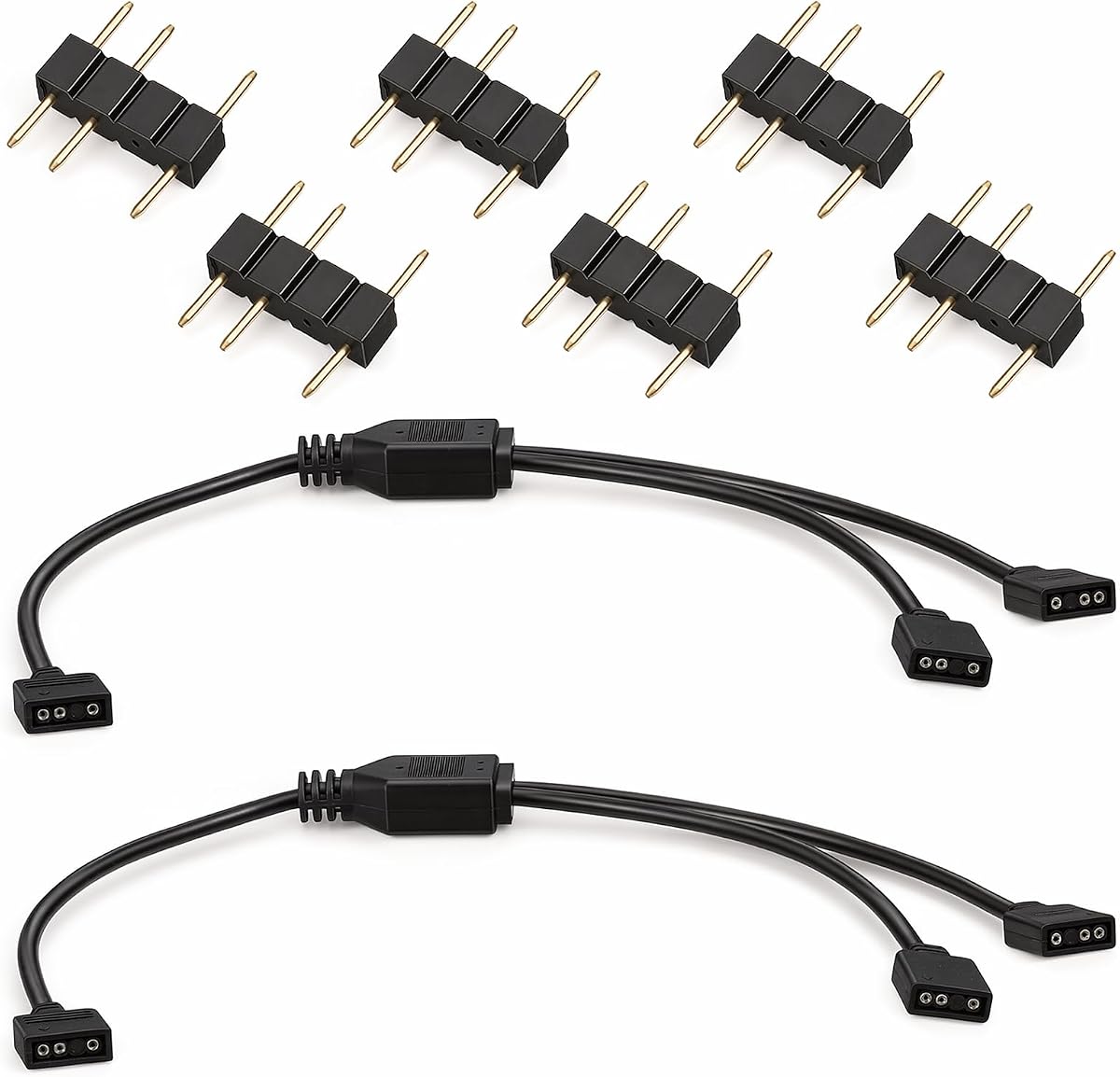


This splitter delivers reliable basic functionality for budget-conscious builders looking to expand their lighting without spending much. It holds a solid rating from users who appreciate the simple 1-to-3 design for connecting fans to a single header.
We may earn a commission when you buy through this link, at no additional cost to you.
The package includes two cables and eight connectors, which provides enough hardware for typical setups. The 11.8 inch length is sufficient for compact chassis where space is tight. Users can easily align the arrows on the connectors to ensure correct polarity and prevent damage.
While the plastic housing is not as premium as braided options, it protects the internal wiring adequately for standard use. The lack of tools needed for installation saves time during the build process. It is a practical solution for basic synchronization needs.
Buyers seeking a no-frills way to connect three devices should consider this option. It balances cost and performance well for entry-level custom PC builds. Just verify your motherboard supports 5V 3-pin headers before purchasing to ensure compatibility.
This cable offers a low-cost way to add more lighting zones without buying a new motherboard or complex controller.
The plug-and-play design eliminates the need for soldering or specialized tools, making it accessible for beginners.
We may earn a commission when you buy through this link, at no additional cost to you.
This white variant stands out for builds needing a clean look without dark cables showing. It has a strong user rating reflecting satisfaction with the material quality and signal transmission performance. The white finish helps it blend into light-colored chassis interiors.
We may earn a commission when you buy through this link, at no additional cost to you.
The soft PVC material is wrapped firmly around new copper cores to extend service life. This construction reduces the risk of dust accumulation and physical damage over time. The 1-to-2 configuration is perfect for linking a pair of fans directly to a motherboard port.
Although it only supports two devices per cable, the quality of the connectors ensures a secure connection. The 11.8 inch length provides enough reach for most internal layouts. Users value the durability and the ability to match white fan casings.
If you are building a white themed PC, this cable is an excellent choice to maintain visual consistency. It offers a balance of style and function that many users prefer over generic black options.
The white sheathing matches white LED strips and fans to create a cohesive look in your build.
The PVC wrap protects the copper wires from wear, ensuring reliable performance over years of use.
We may earn a commission when you buy through this link, at no additional cost to you.
Safety is a major concern when dealing with exposed pins and chassis metal parts. This model addresses that with insulating protective caps on every needle interface. The design helps prevent bends and shorts that could damage your motherboard or lighting components.
We may earn a commission when you buy through this link, at no additional cost to you.
The cable measures 33.5 cm or about 13 inches, offering a slight length advantage over some competitors. It is designed for simple and practical use with smooth links to solve insufficient interface problems. The protective caps ensure unused needles do not touch the chassis when energized.
While it comes as a single unit, the focus on safety makes it a reliable choice for cautious builders. The caps are easy to remove when connecting but stay in place to protect unused ends. This attention to detail adds significant value to the product.
Those worried about short circuits in their custom build will find this option particularly reassuring. The caps are a thoughtful addition that reduces installation risks and improves longevity of the connector pins.
Insulating caps on the pins prevent accidental shorts when the cable is powered but not connected to a device.
At 13 inches, it offers slightly more reach than the common 11.8 inch standard found in many bundles.
We may earn a commission when you buy through this link, at no additional cost to you.
For systems with many fans or extensive LED strips, standard splitters might fall short. This splitter supports a 1-to-5 configuration, allowing you to connect up to five devices to one motherboard header. The 50cm length provides ample reach for complex routing inside large cases.
We may earn a commission when you buy through this link, at no additional cost to you.
The package includes two cables, which is useful for managing different zones like front and rear fans. The use of genuine new copper cores ensures that the data signals remain stable across all five connections. This reduces the risk of flickering or color shifts.
While managing five devices on one header requires careful planning to avoid signal degradation, this cable handles the load well. The plastic housing is durable enough to protect the internal wiring. It is an efficient solution for maximizing a single RGB header.
Builders with high density lighting setups will appreciate the ability to expand significantly without adding more ports. It is particularly useful for those with limited motherboard headers but many RGB components.
The 1-to-5 design allows you to centralize control of multiple fans and strips from a single header.
With 19.6 inches, it reaches further than standard cables, helping with clean management in tall chassis.
We may earn a commission when you buy through this link, at no additional cost to you.
This product stands out with a perfect 5.0 rating from verified users. It is a reliable option for those who need a straightforward way to sync lighting across multiple devices. The high user satisfaction suggests consistent quality and performance across batches.
We may earn a commission when you buy through this link, at no additional cost to you.
The package contains two cables and eight male connectors, offering ample hardware for a full build. The arrow alignment feature ensures that users plug the cables correctly, minimizing the risk of damage. No soldering or tools are required for setup.
While it follows a standard design, the reliability and completeness of the package make it a strong contender. The 11.8 inch length is typical for this category and works well for most standard chassis layouts. It is a safe choice for general use.
Builders looking for a high satisfaction score and good value will find this option appealing. It provides all the necessary components to expand your RGB setup without hassle or complex configuration.
The perfect rating indicates that users consistently find the cables reliable and easy to use in their builds.
With eight connectors included, you have plenty of spares for various connections during your installation process.
We may earn a commission when you buy through this link, at no additional cost to you.
This cable is designed for simple extension needs where you just need to reach a header. It functions as a 1-to-1 extension rather than a multi-split, making it ideal for connecting one device to a distant port. The user feedback reflects solid basic utility.
We may earn a commission when you buy through this link, at no additional cost to you.
The package includes two cables and four male connectors. The 11.8 inch length helps bridge small gaps without adding bulk. It is a straightforward solution for extending the reach of existing LED strips or fans.
While it does not split signals, its reliability for extension tasks is appreciated by users. The connectors are standard and fit most 5V headers securely. It is a practical accessory for those who need to move a connection slightly further.
If your need is purely to extend a single connection rather than split it, this cable does the job well. It is a cost-effective addition to your toolkit for basic cable management tasks.
This cable is optimized to extend the reach of one RGB component to a motherboard header without splitting.
Ideal for users who only need to extend a few inches without complex wiring needs or multiple splits.
We may earn a commission when you buy through this link, at no additional cost to you.
Reliable material is key for consistent lighting effects across chained devices. This cable uses pure copper cores which helps maintain data integrity for color and animation. The perfect user rating suggests the material choice is appreciated by those who value quality.
We may earn a commission when you buy through this link, at no additional cost to you.
The 1-to-2 configuration allows you to double your lighting options from a single header. The connectors feature arrow indicators to ensure correct polarity alignment during installation. This reduces the chance of error and makes the process straightforward for beginners.
The 11.8 inch length offers sufficient reach for most cases without clutter. The plug-and-play nature means no soldering or special tools are required. Users value the reliability and the stability of the signal transmission over time.
For builders who prioritize signal integrity and consistency, this copper-heavy design is a strong pick. It ensures that your RGB effects look uniform across all connected devices without flickering or delays.
Pure copper wiring is chosen for its efficiency in power and data transmission to maintain consistent colors.
Arrow indicators on the connectors make it easy to install correctly and prevent reverse polarity damage.
We may earn a commission when you buy through this link, at no additional cost to you.
When you have multiple zones like fans, coolers, and strips, having multiple cables ready is useful. This pack includes three cables and twelve connectors, giving you plenty of hardware for a large scale setup. The rating reflects satisfaction with this quantity.
We may earn a commission when you buy through this link, at no additional cost to you.
Each cable supports a 1-to-3 split, allowing you to connect three devices to a single header. The package provides enough connectors to plug everything directly into the motherboard ports without needing extra adapters. This simplifies complex routing plans.
The cables are standard quality with a focus on utility and quantity. They fit the 5V 3-pin headers securely and allow for quick plug and play installation. Users appreciate having a ready-to-go solution for big builds.
If you are planning a comprehensive lighting setup, this bundle ensures you do not run out of cables mid-installation. It is a cost-effective way to cover all your RGB needs in one purchase.
Three cables and twelve connectors provide enough components for multiple lighting zones and headers.
The 1-to-3 splits allow you to group devices into separate zones for better organization and control.
We may earn a commission when you buy through this link, at no additional cost to you.
Durability is often overlooked but matters for long-term stability. This cable uses a soft PVC outer sheath that resists wear and aging. The copper core wires ensure stable signal transmission and anti-interference performance. The perfect rating confirms user satisfaction.
We may earn a commission when you buy through this link, at no additional cost to you.
The 1-to-3 distribution allows you to link multiple fans or strips to one header. The connectors feature foolproof arrow markings so you can align them easily. This plug-and-play design saves time and effort during the build.
Each cable is about 11.8 inches long, which is a moderate length for flexible management inside a chassis. The design prevents tangling while still reaching most connection points. Users value the balance of durability and flexibility.
If you want a cable that will hold up to regular handling and bending without degrading, this is a good option. The durable sheath protects the internal wires from physical stress during cable routing.
The outer PVC sheath is designed to resist aging and physical wear, protecting the internal wiring.
Copper wires with anti-interference properties keep your RGB effects consistent across all connected devices.
We may earn a commission when you buy through this link, at no additional cost to you.
Premium materials are used to ensure high performance in demanding setups. This splitter features gold-plated contacts and oxygen-free copper wiring which enhances signal integrity. The braided sleeves prevent tangling and reduce electromagnetic interference for cleaner visuals.
We may earn a commission when you buy through this link, at no additional cost to you.
The design supports connecting up to twelve ARGB devices when using multiple units. It includes sixteen male connectors in the package, enabling seamless expansion for complex custom configurations. The friction-lock design ensures secure joins that resist vibration.
While it comes at a higher price point, the quality of construction justifies the cost for enthusiasts. Users value the ability to maintain color accuracy across long cable runs. It is built to handle demanding custom PC configurations.
For those who prioritize top-tier signal integrity and aesthetics, this is the best option available. The gold contacts ensure longevity and consistent performance even with extended use.
Gold-plated contacts and oxygen-free copper minimize signal loss for consistent colors across all devices.
Braided sleeves protect the cables from tangling and electromagnetic interference during complex installations.
We may earn a commission when you buy through this link, at no additional cost to you.
Choosing the right splitter depends on your motherboard compatibility and build complexity. Here are the key factors to consider before purchasing.
Ensure the splitter matches your motherboard header type. Most modern boards use 3-pin 5V ARGB headers, but older ones use 4-pin 12V RGB. Mixing these can damage components.
Always verify your motherboard manual to confirm the correct voltage and pin count before buying any splitter cable.
Most splitters use female-to-female connectors with male pins included. This allows you to plug directly into headers without needing extra adapters. Ensure the arrow alignment is clear on the connectors.
Look for cables with clear arrow markings to help you align the polarity correctly during installation.
Measure the distance from your motherboard to the first fan or strip. Standard lengths are around 11.8 inches, but larger cases may require 19.6 inches or longer. Ensure the length is sufficient to avoid stretching.
Choose a length that fits your chassis layout comfortably without creating tension on the connections.
Decide if you need a 1-to-2 or 1-to-3 splitter based on how many devices you have. Higher splits can overload headers if you exceed power limits. Plan your layout to distribute load across multiple headers if possible.
Select a configuration that matches the number of devices you plan to connect to each header.
Copper cores and durable sheaths like PVC or braided nylon ensure reliable signal transmission. Gold-plated contacts resist corrosion and improve longevity. Higher quality materials reduce the risk of flickering lights.
Look for cables with solid copper wiring and protective sheathing for long-term reliability.
A good bundle should include enough male connectors for your build. Some packages come with extra connectors to spare. Check the contents before buying to avoid needing extra purchases later.
Ensure the package includes enough male connectors to connect all your components directly to the splitters.
If you have many fans and strips, consider bulk bundles or longer cables. Complex builds may need multiple splitters to keep signal clear. Plan your wiring layout ahead of time to simplify installation.
For large builds, opt for multi-pack bundles that offer flexibility and enough connectors for all devices.
Basic splitters are affordable but may lack premium features like braided sleeves. Premium options cost more but offer better durability and signal integrity. Choose a price point that fits your budget and quality needs.
Balance your budget with the level of quality needed for your specific setup.
First, turn off your computer and disconnect power before installing any RGB cables. This prevents short circuits and protects your motherboard from electrical damage.
Align the arrow on the splitter connector with the arrow on the motherboard header. Plug firmly but do not force the connection. Ensure all devices are connected to the female ends securely.
Check that all unused pins are covered with insulating caps if included. This prevents accidental contact with metal parts inside the case. Route cables carefully to avoid sharp bends or tension.
No, these splitters are designed specifically for 5V 3-pin ARGB headers. Using them with 12V 4-pin headers can damage your LEDs and motherboard. Always check your header voltage before connecting.
Typically you can connect 3 to 5 devices per header depending on power limits. Check your motherboard manual for power specifications to avoid overloading the circuit.
Yes, they work with any 5V 3-pin ARGB fan or strip regardless of brand. Just ensure the pinout matches the standard configuration.
Plugging the cable in backwards can cause lights to stay off or flicker. In worst cases it might damage components. Always match the arrow indicators on both ends.
You can connect multiple splitters but be careful not to exceed power limits. Daisy chaining too many devices may result in signal degradation or power drops.
This can happen if connectors are loose or cables are damaged. Ensure all cables are fully seated and aligned correctly. Replace damaged cables to restore sync.
Yes, these are plug and play tools require no soldering. Just align the arrows and insert the connectors into headers and devices.
We have reviewed ten distinct options ranging from basic budget cables to premium gold-plated connectors. Each product offers a balance of length, durability, and connector quality to suit different build needs.
When choosing a splitter, prioritize compatibility with your motherboard headers and sufficient length for your case. Reliable materials like copper cores and protective sheaths will ensure stable performance over time.
Prices and availability can change frequently so verify current listings before buying. Check reviews for recent feedback on durability and signal stability to make an informed choice.