
LG UltraFine evo 32U990A-S
4.5Editor score
Thunderbolt 5 support
Nano IPS Black panel
High pixel density
Finding the right display for your workflow is crucial when working with high-resolution content. A 6K monitor offers exceptional clarity and pixel density that surpasses standard 4K displays, making it ideal for detailed creative tasks.
We have analyzed ten leading models based on panel technology, color gamut coverage, connectivity options, and overall build quality. Each product was selected to represent different needs ranging from professional editing to immersive gaming experiences.
Every pick in this list highlights specific strengths and trade-offs to help you make an informed decision. Please note that product availability and specifications may change over time so always verify details before purchasing.
4.5Editor score

3.9Editor score

3.7Editor score
As an Amazon Associate we earn from qualifying purchases.
The following table provides a side-by-side overview of all ten monitors evaluated in this guide allowing you to quickly compare key specifications and features across different models and price points.




The ASUS ProArt PA32QCV stands out as a top choice for professionals who need reliable color accuracy and seamless integration with Mac systems. It offers a stunning 6K resolution that provides exceptional detail for design work and video editing tasks.
We may earn a commission when you buy through this link, at no additional cost to you.
Its factory calibration ensures that colors are accurate right out of the box which is critical for creative professionals. The inclusion of dual Thunderbolt 4 ports allows for efficient daisy-chaining and powerful data transfer capabilities.
While it excels in productivity and color work it may not be the best fit for high-speed gaming due to its standard refresh rate. However for most creative workflows this trade-off is acceptable given the display quality.
If you are a designer or video editor looking for a monitor that delivers consistent results and connects easily to your MacBook this model is highly recommended for your setup.
The monitor comes factory calibrated with Delta E less than 2 ensuring that what you see on screen matches your final output accurately.
A dedicated MacBook Color Matching preset ensures seamless workflow between the monitor and Apple devices for consistent visual experiences.
We may earn a commission when you buy through this link, at no additional cost to you.
This Dell monitor offers an expansive 52-inch curved display that transforms your workspace into a cinematic environment suitable for both productivity and entertainment. The 6K resolution ensures that every detail is crisp even on such a large screen.
We may earn a commission when you buy through this link, at no additional cost to you.
The IPS Black panel technology provides a superior contrast ratio which results in deeper blacks and more vivid colors compared to standard IPS panels. This makes it ideal for viewing media and doing color critical work.
Its high refresh rate of 120Hz adds smoothness to scrolling and motion which is a nice bonus for general usage and light gaming. The Thunderbolt 4 hub functionality simplifies your desk by reducing cable clutter significantly.
For users who need a massive amount of screen real estate and value visual quality this monitor delivers an impressive experience though it requires significant desk space and careful planning.
The curved 21:9 aspect ratio wraps around your field of view making it easier to multitask and immerse yourself in content without constant panning.
With up to 140W power delivery via Thunderbolt 4 you can charge high-performance laptops while maintaining full display functionality through a single cable.
We may earn a commission when you buy through this link, at no additional cost to you.
The G32P model combines a high pixel density with a glossy screen finish to deliver vibrant colors and sharp text that pop on the display. This makes it an excellent choice for users who prioritize visual fidelity in their creative work.
We may earn a commission when you buy through this link, at no additional cost to you.
Its 100W high-speed power port allows you to charge your laptop while transmitting video signals reducing the need for multiple cables on your desk. The IPS panel ensures wide viewing angles and consistent color performance across the screen.
While the glossy finish can lead to reflections in bright environments it also enhances contrast and saturation which many editors prefer. The ergonomic stand provides ample adjustability to help you find a comfortable viewing position.
If you want a monitor that balances high resolution with strong color performance and modern connectivity this is a solid option for a dedicated workstation setup.
With 223 PPI the text and images appear incredibly sharp reducing eye strain during long sessions of detailed editing or writing.
The versatile connectivity options allow seamless multitasking with gaming consoles and PCs without needing external adapters or hubs.
We may earn a commission when you buy through this link, at no additional cost to you.
Samsung has created a unique gaming monitor that offers 6K resolution alongside high refresh rates which is rare in the market. This allows for incredibly detailed visuals in games while maintaining smooth motion for competitive play.
We may earn a commission when you buy through this link, at no additional cost to you.
The Dual Mode feature lets you switch between 6K at 165Hz and 3K at 330Hz depending on whether you prioritize detail or speed. This flexibility makes it a powerful tool for gamers who also do content creation.
Fast IPS technology ensures quick response times reducing motion blur and ghosting during fast-paced action. The HDR10+ support enhances the visual depth making games look more realistic and immersive.
For gamers who demand high resolution and smooth performance this monitor provides a cutting-edge experience though it may lack the color precision needed for professional design work.
You can choose between 6K for detailed scenes or 3K for lightning-fast action ensuring you always have the right balance for your current activity.
NVIDIA G-Sync compatibility and AMD FreeSync Premium support eliminate screen tearing and stuttering for a fluid gaming experience.
We may earn a commission when you buy through this link, at no additional cost to you.
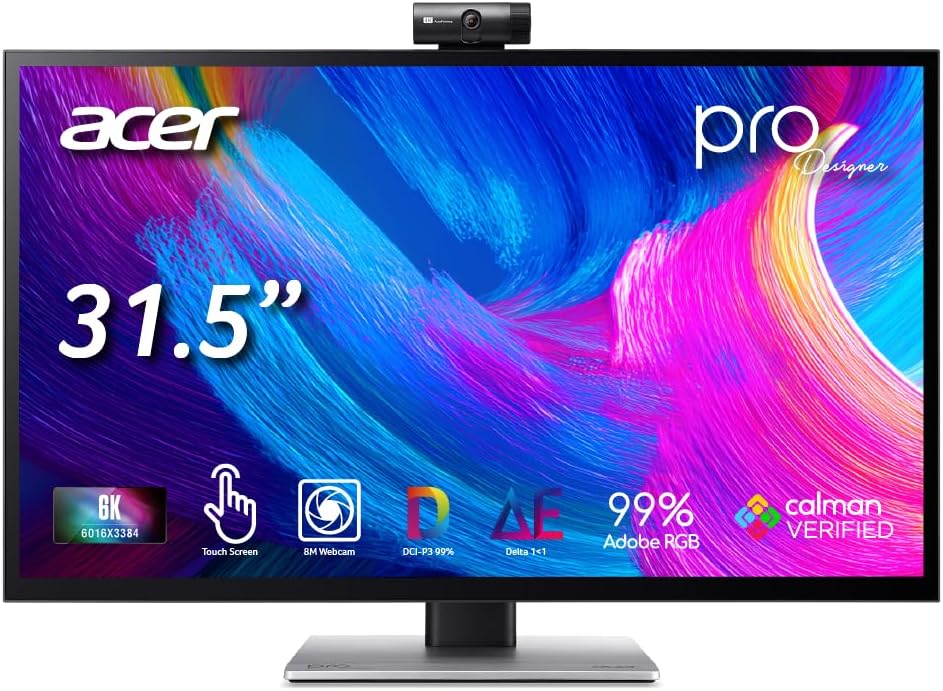
The Acer ProDesigner is designed for artists who want to sketch and edit directly on the screen without needing a separate tablet. Its 6K resolution ensures that every brushstroke and detail is visible with incredible precision.
We may earn a commission when you buy through this link, at no additional cost to you.
Factory calibration with Delta E less than 1 guarantees professional color accuracy for print and digital delivery. The included stylus support adds a natural feel to drawing tasks which enhances creative flow.
Integrated features like the 8MP webcam and 4-mic array simplify your workflow by removing the need for extra hardware during client calls. This makes it a versatile all-in-one solution for remote work environments.
If you are a digital artist or designer who values direct interaction with your work this monitor offers a unique and highly productive experience that saves space and time.
Work directly on the screen to retouch photos or annotate projects without switching between devices for a streamlined creative process.
Calman Verified calibration ensures that what you see on screen is exactly what your clients will see in print or delivery.
We may earn a commission when you buy through this link, at no additional cost to you.
This minimalist monitor delivers high performance without unnecessary features focusing on a clean design and essential productivity tools. The 6K resolution and high pixel density make it a strong contender for professional desktop setups.
We may earn a commission when you buy through this link, at no additional cost to you.
It supports 100W charging through a single cable which helps keep your workspace tidy and efficient. The anti-glare coating ensures that you can work in well-lit environments without distracting reflections.
Its sturdy build and ergonomic stand provide comfort during long work sessions allowing you to adjust the height and angle to your preference. The universal mount compatibility adds flexibility for custom mounting solutions.
For those who appreciate simplicity and quality this monitor offers a reliable and visually pleasing display that fits well into a modern professional workspace.
The minimalist design reduces visual clutter on your desk while maintaining high performance standards for demanding workloads.
Premium materials and a CNC-machined aluminum body ensure long-lasting use and sleek aesthetics for your studio or office.
We may earn a commission when you buy through this link, at no additional cost to you.
Dell offers this massive 52-inch monitor with a unique resolution and refresh rate optimized for multitasking and professional workflows. The 6K resolution ensures that text and graphics remain sharp even on a large display.
We may earn a commission when you buy through this link, at no additional cost to you.
With up to 140W power delivery this monitor can charge high-end laptops while also supporting multiple inputs via dual HDMI and DisplayPort connections. The built-in KVM functionality allows you to switch between computers easily.
The 120Hz refresh rate provides smooth scrolling and motion which is helpful for navigating large documents or timelines. Despite its size it aims to deliver a complete hub experience for complex work environments.
If you need a single solution that replaces multiple screens and charging adapters this model offers a powerful way to consolidate your desk setup effectively.
Manage two connected computers with a single keyboard and mouse via Picture-by-Picture and KVM support for seamless workflow.
Receive up to 140W of power through Thunderbolt 4 to charge laptops quickly while maintaining full display functionality.
We may earn a commission when you buy through this link, at no additional cost to you.
This LG monitor represents the future of connectivity with Thunderbolt 5 support offering unprecedented data transfer speeds alongside a high-quality display. It is built for professionals who need top-tier performance and future-proofing.
We may earn a commission when you buy through this link, at no additional cost to you.
The Nano IPS Black panel delivers a high contrast ratio and wide color gamut covering 99.5 percent Adobe RGB for accurate color critical work. The 224 PPI ensures that text and graphics are exceptionally sharp and clear.
With DisplayHDR 600 certification you can preview HDR content with confidence knowing that highlights and shadows are rendered accurately. The bundle includes useful accessories like cable ties and cleaning kits to enhance the user experience.
For power users who demand the latest technology and superior image quality this monitor sets a new standard for professional displays in the market today.
Enjoy up to 80 gigabits per second data transfer and 96 watts charging power over a single cable for ultimate convenience.
Studio-grade color accuracy with 10-bit support ensures your work is represented faithfully across all professional color spaces.
We may earn a commission when you buy through this link, at no additional cost to you.
Dell provides this bundle including an enhanced protection plan which adds peace of mind for users who want long-term reliability. The 6K resolution delivers a vivid and crystal clear display suitable for various professional tasks.
We may earn a commission when you buy through this link, at no additional cost to you.
Its 5 ms GTG response time makes it a decent choice for action films and gaming without significant motion blur. The USB Type-C port allows for high-speed data transmission alongside video input for versatile connectivity.
While it may not have advanced features like touch or dual mode it offers a solid foundation for standard professional use. The included cables ensure you have everything needed to get started immediately after setup.
If you prioritize warranty and reliability over extra features this bundle offers a practical solution for maintaining a stable and supported workstation.
The 2 year premium extended service protection ensures you are covered for hardware issues giving you confidence in your investment.
USB Type-C allows quick transmission of data at a higher rate providing convenience for transferring large files efficiently.
We may earn a commission when you buy through this link, at no additional cost to you.
This renewed option offers the same large screen and hub capabilities as the new version but without a stand. It is ideal for users who prefer custom VESA mounting setups and want a more budget-friendly price point.
We may earn a commission when you buy through this link, at no additional cost to you.
The 52-inch curved display with 21:9 aspect ratio provides an immersive experience for multitasking and media consumption. It includes a 120Hz refresh rate and Thunderbolt 4 hub for smooth performance and connectivity.
Since it is a renewed product you should verify its condition and warranty details before purchasing. However it can be a smart way to access premium features if you are comfortable with refurbished electronics.
If you need a large professional display and already have a mounting solution this model provides a cost-effective way to get a powerful setup.
Designed for VESA mount only this option lets you integrate the monitor into custom setups without a traditional base.
The curved screen wraps around your field of view reducing distortion and improving immersion for wide content.
We may earn a commission when you buy through this link, at no additional cost to you.
Selecting the right 6K monitor requires understanding your specific needs and how the display will integrate with your existing workflow.
6K resolution provides over twice the pixel count of 4K making text and images incredibly sharp. High pixels per inch ensures that details are visible without zooming in which saves time during detailed editing.
Prioritize monitors with at least 200 PPI for the best clarity and reduced eye strain over long periods.
IPS panels offer wide viewing angles and consistent color which are essential for professional work. IPS Black variants improve contrast for deeper blacks and better visual depth compared to standard IPS.
Choose IPS Black if you need better contrast in dark scenes or standard IPS for cost-effective color accuracy.
Look for monitors with high DCI-P3 or Adobe RGB coverage to ensure accurate color reproduction. Factory calibration with low Delta E values means the display is ready for professional use out of the box.
Always check that the monitor meets the color standards required for your specific workflow industry.
Thunderbolt 4 or newer ports allow for single cable connectivity that handles video data and power delivery. Multiple HDMI and DisplayPort inputs are useful if you connect multiple devices to one monitor.
Verify that the monitor supports your laptop's charging requirements via USB-C or Thunderbolt to simplify your desk.
Higher refresh rates make scrolling and motion smoother which reduces eye fatigue during productivity tasks. Fast response times are critical if you plan to use the monitor for gaming or video playback.
Select a refresh rate of at least 60Hz for comfort and consider 120Hz or higher for dynamic content.
An adjustable stand with height tilt and swivel options helps you maintain a comfortable posture during long work sessions. VESA mount compatibility is useful if you prefer a custom monitor arm or dual setup.
Ensure the physical dimensions of the monitor fit your desk space and mounting preferences before buying.
Built-in webcams and microphones can reduce clutter if you attend many video meetings from your desk. Touch screens or stylus support add interaction options for designers and artists who prefer drawing directly on screen.
Decide which extras you genuinely need to avoid paying for features you will not use regularly.
Connect your device using the provided high-quality cables to ensure the full resolution is recognized by your computer settings. Adjust the refresh rate and scaling in your operating system to match the monitor capabilities.
Clean the screen with a microfiber cloth and avoid harsh chemicals that could damage the coating. For glossy panels be extra gentle to prevent scratches and avoid touching with bare hands to prevent oils.
Use built-in eye care features like blue light filters when working late at night to reduce strain. Adjust the brightness and contrast to match ambient lighting conditions for a comfortable viewing environment.
6K monitors have a resolution of approximately 6144 by 3456 pixels which is nearly double that of 4K. This higher pixel density results in sharper text and more detailed images allowing you to work without zooming in.
Many 6K monitors support Thunderbolt and USB-C which are native to Mac computers. Models with specific macOS presets offer seamless color matching and easy connectivity for Apple users.
Yes but performance depends on the refresh rate and GPU capabilities. Gaming focused models offer higher refresh rates and adaptive sync to ensure smooth visuals during play.
Thunderbolt 4 provides the bandwidth and power delivery needed for 6K over a single cable. Without it you may need multiple cables or adapters to achieve the full resolution and charging functionality.
Glossy screens offer vibrant colors and contrast while matte screens reduce reflections in bright environments. Choose based on your workspace lighting and whether you prioritize color vividness or glare reduction.
Power usage varies by model and settings but generally 6K monitors are more efficient per pixel than lower resolutions due to panel tech. Expect moderate consumption compared to high brightness commercial displays.
High speed cables like certified DisplayPort or USB-C are essential for full bandwidth. A monitor arm with VESA support adds ergonomic flexibility and a color calibrator ensures long term accuracy.
The monitors listed here cover a wide range of needs from creative professionals to gamers and business users. Each option balances resolution color accuracy and connectivity to help you find the perfect fit for your workspace.
Prioritize features that directly impact your daily tasks such as color gamut for designers or refresh rates for gamers. The best monitor is one that integrates smoothly with your workflow without requiring unnecessary compromises.
Keep in mind that specifications and availability may vary so verify current details before making your purchase. Taking the time to compare models ensures you get the most value and performance for your specific needs.