
USB 2.0 HD Pro Webcam
4.0Editor score
Full HD 1080p output
Manual focus ring included
Plug and play setup
Creating stop motion animation requires precise control over your camera to ensure consistent framing and exposure across thousands of individual frames. A good camera for this purpose offers manual focus, stable image quality, and software integration that simplifies the frame-by-frame workflow. Whether you are a student, hobbyist, or professional animator, selecting the right camera is the first step toward bringing your characters to life.
We have carefully evaluated ten distinct camera options specifically suited for stop motion animation needs. Our comparison includes dedicated animation kits with bundled software alongside versatile video cameras that support external capture tools. Each product was assessed based on resolution, manual control options, lighting features, and compatibility with popular animation software like Stop Motion Studio and Dragonframe.
Each pick below highlights key specifications and unique strengths that make it suitable for different animation styles and budgets. You will find options ranging from budget friendly USB cameras to professional mirrorless bodies with specialized firmware. Please note that product availability and pricing can change frequently, so always check the latest details before making your final purchase decision.
4.0Editor score

4.0Editor score

4.1Editor score
As an Amazon Associate we earn from qualifying purchases.
The following table provides a side-by-side comparison of all ten camera options analyzed in this guide. It highlights essential specifications and unique features to help you quickly identify which model aligns best with your specific animation requirements and technical preferences.



The HUE Animation Studio Pro stands out as a top choice for educators and hobbyists seeking a complete package. It features a Full HD 1080p camera with built-in LED lights and a manual focus lens that ensures consistent framing without constant adjustments. This setup is ideal for those who want an all-in-one solution without needing additional accessories or complex configurations.
We may earn a commission when you buy through this link, at no additional cost to you.
Its manual focus lens is a significant advantage for stop motion work, preventing autofocus hunting between frames. The wider field of view allows for detailed shots up to A3 size, making it versatile for various project scales. The included software supports both Windows and macOS, offering easy-to-use tools and educational resources to help users master animation techniques quickly.
While the camera relies on USB connectivity which may limit wireless setups, the stability of a wired connection is often preferable for precise animation. The fixed focus range is well-suited for typical desk-based projects though it may require repositioning for larger scenes. Overall these trade-offs are acceptable given the comprehensive features and ease of use provided in the kit.
This kit is highly recommended for teachers and beginners who need a reliable tool for classroom projects or personal creativity. It simplifies the process of creating stop motion movies by integrating camera hardware and software seamlessly. We suggest this product for anyone looking to start animating immediately with minimal setup time and maximum educational value.
Built-in LED lights ensure consistent illumination across frames without external equipment.
Includes projects and tutorials to teach rotoscoping and time-lapse photography effectively.
We may earn a commission when you buy through this link, at no additional cost to you.
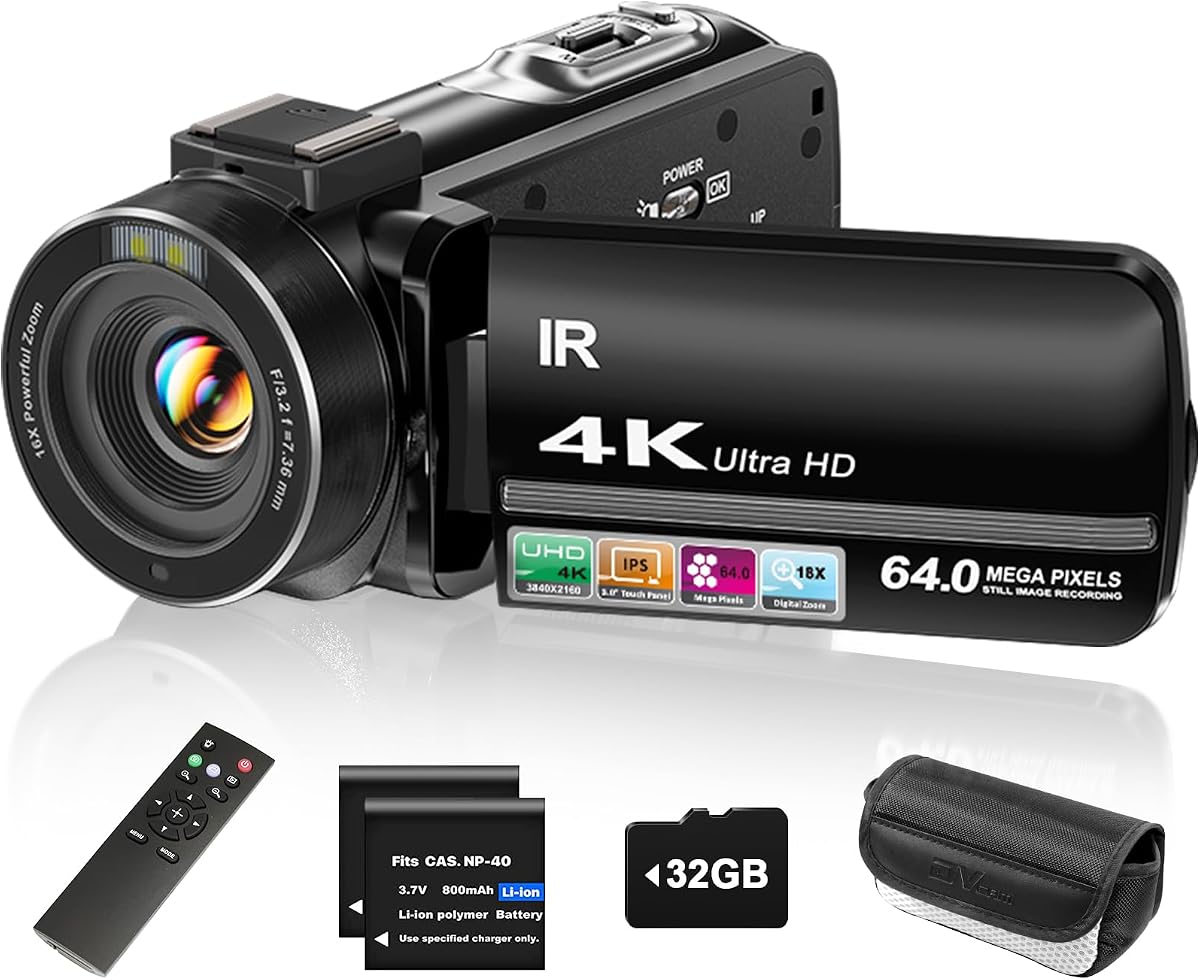
The ZYDIIE 4K Video Camera offers high-resolution capture suitable for detailed stop motion projects. With 4K Ultra HD recording and a rotating touchscreen, it provides flexibility in framing shots from various angles. The included remote control allows for easy triggering without touching the camera which is crucial for maintaining stable frames during animation sequences.
We may earn a commission when you buy through this link, at no additional cost to you.
Its infrared night vision enables creative shots in low light conditions that would otherwise be impossible. The 18x digital zoom brings distant action closer though users should be mindful of quality loss at high zoom levels. The 270-degree rotating screen helps in self-framing and overhead shots making it adaptable for different shooting setups.
One trade-off is the digital zoom which can reduce image sharpness compared to optical zoom. Additionally battery performance may vary depending on usage patterns though two batteries are included to extend recording sessions. These limitations are manageable for most hobbyist projects where ultimate optical precision is not the primary requirement.
This camera is well-suited for creators who want versatility beyond just stop motion animation. It handles vlogging and general video recording well making it a multi-purpose tool. We recommend it for those who need a budget-friendly option with high-resolution capabilities and flexible shooting angles.
The 270-degree rotating screen allows for easy overhead and low-angle framing.
Wireless remote helps prevent camera shake when triggering shots manually.
We may earn a commission when you buy through this link, at no additional cost to you.
The Canon EOS R6 Mark II with Stop Motion Animation Firmware represents the pinnacle of professional stop motion camera options. Its full-frame sensor delivers exceptional image quality and low-light performance ensuring rich detail and color accuracy across frames. The dedicated firmware enhances compatibility with animation software like Dragonframe streamlining the workflow for complex productions.
We may earn a commission when you buy through this link, at no additional cost to you.
Features like the silent electronic shutter prevent vibration which is critical for maintaining frame stability. The increased Live View resolution allows for precise framing and focus adjustments directly through the camera interface. This level of control ensures consistency that is essential for high-end animation work where quality cannot be compromised.
While the camera is a significant investment it offers unmatched flexibility and image quality for serious creators. It requires separate animation software which may add to the setup cost and complexity. However for professional environments where time and quality are paramount these requirements are standard and justifiable given the output standards.
This camera is best suited for professional animators and production teams who demand the highest fidelity. It excels in projects requiring detailed textures and challenging lighting conditions. We recommend it for those who prioritize image quality and workflow efficiency over budget considerations.
Electronic shutter reduces vibration ensuring stable frames without manual stabilization.
Higher resolution live view facilitates precise framing and focus adjustments.
We may earn a commission when you buy through this link, at no additional cost to you.
The FlyFrost 8K Video Camera pushes resolution limits with 8K recording at 15FPS ideal for high detail capture. It supports WiFi connectivity allowing you to manage and transfer files via smartphone apps. The included external microphone reduces wind and background noise ensuring better audio quality for any animated sequences that require sound.
We may earn a commission when you buy through this link, at no additional cost to you.
Its 3.0-inch touchscreen with 270-degree rotation provides flexibility in framing and monitoring shots. The lens hood protects against excess light preventing overexposure in bright environments. The included stabilizer helps maintain smooth footage which can be useful for dynamic animation sequences involving camera movement.
However 8K video generates large file sizes that require significant storage and processing power. The digital zoom features can degrade image quality if pushed to maximum. These factors are important to consider before committing to this camera for long or complex stop motion projects.
This camera is a strong choice for creators who want high-resolution footage for multiple uses. It is versatile enough for vlogging and professional video as well as animation. We recommend it for those who have the technical infrastructure to handle high-resolution files and prioritize visual detail.
Connect via app for remote control and easy file transfer to mobile devices.
External microphone input ensures clear sound capture for animated videos.
We may earn a commission when you buy through this link, at no additional cost to you.
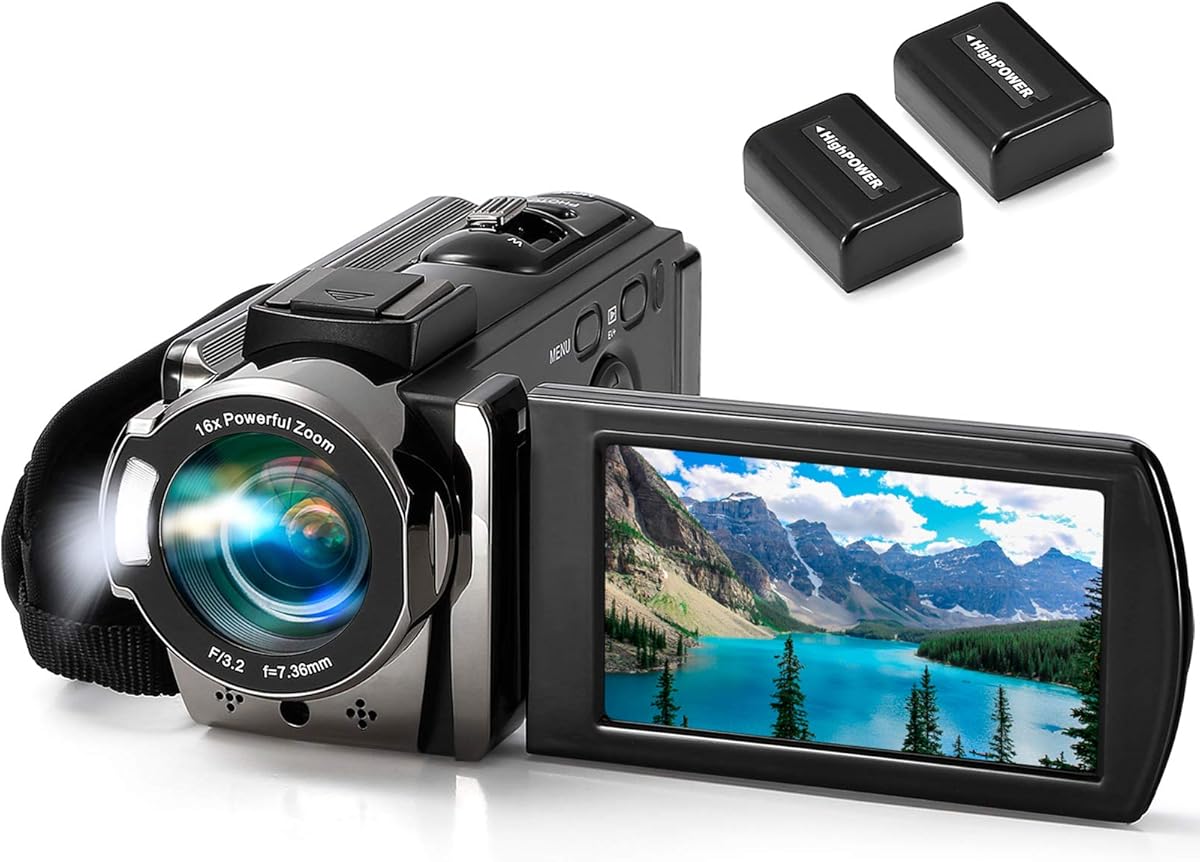
The kimire Video Camera Camcorder offers practical features that simplify stop motion workflows for beginners. Its pause function allows you to stop recording without ending the file making it easier to edit later. Recording while charging extends battery life ensuring longer capture sessions without interruptions.
We may earn a commission when you buy through this link, at no additional cost to you.
The Full HD 1080P resolution at 15FPS is well-suited for standard stop motion rates. The compact design makes it easy to position on tripods or shelves. The included fill light helps illuminate dark scenes ensuring better visibility in low-light conditions without additional equipment.
A limitation is the 15FPS limit which may not support higher frame rate workflows. The autofocus is basic and may require manual intervention for consistent focus. These trade-offs are acceptable for hobbyists who prioritize ease of use over advanced technical capabilities.
This camcorder is an excellent entry-level option for students and casual animators. Its user-friendly features reduce the complexity of setting up shots. We recommend it for those seeking a reliable and affordable tool to start creating animated videos.
Pause and resume recording without creating separate video files for seamless editing.
Supports recording while charging to extend shooting sessions significantly.
We may earn a commission when you buy through this link, at no additional cost to you.
The DJI Osmo Pocket 3 delivers exceptional stabilization with its 3-axis mechanical gimbal ensuring smooth and steady shots. This is invaluable for dynamic stop motion sequences where camera movement is part of the animation. The 1-inch CMOS sensor provides excellent low-light performance allowing for high-quality capture in dimly lit sets.
We may earn a commission when you buy through this link, at no additional cost to you.
Its 4K/120fps capability enables slow-motion effects that can add drama to animation. The ActiveTrack 6.0 helps keep subjects in focus automatically which is useful for moving characters. The pocket-sized design makes it highly portable and easy to mount in tight spaces.
Manual controls are less extensive than professional cameras limiting precise adjustments for frame-by-frame work. The price point is also higher than typical hobbyist options. However the image quality and stabilization features make it a standout choice for creators who prioritize visual smoothness.
This camera is ideal for animators needing compact tools with superior stabilization. It is best for projects where physical camera movement is integrated into the story. We recommend it for those who value portability and image stability over extensive manual configuration.
3-axis gimbal ensures smooth shots preventing jitter during motion animation.
Keep moving subjects in focus automatically during complex animation sequences.
We may earn a commission when you buy through this link, at no additional cost to you.
The Canon EOS R6 Mark II Kit provides a complete package with stop motion firmware and essential accessories. It includes a 64GB card and backpack ensuring you have everything needed to start shooting immediately. The aperture lock feature ensures consistent exposure across frames a critical requirement for professional animation quality.
We may earn a commission when you buy through this link, at no additional cost to you.
Focus position memory allows you to save focus settings simplifying complex shots requiring repeated focus points. The dual pixel autofocus delivers fast and intelligent tracking ensuring sharp subjects even in challenging conditions. This kit is designed for serious creators who need reliability and precision.
While no significant trade-offs are noted the high-end nature means it may be overkill for casual users. The complexity of settings may also require a learning curve. However for production environments these features streamline workflows significantly enhancing productivity.
This kit is recommended for professionals and advanced users who need a robust solution. It balances image quality with workflow-specific features effectively. We suggest it for those investing in a long-term animation setup requiring high performance and convenience.
Lock aperture to ensure consistent exposure across thousands of animation frames.
Save focus positions for reuse simplifying complex multi-shot sequences.
We may earn a commission when you buy through this link, at no additional cost to you.
The 4K Digital Camera with Macro & Wide Angle Lens offers lens versatility that enhances creative stop motion options. The included macro lens allows for close-up shots of small details while the wide-angle lens captures broader scenes. This flexibility is ideal for diverse project requirements without buying separate optics.
We may earn a commission when you buy through this link, at no additional cost to you.
It supports 48MP photo resolution ensuring high detail in static frames. The rechargeable battery supports long-term shooting and charging while recording ensures uninterrupted sessions. Its compact design makes it easy to set up on tables or shelves without bulky accessories.
The basic sensor may not match higher-end options in low light. Autofocus is standard and may need manual intervention for precise framing. However for entry-level users the included lens bundle provides excellent value and creative freedom.
This camera is perfect for beginners who want to explore different perspectives. It is easy to operate making it accessible for kids and students. We recommend it for those who prioritize lens options and ease of use in their setup.
Macro and wide lenses included allow versatile framing for detailed or broad scenes.
Continuous power support prevents interruptions during long animation sessions.
We may earn a commission when you buy through this link, at no additional cost to you.
The Complete HD Stop Motion Kit offers everything needed to create animated movies right out of the box. It includes a Full HD 1080P camera and software specifically designed for stop motion workflows. The instructional book provides step-by-step guidance helping users learn techniques like rotoscoping and animation basics.
We may earn a commission when you buy through this link, at no additional cost to you.
The software is available via CD-ROM or free download eliminating registration hassles. The camera connects securely to computers without detaching ensuring stable performance during long projects. This bundle is ideal for educators and after-school programs looking for curriculum-friendly tools.
Software options are limited to the bundled package which may lack advanced features. The camera is basic but sufficient for typical projects. These constraints are acceptable for educational settings where ease of use and comprehensive instructions are prioritized over advanced control.
This kit is best for schools and parents wanting a structured introduction to animation. It simplifies the learning process with dedicated resources. We recommend it for those seeking a ready-to-use solution that combines hardware and education effectively.
Book and tutorials teach essential techniques like rotoscoping and time-lapse.
Camera stays securely connected to computer ensuring reliable data transfer.
We may earn a commission when you buy through this link, at no additional cost to you.
The USB 2.0 HD Pro Webcam is the most accessible option for entry-level stop motion animation. It provides Full HD 1080p resolution and a manual focus lens to prevent unwanted autofocus shifts. The built-in microphone with noise cancellation helps reduce background noise ensuring clean audio captures.
We may earn a commission when you buy through this link, at no additional cost to you.
Its plug-and-play setup works seamlessly with Windows and macOS without requiring complex drivers. The heat-resistant lens maintains clarity over extended sessions which is important for long recording times. This webcam turns any computer into a capable camera station quickly.
The fixed focal length limits creative framing adjustments without moving the device. Lack of native software requires third-party tools for advanced control. However these limitations are minor given the low price and ease of setup making it a strong value.
This webcam is perfect for students and beginners with limited budgets. It delivers essential features without unnecessary cost or complexity. We recommend it as a starter tool to test animation ideas before investing in more advanced cameras.
Twist focus ring to lock focus preventing autofocus hunting between frames.
Internal microphone filters household appliances ensuring clearer audio for videos.
We may earn a commission when you buy through this link, at no additional cost to you.
Selecting the right camera involves balancing resolution manual control and software compatibility to ensure a smooth workflow.
Resolution determines the level of detail in your frames. Higher resolutions like 4K or 8K provide crisp images but require more storage and processing power. For most beginners Full HD 1080p is sufficient and balances quality with performance effectively.
Manual focus is crucial for stop motion to prevent the camera from searching for focus between frames. Look for cameras with a physical focus ring or settings that allow locking focus. This ensures consistency across your thousands of shots without distracting flickers or shifts.
Consistent lighting is as important as camera quality. Cameras with built-in lights or compatibility with external lighting kits simplify setups for indoor projects. Aperture lock features help maintain consistent exposure across frames reducing the need for post-production corrections.
Ensure the camera works with your preferred stop motion software like Stop Motion Studio or Dragonframe. Some cameras come bundled with software or drivers that streamline connection. Compatibility avoids technical headaches allowing you to focus on creativity rather than troubleshooting.
Stability is key to avoiding jitter in your animation. Choose a camera with standard tripod threads or a secure mounting system. Models with adjustable stands or built-in stabilization help keep the frame steady during long recording sessions and complex movements.
Stop motion projects often require hours of recording. Look for cameras that support recording while charging or come with multiple batteries. This feature ensures you won't miss a frame due to power loss and extends your shooting time significantly.
Connectivity affects how easily you transfer files and control the camera. USB connection is reliable and simple for wired setups. WiFi capabilities offer wireless convenience for viewing and transferring footage though wired setups remain preferred for stability in frame-by-frame work.
Determine your budget early to narrow down choices between webcams dedicated kits and professional cameras. Entry-level options offer great value for beginners while premium models provide advanced features for production. Balance what you need now with potential future expansion plans.
Set up your camera on a stable tripod or stand to ensure consistent framing throughout your animation. Use the manual focus ring or lock focus settings to prevent the camera from adjusting between frames. This stability is essential for smooth playback later.
Adjust your lighting to ensure even illumination across your set. Built-in LEDs or external softboxes can help reduce harsh shadows. If your camera supports it use consistent exposure settings or aperture lock to maintain uniform brightness.
Care for your camera by keeping the lens clean and storing it in a dry safe place when not in use. Avoid exposing it to extreme temperatures or humidity to prolong its lifespan. Regularly update firmware and drivers to ensure optimal compatibility with software.
Yes many webcams like the USB 2.0 HD Pro work well for entry-level projects. They offer Full HD resolution and manual focus rings. Ensure compatibility with stop motion software like Stop Motion Studio for frame capture.
Standard stop motion typically uses 12 to 15 frames per second. This provides smooth motion without excessive file size. Higher rates like 24fps offer more fluidity but require more frames and effort per minute.
Most cameras work with popular third-party software like Stop Motion Studio or Dragonframe. Some kits bundle software. Ensure the camera drivers are installed and recognized by your operating system before starting.
Manual focus is critical to prevent autofocus hunting which causes frame flickering. Cameras with physical focus rings or focus lock options are highly recommended for consistent results during long shoots.
External LED lights or desk lamps can supplement lighting. Position them to minimize harsh shadows and ensure consistent brightness. Softboxes or diffusers help create even lighting suitable for close-up animation.
Yes mirrorless cameras offer superior image quality and low-light performance. Models with stop motion firmware like the R6 Mark II streamline workflows. Ensure you have a reliable tripod and software integration.
Use a sturdy tripod and avoid touching the camera between frames. A wireless remote control allows triggering shots without physical contact. Built-in stabilization or external gimbals help further reduce unintended motion.
4K is not strictly necessary but offers more detail and cropping flexibility in post. Full HD 1080p is often sufficient for online videos. Choose based on your output needs and storage capacity.
We reviewed ten cameras ranging from dedicated kits like the HUE Animation Studio Pro to professional options like the Canon EOS R6 Mark II. The HUE kit and USB 2.0 HD Pro Webcam offer excellent starting points for hobbyists and educators. The Canon EOS R6 Mark II stands out for professionals needing highest fidelity.
Prioritize manual focus and consistent lighting features to ensure smooth animation. Consider your software needs and whether a bundled kit simplifies setup. Investing in stability and control now will save time and effort during production.
Remember to check current product availability and features before purchasing. Prices and models can change over time. Select the camera that best fits your current skill level and project goals for the best creative experience.