
Cherry KC 1000 Smartcard Keyboard
4.6Editor score
FIPS 201 approved
Thin low-profile design
One-handed card operation
Discover the top 10 best keyboard with smart card reader options for secure access and seamless authentication in offices and government workstations today.
Finding the right keyboard with smart card reader ensures secure and efficient access to protected systems in professional environments. These devices combine typing comfort with advanced authentication, making them essential for finance, healthcare, and government workstations.
We evaluated ten top-rated models based on build quality, reader compatibility, ergonomic design, and security certifications. Each product was analyzed for its ability to support secure login workflows while maintaining reliable performance during long typing sessions.
Every review highlights key strengths and potential trade-offs so you can choose the best fit for your workspace. Keep in mind that product availability and pricing may change over time, so verify current details before purchasing.
4.6Editor score
4.6Editor score

4.1Editor score
This side-by-side comparison highlights the key features and specifications of each model so you can quickly identify the best option for your security and comfort needs.


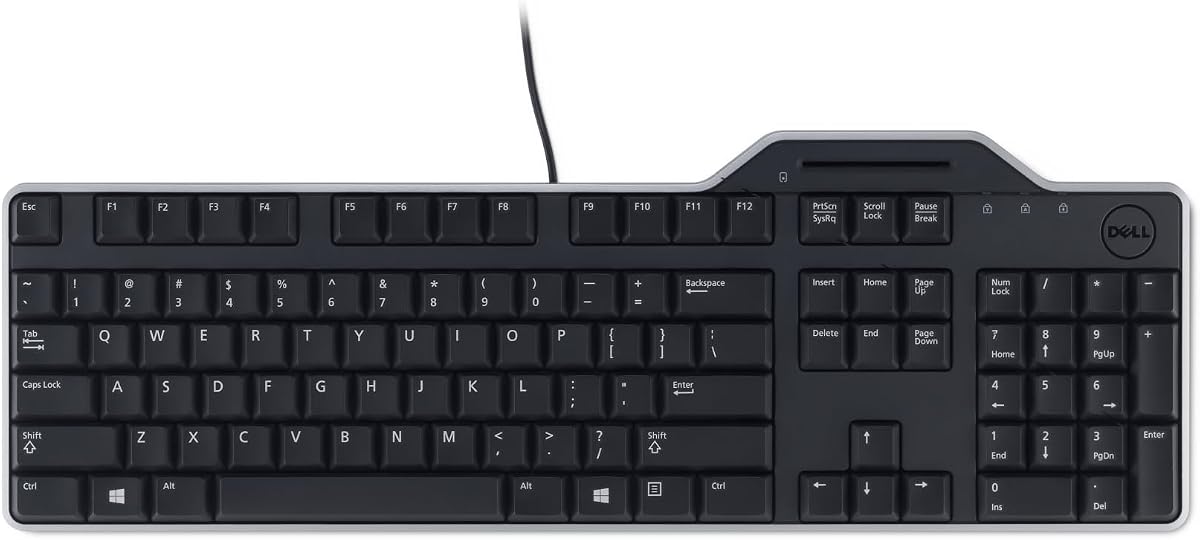
The Dell KB813 stands out as a top performer in the secure keyboard category, earning a strong 4.6-star rating from users. Its integrated smartcard reader provides reliable authentication for protected systems while maintaining a comfortable typing experience.
We may earn a commission when you buy through this link, at no additional cost to you.
This keyboard features a spill-resistant design that protects against accidental liquid damage, which is essential in busy office environments. The ergonomic layout includes a detachable palm rest and low-profile keys that reduce fatigue during long work sessions.
While it lacks advanced customization features, the wired USB connection ensures stable performance without relying on batteries. The simple plug-and-play setup makes it accessible for users who prioritize functionality and security over extra bells and whistles.
Ideal for professionals in government or healthcare, this model balances security, durability, and comfort. It is a dependable choice for organizations requiring secure login capabilities without compromising on daily typing efficiency.
The built-in smartcard reader enables secure logon processes, making it easy to authenticate with smartcards for protected systems.
Spill-resistant construction and a detachable palm rest ensure long-lasting performance and comfort during extended use.
We may earn a commission when you buy through this link, at no additional cost to you.
The Adesso TruForm AKB-150SB-TAA earns a premium badge for its advanced ergonomic design and robust security features. With a 4.1-star rating, it caters to professionals needing secure access and long-term typing comfort.
We may earn a commission when you buy through this link, at no additional cost to you.
Its split key zones and gently sloped shape encourage natural hand positioning, reducing joint pain and spinal discomfort. The integrated palm rest enhances comfort, while 13 multimedia hotkeys streamline access to common tools.
Although it costs more than standard models, the TAA compliance and comprehensive security support make it ideal for government and enterprise users. The membrane keys provide a quiet, smooth typing experience with a five million keystroke lifecycle.
This keyboard is best suited for users prioritizing ergonomic health and regulatory compliance. Its secure smartcard reader ensures seamless authentication in industries like banking and healthcare.
The split ergonomic design promotes natural hand, improving posture and reducing strain during long use.
TAA compliance and built-in smartcard support make it ideal for government and enterprise environments.
We may earn a commission when you buy through this link, at no additional cost to you.
The Cherry KC 1000 is a top budget-friendly option with a 4.6-star rating. It delivers essential security features like FIPS 201 approval and PC/SC smartcard reading without the added cost of premium ergonomic designs.
We may earn a commission when you buy through this link, at no additional cost to you.
Its thin, low-profile design includes a smart card contacting unit that supports ISO 7816 compliant cards. Secure PIN entry and one-handed module operation provide convenience, while driver support extends to Windows, macOS, and Linux.
Though it lacks multimedia hotkeys or advanced ergonomics, this keyboard excels at secure authentication tasks. The lightweight build ensures portability, making it a practical choice for shared workstations or mobile setups.
Ideal for users prioritizing security and value, this keyboard offers robust protection for sensitive data. It is a reliable pick for organizations needing certified secure access on a budget.
FIPS 201 approval and secure PIN entry ensure reliable protection for sensitive authentication processes.
A thin profile and lightweight design make it easy to transport and integrate into diverse work environments.
We may earn a commission when you buy through this link, at no additional cost to you.
The Adesso EasyTouch 130SB brings mechanical switching to secure keyboards, earning a 4.6-star rating. Its red switches deliver tactile feedback, while the integrated smartcard reader supports secure banking and identification transactions.
We may earn a commission when you buy through this link, at no additional cost to you.
Designed for accessibility, it features large print keycaps for improved legibility in low-light conditions. The dedicated Copilot AI hotkey provides instant access to Microsoft Copilot, aiding productivity for creative and coding tasks.
With a 50 million keystroke lifecycle, this keyboard is built for durability. While it may produce more sound than membrane models, the enhanced typing experience and security features make it worth the trade-off.
Best for power users seeking responsiveness and security, this keyboard combines tactile satisfaction with authentication capabilities. It is ideal for offices requiring secure login and robust typing performance.
The Copilot AI hotkey streamlines tasks by providing instant access to assistance without software navigation.
Large print keycaps improve visibility, making it easier to read letters and symbols in various lighting.
We may earn a commission when you buy through this link, at no additional cost to you.
This Dell model earns a 4.7-star rating for its reliable secure performance and quiet operation. It features wired USB connectivity and a spill-resistant design that protects against beverage accidents in shared workspaces.
We may earn a commission when you buy through this link, at no additional cost to you.
The full-size layout includes low-profile keys and a detachable palm rest, providing comfort during extended use. Its quiet operation minimizes distractions, making it suitable for collaborative office environments where noise is a concern.
While it lacks advanced features, the focus on basic security and typing comfort makes it a practical choice. The plug-and-play USB connection eliminates battery dependency, ensuring consistent performance.
Ideal for users seeking a no-frills secure keyboard, this model delivers essential smartcard authentication with reliability. It is a solid option for businesses prioritizing functionality and cost-effectiveness.
Quiet low-profile keys ensure a peaceful typing experience that does not disturb colleagues.
Spill-resistant construction safeguards the keyboard against liquid damage, extending its lifespan.
We may earn a commission when you buy through this link, at no additional cost to you.
The Kensington KB201C offers a full-size layout with a certified CAC smartcard reader, earning a 3.8-star rating. It is TAA compliant, making it suitable for US Federal Government institutions requiring regulatory standards.
We may earn a commission when you buy through this link, at no additional cost to you.
Its quiet-click keys provide a peaceful typing experience while maintaining productivity. The full-size numeric keypad enhances data entry speed for professionals working with numbers regularly.
Although some users report limited advanced features, the strong warranty and compliance make it reliable for institutional use. It supports multiple standards like PC/SC and FIPS-201 for robust authentication.
Best for government or enterprise users, this keyboard balances security compliance with essential typing functionality. It is a dependable choice for organizations needing certified secure access.
TAA compliance and CAC support make it ideal for US Federal Government institutional procurement.
Quiet-click keys allow for focused productivity without disturbing colleagues during use.
We may earn a commission when you buy through this link, at no additional cost to you.
Lenovo offers a reliable wired smartcard keyboard with a 4.4-star rating. It features a standard US English layout and wired USB connectivity for stable performance without battery dependency.
We may earn a commission when you buy through this link, at no additional cost to you.
The compact package dimensions make it easy to transport and store, ideal for mobile professionals. Its standard key spacing ensures comfortable typing familiarity for users transitioning from traditional keyboards.
While detailed smartcard specifications are limited in public descriptions, its integration with Lenovo systems ensures compatibility. The lightweight build enhances portability for users who move between workstations.
Best for general office use, this model balances basic security features with cost-effectiveness. It is a practical choice for businesses seeking affordable secure keyboard solutions.
Compact dimensions and lightweight build make it easy to transport between workstations.
A standard US English layout ensures quick adaptation for users switching from traditional keyboards.
We may earn a commission when you buy through this link, at no additional cost to you.
The HP USB Business Slim Smartcard Keyboard features a sleek design with a 4.5-star rating. Its built-in spill drain technology protects against accidental liquid spills, ensuring durability in busy environments.
We may earn a commission when you buy through this link, at no additional cost to you.
LED key indicators provide clear visual feedback, while the 104-key membrane layout supports efficient data entry. The cable connectivity ensures a stable connection without the need for batteries or charging.
While it offers basic membrane keys, its robust build and spill protection make it suitable for high-traffic offices. The slim profile saves desk space, contributing to a tidy workspace.
Ideal for business users seeking durability and reliability, this model combines security features with practical design elements. It is a solid choice for shared workstations requiring consistent performance.
Spill drain technology redirects liquid away from critical components, extending the keyboard's lifespan.
LED key indicators provide quick status updates, improving workflow efficiency and user clarity.
We may earn a commission when you buy through this link, at no additional cost to you.
Cherry's Secure Board 1.0 offers robust protection with a 4.2-star rating. It features GS approval and supports RF/NFC interfaces for seamless card authentication in thin client environments.
We may earn a commission when you buy through this link, at no additional cost to you.
Its secure mode with encryption ensures data protection during login processes. The PC/SC smartcard reader supports multiple protocols, making it versatile for different security standards.
While it may require complex configuration, the high-level security makes it ideal for government or military use. The black QWERTY design is compact and professional for office setups.
Best for specialized security needs, this keyboard delivers certified protection for sensitive systems. It is a top pick for environments requiring advanced authentication and encryption.
GS approval certification ensures the keyboard meets strict German security standards for government use.
Secure mode with authentication and encryption protects sensitive data during thin client login.
We may earn a commission when you buy through this link, at no additional cost to you.
This OEM Dell keyboard provides a reliable replacement option with a 4.4-star rating. It comes in new unopened packaging with an integrated smartcard reader for secure authentication.
We may earn a commission when you buy through this link, at no additional cost to you.
Its black USB design mirrors the standard Dell KB813 model, ensuring compatibility with existing systems. The English layout supports standard typing needs, making it easy to adopt for office users.
While documentation may be limited compared to retail versions, it offers the same core security features. The cost-effective pricing makes it a practical choice for bulk replacements.
Ideal for businesses needing secure keyboards without retail markup, this model delivers essential functionality. It is a dependable option for maintaining secure login standards.
Unopened OEM packaging ensures brand-new quality, making it suitable for bulk office upgrades.
Compatible with Dell systems, this keyboard integrates easily into existing secure environments.
We may earn a commission when you buy through this link, at no additional cost to you.
Selecting the right secure keyboard requires evaluating compatibility, ergonomic needs, and certification standards. Use these factors to find a model that supports your organization's security protocols.
Ensure the keyboard supports your organization's smart card standards like CAC, PIV, or ISO7816. Compatibility with PC/SC and CCID protocols ensures seamless integration with authentication systems.
Check protocol support before purchasing to avoid connectivity issues with existing infrastructure.
Look for certifications like FIPS 201, EMV, or TAA compliance. These standards ensure the keyboard meets government or industry requirements for secure login and data protection.
Certified keyboards reduce compliance risks and are essential for regulated industries.
Choose a design that supports long typing sessions. Split layouts, palm rests, and low-profile keys reduce strain on wrists and hands.
Ergonomics improve productivity and prevent repetitive strain injuries during extended use.
A durable build ensures reliability in busy environments. Spill-resistant designs and high keystroke life ratings indicate longevity.
Invest in models with spill protection and robust construction for shared workstations.
Decide between wired USB or wireless options. Wired connections offer stability and eliminate battery dependency, while wireless models provide flexibility.
Wired connections are often preferred for secure environments to avoid signal interference.
Verify compatibility with your OS like Windows, macOS, or Linux. Driver support is essential for the smart card reader to function properly.
Cross-platform support ensures the keyboard works across different devices without issues.
Consider multimedia keys, backlighting, or AI hotkeys for enhanced productivity. These features can streamline workflows beyond basic authentication.
Prioritize features that align with daily tasks to maximize value.
Balance cost with security requirements. While budget models may lack ergonomic features, they often provide core smartcard support.
Choose a model that fits your financial constraints without compromising essential security standards.
Connect the keyboard to your computer via USB and install any necessary drivers from the manufacturer's website. Once installed, insert your smart card into the reader to authenticate and access secure systems.
Clean the keyboard regularly with compressed air and a soft cloth to prevent dust buildup. Avoid placing liquids near the workspace to protect spill-resistant features and ensure longevity.
Store the keyboard in a dry, cool environment when not in use. If you need to replace batteries or disconnect the device, do so carefully to avoid damage to the smart card reader.
A keyboard with a smart card reader is primarily used for secure authentication in organizations requiring protected access to systems. It allows users to log in using smart cards, enhancing security by combining something you have with something you know.
Not all models support every operating system. Always check the product specifications for compatibility with Windows, macOS, or Linux before purchasing to ensure proper functionality.
Most keyboards are plug-and-play, but smart card readers often require specific drivers for full functionality. Check the manufacturer's website for any necessary software to ensure seamless authentication.
Look for FIPS 201, TAA, or EMV certifications depending on your industry. These ensure the keyboard meets government or financial security standards for data protection.
Use compressed air to remove debris and a soft cloth to wipe the surface. Avoid soaking the keyboard or using harsh chemicals that could damage the smart card reader or electronics.
While some models offer wireless options, most secure keyboards use wired USB connections for stability and to avoid potential security vulnerabilities. Verify the connection type before purchasing.
The Dell KB813, Cherry KC 1000, and Adesso TruForm AKB-150SB-TAA stand out as top choices for balance, value, and premium ergonomics. Each offers unique strengths depending on your security and comfort needs.
Prioritize certifications like FIPS or TAA if your organization requires compliance. Ergonomics and spill resistance should be considered to protect your health and investment over the long term.
Remember to verify current availability and specifications before purchasing. Security standards evolve, so always check the latest details to ensure the model meets your requirements.