
Anker Laptop Docking Station Dual Monitor
4.5Editor score
8-in-1 connectivity
Dual HDMI 4K output
85W pass-through charge
Compare top docking stations for Dell laptops including Dell and Anker models for dual monitors, high-speed data, and reliable connectivity.
Finding the right docking station for Dell laptop devices can transform your workspace into a full desktop environment. Whether you need multiple display support or fast charging capabilities, the right hub connects all your peripherals seamlessly.
We evaluated ten leading models based on port variety, power delivery strength, and compatibility with modern Dell systems. Our analysis covers budget-friendly options alongside premium enterprise-grade docks designed for professional workflows.
Each selection highlights specific strengths like video output limits or network speeds to help you decide. Note that prices and availability change frequently so verify current details before finalizing your purchase decision today.
4.5Editor score

4.5Editor score

4.3Editor score
This side-by-side comparison highlights key specifications across all ten selected models to help you identify the best match for your specific Dell laptop requirements.




The Dell Pro Laptop Docking Station WD25 earns its top spot with powerful compatibility and sustainable design features perfect for modern Dell AI PCs and non-Dell machines.
We may earn a commission when you buy through this link, at no additional cost to you.
It drives up to 100W of power and supports native configuration for up to four high-resolution displays ensuring your workspace stays productive with faster USB and network speeds.
While the price reflects its premium status the ambidextrous USB-C cable enhances cable management and its use of recycled materials aligns with eco-friendly workplace goals.
Business professionals seeking reliable hardware should pick this dock as it offers flexible management capabilities to keep users working without IT disruption daily.
The WD25 delivers up to 100W power to both new Dell AI PCs and non-Dell systems ensuring broad utility across various laptop brands.
Configurable ambidextrous cabling and robust connectors reduce downtime while supporting IT efficiency through flexible management features.
We may earn a commission when you buy through this link, at no additional cost to you.
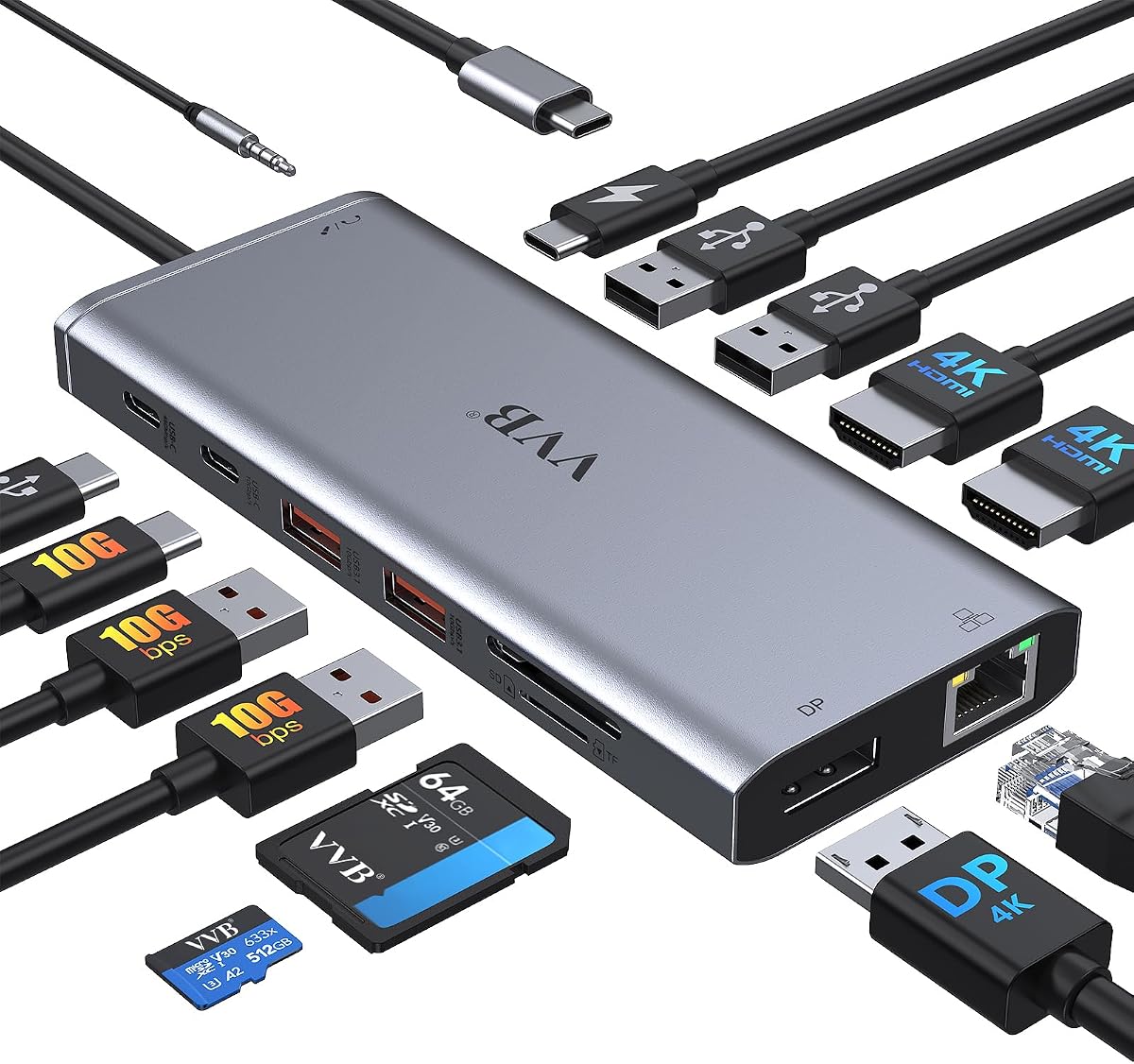
The Anker Laptop Docking Station Dual Monitor provides massive expansion via a single USB-C port making it an excellent budget choice for home or office setups.
We may earn a commission when you buy through this link, at no additional cost to you.
Equipped with 2 HDMI ports and a microSD reader it supports streaming or mirroring in stunning 4K@60Hz on one screen or two at 4K@30Hz.
Its Power Delivery compatibility ensures high-speed pass-through charging up to 85W though you will need a 100W wall charger and specific cable for full results.
Students or remote workers on a tight budget will appreciate its reliability and included 18-month warranty making it a safe low-risk investment.
This hub expands a single USB-C port into multiple data and video outputs including Ethernet and SD card readers for total connectivity.
High-speed pass-through charging up to 85W keeps your laptop powered while you work without needing a separate charger at your desk.
We may earn a commission when you buy through this link, at no additional cost to you.
The Anker Prime Docking Station brings together all your devices with a 14-in-1 solution that handles charging data transfer and dual displays effectively.
We may earn a commission when you buy through this link, at no additional cost to you.
It delivers a powerful charge with 160W of total output capable of charging up to four devices simultaneously through three USB-C ports and one USB-A port.
While it supports dual 4K displays at 2K@60Hz it does not support ultra-wide 5120*1440 monitors so verify your screen specs before purchasing.
Power users needing fast 10Gbps data speeds and maximum power output should choose this dock to master their workflow efficiently and confidently.
With 160W total output and 10Gbps data speeds this dock ensures your devices charge and transfer files without bottlenecks or delays.
Efficiently manage data across multiple devices with versatile ports offering speeds up to 10Gbps alongside dual display and audio options.
We may earn a commission when you buy through this link, at no additional cost to you.
This USB C Docking Station offers an 8-in-1 design with robust video capabilities including dual HDMI and DisplayPort options for extensive monitor setups.
We may earn a commission when you buy through this link, at no additional cost to you.
It can output up to 4K dual or triple display videos though connecting VGA limits all displays to 1080P resolution due to signal constraints.
The 100W USB C PD charging port provides up to 87W safe output to your laptop ensuring your device stays charged while running all peripherals.
Users needing triple displays on a budget will find this hub versatile enough for most tasks provided they avoid VGA if high resolution is key.
This hub supports up to three displays via HDMI and VGA allowing you to expand your workspace significantly with affordable hardware.
Up to 100W input and 87W safe output keep your laptop powered efficiently while you utilize all the connected video ports.
We may earn a commission when you buy through this link, at no additional cost to you.
The Anker Nano Laptop Docking Station features a detachable 6-in-1 portable hub that snaps off for on-the-go use replacing two devices entirely.
We may earn a commission when you buy through this link, at no additional cost to you.
It supports triple display setups with two HDMI ports and one DisplayPort perfect for data analysts or content creators who need massive screen real estate.
With 100W Power Delivery and 10Gbps transfer speeds moving files happens quickly while keeping your laptop fully powered during heavy workloads.
Travelers wanting a versatile setup for home office and mobile work should choose this dock as its detachable design simplifies life significantly.
One docking station replaces two by offering a full desktop setup and a portable hub that snaps off for mobile work needs.
Connect up to three monitors via HDMI and DisplayPort to create a full desktop workstation suitable for complex multitasking tasks.
We may earn a commission when you buy through this link, at no additional cost to you.
This 14 in 1 USB C docking station extends your laptop capabilities with two HDMI ports a DisplayPort and a 100W power delivery port.
We may earn a commission when you buy through this link, at no additional cost to you.
It supports ultra high-definition 4K dual monitor outputs and triple displays on Windows offering flexibility for various professional workflow needs.
The Super Speed Data Transfer feature allows file transfers in seconds via 10Gbps ports ensuring quick access to external drives or cards.
Workers needing stable Gigabit Ethernet and fast data access will find this hub reliable for daily office tasks despite excluding the power adapter.
USB C and USB A ports offer up to 10Gbps speeds allowing you to transfer files in seconds from external drives or cards.
While MacOS limits to mirrors Windows users can utilize triple displays to maximize their workspace efficiency and multitasking capabilities.
We may earn a commission when you buy through this link, at no additional cost to you.
The Dell WD19S 180W Docking Station is built for the future with a robust design intended to optimize your workspace and power connections effectively.
We may earn a commission when you buy through this link, at no additional cost to you.
It delivers 130W Power Delivery to your laptop ensuring that even high-performance Dell machines receive sufficient power for demanding tasks without throttling.
Although it carries a lower rating than newer models it remains a reliable choice for users who need consistent dual DisplayPort support and solid connectivity.
Legacy Dell workstation owners looking for a sturdy dock with high power output should consider this model despite its age in the market.
With 130W Power Delivery this dock ensures your laptop and all connected peripherals run smoothly without power interruptions or throttling.
The dual DisplayPort and HDMI support allow you to configure a multi-monitor setup that enhances productivity and desk organization.
We may earn a commission when you buy through this link, at no additional cost to you.
Turn your laptop into a desktop workstation with this 13-in-1 USB C docking station designed to support triple displays for expanded multitasking.
We may earn a commission when you buy through this link, at no additional cost to you.
It charges your laptop at 85W and your phone at 18W simultaneously while allowing you to read SD cards at 104 MB/s speed.
The vertical design saves desk space and the included 135W power adapter ensures desktop-grade power delivery right out of the box.
Power users who need reliable connectivity for three monitors and fast data transfer will find this Anker model a solid daily driver.
This hub provides 13 ports including HDMI and DisplayPort to turn your laptop into a full desktop workstation efficiently.
With 10Gbps USB-C transfers and 104 MB/s SD card reading this dock handles heavy data tasks without slowing down your workflow.
We may earn a commission when you buy through this link, at no additional cost to you.
The Dell WD19 130W Docking Station offers classic features like dual DisplayPort 1.4 and HDMI 2.0B to maintain compatibility with older Dell setups.
We may earn a commission when you buy through this link, at no additional cost to you.
It provides 90W Power Delivery which suits many standard laptops and includes a combo audio headset port for versatile connectivity options.
While it has older USB-A Gen 1 ports it remains a sturdy choice for users needing stable Gigabit Ethernet and dual video outputs.
Users seeking a dependable Dell-specific dock with proven compatibility should consider this model for its balance of legacy features and reliability.
Dual DisplayPort 1.4 and HDMI 2.0B outputs allow you to connect high-resolution monitors for a robust dual-screen work environment.
This dock is designed specifically for Dell laptops ensuring stable connectivity and optimized power delivery for your specific hardware.
We may earn a commission when you buy through this link, at no additional cost to you.
This renewed WD19 Dell Docking Station simplifies your setup by connecting peripherals and monitors with a reliable USB-C interface for broad compatibility.
We may earn a commission when you buy through this link, at no additional cost to you.
It supports various Dell devices including Inspiron XPS and Precision models while offering dual DisplayPort and HDMI for effective video output needs.
The 180W adapter ensures adequate power delivery though users should verify their computer compatibility before purchasing to avoid any issues.
Those seeking a cost-effective refurbished option should choose this dock as it maintains the functionality of new models at a lower price.
Effortlessly connect your peripherals monitors and devices with this dock which simplifies your setup and maximizes productivity daily.
This hub supports select models from the Inspiron Venue Precision XPS and Latitude series ensuring it fits many Dell laptop needs.
We may earn a commission when you buy through this link, at no additional cost to you.
Selecting the right docking station requires understanding your specific needs regarding ports power and video output to ensure a seamless workstation setup.
Evaluate the number of USB-A USB-C HDMI and DisplayPort ports you need to connect your monitors keyboards and storage devices efficiently.
Look for docks that offer more ports than you currently use to accommodate future device additions without buying extra adapters or hubs.
Ensure the dock supports enough Power Delivery wattage to charge your Dell laptop while running all connected peripherals simultaneously without draining battery.
Aim for at least 65W to 100W output depending on your laptop size and workload to maintain optimal performance during intensive tasks.
Check the supported resolution and refresh rates for dual or triple monitor setups to ensure they match your external display requirements.
Verify that the dock supports your desired resolution such as 4K@60Hz if you plan to run high-end displays for creative or productivity work.
Consider the USB version supported by the dock whether it is USB 3.0 or 3.1 to ensure fast file transfers for external drives.
High-speed data transfer is essential if you frequently move large video files or datasets between your laptop and external storage devices.
If you require a stable internet connection choose a dock with a Gigabit Ethernet port to ensure reliable network access without Wi-Fi drops.
Ethernet support is critical for business users who need consistent low-latency connections for video conferencing or secure network access.
Confirm that the dock supports your operating system especially if you use macOS since some hubs limit displays to mirrored mode on Mac.
Linux users should verify driver support as some USB-C hubs may not function correctly without specific software configurations or firmware updates.
Assess the dock's physical size and cable management features like ambidextrous routing to keep your desk organized and clutter-free.
A compact design with durable connectors helps prevent wear and tear ensuring the dock lasts longer under daily professional use conditions.
Look for reputable brands offering at least an 18-month warranty to protect your investment against hardware failures or connection issues.
Good customer support ensures that you get quick assistance if the dock fails to recognize your laptop or peripheral devices unexpectedly.
Begin by connecting the dock's power adapter to an outlet and then plug the USB-C cable into your Dell laptop to establish a stable connection.
Connect your external monitors to HDMI or DisplayPort ports and then attach peripherals like keyboards and storage drives to the available USB ports.
To maintain longevity keep the dock in a well-ventilated area free from dust and ensure cables are not bent sharply to prevent internal damage.
The Dell Pro Laptop Docking Station WD25 is ideal due to its enhanced compatibility and Power Delivery. It supports up to four displays and offers 100W charging for most Latitude models. This ensures seamless integration with Dell's hardware ecosystem.
Yes many hubs like the Anker Nano support triple displays via HDMI and DisplayPort. You must ensure your laptop supports MST or multiple video modes for extended screens. macOS users should note that external displays often mirror instead of extending.
Many docks include a power adapter but some require a separate PD charger for charging your laptop. Check if the dock provides enough wattage like 85W or 100W to charge your device while in use.
USB-C hubs work with MacBooks but macOS often limits external monitors to mirrored mode unless using specific Thunderbolt docks. Ensure the hub supports DP Alt Mode for video output on macOS systems.
Download the Dell Command Update tool to check for and install firmware updates for your docking station. This ensures compatibility with the latest Dell laptops and fixes potential connection bugs.
Flickering often occurs if the cable or port does not support the required bandwidth for your monitor resolution. Try using a high-quality cable or reducing the refresh rate to stabilize the connection.
We have reviewed ten top options ranging from budget-friendly Anker hubs to powerful Dell enterprise docks to meet diverse workstation needs.
Prioritize power delivery and video output capabilities when selecting a dock to ensure your peripherals run smoothly without bottlenecks.
Remember to check current prices and availability as these models may vary in stock and cost over time.