
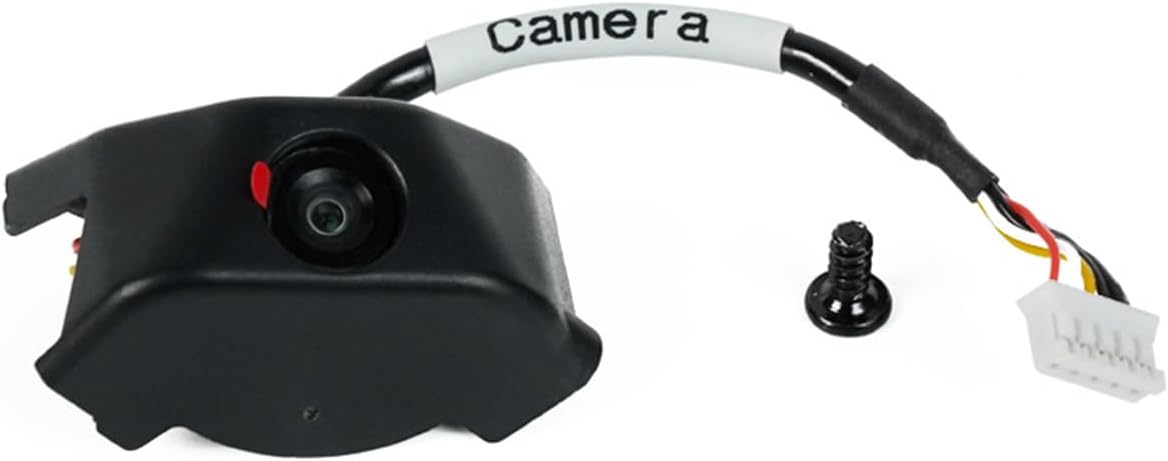
Anycubic Kobra 3 Camera
4.5Editor score
Ultra clear resolution support
DIY replaceable frame design
Anycubic APP integration
This guide compares the top 3D printer cameras for remote monitoring, evaluating features like night vision, time-lapse, and compatibility to help you choose
Monitoring your 3D prints from anywhere requires a reliable camera system that delivers clear visuals and real-time alerts. These devices help you catch failures early, save filament, and capture stunning time-lapse videos without constant supervision of your workspace.
We evaluated ten leading 3D printer cameras based on resolution, connectivity, ease of installation, and specific features like spaghetti detection or night vision. Each product was analyzed for compatibility with popular printer models and overall value for hobbyists and professionals alike.
Each pick below highlights key strengths, trade-offs, and ideal use cases to help you decide which camera fits your workflow. Please note that product availability and pricing can change frequently, so always verify current details before making your final purchase decision today.
4.5Editor score

4.3Editor score

4.1Editor score
The following table provides a side-by-side comparison of all ten selected 3D printer cameras. Review the key specifications and features to quickly identify which model aligns with your printer compatibility and remote monitoring needs.



The Creality Official Nebula Camera is a standout option for users seeking reliable remote monitoring capabilities. With a strong rating of 4.3 stars, it promises effortless connectivity and impressive features like auto-generated time-lapse videos and infrared night vision for 24-hour monitoring.
We may earn a commission when you buy through this link, at no additional cost to you.
Its standout quality lies in the hassle-free setup process. You simply connect the cable to your compatible printer, download the Creality Cloud app, and link to WiFi to start monitoring. The embedded code system captures images layer by layer, creating stunning time-lapse videos without any extra configuration required by the user.
While the night vision function using 940nm infrared light ensures clear pictures in the dark, users should note that it is only compatible with specific printers like the Ender-3 V3 KE or Sonic Pad. Additionally, the manual focus lens requires you to rotate it to adjust the focal length, which might take a moment to perfect for the sharpest image.
This camera is an ideal choice for Creality users who want to track prints remotely and capture memories of their projects without complex setups. If you value convenience, clear night vision, and automated video creation, the Nebula Camera delivers exceptional value and performance for your printing workflow.
The camera features a compact design that connects easily via USB, requiring only the Cloud App and a WiFi link to start working immediately.
An embedded system automatically captures an image at the end of every layer, generating a video file once printing is complete without user intervention.
We may earn a commission when you buy through this link, at no additional cost to you.
The Anycubic Kobra 3 3D Printer Camera offers an excellent balance of quality and affordability for hobbyists. Rated 4.5 stars, it stands out for its ultra-clear resolution and the creative ability to replace its frame, adding a personal touch to your printing setup.
We may earn a commission when you buy through this link, at no additional cost to you.
Its primary strength is the real-time and remote monitoring capability via the Anycubic APP. This allows you to view printing progress from anywhere, helping you identify issues like layer adhesion or filament jams quickly to save time and material. The assembly process is straightforward, requiring just a few minutes to connect via USB and insert into the printer.
One trade-off is the DIY frame aspect. While it allows for unique customization and fun, it means you might spend extra time assembling or changing parts to fit your aesthetic preferences. However, this does not hinder the core functionality of capturing high-quality images of your print progress.
This camera is perfect for users who want high-quality visuals and the flexibility to customize their hardware. With wide compatibility across Kobra series and other printers, along with strong technical support, it remains a top budget-friendly choice for remote monitoring.
The camera frame can be replaced with unique designs, allowing you to showcase your creativity alongside your printing intelligence.
Real-time alerts help you spot filament jams or layer issues early, preventing wasted filament and failed prints effectively.
We may earn a commission when you buy through this link, at no additional cost to you.
The Official Original FLASHFORGE AD5M Camera Smart Kit is tailored specifically for Flashforge printers, offering a seamless integration experience. With a 4.1 rating, it promises HD quality visuals and the convenience of monitoring your printer via PC browser or the Flash Maker APP.
We may earn a commission when you buy through this link, at no additional cost to you.
Its key strength is the specialized design for the Adventurer 5M and related models. This ensures a smoother workflow as the camera is meant to fit perfectly without complex modifications. You can check printing status anywhere, identify issues quickly, and even record the process to share exciting moments with others.
A potential downside is the limited compatibility outside the Flashforge ecosystem. If you switch printers later, this kit might not be useful. Also, PC browser monitoring relies on LAN access, which might restrict remote viewing compared to internet-connected options in some setups.
For Flashforge owners, this camera is a premium choice that simplifies monitoring and enhances the user experience. Its ease of installation and clear HD output make it a reliable tool for anyone looking to upgrade their printing setup.
Designed specially for the Adventurer 5M, the kit ensures a smoother workflow with easy installation guides and videos.
The camera allows users to review and share print process videos, capturing the exciting moments during the printing process.
We may earn a commission when you buy through this link, at no additional cost to you.
This variant of the Creality Official Nebula Camera emphasizes high-definition imaging and 24-hour monitoring capabilities. With a 4.4 rating, it features a night vision function with auto-switching and manual focus controls to ensure optimal image clarity during any time of day.
We may earn a commission when you buy through this link, at no additional cost to you.
The key strengths include the easy-to-connect USB port and the adjustable focus lens. You can manually rotate the lens knob to achieve high-definition image quality tailored to your printer setup. The resolution supports 1920×1080, delivering detailed visuals of your printing progress.
Users should be aware that the manual focus requires a bit of adjustment to get right. While this allows for precise control, it might be less convenient for those who prefer fully automatic lens adjustments out of the box.
This camera is suitable for users who need precise focus control and reliable night vision. It is perfect for tracking prints around the clock and capturing high-quality time-lapse footage with a little manual setup.
Equipped with an adjustable-focus lens, you can manually rotate the lens to easily achieve high-definition image quality.
The camera supports auto-switching for night vision, allowing continuous monitoring in low light or dark conditions.
We may earn a commission when you buy through this link, at no additional cost to you.
The FLASHFORGE Camera Kit for Adventurer 5M/Pro/AD5X provides a practical solution for owners of these specific models. With a 4.0 rating, it allows remote control and monitoring through the Flash Maker App, ensuring flexibility and convenience for users on the go.
We may earn a commission when you buy through this link, at no additional cost to you.
Its main benefits include seamless integration with the printer and an easy installation process. The kit comes with all necessary components, making setup quick without complex steps. You can view the printing status from anywhere, adding a layer of security to your printing jobs.
The app interface might feel basic compared to other ecosystem apps, which could limit advanced features. However, for essential monitoring and control tasks, it performs reliably. It is best suited for users who prioritize ease of use over advanced customization.
This camera kit is ideal for those who want a plug-and-play experience with their Flashforge printers. It simplifies remote access and ensures you never miss a critical update on your print progress.
As an official kit, it is designed for seamless integration with Adventurer 5M and AD5X printers for optimal performance.
With the Flash Maker App, you can control the printer from anywhere, offering convenience and flexibility to your workflow.
We may earn a commission when you buy through this link, at no additional cost to you.
The Anycubic Kobra 3 3D Printer Camera is another robust option from Anycubic that focuses on real-time monitoring and community interaction. With a 4.4 rating, it features a DIY frame that can be replaced, adding fun and creativity to your printing journey.
We may earn a commission when you buy through this link, at no additional cost to you.
The ease of assembly is a major strength, requiring just minutes to connect via USB. The product undergoes strict testing and comes with excellent packaging. You get 3 months of after-sale service and lifetime technical support, ensuring help is available if issues arise.
The DIY aspect is great for creativity but means you need to handle assembly carefully. It may not be the best choice for those who want a fully enclosed, ready-to-use unit without extra steps. However, the community and support around Anycubic are strong.
Choose this camera if you enjoy customization and want reliable support. It is a solid investment for Anycubic users who value remote monitoring and the ability to show off their 3D printing intelligence.
There are no complicated installation steps; you simply connect the camera to the USB interface and insert it into the printer.
Each camera comes with 3 months of after-sale product service and lifetime technical support for peace of mind.
We may earn a commission when you buy through this link, at no additional cost to you.
The Creality K1 AI Camera is optimized for the K1 series of printers, offering high-definition monitoring and seamless integration. With a 4.5 rating, it delivers 1080P HD images and time-lapse capabilities that keep your printing experience efficient and engaging.
We may earn a commission when you buy through this link, at no additional cost to you.
Its standout qualities include the reserved camera interface on the printer, which allows for effortless installation. Logging in to your Creality Cloud account enables automatic time-lapse video generation after printing, making it convenient to share your progress with others easily.
The limitation is that it works only with K1, K1 SE, and K1 Max printers. If you use a different model, this camera won't be compatible. Additionally, some features rely on cloud connectivity, which might require internet access during setup.
This camera is perfect for K1 users who want a straightforward, high-quality monitoring experience. The clear visuals and automatic time-lapse features make it a top choice for capturing and sharing your 3D prints.
The camera captures images in 1080P high definition, ensuring clear visuals without missing any details of your print.
By logging into your Creality Cloud account, you can automatically generate time-lapse videos after the print is complete.
We may earn a commission when you buy through this link, at no additional cost to you.
This Creality Official Nebula Camera variant emphasizes anomaly monitoring to save filament and prevent failed prints. With a 4.4 rating, it supports real-time monitoring and can detect printing issues in time to pause the process and avoid waste.
We may earn a commission when you buy through this link, at no additional cost to you.
The key strength is the ability to keep an eye on anomalies. If something goes wrong, the system reminds you in time and pauses the printing to stop waste of filaments. The 1920×1080 resolution and night vision function ensure clear views of the process.
The automatic pause feature might be abrupt for some workflows, potentially interfering with minor adjustments that don't require stopping. However, for serious failures, it is a valuable safety net. It is best suited for unattended printing scenarios.
This camera is ideal for users who want an added safety layer. It helps prevent total print failures by catching issues early and alerting you to address them promptly.
The camera keeps an eye on anomalies in the process and pauses printing to avoid waste of filaments when errors occur.
Resolution of 1920×1080 ensures high-definition image quality so you can examine prints closely for any issues.
We may earn a commission when you buy through this link, at no additional cost to you.
This Creality Nebula Camera focuses on advanced features like spaghetti detection and 24-hour real-time monitoring. With a 4.3 rating, it helps eliminate waste by identifying printing errors like spaghetti tangles and alerting you before they ruin the entire print.
We may earn a commission when you buy through this link, at no additional cost to you.
The key strengths include the ability to visualize and evaluate your progress through time-lapse photography. The manual focus feature ensures high-definition quality so you can closely examine your prints. WiFi connection allows seamless access via the Creality Cloud app.
Spaghetti detection might require initial tuning to avoid false positives, but once set, it is a great waste-saving tool. Setup is easy via USB, and connectivity is straightforward. It is perfect for those who value safety and automation.
This camera is a strong choice for users who want to minimize waste. Its detection features ensure that you are alerted to errors quickly, saving time and materials on long prints.
The advanced spaghetti detection feature helps eliminate waste by identifying and alerting you to printing errors quickly.
Time-lapse photography lets you visualize and evaluate your 3D printing progress effectively throughout the process.
We may earn a commission when you buy through this link, at no additional cost to you.
The Flashforge Camera Kit for Adventurer 5M and AD5X offers a straightforward way to monitor and record your prints. With a 4.1 rating, it provides a detailed view of the process and allows video files to be exported to a USB flash drive after printing.
We may earn a commission when you buy through this link, at no additional cost to you.
Its key benefits include an easy installation thanks to a longer cable designed to fit the 3D printed enclosure. It is the same camera as in the official AD5M series, ensuring compatibility with the Flash Maker App for seamless tracking.
Exporting video to USB is a simple method but might be less convenient than cloud storage for some users. It works well for local backups, though. This camera is best for those who prefer local storage over cloud options.
This camera is a good choice for Flashforge users who want reliable local recording. It enhances your setup with remote monitoring and easy video export options for sharing or reviewing later.
Video files are generated after the model is printed, which you can export to a USB flash drive for viewing.
The cable is made longer to fit the 3D printed enclosure, making installation a breeze for the user.
We may earn a commission when you buy through this link, at no additional cost to you.
Selecting the right camera depends on printer compatibility, desired features like night vision, and your preferred method of remote access. This guide outlines the key factors to consider.
Ensure the camera works with your specific printer model. Some kits are designed for specific brands like Creality or Flashforge, while others offer broader USB support.
Check product listings for compatibility before purchasing to avoid fitting issues or functional limitations.
Higher resolution like 1080P or 1920×1080 ensures clear details of your prints. This helps in spotting issues like layer adhesion or filament jams.
Prioritize cameras with good resolution if you need detailed visuals for monitoring or time-lapse creation.
Night vision using infrared light allows monitoring in low light or dark environments. Look for built-in IR fill lights like 940nm.
This feature is essential if you print overnight or in spaces without constant lighting.
Determine if you need local LAN access or full internet remote access. App-based solutions often provide more flexibility for viewing from outside your home.
Choose cameras that offer browser or app access to match your remote needs.
Auto time-lapse generation saves manual effort by capturing frames automatically. This is a great way to document your prints.
Look for cameras that support this feature if you plan to share or review your work.
Advanced cameras can detect failures like spaghetti tangles and pause prints to save material. This adds a layer of safety.
Consider this feature if you often leave prints unattended for long durations.
Easy installation reduces frustration. Look for options with clear guides, videos, or plug-and-play USB connections.
A simple setup ensures you can start monitoring quickly without technical hurdles.
Check the warranty period and availability of technical support. Brands offering 24/7 service are helpful for troubleshooting.
Good support ensures you are not left stranded if issues arise with the hardware or software.
Install the camera according to the manufacturer's instructions, ensuring it connects securely to your printer or power source. For USB models, plug the cable into the appropriate port on the printer.
Connect to the network or open the dedicated app to start monitoring. Adjust focus and angles for the best view of the print bed and ensure night vision settings are active if needed.
Periodically clean the lens with a soft cloth to maintain clear image quality. Update the camera firmware or app software regularly to ensure you have the latest features and security patches.
Yes, most cameras require a WiFi connection for true remote access from outside your local network. Some may offer LAN-only viewing through a browser, but for full remote monitoring on your phone, WiFi is essential.
Not all cameras are universal. Some are designed for specific brands or models, while others use USB ports that fit many printers. Always check compatibility lists before purchasing to ensure it works with your setup.
Spaghetti detection is a feature that identifies tangled filament and potential print failures. The camera alerts you or pauses the print to save material, which is very useful for unattended printing sessions.
Most cameras work without a subscription, using free apps for local or remote monitoring. However, some advanced cloud features might require a paid plan, so check the app details before committing.
Videos can often be stored in the camera's internal memory, exported to a USB drive, or saved to cloud storage via the app. Check the specific storage options available for your model to choose your preferred method.
If the lens gets blurry, clean it gently with a microfiber cloth to remove dust or smudges. If it remains blurry, you may need to adjust the focus manually or contact support for a replacement lens.
Most cameras are designed to be safe for use in enclosed printers. However, ensure they are mounted correctly and do not touch hot components. Always follow safety guidelines provided by the manufacturer.
We reviewed ten top 3D printer cameras ranging from budget-friendly options to premium kits. Our top picks like the Creality Nebula Camera and Anycubic Kobra 3 Camera offer excellent value and features for most users.
When choosing, prioritize compatibility with your printer and features that matter to you, such as night vision or automatic time-lapse generation. A reliable camera can significantly improve your printing success and workflow.
Remember to check current pricing and availability on Amazon as these change frequently. Selecting the right camera today will help you monitor your projects with confidence and ease.