
Yealink Sp92 Conference Speaker
4.1Editor score
AI Noise Cancelling
20 Hour Call Time
360 Room Coverage
This guide compares the top Bluetooth speakerphones for home offices, evaluating audio quality, connectivity, and microphone performance to help you choose the
Finding the right audio device is crucial for productive remote work. A quality Bluetooth speakerphone ensures clear calls and reduces background noise effectively.
We evaluated ten leading models based on microphone arrays, battery life, and platform compatibility. Our analysis focuses on real-world performance in home settings.
Each pick highlights key strengths and potential limitations for your specific needs. Remember that availability and pricing can shift frequently across retailers.
4.1Editor score
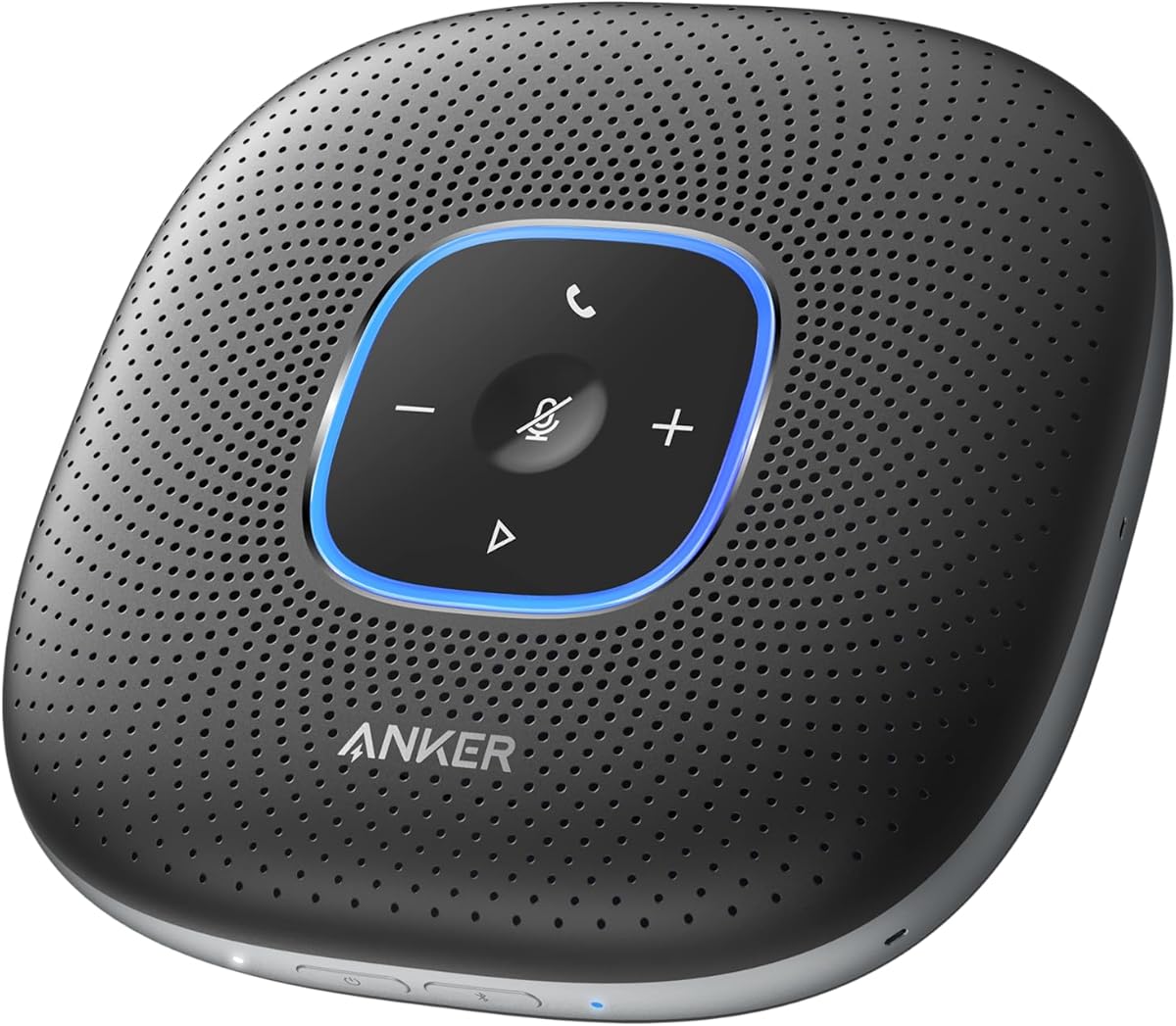
4.4Editor score

4.4Editor score
This side-by-side comparison highlights the key specifications and strengths of each model to help you find the perfect fit for your workspace needs.

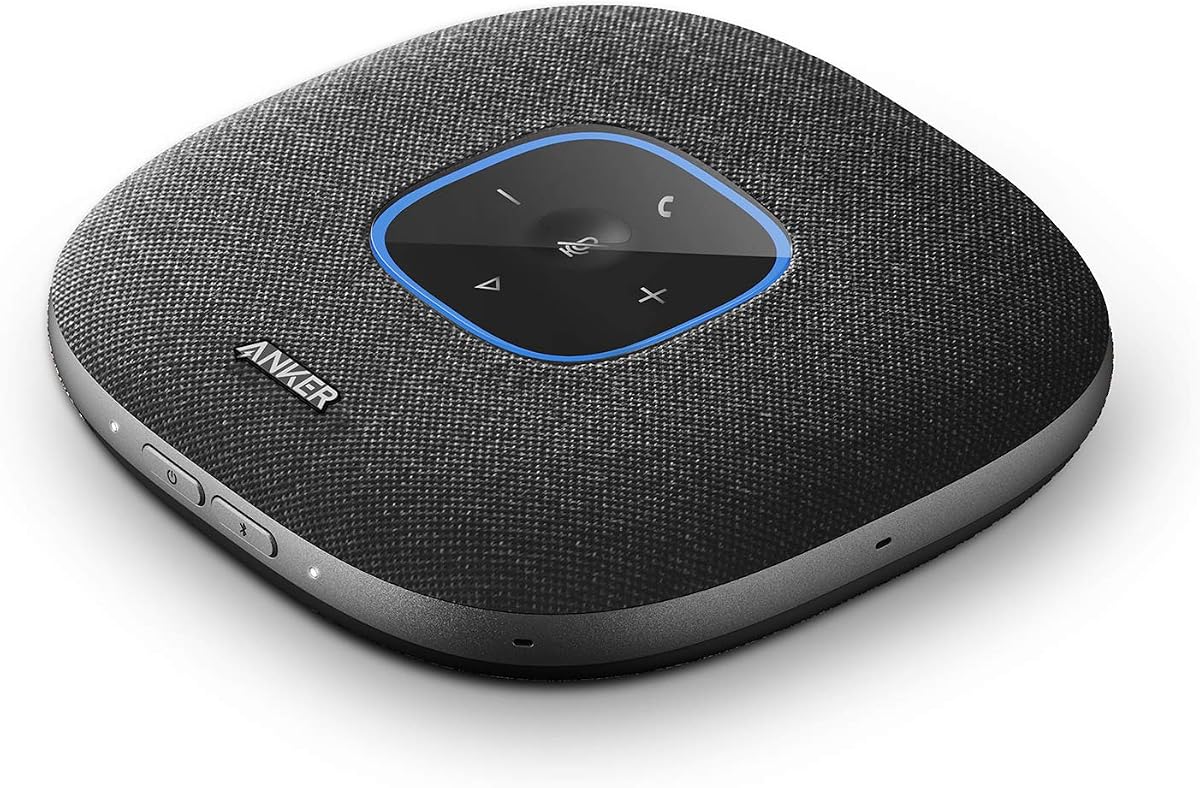


The Anker PowerConf Speakerphone stands out as a top choice for home office professionals needing reliable audio. With a 4.4 star rating, users praise its ability to pick up voices clearly from all directions thanks to its six microphone array.
We may earn a commission when you buy through this link, at no additional cost to you.
Its Voice Radar 3.0 technology uses AI to reduce background noise and cancel echoes effectively. This ensures your voice is balanced regardless of your distance from the device. The 24-hour battery life supports all-day meetings without frequent recharging.
While the device is versatile, it is somewhat larger than ultra-portable options. However, this size accommodates the larger battery and microphone array needed for superior audio performance in typical home office environments.
Buyers seeking a certified conference speaker that integrates seamlessly with platforms like Zoom will find this model ideal. It offers a professional sound quality that justifies the investment for frequent virtual meetings.
Voice Radar 3.0 technology actively filters out distracting background sounds like keyboard typing or air conditioning hum for clearer conversations.
The 5,200mAh battery ensures you can take calls anywhere without worrying about running out of power during critical meetings.
We may earn a commission when you buy through this link, at no additional cost to you.
The Anker PowerConf S330 offers a robust solution for users who prefer a stable wired connection. Its 4.4 rating reflects satisfaction with its sound quality and ease of setup. The 1.75-inch driver delivers deep audio suitable for music and meetings.
We may earn a commission when you buy through this link, at no additional cost to you.
Smart Voice Enhancement technology ensures your voice comes through clearly even if there is background noise. The four microphones provide 360-degree coverage for up to three meters. This makes it effective for small to medium-sized home office spaces.
Since it relies on a USB-C connection, it is not as portable as battery-powered models. However, this ensures a reliable link to your computer without latency issues or battery anxiety during long sessions.
This model is ideal for fixed desk setups where audio quality is prioritized over mobility. The inclusion of a USB adapter ensures compatibility with various laptop ports making it ready to use immediately.
Connect via USB-C to join meetings instantly without needing to install additional drivers or configure complex settings on your computer.
Two passive bass-radiators add body and depth to audio output ensuring both speech and music sound rich and professional.
We may earn a commission when you buy through this link, at no additional cost to you.
The Anker PowerConf S3 builds on the brand's reputation with advanced features like app control and 24-hour battery life. Users appreciate the smart voice enhancement that optimizes clarity in real time. It connects easily via Bluetooth or USB-C to various devices.
We may earn a commission when you buy through this link, at no additional cost to you.
Its six microphone array ensures voices are captured from any direction within the room. The double talk feature allows multiple speakers to talk at once without skipping words which is crucial for collaborative meetings. The app lets you tweak settings to suit your preferences.
While the app adds functionality it may be unnecessary for users who just want basic plug and play simplicity. Additionally the price is slightly higher than the S330 which offers similar core audio performance without the extra controls.
Tech-savvy users who want to fine-tune their audio environment will love this model. It balances professional performance with modern connectivity options making it a strong contender for the home office market.
Use the dedicated app to adjust volume and voice optimization settings to match your specific room acoustics and personal preferences.
The double talk feature ensures that overlapping voices during group discussions are captured clearly without audio distortion or drops.
We may earn a commission when you buy through this link, at no additional cost to you.
The Jabra Speak 510 is a classic choice known for its ease of use and portability. With a high 4.7 rating users consistently commend its clear audio quality and reliable connection options. It fits easily into a laptop bag for those who work from different locations.
We may earn a commission when you buy through this link, at no additional cost to you.
Setup is incredibly fast allowing you to join meetings within seconds. You can connect via Bluetooth or USB depending on your device preference. The sound is sharp and professional making it suitable for formal client calls or internal team syncs.
As a newer edition of an older model it may lack some of the advanced AI noise cancellation found in 2026 releases. However its simplicity and proven reliability remain appealing for users who want a no-fuss solution without complex features.
This speakerphone is perfect for travelers or those with limited desk space who need a trusted audio device. It delivers consistent performance across various operating systems and meeting platforms ensuring you are always ready to speak.
Works seamlessly with softphones, mobile devices, and computers ensuring you can connect regardless of the hardware you are using.
No drivers or complicated configuration are required simply plug it in or pair it and start your meeting immediately.
We may earn a commission when you buy through this link, at no additional cost to you.
The Yealink Sp92 offers a highly affordable entry point for those needing a certified conference speaker. With a 4.1 rating it delivers solid performance for its price point. The AI noise cancellation filters over 1,000 types of background noises for accurate speech.
We may earn a commission when you buy through this link, at no additional cost to you.
Its 50mm speaker provides clear audio within a 13ft radius making it suitable for 4 to 8 person meetings. The device is ultra-portable weighing just 276g and comes with a carrying case. You can connect via Bluetooth 5.3 or USB-C for flexibility.
While it lacks the premium build of more expensive models it fulfills core requirements effectively. The 20-hour battery life supports full-day usage and the standby time is excellent. It is a great value for small teams or home offices.
Buyers looking for a cost-effective solution that still meets enterprise standards should consider this model. It supports multiple platforms including Zoom and Google Meet ensuring it fits into existing workflows without hassle.
Real-time AI noise cancellation identifies and removes specific sounds like keyboard clicks to ensure your voice remains the focus.
Microsoft Teams certified status guarantees seamless integration and optimized performance for users within the Microsoft ecosystem.
We may earn a commission when you buy through this link, at no additional cost to you.
The Lenovo Speakerphone is designed with enterprise needs in mind offering a dedicated Teams button and robust audio capabilities. Users rate it 4.5 stars for its professional sound quality. The eight beamforming microphones ensure voices are prioritized over background noise up to 5 meters.
We may earn a commission when you buy through this link, at no additional cost to you.
Its full duplex performance allows for natural conversations without awkward cut-offs. The IP54 rating adds durability against dust and splashes which is useful in varied work environments. Connectivity is flexible with Bluetooth 5.3 and USB options.
While the features are powerful they may be overkill for a solo home office user. The price reflects the enterprise-grade build and specific integration with Microsoft Teams. It is heavier than ultralight models due to the internal hardware.
This model is best for teams using Microsoft environments heavily or those needing a rugged device for different locations. The dedicated control buttons make call management easy during busy meeting days without needing to touch your laptop.
A dedicated Teams button provides quick access to call functions enhancing productivity for users who live in the Teams application.
The IP54 rating protects the device from dust and water splashes making it reliable for travel or shared office spaces.
We may earn a commission when you buy through this link, at no additional cost to you.
The Jabra Speak2 55 represents a premium option with exceptional build quality and clear sound. It is fully compatible with Microsoft Teams ensuring seamless integration. The four beamforming microphones pick up sound from all directions while normalizing voice levels around the room.
We may earn a commission when you buy through this link, at no additional cost to you.
With a 30m Bluetooth range you can move freely during calls without losing connection. The device supports 12 hours of battery life and includes a USB-C charging adaptor in the box. A 2-year warranty offers peace of mind for your purchase.
The high price point makes it less accessible for budget conscious buyers. However the audio fidelity and durability justify the cost for professionals who spend hours daily on calls. The compact design ensures it does not clutter your desk.
Investors in a high-quality audio experience for professional meetings will find this model superior. The voice level normalization ensures everyone sounds equal which is vital for inclusive and effective team communications.
This technology equalizes the volume of different speakers so quieter voices are amplified to match louder ones in the room.
A 30m Bluetooth range allows you to move away from your device while staying connected to your computer or phone.
We may earn a commission when you buy through this link, at no additional cost to you.
The Jabra Speak 510 MS is a trusted device optimized for softphones and mobile devices. With a high 4.6 rating it offers reliable HD Voice quality for high-definition conversations. The 15-hour talk time ensures it lasts through a full work week of calls.
We may earn a commission when you buy through this link, at no additional cost to you.
It connects via Bluetooth or USB to PCs and smartphones. Compatibility with Microsoft Lync and Office Communicator makes it a legacy favorite for enterprise users still on these platforms. It is straightforward to set up without technical knowledge.
While it is an older model it still performs well for basic conference calls. It lacks the latest AI features found in 2026 devices but remains a solid choice for those who prefer simplicity. The standby time of four days is impressive.
This speakerphone is ideal for office environments relying on softphone solutions. It provides a professional audio experience at a reasonable price for those needing a dedicated call device for their workstation.
Delivers high-definition sound quality that captures the nuances of speech making conversations feel more natural and clear.
Optimized for legacy Microsoft communication platforms ensuring compatibility with specific enterprise setups and software.
We may earn a commission when you buy through this link, at no additional cost to you.
The Jabra Speak 710 UC delivers immersive sound that transforms any room into a conference space. Rated 4.6 stars it offers clear audio for up to six people. The Link 370 adapter ensures a strong USB connection for laptops without Bluetooth capabilities.
We may earn a commission when you buy through this link, at no additional cost to you.
It features an omnidirectional microphone and HD voice technology for high definition calls. The design is lightweight and comes with a protective travel pouch for on-the-go use. It supports platforms like Zoom and Google Meet seamlessly.
While the Link 370 adapter adds value it requires an extra cable which might bother minimalists. The price reflects the premium audio quality and certification which is worth it for frequent travelers or meeting hosts.
Buyers prioritizing audio richness and portability will appreciate this model. The certification ensures reliable performance with major platforms making it a safe choice for professional communication needs.
Included adapter provides a reliable USB connection ensuring compatibility with laptops that lack native Bluetooth or have connection issues.
The compact design and included pouch make it easy to carry in a bag without adding significant weight to your travel kit.
We may earn a commission when you buy through this link, at no additional cost to you.
The YAMAHA YVC-330 is a professional-grade speakerphone known for its SoundCap Technology that eliminates background noise outside a 3ft range. With a 4.6 rating it is trusted for high-fidelity audio. It features three unidirectional microphones optimized for speech activity detection.
We may earn a commission when you buy through this link, at no additional cost to you.
Self silence technology mutes the mic when no one is speaking reducing distractions for participants. It handles 5 to 8 people comfortably making it suitable for larger home offices. Connectivity is flexible with USB 3.0, NFC, or Bluetooth options.
The price is higher than most consumer models reflecting its professional audio engineering. It is also larger and less portable than compact units. However for static meeting spaces this performance is unmatched.
This device is ideal for dedicated conference rooms or professionals who need premium noise isolation. The SoundCap feature ensures that outside distractions do not interfere with the conversation flow during critical calls.
Automatically mutes the microphone when participants are silent to avoid transmitting unwanted background noise or room sounds.
Far field noise reduction eliminates distractions outside the immediate range ensuring only relevant speech is captured and transmitted.
We may earn a commission when you buy through this link, at no additional cost to you.
Selecting the right speakerphone involves balancing audio quality, connectivity, and features to fit your specific workspace requirements.
Look for devices with multiple microphones that offer 360-degree coverage. This ensures voices are picked up clearly from any position in the room without needing to adjust seating.
Prioritize models with beamforming or omnidirectional mics to ensure clear capture of speech from all directions.
Effective noise cancellation is essential to filter out background sounds like keyboards or street noise. Advanced AI algorithms help focus on human voices specifically.
Choose speakers with dedicated echo cancellation to prevent feedback during calls especially in rooms with hard surfaces.
Ensure the device supports both Bluetooth and USB connections for flexibility. This allows you to switch between devices or use a stable wired connection for desktops.
Check for USB-C compatibility as it is the standard for modern laptops and offers faster data transfer rates.
For wireless use a battery life of at least 12 to 20 hours is recommended to cover a full workday without interruption.
Consider models with fast charging or battery indicators to avoid running out of power during critical meetings.
Verify that the speakerphone is certified for your primary conferencing platform such as Teams Zoom or Google Meet.
Certified devices ensure optimized features like mute buttons and status indicators that integrate directly into the software.
If you travel or move between rooms choose a lightweight unit with a carrying case. Compact designs reduce desk clutter and enhance mobility.
Look for durable materials if you plan to use the device in various environments or shared spaces.
A quality speaker driver ensures outgoing audio is clear and loud enough to be heard comfortably by remote participants.
Check for features like bass enhancement or voice normalization to ensure consistent volume levels across different speakers.
Plug-and-play functionality saves time and removes the need for complex driver installations. Dedicated physical buttons for mute and volume are highly convenient.
Apps that allow customization can be useful but consider if they add unnecessary complexity for your daily workflow.
Place the speakerphone on a flat surface at the center of your meeting area to ensure optimal microphone pickup. Avoid placing it directly against walls to prevent echo and sound distortion during calls.
Keep the device updated through its companion app if available to benefit from performance improvements and new features. Regularly check battery levels to ensure it is fully charged before important meetings.
Clean the microphones and speakers with a dry cloth to remove dust which can affect audio quality. Store it in a protective case when not in use to prevent scratches and damage from handling.
Bluetooth allows for wireless flexibility with a computer or phone but may introduce latency or battery drain. USB provides a stable wired connection often without needing drivers which is reliable for desktop setups.
Most modern speakerphones are plug and play via USB. However some models have companion apps for advanced settings. Always check the product description if you prefer a driver free experience.
Position the speakerphone centrally and use a room with minimal echo. Enable noise cancellation features on the device and ensure your microphone array is oriented correctly for your seating arrangement.
Yes most models support Bluetooth pairing with smartphones allowing you to take calls directly on the device. Some also offer dedicated mobile accessories for easier connection and control.
Battery life ranges from 12 to 24 hours depending on the model. This generally covers a full workday. Look for models with quick charging to top up power during short breaks.
AI noise cancellation uses machine learning to identify and remove background sounds like typing or traffic. This technology enhances speech clarity by focusing only on human voices during calls.
Choosing the right speakerphone depends on your specific needs for portability, audio quality, and connectivity. The Anker PowerConf Speakerphone leads with its balanced features and strong battery life for general office use.
Consider your primary software platform and whether you need a dedicated Teams or Zoom device. Budget models like the Yealink Sp92 offer excellent value without sacrificing essential audio performance.
Check current availability and pricing as these factors can change frequently across retailers. Investing in a quality device will improve the professionalism and clarity of your remote communication setup.