
FLASHFORGE Creator 5 Pro
4.0Editor score
Industrial Multi-Material
Active Heated Chamber
Near-Zero Waste System
This guide compares the top 3D printer for figurines and models based on speed, precision, and ease of use for hobbyists and professionals.
Choosing the right 3D printer for figurines and models requires balancing precision, speed, and ease of use. Modern printers offer automated calibration and multi-color capabilities that transform how creators bring designs to life.
We evaluated ten leading models based on their build volume, nozzle technology, and software integration. Our analysis focuses on machines that deliver high-detail results suitable for collectibles, prototypes, and artistic projects.
Each pick highlights specific strengths like multi-color printing or rapid prototyping speeds. Prices and availability change frequently, so verify current offers before purchasing to ensure you get the best value for your needs.
4.0Editor score

4.7Editor score

4.4Editor score
This comparison table outlines the core specifications and unique features of each model to help you find the perfect match for your specific figurine printing needs.





The Bambu Lab A1 stands out as a premier choice for those seeking a reliable 3D printer for figurines and models without extensive setup. Its high-speed precision and automatic calibration make it accessible for beginners while maintaining professional quality output.
We may earn a commission when you buy through this link, at no additional cost to you.
This printer delivers exceptional accuracy with active flow rate compensation ensuring smooth surfaces on detailed prints. The multi-color printing capability allows for vibrant figurines without manual filament swaps when using the AMS lite accessory.
While the open frame design may not suit high-temperature materials like ABS without enclosure, it offers great versatility for PLA and PETG which are ideal for detailed models. The active motor noise canceling ensures a quiet environment for home offices.
Ideal for hobbyists who want top-tier results quickly, the A1 balances speed and ease of use perfectly. It is our top recommendation for anyone entering the world of high-quality model printing with minimal fuss.
The A1 handles Z-offset and bed leveling automatically ensuring every print starts perfectly. This feature reduces failed prints and saves hours of manual adjustment.
With noise canceling and fast speeds, this printer fits seamlessly into living spaces. You can print overnight without disturbing others while maintaining high detail.
We may earn a commission when you buy through this link, at no additional cost to you.
The FLASHFORGE Creator 5 Pro targets advanced users needing industrial-grade reliability for complex figurine production. With four independent toolheads and a heated chamber, it handles engineering-grade materials that others cannot process effectively.
We may earn a commission when you buy through this link, at no additional cost to you.
Its near-zero waste system saves significant filament costs during multi-color prints by eliminating massive purge waste. The CoreXY motion structure ensures stability at high speeds, reducing vibrations that can mar detailed model surfaces.
While the price is higher than entry-level options, the speed and material versatility justify the investment for serious creators. The dual HEPA and carbon filtration system makes it safe for indoor use despite engineering material fumes.
This printer is best for professionals or workshops requiring robust, reliable, and multi-material capabilities. It excels where standard hobbyist printers fail in terms of temperature stability and material range.
Switching nozzles takes just seven seconds without flushing filament. This allows for rapid material changes between support and model layers.
The active heated chamber prevents warping on large models. Air filtration ensures a clean environment for long-duration prints.
We may earn a commission when you buy through this link, at no additional cost to you.
The FLASHFORGE AD5X offers an impressive array of high-end features at a budget-friendly price point. Its Independent Filament System allows multi-color printing without the complex cost of traditional multi-color machines.
We may earn a commission when you buy through this link, at no additional cost to you.
High-speed printing up to 600mm/s and automatic leveling ensure quick turnaround for prototypes and models. The 300°C nozzle capacity expands material choices beyond standard plastics, allowing for more durable figurines.
While it may lack the advanced software ecosystem of premium brands, its core performance remains strong for cost-conscious buyers. The large build volume permits single prints of larger figures without segmentation.
Choose this model if you need multi-color capabilities and speed without breaking the bank. It provides a solid foundation for learning high-performance printing techniques.
IFS technology enables up to four colors simultaneously. This simplifies the process of creating vibrant models without extra hardware.
A 300°C nozzle handles various filaments including advanced engineering materials. This flexibility is rare in this price range.
We may earn a commission when you buy through this link, at no additional cost to you.
The Bambu Lab P2S Combo combines speed and smart features to create a seamless multi-color printing experience. With AMS 2 Pro included, users get integrated filament drying and advanced multi-material support out of the box.
We may earn a commission when you buy through this link, at no additional cost to you.
Its adaptive airflow system ensures crisp overhangs and proper cooling for diverse materials. The high speed combined with active flow compensation maintains sharp corners on intricate model details.
The included drying unit prevents moisture issues common with hygroscopic filaments. This proactive maintenance feature extends print quality and reduces failures due to material degradation over time.
Ideal for creators prioritizing convenience and material quality, this combo minimizes manual intervention. It is a robust solution for those wanting advanced color control without separate purchases.
Built-in drying keeps spools ready for printing. This prevents print defects caused by absorbed moisture in filaments.
Adaptive airflow balances cooling and heat retention. This ensures structural integrity and surface finish across different materials.
We may earn a commission when you buy through this link, at no additional cost to you.
The Bambu Lab P1S is a compact powerhouse designed for speed and reliability. Its fully enclosed body makes it suitable for engineering-grade filaments like ABS and ASA which require stable temperatures.
We may earn a commission when you buy through this link, at no additional cost to you.
Lightning-fast speeds allow for rapid prototyping without sacrificing accuracy. The auto bed leveling feature ensures consistent first layers, reducing user error and print failures significantly.
While it supports up to sixteen colors with AMS, it requires that external accessory. However, for single-material high-quality prints, it delivers exceptional results with minimal setup effort.
This printer is perfect for users needing an enclosed machine for better material control. It balances performance and ease of use better than many competitors in its class.
Enclosure maintains temperature for advanced materials. This prevents warping and ensures successful prints on ABS and ASA.
High acceleration maintains precision at top speeds. You can print complex figurines in record time.
We may earn a commission when you buy through this link, at no additional cost to you.
The Snapmaker U1 introduces a robust tool-changing mechanism that revolutionizes multi-material printing. With four independent toolheads preloaded and preheated, it eliminates manual swaps for complex model details.
We may earn a commission when you buy through this link, at no additional cost to you.
Its SnapSwap system reduces tool change time to five seconds, drastically cutting waste and print time. The rigid CoreXY structure ensures stability during these rapid transitions.
True multi-material capabilities allow combining rigid and flexible parts in one print. This is ideal for functional figurines that need moving joints or soft components like clothing.
Choose this for advanced workflows needing true multi-material support. It is a significant upgrade for users tired of single-material limitations.
SnapSwap ensures reliable changes with zero failures. This saves time and material during multi-step prints.
Combine different materials seamlessly for functional parts. Supports water-soluble supports for easy cleanup.
We may earn a commission when you buy through this link, at no additional cost to you.
The Creality SPARKX i7 Combo is designed for instant gratification with its 95% pre-assembled frame. Users can start printing within minutes of unboxing, making it ideal for impatient hobbyists.
We may earn a commission when you buy through this link, at no additional cost to you.
Its AI feature allows uploading a portrait to generate a 3D model automatically. This simplifies creating personalized figurines without needing professional modeling skills or software.
The large build volume accommodates full-size prints, and quiet night mode ensures silent operation during sleep. The multicolor system provides vibrant results without complex configuration.
Best for beginners wanting immediate results and fun AI features. It balances ease of use with decent performance for casual model printing.
Upload a photo to generate a unique model. This turns selfies into 3D prints instantly.
Night mode minimizes noise for bedroom use. You can print overnight without disruption.
We may earn a commission when you buy through this link, at no additional cost to you.
The Adventurer 5M Pro focuses on automation with its one-click auto printing system. It handles leveling and setup automatically so you can focus on the design rather than configuration.
We may earn a commission when you buy through this link, at no additional cost to you.
Its 3-second quick-swap nozzle feature allows rapid nozzle changes for different detail levels. The high-temp extruder supports engineering materials like ABS and PETG-CF for durable parts.
Vibration compensation eliminates ghosting for smooth surfaces on models. The dual filtration system keeps the environment clean and odorless during prints.
Ideal for those wanting minimal setup and fast printing. It simplifies the workflow without sacrificing speed or material range.
Auto-printing manages leveling and extrusion automatically. This reduces user input to a single action.
Change nozzles in three seconds without tools. This enables quick transitions between rough and fine detail.
We may earn a commission when you buy through this link, at no additional cost to you.
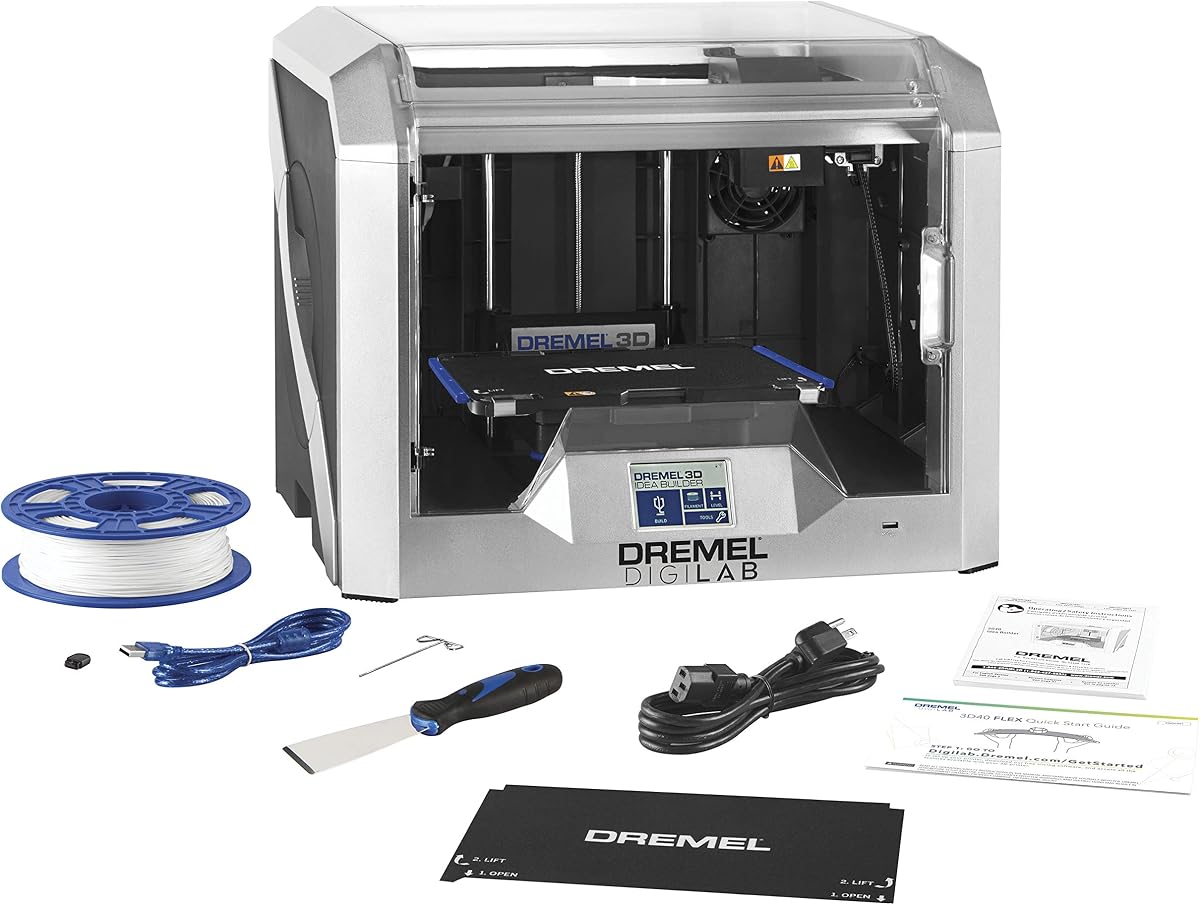
The Dremel 3D40 Flex is designed with ease of use in mind. Its flexible build plate allows models to pop off easily without damaging the print or the bed.
We may earn a commission when you buy through this link, at no additional cost to you.
Fully enclosed housing ensures safety and consistency for beginners. The automated 9-point leveling sensor accounts for bed variations to guarantee successful prints.
While slower than high-speed rivals, it offers reliable quality for standard PLA and flexible filaments. Dremel's lifetime support ensures you are never left without help.
Best for schools or users needing safe, simple operation. It balances reliability and safety over raw speed.
Flexing the plate releases prints instantly. This protects delicate model edges from damage.
Dremel offers lifetime customer service. This adds value and peace of mind for long-term users.
We may earn a commission when you buy through this link, at no additional cost to you.
The Bambu Lab A1 Combo packages the popular A1 with the AMS Lite for immediate multi-color capability. It offers a complete solution for those wanting to start printing colored models right away.
We may earn a commission when you buy through this link, at no additional cost to you.
Active flow compensation ensures consistent extrusion regardless of print speed. This technology maintains accuracy even at high speeds for detailed figurine parts.
The quick-change nozzle system simplifies maintenance allowing rapid adjustments. Motor noise cancellation keeps the printer quiet during operation.
Ideal for new users wanting a full setup without extra purchases. It combines ease of use with reliable performance for most model projects.
Includes AMS Lite for multi-color printing immediately. This saves buying components separately.
Eddy current sensors measure nozzle pressure precisely. This ensures consistent flow for high detail.
We may earn a commission when you buy through this link, at no additional cost to you.
Selecting the right machine requires evaluating build volume, speed, and multi-color capabilities. Use this guide to match specifications to your specific modeling needs.
The build volume determines the maximum size of a single figurine you can print. Larger volumes allow for life-size models but often come with higher costs and larger footprints.
Choose a volume that fits your largest intended project to avoid unnecessary assembly of segmented prints.
Multi-color capability transforms static prints into vibrant figurines. Systems range from single-nozzle swapping to independent toolheads or extruders.
Independent systems provide cleaner color transitions and reduced waste compared to traditional multi-tool setups.
High-speed printers reduce turnaround time significantly. Acceleration rates impact the sharpness of edges and details at high velocities.
Look for active flow compensation to maintain accuracy even when printing at maximum speeds.
Automatic calibration features like bed leveling and flow calibration minimize user error. These systems ensure every print starts with optimal adhesion and settings.
Fully auto-calibrating machines save time and reduce failure rates for beginners.
Enclosed chambers maintain temperature consistency for engineering materials. Safety features like HEPA filters reduce exposure to fumes during long prints.
Consider enclosure needs based on the filaments you plan to use regularly.
Integrated software solutions streamline the workflow from model to print. Features like AI monitoring simplify troubleshooting during operation.
A strong ecosystem supports firmware updates and community-driven improvements over time.
Different filaments require different nozzle temperatures and bed settings. High-temperature nozzles open up options for durable and flexible materials.
Ensure the printer supports your preferred materials before purchase.
Initial price is only one part of the cost. Consider filament costs, accessories like AMS units, and maintenance requirements.
A higher upfront cost may save money through reduced waste and higher reliability.
Start with proper calibration to ensure the nozzle distance matches the bed perfectly. Use the auto-leveling features to save time on manual adjustments before every print.
Clean the nozzle regularly to prevent clogs that affect detail. Use appropriate cleaning needles or solvent to keep the extrusion path clear.
Store filament in dry containers to prevent moisture absorption. Moisture can cause bubbling and poor surface finish on your models.
For detailed miniatures, high-resolution printers are preferred. Models with active flow compensation and fine nozzle options like the Bambu Lab A1 offer excellent surface quality.
Yes, an enclosure is necessary for ABS to prevent warping. Look for fully enclosed designs like the P1S or Creator 5 Pro to ensure stable temperature.
Choose multi-color if you want vibrant models without painting. Independent toolhead systems provide the best color transitions for complex figurines.
Build volumes vary from 200mm to over 300mm. Check dimensions against your project needs to decide if you need to print segments or full-size.
Not necessarily. Modern accelerators like 10000 mm/s2 maintain accuracy at high speeds. Active flow compensation ensures smooth surfaces even at top speeds.
Clean the nozzle every few hundred hours of printing or if you switch filaments. Regular maintenance prevents jams that ruin prints.
Yes, most support TPU for flexible parts. Ensure the extruder can handle flexible filaments by checking specifications for TPU compatibility.
The top picks cover various needs from budget-friendly models to premium industrial solutions. Each offers unique strengths for speed, multi-color support, and ease of use.
Prioritize features that match your most common projects. Multi-color and speed are valuable, but reliability and ease of setup are equally critical.
Prices and availability change frequently so verify current offers before buying. Check the latest models and bundles to ensure you get the best value.