
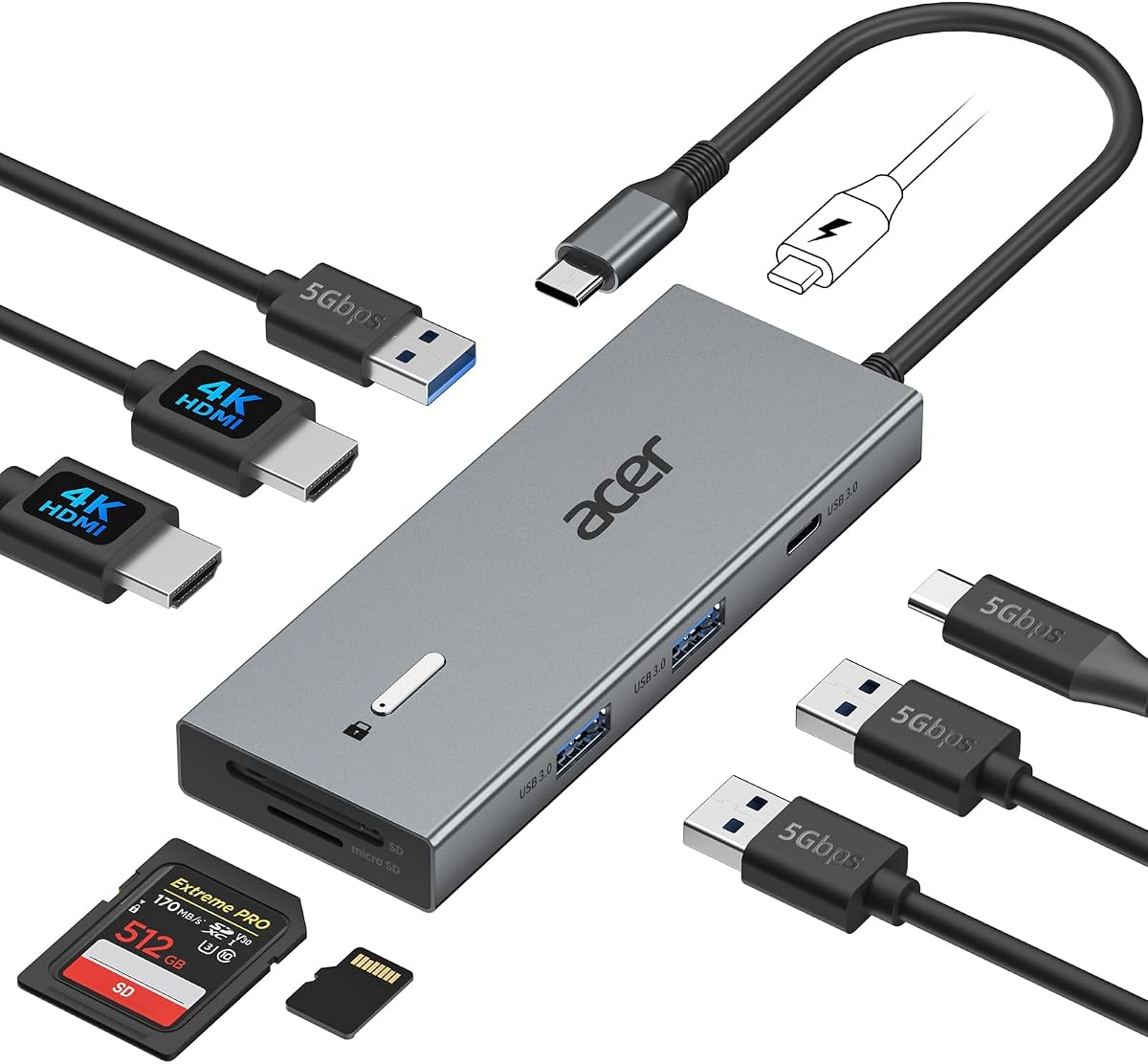
Acer 13-in-1 Laptop Docking Station
4.5Editor score
Triple display support with MST
110W power adapter included
Secure lock slot included
This guide compares the top 10 docking stations with 2 HDMI ports for 2026, evaluating display quality, charging power, port variety, and compatibility.
Finding the right docking station with 2 HDMI ports can transform your laptop into a powerful desktop setup. These devices allow you to connect multiple monitors, peripherals, and storage drives through a single cable, streamlining your workspace and boosting productivity significantly.
We evaluated ten top-rated models based on display performance, charging capabilities, port selection, and build quality. Our comparison considers real-world usage scenarios, compatibility with major operating systems, and value for money to help you make an informed decision.
Each pick below highlights specific strengths like budget friendliness or premium features. Remember that prices and availability can change frequently, so check the current listings before purchasing to ensure you get the best deal available today.
4.5Editor score

4.5Editor score

4.4Editor score
Below is a side-by-side comparison of all ten models. Review the specifications and features to see which one fits your specific workstation needs and budget requirements best.


The Anker 8-in-1 USB C Hub stands out as a top choice for users needing dual HDMI ports. With a strong rating of 4.5 stars, it offers reliable performance for daily tasks. Its standout quality lies in its ability to handle high-resolution displays while charging your laptop simultaneously.
We may earn a commission when you buy through this link, at no additional cost to you.
This dock features two HDMI ports that support 4K at 60Hz on a single screen or 30Hz on dual screens. It includes a USB-C PD port capable of pass-through charging up to 85W. Additional connectivity comes in the form of Ethernet, microSD/SD readers, and USB-A data ports.
While highly capable, note that Linux support is not available. Also, macOS users will experience screen mirroring rather than extended desktops due to system constraints. These trade-offs are acceptable given the overall stability and feature set provided for most Windows and ChromeOS users.
If you need a trustworthy dock for a standard dual-monitor office setup, this model is an excellent recommendation. It balances performance, compatibility, and cost effectively. It is suitable for professionals who value reliability and brand support in their daily workflow.
The dual HDMI ports allow for crisp 4K visuals on external monitors, enhancing clarity for spreadsheets and design work.
With up to 85W pass-through charging, your laptop stays powered during heavy usage without needing a separate charger.
We may earn a commission when you buy through this link, at no additional cost to you.
The Acer 13-in-1 Docking Station is designed for power users who need extensive connectivity. Rated 4.5 stars, it offers robust features like triple display support and a high-wattage power adapter included in the box. It transforms your laptop into a full desktop command center.
We may earn a commission when you buy through this link, at no additional cost to you.
This unit supports two HDMI ports plus one DisplayPort for triple independent screens on Windows laptops via MST. It comes with a 110W power adapter that delivers 100W to your laptop. The aluminum body helps with heat dissipation, and a security slot protects your gear in public spaces.
While it offers premium features, the price is higher than basic hubs. macOS users will still face mirroring-only limitations. These factors are manageable for those needing maximum connectivity and security in a professional environment like an office or dorm.
For professionals requiring three screens and secure hardware, this is the best pick. It handles heavy workloads without dropping performance. If budget allows, it provides the most comprehensive solution for multi-monitor productivity today.
Connect three monitors independently to maximize workspace efficiency for coding, trading, or content creation tasks.
The integrated security slot allows you to lock the dock to your desk, preventing theft in shared environments.
We may earn a commission when you buy through this link, at no additional cost to you.
The Selore 8-in-1 Dual HDMI adapter delivers exceptional value at a low price point. With a 4.4 rating, it satisfies the need for dual monitors without breaking the bank. It supports 4K at 60Hz on dual screens when connected to a compatible Windows laptop.
We may earn a commission when you buy through this link, at no additional cost to you.
Key strengths include support USB-C PD input capable of 100W charging. It also offers fast data transfer via USB 3.0 ports and SD card slots. This makes it ideal for students or remote workers who need basic dual-screen setups without expensive peripherals.
Mac users are limited to mirroring mode. Also, you must supply your own charger and cables. These are minor drawbacks given the significant savings. For budget-conscious buyers, the functionality provided here is hard to match.
If you need a simple, effective dual HDMI solution, this is the top budget choice. It maximizes productivity by allowing extended screens affordably. It is perfect for home offices where cost efficiency is a priority.
Achieve a dual monitor setup for a fraction of the cost of dedicated premium docking stations.
USB 3.0 ports allow quick file movement between devices, speeding up daily workflows efficiently.
We may earn a commission when you buy through this link, at no additional cost to you.
The Acer 9-in-1 Docking Station offers a balanced feature set for users needing dual HDMI connectivity. It supports 4K at 60Hz on two screens and provides 100W PD charging. A built-in cable simplifies setup, making it plug-and-play ready for most laptops.
We may earn a commission when you buy through this link, at no additional cost to you.
This model features multiple USB ports for peripherals and SD card slots for storage. The lock button adds convenience for quick screen privacy. However, you need a separate 100W adapter to get full charging power. Mac users will face mirroring constraints.
The value proposition is strong considering the included cable. While not a budget king, it offers more than basic hubs. It is suitable for users who want reliability without the premium price tag of higher-end models.
Choose this if you want a middle-ground option with good build quality. It handles common office tasks well and supports a clean desk setup. It is a solid choice for everyday productivity needs.
The included cable reduces desk clutter and ensures you have the right connector right out of the box.
A single click locks your screen instantly, protecting sensitive data when you step away from your desk.
We may earn a commission when you buy through this link, at no additional cost to you.
The Dell D3100 is designed for systems relying on USB 3.0 rather than USB-C. With a 4.2 rating, it provides stable dual HDMI plus DisplayPort outputs. It is ideal for users with older laptops that lack modern USB-C video capabilities.
We may earn a commission when you buy through this link, at no additional cost to you.
This dock supports three screens and includes an HDMI-to-DVI adapter for added flexibility. It offers reliable Gigabit Ethernet for stable internet. However, the 65W power output may not charge high-performance laptops under load as effectively as newer USB-C models.
While it lacks the speed of USB 4, it remains reliable for office work. If your laptop has older ports, this ensures compatibility. It is a pragmatic choice for maintaining older hardware investments efficiently.
Opt for this if you have legacy equipment needing display expansion. It bridges the gap between older ports and modern monitor needs. It is a practical solution for budget offices with older PCs.
Ideal for users with older laptops lacking modern USB-C video ports, ensuring continued hardware usability.
The RJ-45 port ensures a reliable wired internet connection, reducing lag during critical video calls.
We may earn a commission when you buy through this link, at no additional cost to you.
The Anker 7-in-1 Hub is perfect for those needing a portable dual-screen setup. It supports 1080p at 60Hz on two monitors. Its small form factor makes it easy to carry. With a 10Gbps data port, file transfers are impressively fast.
We may earn a commission when you buy through this link, at no additional cost to you.
This hub delivers up to 85W to your laptop while charging. It lacks Ethernet but focuses on speed and portability. If you prioritize travel and speed over networking, it fits the bill. It is suitable for digital nomads.
The lack of Ethernet is a trade-off for size. But for most users, Wi-Fi suffices. It balances mobility and productivity well. This makes it a great companion for frequent travelers.
Choose this if you want dual screens on the go. It offers Anker reliability in a small package. It is ideal for remote workers who value speed and convenience.
The 10Gbps port cuts file transfer times significantly, speeding up large data moves efficiently.
Its compact size fits easily in laptop bags, making it perfect for mobile office setups.
We may earn a commission when you buy through this link, at no additional cost to you.
The MOKiN 13-IN-1 Docking Station offers exceptional port variety for multiple peripherals. With a 4.3 rating, it supports dual 4K at 60Hz. It includes four USB-A ports, Ethernet, and strong charging. A screen lock button enhances privacy instantly.
We may earn a commission when you buy through this link, at no additional cost to you.
This hub is built for users with many USB accessories. It handles video and data well. While Mac users see mirroring, Windows users get full extended desktops. It is a functional choice for diverse hardware needs.
You need your own power cable, which is common. But the sheer number of ports saves dongles. It reduces desk clutter by centralizing connections. This makes it efficient for complex setups.
Select this if you need many USB ports alongside dual HDMI. It combines variety and performance well. It is suitable for power users who keep multiple gadgets connected.
Multiple USB-A ports allow connecting mice, keyboards, and drives simultaneously without extra adapters.
The quick-access lock button hides sensitive information instantly, protecting privacy during meetings.
We may earn a commission when you buy through this link, at no additional cost to you.
The Selore 10-in-1 Hub supports three monitors using two HDMI and one DisplayPort. With a 4.5 rating, it is a strong contender for budget multi-screen setups. It also offers VGA for legacy projectors. A monitor button controls displays quickly.
We may earn a commission when you buy through this link, at no additional cost to you.
This hub allows 8K via DP on Windows. It includes Ethernet for stable internet. Mac users will face mirroring limits. But for Windows, the flexibility is impressive at this price. It is great for trading or coding.
The monitor control button simplifies power management. It saves energy by waking screens easily. For budget buyers, this is a premium feature. It enhances usability without extra cost.
Choose this if you want three screens affordably. It offers high-end features like VGA and control buttons. It is perfect for users needing maximum screen real estate.
The VGA port ensures compatibility with older monitors or projectors, adding flexibility to your setup.
The dedicated button lets you wake or sleep all screens instantly, saving power efficiently.
We may earn a commission when you buy through this link, at no additional cost to you.
The Anker 13-in-1 Docking Station saves desk space with a vertical design. With a 4.0 rating, it supports three displays and includes a 135W power adapter. It has multiple USB-C ports for flexible connectivity. It simplifies cabling significantly.
We may earn a commission when you buy through this link, at no additional cost to you.
This dock is built for Windows extended modes. It charges your laptop and phone simultaneously. Mac users are limited to mirroring. But for Windows, it offers a complete desktop replacement. It reduces clutter effectively.
The included 135W adapter is a key benefit. It ensures your laptop stays charged under load. The vertical shape keeps the desk tidy. This design makes it stand out from horizontal docks.
Select this if you value desk space. It offers comprehensive connectivity in a slim profile. It is ideal for small desks needing triple-monitor power.
The upright form factor reduces desk footprint, leaving room for notebooks and other essentials.
Includes a 135W adapter to power your laptop fully while running multiple monitors.
We may earn a commission when you buy through this link, at no additional cost to you.
The Selore 8-in-1 Dual HDMI Hub is a budget-friendly option for dual screens. With a 4.4 rating, it delivers solid performance at a low price. It supports 4K at 60Hz on Windows. It includes essential ports for daily use.
We may earn a commission when you buy through this link, at no additional cost to you.
This hub supports 100W charging input and has SD card slots. It is plug-and-play for Windows. Mac users should note mirroring limits. But for Windows, it offers great value. It is ideal for basic office needs.
Cables must be sourced separately. But this keeps costs down. It works well with existing setups. For budget buyers, it is a practical choice. It maximizes utility per dollar.
Choose this for simple dual-screen needs. It is reliable and affordable. It is suitable for students or entry-level remote workers.
Supports up to 100W PD input, keeping your laptop charged during long work sessions.
Plug-and-play functionality means no drivers are needed, allowing instant connection to your laptop.
We may earn a commission when you buy through this link, at no additional cost to you.
Choosing the right docking station requires considering several key factors to ensure compatibility with your workflow and hardware.
Ensure the docking station supports the resolution you need. Look for 4K at 60Hz for sharp visuals. Some hubs may limit dual screens to 30Hz. Check your laptop's capabilities before buying.
Prioritize high refresh rates for smoother video and scrolling.
Check the wattage output to ensure it can charge your laptop. Most high-performance laptops need 65W or more. Some docks include the charger; others do not.
Select a dock with sufficient wattage to prevent battery drain.
Verify OS support, especially for macOS. Many hubs only mirror screens on Mac. Windows users often get extended desktops via MST.
Check reviews for specific OS limitations.
Consider other ports like USB-A, Ethernet, or SD card readers. Some models include legacy ports like VGA. Ensure the hub meets your peripheral needs.
Choose a dock with enough ports to avoid dongles.
Look for aluminum bodies that dissipate heat well. A sturdy build ensures longevity. Check warranty terms for peace of mind.
Quality builds prevent overheating during extended use.
Confirm your laptop has a Thunderbolt or full-featured USB-C port. Older models may need USB 3.0 docks. Verify DP Alt Mode support for video.
Ensure your port supports video output.
Consider horizontal versus vertical designs. Vertical models save desk space. Horizontal models may offer better stability.
Choose a shape that fits your workspace layout.
Determine your price range. Basic hubs are affordable. Premium docks offer more power and security features.
Balance features with your available budget.
Connect the docking station to your laptop using a compatible USB-C or Thunderbolt cable. Ensure the power adapter is plugged into the dock to maintain full performance during use.
Connect your HDMI monitors, USB peripherals, and network cables to the ports. Configure your display settings in your OS to extend or mirror your screens effectively.
Keep the ventilation areas clear of dust to prevent overheating. Store the device in a cool, dry place when not in use to maintain its lifespan.
Yes, they work for charging and data. However, macOS often limits external monitors to mirroring mode. You may not get extended desktops on macOS.
Yes, your laptop port must support DisplayPort Alt Mode and power delivery. A standard charging port may not transmit video. Check your laptop specifications first.
Yes, most modern docks support pass-through charging. Ensure the dock has sufficient wattage for your laptop model. Some may require a high-wattage adapter.
Most are plug-and-play on Windows. Some may require driver updates for specific features. macOS usually needs no extra drivers for basic use.
Some models support triple screens via an extra DisplayPort. Check if your laptop supports MST. Not all hubs support three independent screens.
1080p is standard, but 4K is preferred for sharp text. Check if the dock supports 4K at 60Hz. High resolution improves readability and productivity.
We have explored ten top docking stations with 2 HDMI ports. The Anker 8-in-1 and Acer 13-in-1 models stand out for reliability and performance.
Prioritize features like power delivery and OS compatibility. Your workflow demands will dictate the best model for your needs.
Prices and availability change often. Verify current offers and stock before making your purchase today.