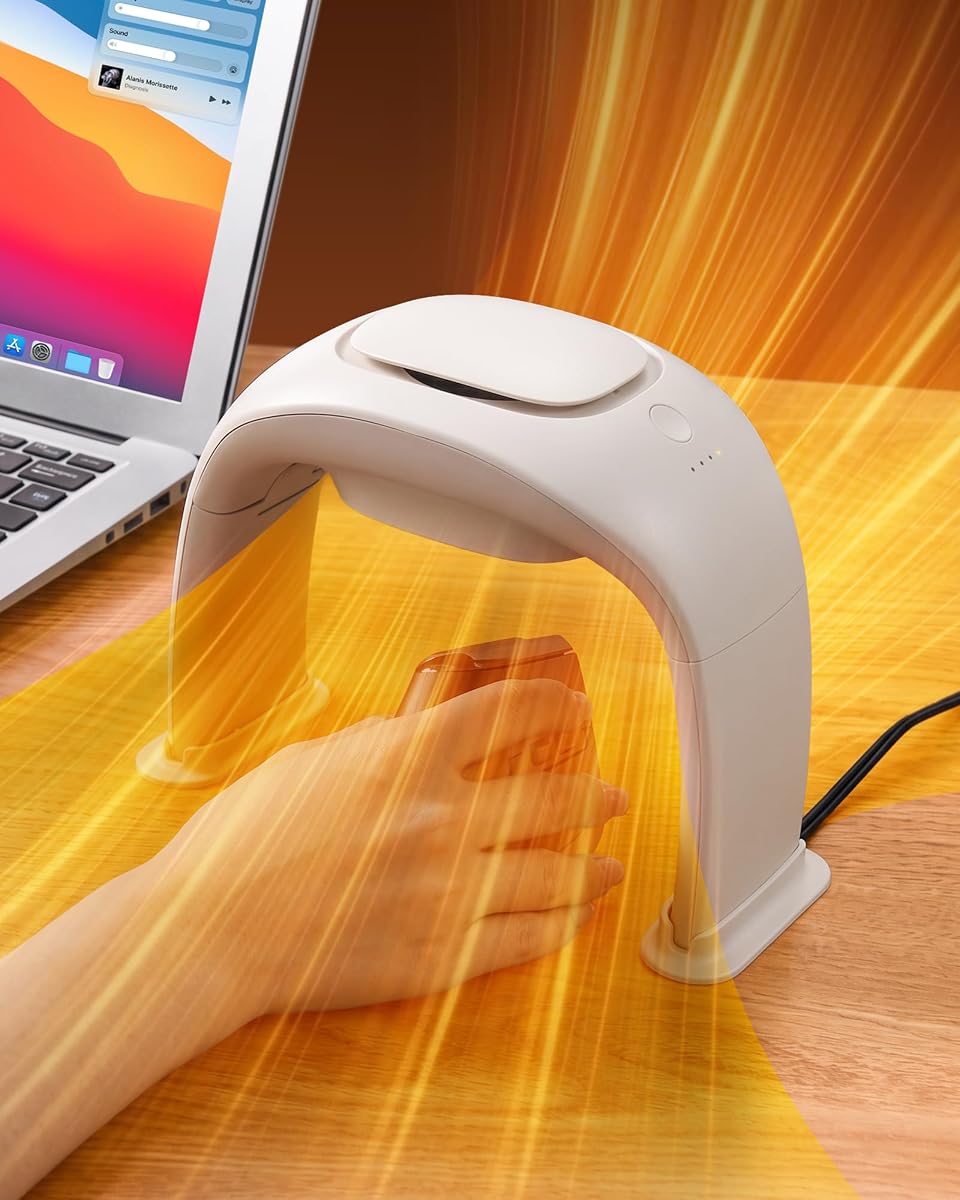
Desk Hand Warmer Over Mouse
4.5Editor score
Super quiet ceramic heating system
Free mouse operation space
Tip-over auto shut-off function
Discover the top hand warmer mouse pad options for cold offices. Our guide compares features, heating tech, and safety to help you find the perfect desk
Cold hands can make any work session uncomfortable and slow. A hand warmer mouse pad solves this by keeping your fingers cozy while you type or game. These devices combine functionality with warmth to improve your daily workflow significantly.
We evaluated ten distinct models based on heating efficiency, safety features, and ergonomic design. Our analysis considers user feedback and technical specs to ensure you get reliable performance during the coldest months of the year.
Each pick highlights unique strengths like auto shut-off timers or portable designs. Prices fluctuate often so check current listings before buying to ensure you get the best deal available for your specific budget needs today.
4.5Editor score

4.2Editor score

4.5Editor score
This side-by-side comparison highlights key specifications across all ten models so you can quickly identify which device matches your specific desk setup and heating requirements this winter season.


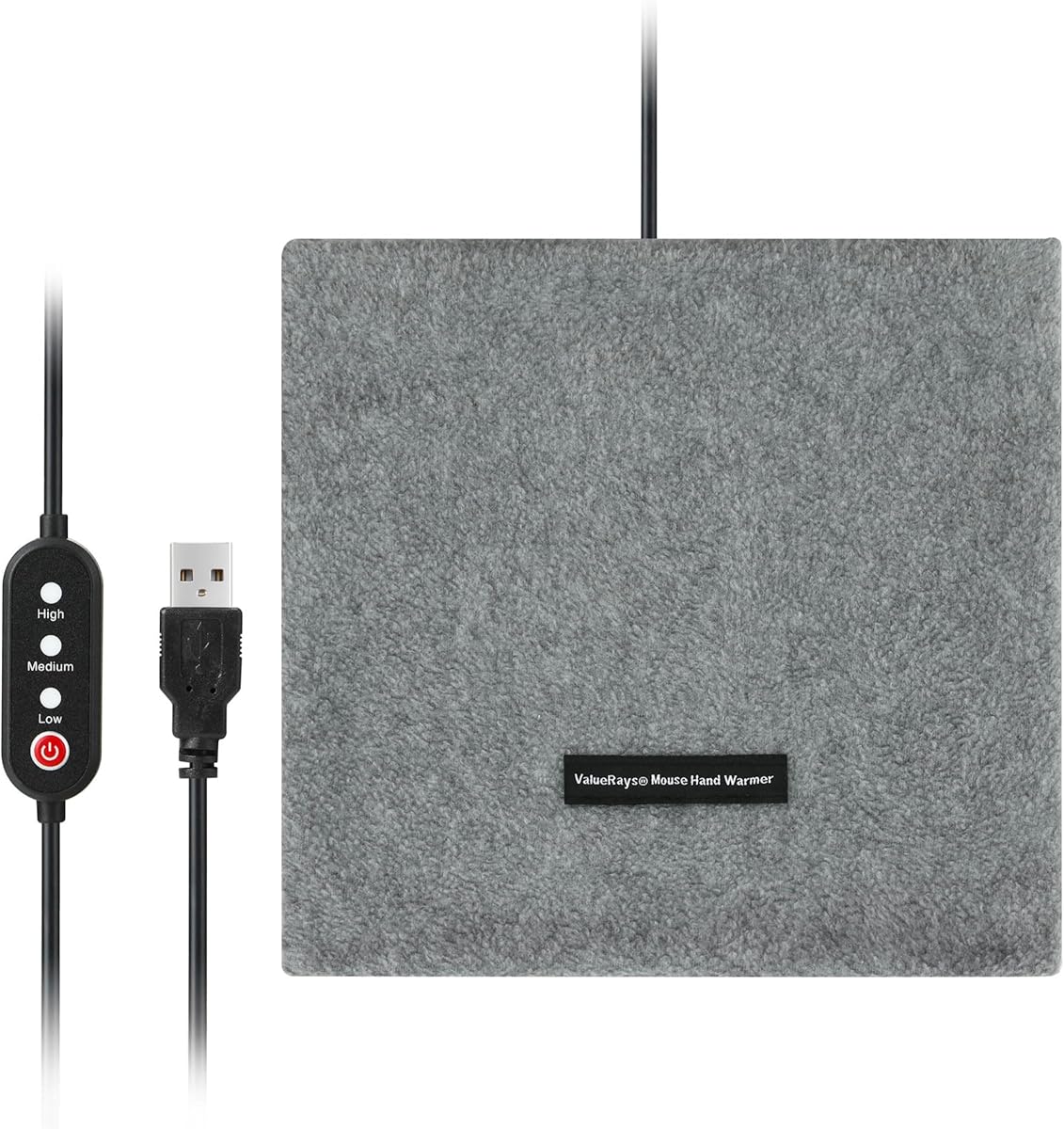
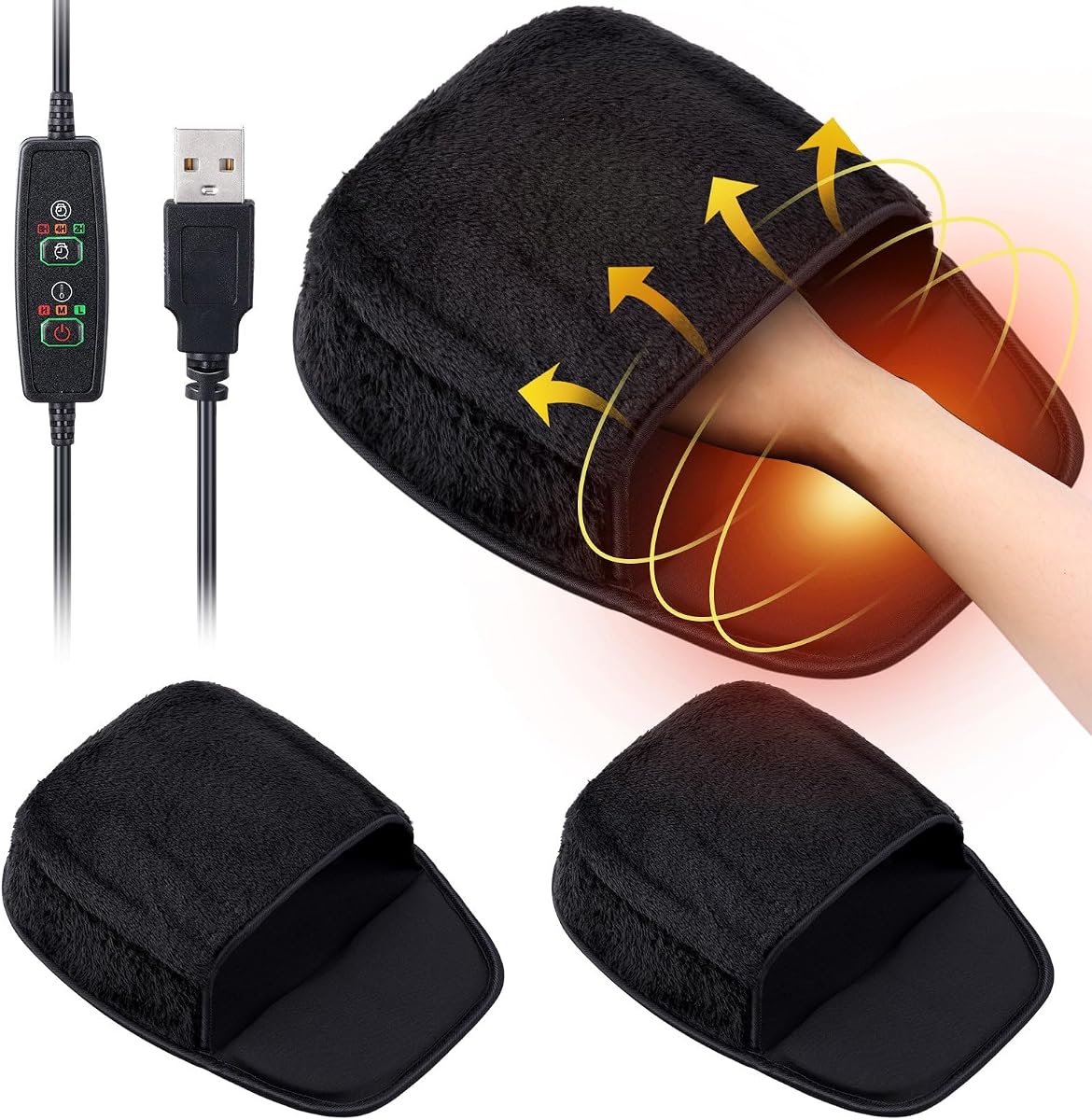

This USB heated mouse pad hand warmer stands out as the top choice for most users due to its enclosed cocoon design. It wraps your entire hand in soft neoprene insulation ensuring your fingers and knuckles stay warm while you work. With a rating of 4.2 stars it balances comfort and practicality effectively.
We may earn a commission when you buy through this link, at no additional cost to you.
The device offers three temperature levels ranging from gentle warmth to intense heat allowing you to customize your comfort. Built-in auto shut-off timers provide peace of mind during long work sessions. The removable heating element makes maintenance simple as you can hand wash the top layer when needed.
While it requires a USB connection which limits mobility slightly the flexibility of plugging into various power sources mitigates this. The wrist rest is a nice touch but might feel bulky for some ergonomic setups. These trade-offs are acceptable given the superior warmth it provides compared to flat mats.
Anyone who spends hours at a desk in cold environments will benefit most from this model. It is an ideal gift for remote workers or gamers who need consistent hand warmth. We recommend this for anyone seeking a reliable heated solution that protects hands without restricting movement.
The cocoon design ensures heat reaches fingers and knuckles not just the palm or wrist for complete comfort.
Auto shut-off timers and a removable heating pad make this unit safe and easy to keep clean over time.
We may earn a commission when you buy through this link, at no additional cost to you.
This desk hand warmer offers a premium experience with its high-power ceramic heating system that warms hands quickly. It sits over your mouse providing 360-degree warmth without pressing against your hand back. The rating of 4.5 stars reflects user satisfaction with its efficiency and quiet performance.
We may earn a commission when you buy through this link, at no additional cost to you.
The unit runs at less than 20 decibels making it ideal for quiet offices or late-night gaming sessions. It features three heating modes with adjustable cycling to maintain consistent temperatures. The wide air guide ensures heat spreads evenly across your workspace without creating hot spots.
Using a standard wall outlet means it lacks USB flexibility but ensures strong heat output. The foldable design helps save space on crowded desks when not in use. While pricier than USB options the superior heating power justifies the cost for those who run cold easily.
This model is best for users needing powerful warmth in a professional setting where noise matters. The safety features like auto shut-off make it reliable for unsupervised use. Consider this if you want a dedicated heater that doubles as a mouse pad without sacrificing performance.
Advanced ceramic technology keeps noise below 20dB ensuring your work environment remains peaceful while warming your hands.
Energy-saving chips maintain constant temperature while tipping protection ensures safety even if the unit is knocked over.
We may earn a commission when you buy through this link, at no additional cost to you.
This heated desk pad provides exceptional value by covering a large area for both keyboard and mouse use. Made of PU leather it offers a smooth surface that stays warm across the entire desk. The rating of 4.5 stars highlights its popularity among users needing full desk warmth.
We may earn a commission when you buy through this link, at no additional cost to you.
Three heat settings allow you to choose between gentle background heat or quick warm-up cycles. The four-hour auto shut-off feature prevents energy waste and ensures safety overnight. It is certified by UL and FCC which adds confidence to its electrical safety standards.
The main limitation is its size and plug requirement which makes it less portable than smaller pads. However the durability and waterproof nature make it suitable for long-term daily use. The price point remains competitive for the amount of surface area heated compared to smaller units.
This is perfect for home offices where a large warm workspace is preferred over a small mouse specific heater. Users who type frequently will appreciate the consistent warmth under their wrists and palms. We recommend this for anyone looking to upgrade their entire desk surface with heating capabilities.
At 31.5 by 13 inches this pad warms your entire workspace including keyboard and mouse areas for total comfort.
The PU leather construction resists spills and wear ensuring the pad remains functional and clean over long periods.
We may earn a commission when you buy through this link, at no additional cost to you.
This set includes two heated mouse pads allowing you to keep one at home and one at the office. The plush material provides a soft touch while the wrist rest adds ergonomic support. With a rating of 3.6 it is a budget-friendly option for basic warmth needs.
We may earn a commission when you buy through this link, at no additional cost to you.
The heater and mouse pad are separate which allows flexibility but adds a step to setup. It connects via USB to your computer making it easy to power without extra outlets. The 11 by 9 inch size ensures enough space for standard mouse movements.
Users report the heating element may have limited durability compared to higher-end models. It is designed for short-term warming sessions rather than continuous all-day use. The value lies in getting two units for a low price which is great for households with multiple computers.
Ideal for students or remote workers needing a backup heated pad without spending much. The wrist rest helps prevent strain during typing sessions. We suggest this for casual users who want a simple solution for occasional cold hand discomfort.
Getting two pads in one package means you can have warm hands at both work and home without buying twice.
The plush top layer offers a soft touch that feels good against your skin during long work hours.
We may earn a commission when you buy through this link, at no additional cost to you.
This model emphasizes comfort with its thick plush material that feels soft on your hands. Like the previous option it comes with two pieces for different locations. The 3.8 rating suggests decent satisfaction among users seeking basic heating features.
We may earn a commission when you buy through this link, at no additional cost to you.
The heating element is detachable which makes cleaning easier but requires care during reassembly. It heats up to a suitable level via USB connection but does not offer advanced temperature controls. The design is simple and focuses on providing gentle warmth.
Durability concerns were mentioned in product notes suggesting it may not last as long as premium brands. The price is low enough that replacements might be affordable if needed. It is a good choice for light users who do not require intense heat output.
Best for casual computer use in moderately cold rooms where extreme warmth is not necessary. The soft texture makes it pleasant to rest hands on during breaks. We recommend this for budget-conscious buyers needing a simple solution.
The plush surface is designed to be skin-friendly and comfortable to touch throughout your daily work routine.
A detachable heating pad lets you wash the cover easily to keep your workspace fresh and clean.
We may earn a commission when you buy through this link, at no additional cost to you.
This unit delivers high power with 100 watts output ensuring fast and effective hand warming. It sits at a height that allows free mouse movement without restricting motion. The 4.3 rating indicates strong user approval for its performance and build quality.
We may earn a commission when you buy through this link, at no additional cost to you.
It uses upgraded ball bearings and ceramic heating for efficient heat transfer. The foldable legs make it easy to store when not in use. Safety features like over-heating protection ensure safe use even during long periods of inactivity.
The white finish looks clean but might need frequent cleaning to stay pristine in a dusty office. It uses a 110V plug which limits compatibility to regions with compatible outlets. However the heat performance is robust enough to make it worth the trade-off.
Ideal for users who need strong warmth quickly without waiting for the device to heat up. The portability makes it suitable for moving between rooms or taking on trips. We suggest this for anyone needing a reliable heavy-duty option.
The 100W output ensures your hands warm up rapidly so you can get back to work immediately.
Foldable legs allow you to collapse the unit for compact storage when not in use.
We may earn a commission when you buy through this link, at no additional cost to you.
This device uses MCH PTC ceramic technology to keep hands warm during winter work. It offers three temperature options and a smart chip to save energy once the target is reached. The 4.3 rating reflects satisfaction with its efficiency and design.
We may earn a commission when you buy through this link, at no additional cost to you.
Noise levels are kept low at 15 decibels so it does not disturb focus during gaming or calls. The foldable design saves desk space while the anti-skid bottom keeps it stable. Safety protections include tip-over and overheat features for peace of mind.
It relies on manual buttons for control rather than a remote or complex interface. This simplicity is appreciated by those who want to plug in and use without setup. The price is competitive for a unit with these safety and efficiency features.
Best for users who value energy efficiency and safety features in a compact unit. It is well-suited for small desks or temporary setups. We recommend this for anyone wanting a quiet and safe warming solution.
A built-in smart chip adjusts power automatically to save energy while maintaining comfortable warmth.
Anti-skid silicone on the bottom ensures the warmer stays firmly in place even with active mouse use.
We may earn a commission when you buy through this link, at no additional cost to you.
This model uses infrared technology to provide warmth through a standard USB connection. It features a manual control switch for simple operation. The 3.8 rating suggests it is a basic solution with limited advanced features compared to others.
We may earn a commission when you buy through this link, at no additional cost to you.
Infrared heating can provide gentle consistent warmth without high power consumption. The design is likely compact and fits easily on most desks. It is a straightforward option for users who do not need complex temperature settings or timers.
Details about safety features like auto shut-off are not prominent in the description. Users should monitor usage to ensure safe operation. The lack of extensive features keeps the price low but might reduce long-term reliability.
Best for users with tight budgets who need a simple heated solution. It works well for short sessions where manual control is sufficient. We recommend this for basic needs without extra expectations.
Infrared technology provides a natural feeling heat that warms hands directly without excessive power use.
A manual switch keeps operation easy and intuitive for all users without technical expertise.
We may earn a commission when you buy through this link, at no additional cost to you.
This set offers two pads with three temperature modes and auto-off timers for convenience. The wrist cushion helps reduce strain during long typing sessions. With a 3.4 rating it provides features but may have mixed quality experiences among users.
We may earn a commission when you buy through this link, at no additional cost to you.
The non-slip base ensures the pad stays in place during intense gaming or work. Power comes from USB allowing flexible placement across different devices. The auto-off timers help save energy and prevent overheating risks during unsupervised use.
Some users report inconsistent heating which might vary between the two units in the set. This could mean needing to test both before committing to a single location. The feature set is robust for the price point though quality control varies.
Best for families needing multiple units where one might not meet specific needs. The wrist support adds value for ergonomics focused users. We suggest this for those who prioritize feature variety over premium build quality.
The built-in wrist cushion helps align your wrist naturally to reduce strain during typing.
Timed auto-off lets you set a duration so you never have to worry about leaving it on.
We may earn a commission when you buy through this link, at no additional cost to you.
This pad offers a large surface with premium PU leather that looks elegant and durable. It supports multiple functions from mouse pad to foot warmer depending on your need. The lack of a rating means new to the market but specs look promising.
We may earn a commission when you buy through this link, at no additional cost to you.
The non-slip bottom keeps the mat stable on any desk surface during active use. Three temperature settings allow customization based on your comfort preference. The manual switch design is simple to operate with clear light indicators for heat levels.
Since there is no rating yet reliability is not proven by user feedback. It is advisable to check return policies before purchase. The size and material suggest it is a quality option for those upgrading their desk setup.
Best for users wanting a large stylish desk mat that adds heating functionality. It works well for those who need a versatile pad for different tasks. We recommend this if you value design and size over established ratings.
Use it as a mouse pad foot warmer or desk protector to maximize utility on your workspace.
The PU leather offers durability and an elegant look that enhances the overall appearance of your desk.
We may earn a commission when you buy through this link, at no additional cost to you.
Choosing the right heated mouse pad involves considering safety features heating methods and design ergonomics to ensure it fits your workflow.
Most models use PTC ceramic or infrared elements to generate heat. PTC ceramic is generally more efficient and safe as it adjusts resistance based on temperature.
Look for PTC or ceramic elements for consistent warmth and energy efficiency.
Auto shut-off timers prevent overheating and save energy if you forget to turn the device off. Tip-over protection adds another layer of safety by cutting power if the unit is knocked over.
Always choose a model with auto shut-off and tip-over protection for safety.
USB powered pads are portable and easy to plug into computers or power banks. Wall outlet models often offer more power but limit placement to near an outlet.
Decide between USB for flexibility or wall outlet for power.
Enclosed cocoon designs wrap the entire hand while flat pads only warm the palm. Ensure the design allows freedom of movement for your mouse hand.
Select a design that covers your needs without restricting mouse movement.
Some units include fans or mechanisms that create noise. For quiet environments look for models with ratings below 20 decibels.
Prioritize low decibel ratings if you work in a quiet space.
PU leather is durable and easy to clean while plush offers softness. Check if the heating element is removable for washing to maintain hygiene.
Choose materials that are easy to clean and durable for daily use.
Multiple heat levels allow you to adjust warmth based on the room temperature and personal comfort. A range of options ensures the pad works well in varied conditions.
Look for at least two or three temperature settings for better comfort control.
Foldable or lightweight designs are easier to move between home and office. This is crucial if you work from multiple locations frequently.
Choose lightweight or foldable options if you travel often.
Start by placing the pad on a flat stable surface near your computer. Connect it to the appropriate power source such as a USB port or wall outlet.
Set the temperature to your preferred level using the control switch. Allow a few minutes for the unit to heat up before placing your hands on it.
Regularly clean the surface according to the instructions. For removable pads detach the heating element before wiping down the cover with a damp cloth.
Yes most modern heated mouse pads include safety features like auto shut-off timers and tip-over protection. These ensure the device cuts power if left on too long or if it falls over preventing accidents.
Heated mouse pads typically use between 5W and 100W depending on the model. USB powered versions consume less energy while wall outlet models may use more to provide faster heat.
Absolutely these pads work with all types of mice including wireless and Bluetooth models. They simply provide a warm surface so as long as your mouse fits on the pad it will function correctly.
Many users find the warmth helps soothe stiff joints during cold weather. It is always best to consult a doctor before using heat therapy for medical conditions.
Check if the heating element is removable before cleaning. Most fabric covers can be hand washed while PU leather can be wiped with a damp cloth. Always let it dry completely before reassembling.
No these devices are plug-and-play and do not need any software drivers. You simply connect the power source and use the switch on the device to control the heat.
We recommend the USB Heated Mouse Pad Hand Warmer for its balanced design and comfort. It offers the best mix of features and safety for most users in cold offices.
Prioritize safety features like auto shut-off and tip-over protection when making your choice. These details ensure your device lasts longer and protects your workspace from potential hazards.
Remember to check current prices before buying since deals change frequently. Finding the right fit at a good price ensures you stay warm without overspending this winter season.