
Integral 4GB Crypto-197
4.1Editor score
FIPS 197 Certified Security
Brute Force Password Protection
Durable Waterproof Double Layer
This guide compares the top ten encrypted USB flash drives based on security certifications, hardware encryption standards, durability features, and compatibili
In todayâs digital landscape, protecting sensitive information is paramount for individuals and organizations alike. An encrypted USB flash drive offers a robust solution to safeguard files from unauthorized access. These devices utilize advanced hardware encryption to ensure data remains secure even if the physical drive is lost or stolen.
Our team has rigorously evaluated the leading models available on the market today. We considered factors such as encryption standards, physical durability, ease of use, and compatibility across different operating systems. This list covers a diverse range of options to suit various security needs and budget considerations.
Each selection in this guide highlights specific strengths and ideal use cases for different users. You will find detailed insights into how each drive protects your data and what unique features they offer. Please note that prices and availability may change over time, so check current listings before purchasing.
4.1Editor score
4.6Editor score

4.5Editor score
This side-by-side comparison highlights the key specifications and features of the top encrypted USB flash drives available today. Use this table to quickly identify which model aligns best with your specific security and storage requirements.


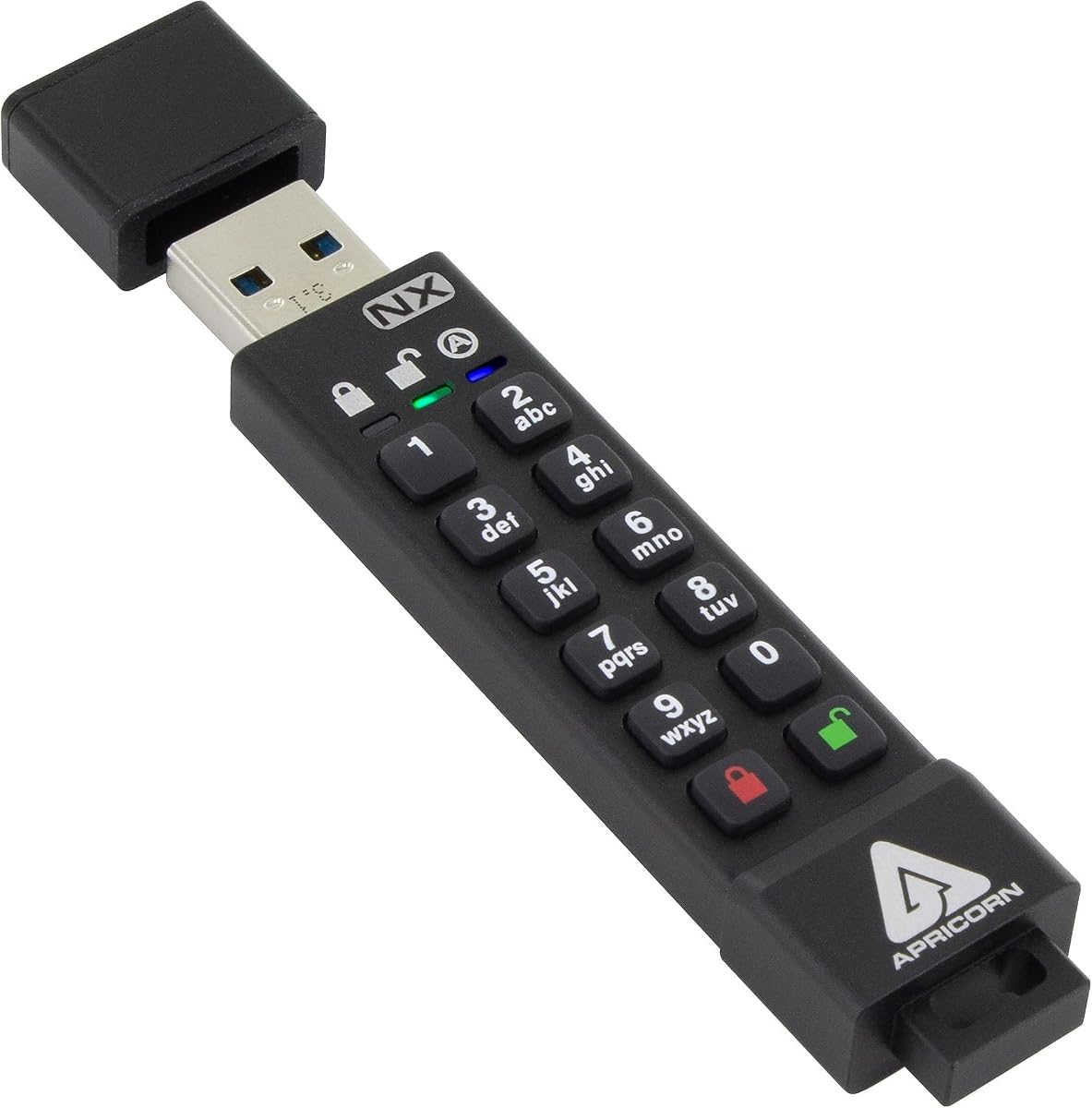
The Apricorn 8GB Aegis Secure Key 3 NX stands out as a top choice for users prioritizing robust security features. With FIPS 140-2 Level 3 validation, this drive ensures that your data is protected against advanced threats. Its hardware encryption means that security is built directly into the device, eliminating the need for software installations.
We may earn a commission when you buy through this link, at no additional cost to you.
One of the key strengths of this drive is its ability to offer separate admin and user modes. This feature allows organizations to enforce security policies while giving end users a simplified interface for accessing data. The inclusion of two read-only modes adds an extra layer of control, ensuring that sensitive files cannot be accidentally modified or deleted.
While this drive offers exceptional security, it does come at a higher price point compared to standard USB drives. Additionally, the 8GB capacity may be limited for users needing to store large media files. However, for those focused on secure document transfer, these trade-offs are generally acceptable given the level of protection provided.
This drive is ideal for corporate environments, government agencies, or individuals handling highly confidential information. If you need a reliable solution that meets strict compliance standards, the Apricorn Aegis Secure Key 3 NX is a strong recommendation. Always ensure you keep your recovery PINs safe to avoid losing access to your data.
The FIPS 140-2 Level 3 validation ensures this drive meets rigorous federal security standards for cryptographic modules.
Separate admin and user modes allow administrators to enforce policies while users enjoy a simplified login experience.
We may earn a commission when you buy through this link, at no additional cost to you.
The Kingston IronKey Vault Privacy 50 offers a premium solution for users needing both security and substantial storage. With 256GB capacity, it accommodates large file transfers while maintaining enterprise-grade protection. The hardware-based encryption ensures that data remains secure without relying on vulnerable software applications.
We may earn a commission when you buy through this link, at no additional cost to you.
A standout feature of this drive is its multi-password option, allowing users to configure complex or passphrase modes based on their preferences. The new passphrase mode enhances security by enabling longer, more memorable phrases without compromising protection. Additionally, the drive safeguards against brute force attacks with self-encryption mechanisms.
Despite its advantages, this drive is one of the more expensive options on the market. The setup process may also feel complex for users unfamiliar with advanced security configurations. However, for enterprises requiring compliance with trade agreements or high-level data protection, these factors are often secondary to security performance.
This model is best suited for businesses, IT professionals, or power users who need significant secure storage. If your priority is balancing capacity with top-tier security, the Vault Privacy 50 is an excellent investment. Ensure you read the user manual thoroughly to maximize its security features during initial setup.
TAA compliance meets Trade Agreements Act requirements, making it suitable for government procurement and contracts.
Digitally-signed firmware protects against BadUSB attacks and unauthorized access attempts effectively.
We may earn a commission when you buy through this link, at no additional cost to you.
The Apricorn 128GB Aegis Secure Key 3 NXC is designed for users with modern devices featuring USB Type-C ports. It combines high-speed data transfer capabilities with robust hardware encryption standards. This drive is particularly useful for professionals using laptops or tablets that have moved away from traditional USB-A connections.
We may earn a commission when you buy through this link, at no additional cost to you.
Its software-free authentication means you can use the drive on any compatible device without installing additional drivers. The 256-bit AES-XTS hardware encryption provides a secure environment for sensitive files. With 128GB of storage, it offers ample space for documents, presentations, and other critical business data.
While the Type-C connector is a plus for modern compatibility, it may require adapters for older systems. The price is also higher compared to standard encrypted drives, reflecting its advanced features. However, for users needing to transfer large secure files quickly between modern devices, this drive is a highly efficient tool.
This drive is ideal for tech-savvy professionals, mobile workers, or anyone with predominantly USB-C devices. If you need secure storage that integrates seamlessly with your current hardware, this model is a strong contender. Keep an eye on adapter needs if you occasionally use older computers for file transfers.
USB 3.2 Type-C ensures compatibility with modern laptops and devices while offering faster data transfer speeds.
Software-free operation allows immediate use on any operating system without driver installation hurdles.
We may earn a commission when you buy through this link, at no additional cost to you.
The Integral 4GB Crypto-197 offers an affordable entry point for those seeking reliable hardware encryption. With FIPS 197 certification, it meets US government-approved security standards at a lower cost than many competitors. This makes it an accessible option for individuals or small businesses on a tight budget.
We may earn a commission when you buy through this link, at no additional cost to you.
Its durable double-layer waterproof design provides physical protection against drops and immersion. The auto-lock feature ensures that the drive encrypts and locks automatically when removed from a computer. This adds a layer of convenience and security for users who might forget to lock their drives manually.
The primary limitation is the 4GB storage capacity, which may not suffice for large files. Additionally, the design is functional rather than stylish. However, for storing text documents or small sensitive datasets, this drive offers robust protection without breaking the bank. It is a practical choice for occasional secure transfers.
This model is best for students, casual users, or organizations needing many low-cost secure drives. If your priority is security compliance at an entry-level price, this drive is a solid choice. Just ensure your file sizes fit within the 4GB limit before purchasing to avoid storage constraints.
FIPS 197 certification provides government-grade security at a budget-friendly price point for general users.
Waterproof double layer design protects the electronics from physical damage and environmental exposure effectively.
We may earn a commission when you buy through this link, at no additional cost to you.
The iStorage datAshur PRO 4 GB features a built-in PIN keypad for authentication, removing the need for on-screen passwords. This physical security feature ensures that your data remains safe even if the computer is compromised. The drive meets FIPS 140-2 Level 3 standards, ensuring strong cryptographic protection.
We may earn a commission when you buy through this link, at no additional cost to you.
Its IP57 rating means it is resistant to dust and water immersion, making it rugged for field work. The drive works seamlessly across Windows, macOS, Linux, and even mobile devices without software installation. Fast read and write speeds ensure efficient file management for business applications.
The 4GB capacity is somewhat limited by modern standards, and the keypad requires battery power to function. Users must manage battery replacement or recharge depending on the model specifics. Despite these minor drawbacks, the physical authentication method is a significant advantage for high-security environments.
This drive is ideal for field workers, security-conscious individuals, or environments with restricted software installation. If you need a drive that can be used anywhere with physical PIN entry, this model is a top choice. Check battery status periodically to ensure the keypad remains operational for access.
Built-in PIN keypad ensures access is granted only by someone who physically knows the code.
Works across multiple operating systems and devices without requiring any software drivers or installation.
We may earn a commission when you buy through this link, at no additional cost to you.
This 64GB encrypted drive offers a balance of storage capacity and security features at a reasonable price point. It utilizes AES256-bit encryption to protect data from unauthorized access. The aluminum alloy shell provides durability and helps dissipate heat during large file transfers.
We may earn a commission when you buy through this link, at no additional cost to you.
Automatic locking ensures that the drive secures itself when disconnected or idle, preventing unauthorized access. If the password is entered incorrectly ten times, the drive automatically resets and wipes data, adding a strong deterrent against brute force attacks. This is ideal for users needing moderate storage space securely.
While effective, it may not have the same rigorous validation as FIPS-certified drives. The setup instructions might require careful reading for new users. However, for general business use or personal secure storage, it offers robust protection features without excessive cost. It is a solid alternative for those needing more than 4GB.
This drive is suitable for general office use or personal data backup where budget is a consideration. If you need 64GB of secure storage with automatic security features, this model provides good value. Ensure you follow the reset instructions carefully to avoid accidental data loss during testing phases.
Drive locks automatically when unplugged or idle to prevent unauthorized access during inactivity.
Automatic data wipe after repeated wrong password attempts protects sensitive information from brute force attempts.
We may earn a commission when you buy through this link, at no additional cost to you.
The Lexar JumpDrive F35 PRO introduces biometric security with fingerprint authentication for easy access. This eliminates the need to remember complex passwords for secure files. With 128GB capacity and fast read speeds, it is optimized for users handling large datasets regularly.
We may earn a commission when you buy through this link, at no additional cost to you.
You can save up to ten different fingerprints, making it ideal for shared devices or teams. The 256-bit AES encryption ensures that data is protected even if the drive is lost. Recognition is quick, typically under one second, allowing for seamless workflow integration.
However, this drive relies on software drivers that must be installed on the host computer. On some systems, especially those without OS access like BIOS boot, this software dependency can be a limitation. For daily office use, these factors are usually manageable, but they are worth noting before buying.
This model is perfect for users who prioritize speed and biometric convenience. If you want a password-free secure experience with high capacity, this drive is a strong choice. Ensure your system supports the required software drivers for smooth authentication and data access.
Fingerprint authentication provides quick and secure access without typing complex passwords repeatedly.
400MB/s read speeds ensure fast file transfers for large media or data files efficiently.
We may earn a commission when you buy through this link, at no additional cost to you.
The iStorage datAshur PRO2 32 GB is designed for extreme durability with an IP68 waterproof rating. It can withstand immersion in water and harsh environmental conditions. This makes it ideal for industrial settings, field work, or outdoor activities where standard drives might fail.
We may earn a commission when you buy through this link, at no additional cost to you.
It uses PIN authentication for hardware encryption, ensuring no software is required for use. The FIPS 140-2 Level 3 certification confirms its robust security standards. Transfer speeds are fast, allowing for efficient data management even when connected to USB 2.0 ports.
While rugged, the 32GB capacity is moderate, and the keypad requires battery management for access. Users should be prepared to replace batteries periodically. Despite this, the protection level against environmental and security threats is exceptional. It is a reliable tool for professionals in challenging environments.
This drive is best for construction, military, or field research professionals needing rugged secure storage. If you need a drive that survives immersion and impacts while protecting data, this model is unmatched. Check battery status regularly to ensure uninterrupted access to your encrypted files.
IP68 certification ensures the drive remains functional even after prolonged water immersion or dust exposure.
Physical PIN entry keeps data safe without relying on host computer software or internet connections.
We may earn a commission when you buy through this link, at no additional cost to you.
The Kingston Ironkey D500S offers military-grade security with FIPS 140-3 Level 3 pending certification. It features dual hidden partitions, allowing users to separate public and private data effectively. The rugged zinc casing protects against physical tampering and impacts.
We may earn a commission when you buy through this link, at no additional cost to you.
Advanced protection against BadUSB and brute force attacks ensures the drive is safe even on untrusted computers. Multi-password options allow for complex access control strategies. The drive is fully customizable, making it adaptable to specific organizational policies.
The 16GB capacity is relatively small for the price, and the cost is high. However, for defense contractors or high-security agencies, these specs are essential. The dual partition feature adds significant flexibility for secure storage management. It is a premium solution for critical data protection.
This drive is ideal for defense personnel, security consultants, or high-level executives. If you need top-tier compliance and physical security features, this model is worth the investment. Check the certification status before purchase to ensure it meets your specific regulatory requirements.
Dual hidden partitions allow you to store public and private files securely without revealing their existence.
Zinc casing protects the internal components from physical intrusion and tampering attempts effectively.
We may earn a commission when you buy through this link, at no additional cost to you.
The Kingston D300S provides a compact solution for users who need portable security. With 8GB capacity, it is ideal for small documents and sensitive credentials. The AES 256 XTS encryption ensures data security without requiring external software.
We may earn a commission when you buy through this link, at no additional cost to you.
Its small form factor makes it easy to carry on a keychain or in a wallet. Password protection adds a layer of access control. For those needing a lightweight and secure drive, this model meets the basics effectively without excessive bulk.
While the storage is low, it is sufficient for text files and basic secure data. The design is utilitarian and may lack modern features like Type-C connectivity. However, its reliability and trusted brand make it a dependable option for basic secure transfers.
This drive is suitable for users needing a simple, secure stick for occasional use. If you want a trusted brand in a compact form, this drive is a solid choice. Ensure your files fit within 8GB before relying on it for regular data storage.
Compact size allows for easy carrying on a keychain without adding bulk to your pockets.
AES 256 XTS encryption ensures robust protection for sensitive data stored on the drive.
We may earn a commission when you buy through this link, at no additional cost to you.
Selecting the right encrypted USB flash drive requires understanding several key factors to ensure it meets your specific security and storage needs.
Look for drives that offer hardware-based encryption, preferably 256-bit AES. Hardware encryption is more secure than software because it does not rely on the host computer's operating system. This ensures data remains safe even if the computer is compromised.
Prioritize drives with 256-bit hardware encryption to ensure maximum data protection without software dependency.
FIPS 140-2 Level 3 validation is the gold standard for government and enterprise security. It confirms that the cryptographic module has been rigorously tested. Drives with this certification are suitable for high-security environments.
Ensure your drive meets FIPS 140-2 Level 3 or higher to comply with strict security regulations.
Determine how much data you need to store regularly. Drives range from 4GB to 256GB. Higher capacity options are better for media files, while smaller drives suffice for documents.
Choose a capacity that matches your typical file sizes to avoid paying for unused space.
Decide between PIN entry, passwords, or biometric authentication. PIN entry is convenient and secure as it does not rely on host software. Passwords are simpler to manage but may be prone to typing errors.
Select an authentication method that balances security with your daily workflow convenience.
For field use or outdoor environments, look for IP ratings indicating water and dust resistance. Rugged casing protects against drops and physical tampering.
Opt for rugged, IP-rated drives if you work in harsh or industrial conditions.
Check if your devices use USB-A or USB-C. USB-C drives are ideal for modern laptops but may require adapters for older systems. Ensure the drive supports your operating system requirements.
Match the drive's interface type to your primary devices to avoid connectivity issues.
Features like auto-lock and brute force protection add significant security value. Auto-lock secures data when the drive is unplugged, while brute force protection wipes data after failed attempts.
Prioritize drives with auto-lock and wipe features to prevent unauthorized access.
Secure drives range widely in price. Higher-end models offer better validation and features. Consider your security needs versus budget constraints to find the best value.
Balance cost against the level of security you require for your data.
To use your encrypted drive, insert it into a USB port and enter your PIN or password. The drive will mount as a standard storage device once authenticated. Access your files as you would with any regular USB drive.
To care for the drive, avoid exposing it to extreme temperatures or moisture unless it is rated for it. Keep the PIN secure and change it periodically. Never remove the drive while files are being written to avoid corruption.
For long-term maintenance, update any firmware if available and check for security patches. If the drive is lost, use remote wipe features if available to protect data. Always back up important data to another secure location.
Hardware encryption uses a dedicated chip on the drive to encrypt data before it leaves the device. Software encryption relies on a program installed on the host computer. Hardware encryption is generally more secure as it is immune to operating system viruses.
Most modern encrypted drives work on Windows, macOS, and Linux without drivers. Some drives may require software on specific operating systems. Always check compatibility before purchasing to ensure it works with your device.
If you forget your PIN, most drives require a recovery PIN or admin mode to reset. Some drives may lock data permanently without a recovery option. Always store recovery codes in a secure physical location separate from the drive.
Many rugged models feature IP ratings indicating water resistance. Look for IP67 or IP68 ratings for full immersion protection. However, not all models are waterproof, so check the specifications carefully.
Most hardware encrypted drives do not require software installation. They mount as standard drives once authenticated via PIN. Some models may require software for management, but basic use is typically software-free.
You can usually wipe data using the management software or via a specific PIN entry method. Most drives allow you to reset and erase all data remotely. This feature is crucial if the drive is lost or stolen.
This guide has highlighted ten top encrypted USB flash drives suitable for various needs. From budget options to premium military-grade security, there is a model for every user.
Prioritize encryption standards and durability based on your environment. Ensure the drive supports your preferred authentication method and operating system compatibility.
Always check current prices and availability before purchasing. Security needs evolve, so regular updates to your storage solutions are recommended.