
ASRock Intel Arc A580 Challenger 8GB OC
4.6Editor score
8GB GDDR6 memory
Intel Xe HPG Architecture
Dual Fan Cooling
This guide compares the top Intel Arc GPU models for gaming, AI, and professional workloads to help you choose the right graphics card for your needs.
The Intel Arc GPU lineup has evolved significantly, offering powerful options for gamers and creators alike. Whether you need raw performance for AAA titles or specialized AI capabilities for creative workflows, there is a model designed to meet your specific demands.
We have analyzed ten distinct products ranging from budget-friendly options to high-end workstation cards. Each entry was evaluated based on architecture, memory capacity, cooling solutions, and real-world performance metrics to ensure a comprehensive and unbiased comparison.
Every pick highlights unique strengths and potential trade-offs so you can make an informed decision. Keep in mind that pricing and availability fluctuate frequently, so checking current listings before purchasing is always recommended for the best deal.
4.6Editor score

4.7Editor score

3.9Editor score
This side-by-side comparison breaks down the key specifications of every model on our list to help you quickly identify which card fits your budget and performance requirements.



The ASRock Intel Arc Pro B60 stands out as the premier choice for professionals needing significant memory capacity. Its 24GB GDDR6 memory makes it uniquely suited for large language model inference and complex 3D rendering tasks that require substantial buffer space.
We may earn a commission when you buy through this link, at no additional cost to you.
Built on the Xe2-HPG architecture, this card delivers 197 INT8 TOPS of AI acceleration power. It supports up to four 8K displays via DisplayPort 2.1, allowing for expansive multi-monitor setups ideal for trading or video editing workflows.
While the blower-style cooling is efficient for server racks, it can be louder than traditional fans in open cases. Additionally, its specialized nature means it is not optimized for standard gaming compared to other models in the lineup.
Choose this card if your priority is professional AI workloads or multi-display workstation capabilities. It represents a significant leap forward for consumer-grade hardware entering professional compute territories.
The massive memory and high TOPS count enable running large quantized models locally without cloud dependency.
Four DisplayPort 2.1 outputs support high resolutions and refresh rates for professional visualization needs.
We may earn a commission when you buy through this link, at no additional cost to you.
The ASRock Arc B570 Challenger offers exceptional performance for its price point. It excels in 1440p gaming scenarios where 10GB of VRAM provides enough headroom for high textures in modern titles.
We may earn a commission when you buy through this link, at no additional cost to you.
Xe Matrix Extensions provide strong AI upscaling via XeSS 2 which improves frame rates while maintaining image quality. The dual fan design ensures temperatures stay low even during intense sessions thanks to 0dB silent cooling technology.
While not the absolute top for 4K gaming, its efficiency is remarkable. The metal backplate adds structural rigidity which prevents sag and extends the lifespan of the board components over time.
This is our top pick for gamers who want next-gen features without breaking the bank. It balances cost and performance better than almost any competitor currently available on the market.
Powered AI upscaling boosts performance significantly while keeping visuals sharp in supported games.
Dual striped axial fans ensure quiet operation and effective heat dissipation under load.
We may earn a commission when you buy through this link, at no additional cost to you.
The Arc A580 Challenger delivers strong value for entry-level builders seeking a dedicated graphics card. It provides a solid jump over integrated graphics and handles 1440p gaming in optimized titles well.
We may earn a commission when you buy through this link, at no additional cost to you.
Factory overclocked to 2000MHz out of the box it offers immediate performance gains. The dual-fan cooling system is efficient and uses 0dB technology to stop fans completely at low loads for silent operation.
Note that this model requires two 8-pin power connectors and occupies significant space. Ensure your power supply and case have enough room before committing to this purchase to avoid compatibility issues.
Choose this card if you are on a tight budget but still want modern DirectX 12 Ultimate features. It is a reliable entry point into the Arc ecosystem for casual gamers and general users.
Full support ensures compatibility with the latest gaming visuals and rendering techniques.
256-bit interface provides high bandwidth for smooth texture handling in creative workloads.
We may earn a commission when you buy through this link, at no additional cost to you.
The Sparkle Titan OC focuses on higher clock speeds and a distinctive cooling solution. With 12GB VRAM it handles more complex textures than 8GB alternatives while offering a higher boost frequency of 2760MHz.
We may earn a commission when you buy through this link, at no additional cost to you.
The TORN Cooling 2.0 is designed to maintain stability during long gaming sessions. The metal backplate not only adds aesthetics but also provides structural protection against bending or stress over time.
The breathing light feature adds a unique touch to your setup though it does not offer RGB customization. It is a simple accent that complements the sleek black design without being overly flashy.
This card is ideal for users who want a slight edge in clock speed and extra VRAM for future proofing. It is a solid choice for mid-range builds seeking a balance of performance and visual style.
Higher boost speeds translate to better frame rates in CPU-bound gaming scenarios.
Included sag bracket helps prevent physical damage to the card and motherboard slot.
We may earn a commission when you buy through this link, at no additional cost to you.
This unique dual-GPU card combines two Pro B60 cores to deliver massive processing power. It is specifically designed for running large language models locally without relying on cloud infrastructure.
We may earn a commission when you buy through this link, at no additional cost to you.
With a combined 394 TOPS and 48GB VRAM it handles 70B-class quantized models efficiently. The consumer-friendly PCIe configuration allows full bandwidth bifurcation on standard consumer motherboards which lowers total system cost.
The triple-thermal design ensures heat dissipates effectively even under sustained loads. It supports a wide range of software tools including vLLM and PyTorch making it versatile for AI developers.
Invest in this card if you need high-concurrency inference or complex AI workloads in a single device. It bridges the gap between consumer hardware and enterprise-level compute requirements.
48GB VRAM allows loading large models entirely into memory without swapping.
Native support for open-source models ensures compatibility with standard workflows.
We may earn a commission when you buy through this link, at no additional cost to you.
The MAXSUN variant offers similar dual-GPU power in a compact dual-slot form factor. It fits neatly into standard PCIe slots without monopolizing all expansion space on the motherboard.
We may earn a commission when you buy through this link, at no additional cost to you.
A single large-diameter turbo fan efficiently exhausts heat out of the chassis maintaining stable temperatures during heavy workloads. This design is optimized for server airflow environments where heat dissipation is critical.
It delivers exceptional parallel processing power for rendering and AI inference tasks. The design ensures you get maximum compute density without needing multiple physical cards installed.
Select this card if you need high performance in a constrained chassis space. It is a robust solution for workstations requiring significant compute power in a small footprint.
Dual-slot design makes it easier to install in standard mid-tower cases.
Two GPU cores on one card maximize performance per slot occupied.
We may earn a commission when you buy through this link, at no additional cost to you.
This bundle simplifies the upgrade process by including a compatible 80+ Gold power supply. The PRO-650G PSU ensures stable and clean power delivery which maximizes system performance and longevity.
We may earn a commission when you buy through this link, at no additional cost to you.
The GPU itself features the Arc B570 with XeSS 2 for AI-powered frame generation. It includes a dual Striped Axial Fan design and 0dB Silent Cooling for effective heat dissipation during idle states.
Buying together often saves money compared to purchasing items individually. The Gold certification on the PSU means you get higher efficiency which reduces electricity costs over time.
Choose this option if you are building a new PC or upgrading an older system. It removes the guesswork from power supply selection and ensures all components work together seamlessly.
80 PLUS Gold certification delivers up to 90% efficiency under typical loads.
ATX3.1 ready design ensures compatibility with modern power delivery standards.
We may earn a commission when you buy through this link, at no additional cost to you.
The GUNNIR PRO B50 LP is designed for small form factor builds needing serious power. Its slim single-slot design fits into mini-towers where space is at a premium.
We may earn a commission when you buy through this link, at no additional cost to you.
Despite its size it delivers 170 TOPS of INT8 compute power for AI inference. The turbo fan and metal shroud keep temperatures manageable even with the high-density components inside.
It requires no external power connectors making installation incredibly simple. You simply plug it into the PCIe slot and it runs on motherboard power alone.
This is the perfect card for edge workstations and compact media centers. It allows you to upgrade from integrated graphics without changing your case or power supply.
Compact dimensions ensure it fits in cases designed for mini-ITX builds.
70W draw means no additional cables are needed for operation.
We may earn a commission when you buy through this link, at no additional cost to you.
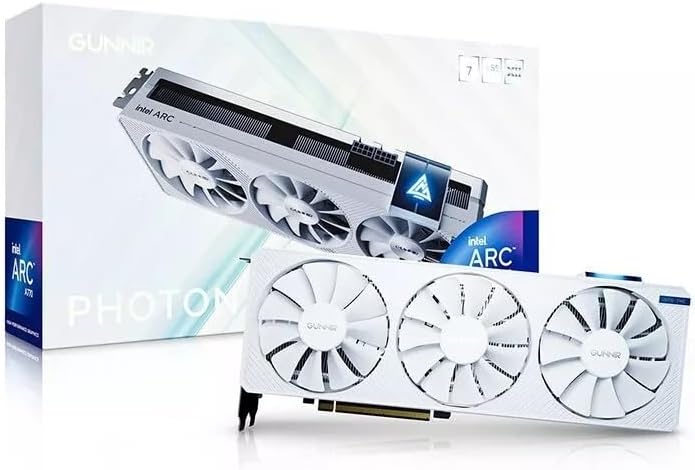
The Photon model brings a unique white design to the Arc lineup for matching specific builds. It packs a triple fan design that ensures efficient cooling during intense workloads.
We may earn a commission when you buy through this link, at no additional cost to you.
Performance is strong for its class with 8GB VRAM and PCIe 4.0 support. It handles 4K outputs easily making it a great fit for modern high-resolution monitors and TVs.
The triple fan setup is quieter than many dual-fan alternatives at similar loads. This makes it a better choice for shared spaces where noise levels matter.
Choose this card if aesthetics are a priority for your gaming setup. It delivers solid performance while helping you maintain a clean and consistent visual theme.
Pure white finish helps match white themed cases and accessories perfectly.
Triple fans distribute heat across a larger area for quieter operation.
We may earn a commission when you buy through this link, at no additional cost to you.
The A310 Omni View is designed for multi-display setups rather than gaming. It features four HDMI outputs allowing you to connect multiple monitors easily without adapters.
We may earn a commission when you buy through this link, at no additional cost to you.
With only a 50W TBP it runs on single slot power and space. The single fan design ensures it remains silent during typical office or playback tasks.
While 4GB VRAM limits high-end gaming it is perfect for media centers or data screens. It supports standard resolutions needed for productivity or digital signage setups.
Select this card if you need a simple upgrade to add multiple screens. It is a cost-effective solution for extending desktop space without complexity or noise.
Four HDMI ports allow for a multi-screen dashboard without extra hardware.
Low power draw ensures it works in almost any PC without upgrades.
We may earn a commission when you buy through this link, at no additional cost to you.
Selecting the right graphics card involves balancing your needs for gaming, AI, and professional work against your budget.
Memory capacity is often the deciding factor for AI and creative workflows. Models with 24GB or 48GB VRAM allow you to run large language models locally without cloud fees.
For general gaming, 10GB is sufficient for high settings in 1440p. Always match the VRAM to your intended workload to avoid bottlenecks.
Newer Xe2-HPG architectures offer better efficiency and AI features like XeSS 2. These chips handle modern upscaling and ray tracing tasks more effectively than older designs.
If you are buying new, prioritize cards with Xe2-HPG cores for better longevity and performance in future titles.
Thermal performance depends heavily on your case airflow. Blower cards are better for dense server racks, while dual-fan designs work best for open desktop cases.
Look for 0dB silent technology if noise is a concern. Ensure the physical size fits your chassis to prevent clearance issues.
Check the Total Board Power (TBP) before purchasing. High-end workstation cards may require multiple 8-pin connectors or specific power supply ratings.
For compact builds, low-power cards like the PRO B50 LP are ideal as they often need no external power connectors.
Connectivity options vary widely. Some cards offer multiple HDMI ports for digital signage, while others feature DisplayPort 2.1 for high-resolution gaming monitors.
Ensure your card has the specific port types required by your monitors to avoid using adapters or converters.
Professional users should look for ISV certification which guarantees stability with engineering and design software. Check for driver updates for your specific workflow needs.
AI developers should verify compatibility with PyTorch and vLLM to ensure the card works with their preferred frameworks.
Evaluate the cost per frame for gaming or cost per token for AI. Bundles can sometimes offer better overall value than buying components separately.
Set a strict budget and prioritize features you actually need rather than raw specs you may never use.
Measure your case space carefully especially for multi-slot or blower-style cards. Single-slot cards are rare and ideal for small form factor builds.
Check for clearance issues with CPU coolers or drive cages to ensure easy installation.
Install the latest drivers from Intel's official website immediately after setup to ensure compatibility with new games and applications. Check for updates regularly to benefit from performance improvements and bug fixes.
Ensure your power supply is stable and provides sufficient wattage for the card. Use high-quality cables and avoid loose connections to prevent unexpected shutdowns or crashes during heavy use.
Clean dust from the heatsink and fans every few months to maintain optimal thermal performance. Monitor temperatures using software tools to ensure the card is running within safe limits.
Yes most modern Intel Arc GPUs support hardware accelerated ray tracing. This feature is enabled in the latest drivers and works well with DirectX 12 Ultimate titles for realistic lighting.
Many Arc cards feature Xe Matrix Extensions (XMX) that boost AI inference performance. Models with high VRAM capacity are particularly effective for running large language models locally.
XeSS is Intel's AI powered upscaling technology similar to DLSS. It improves frame rates by rendering at a lower resolution and upscaling the image while maintaining quality.
Yes Intel Arc GPUs have strong Linux support through open source drivers. Workstation models often have specific optimizations for Linux multi-GPU deployments and AI workflows.
Yes they include AV1 encoding engines which provide high quality streaming at lower bitrates. This makes them efficient for content creators using OBS or similar software.
Most major brands offer standard warranty coverage for Arc cards. You should contact the specific manufacturer or retailer directly for claims or technical assistance.
We have reviewed a diverse range of cards from budget 8GB options to high-end 48GB workstation solutions. Each model offers unique strengths depending on whether you prioritize gaming or professional compute tasks.
Prioritize memory capacity for AI workflows and cooling efficiency for long sessions. Ensure your power supply and case meet the physical requirements to avoid compatibility issues.
Always check current listings for price changes and availability before buying. These technologies evolve quickly so verifying the latest specs will ensure you get the best value available.