
Cooling Fan for Nintendo Switch 1/2
4.6Editor score
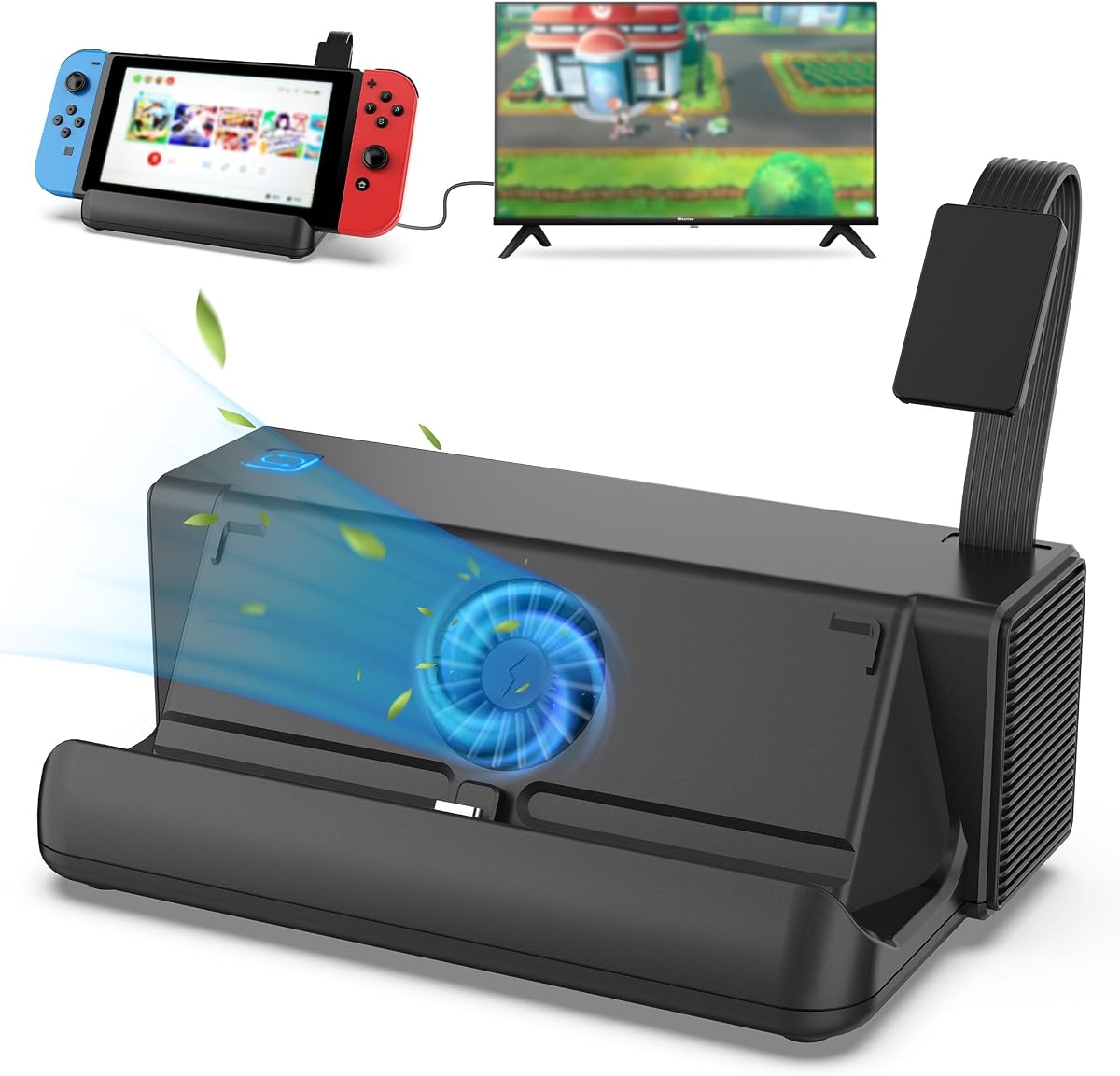
LED speed and temp display
Adjustable fan speed control
Micro USB powered design
This guide compares the top ten external cooling fan options for Nintendo Switch dock stations to help you keep your console cool and extend its lifespan
Gaming on your Switch dock demands reliable thermal management to prevent throttling and hardware stress during long sessions. An external cooling fan provides active airflow where the stock system may fall short, ensuring consistent performance.
We evaluated ten real products based on fan speed, noise levels, build quality, and compatibility with Switch models. Our analysis prioritizes units that deliver measurable temperature drops without disrupting your gameplay or setup.
Each pick highlights key specs and practical benefits so you can choose the right cooler for your needs. Prices and availability change often, so verify current details before purchasing to secure the best deal today.
4.6Editor score
4.4Editor score

4.4Editor score
The following table compares all ten products across key technical specifications and features to help you quickly identify the model that fits your Switch setup and cooling needs.


This cooler targets the standard Switch dock with a practical design that keeps your console cool during long play. It earns a solid 4.6 rating for reliable airflow and a clear LED display that shows fan speed and temperature.
We may earn a commission when you buy through this link, at no additional cost to you.
The unit provides adjustable speeds from 510 RPM up to 6000 RPM, letting you balance silence and cooling. The LED display shows exact degrees so you can see when the dock is under thermal stress.
It uses a Micro USB cable that plugs into the back of the dock, which may limit USB availability for controllers. Noise stays low below 2400 RPM but increases slightly when max speed is needed.
If you want a simple, budget friendly way to protect your Switch from heat without replacing the entire dock, this unit delivers value. It is best for gamers who play for hours in docked mode.
The LED display shows exact degrees Celsius for the exiting air so you know cooling is working in real time.
A fixed pad with sponges secures the fan between the Switch and dock base to prevent slips and scratches.
We may earn a commission when you buy through this link, at no additional cost to you.
This cooler uses three high-speed fans to move air through the original Switch dock effectively. It aims to keep temperatures low and prevent malfunctions without adding bulk to your TV stand.
We may earn a commission when you buy through this link, at no additional cost to you.
The unit has a straightforward application that connects directly to the dock's USB port. You can choose between Turbo and Normal settings to match your gaming intensity.
While it offers strong ventilation, the lack of a display means you cannot monitor exact temperature changes. Some users report mixed results on noise control during extended Turbo use.
It works well if you prioritize raw airflow over features and want a compact add-on for your original dock. Consider this if your current setup runs warm during heavy games.
Three fans work together to push air through the dock vents for faster heat removal than single fan units.
No tools are required since the product inserts onto the back of the dock and uses its USB port.
We may earn a commission when you buy through this link, at no additional cost to you.
This dual-fan stand is built for the Switch 2 charging dock and starts cooling automatically when connected. It includes game card slots and RGB lights to add both function and style to your setup.
We may earn a commission when you buy through this link, at no additional cost to you.
Pressing a button lets you switch between three cooling levels to match your gaming session needs. The stand also adds two USB-A ports and one USB-C port for extra accessory charging.
Since it targets the Switch 2, it may not fit older models without adapters. The RGB lights can be turned off to save power or reduce glare in dark rooms.
Choose this if you own the Switch 2 and want a dock accessory that combines cooling with card storage and expansion ports. It keeps your console stable during long play sessions.
The fan operates at full speed when connected to the charging dock so cooling begins as soon as you dock.
USB-A and USB-C output ports let you charge controllers and phones without using extra adapters.
We may earn a commission when you buy through this link, at no additional cost to you.
The Bewinner fan uses three internal fans to dissipate heat for your console while gaming. It features a small footprint and a side switch that toggles between Turbo and Normal speeds.
We may earn a commission when you buy through this link, at no additional cost to you.
Made from superior material, it aims to be durable without taking up much room on your desk. The switch at the side lets you adjust cooling or turn it off quickly.
It does not show temperature or offer fine-tuned speed control beyond the two modes. Some users may prefer more customization but the simple design keeps it easy to use.
If you want a no-fuss cooler that adds triple fans to your setup, this unit fits that bill. It is best for users who need basic heat management without extra features.
A single side switch toggles between Turbo and Normal cooling so you can match speed to your game.
The small design saves room on your entertainment cabinet while still delivering strong airflow.
We may earn a commission when you buy through this link, at no additional cost to you.
This dock replaces your stock dock and adds cooling plus eight game card slots and multiple ports. It earns a 4.4 rating for combining functions into one unit that saves space and reduces clutter.
We may earn a commission when you buy through this link, at no additional cost to you.
Independent switches let you turn off the fan when not needed to save energy and reduce noise. You can switch between 4 active cards with one button press without physical swapping.
It supports both desktop and TV modes so you can play on the go or on your big screen. The HDMI output delivers 1080P visuals while the fan keeps the console cool during play.
If you want a dock that handles cooling and card storage without extra accessories, this is a strong pick. It is best for home gamers who value convenience and a clean setup.
Seamlessly switch between four active game cards with a single button press to protect your console.
Separate switches for the fan and card reader let you disable unused features to reduce noise.
We may earn a commission when you buy through this link, at no additional cost to you.
This cooler is made for the 2021 OLED dock and uses a high-efficiency fan that blows air directly onto the base. It includes fourteen card slots and a blue light effect that matches the dock aesthetics.
We may earn a commission when you buy through this link, at no additional cost to you.
Installation is quick since it fits perfectly with the official OLED base design. A Type-C data cable plugs into the fan for power and it has a button to turn on or off.
The blue light syncs with the fan so it stays on when cooling is active. Some may prefer no lights but the design adds a tech-inspired touch to your setup.
Choose this if you have the OLED model and want a replacement that improves cooling and adds storage. It keeps the console cool during charging and long play sessions.
Designed to replace the back of the official OLED dock for easy installation and proper airflow.
The blue light turns on with the fan for a consistent tech look on your dock.
We may earn a commission when you buy through this link, at no additional cost to you.
This fan is made for the Switch OLED model base and uses a high-speed fan to improve air circulation inside the base. It features a blue LED light that synchronizes with the fan power.
We may earn a commission when you buy through this link, at no additional cost to you.
You install it on the OLED base and press the switch to turn cooling or the light on and off. It connects to the base using the Type-C power header that it provides.
The design aims to be powerful yet quiet so it does not distract during gameplay. It lacks extra features like card slots but keeps the focus on basic cooling.
If you need a quiet cooling add-on for your OLED dock that is simple to set up, this works. It is best for users who want to reduce noise while keeping temperatures stable.
The blue LED effect turns on and off with the fan so the light matches the cooling state.
Uses the Type-C input to connect to the base for power without extra cables.
We may earn a commission when you buy through this link, at no additional cost to you.
This unit offers three wind speeds and an auto start stop function so it syncs with your Switch 2. It uses a 45mm turbine fan and a vertical duct to deliver focused airflow to the console inlet.
We may earn a commission when you buy through this link, at no additional cost to you.
Press a button to choose low, medium, or max speed to match your scenario. The wide base and residue-free tape keep the fan stable on the dock during use.
The minimalist look avoids redundant parts and noise is optimized through the blade structure. Some may not want to use tape if they move the dock often.
Pick this if you need fine-grained speed control and auto-sync for your Switch 2 setup. It is best for gamers who want to tune cooling for quiet or high-performance modes.
The fan starts and stops automatically with your Switch 2 so you do not need to adjust it manually.
The duct aligns with the console inlet to deliver direct airflow for fast heat removal.
We may earn a commission when you buy through this link, at no additional cost to you.
This stand is a fanless solution that lifts your Switch 2 dock to improve airflow around it without using power. It earns a 4.8 rating for stability and simple design that prevents overheating risks silently.
We may earn a commission when you buy through this link, at no additional cost to you.
The black acrylic construction holds the dock securely with silicone pads that stop slips and scratches. Just place the dock on the stand for instant heat reduction without tools.
Since it has no moving parts, there is no noise or electrical cost. It works best in setups where passive cooling is enough or where you want zero noise at all.
If you need a silent stand to reduce heat without adding fans or wires, this is ideal. It is best for quiet living rooms or setups that already have good room ventilation.
Elevated hollowed-out structure boosts airflow around the dock with no moving parts or noise.
Sturdy acrylic with non-slip pads locks the dock in place to prevent slips and scratches.
We may earn a commission when you buy through this link, at no additional cost to you.
This fan fits the original Switch dock and offers bottom cooling to lower operating temperatures during long sessions. It has an LED display that shows RPM and exhaust temperature with three physical buttons for control.
We may earn a commission when you buy through this link, at no additional cost to you.
The speed runs from 510 RPM to 6000 RPM so you can choose between silent or strong cooling. A fixed stabilizer pad and joystick caps are included to help with stability and protection.
The unit aims to prevent lag and game pauses caused by overheating while keeping noise low under 2400 RPM. It provides a lifetime warranty and 24-hour customer service to support buyers.
Choose this if you want a versatile fan with real-time data and flexible compatibility for both Switch and Steam Deck. It is best for those who value data and warranty support.
LED display shows fan speed RPM and exhaust temperature so you can verify cooling performance.
The maker offers lifetime warranty support to help resolve any product problems quickly.
We may earn a commission when you buy through this link, at no additional cost to you.
Selecting the right external cooling fan depends on your specific model, desired noise levels, and need for extra features like card storage or display readouts.
Ensure the fan or stand matches your exact Switch model such as original, OLED, or Switch 2. Dock designs vary and units made for one version may not fit another without adapters.
Check the product title for explicit mention of your dock type to avoid fit issues before purchasing.
Higher RPM and multiple fans generally move more air and remove heat faster. Look for specs like fan count or speed ranges to compare cooling power across units.
Pick a model with enough airflow to handle your typical gaming intensity and session length.
Some fans run quietly at lower speeds but become audible at max RPM. If you play in a quiet room, look for units that specify low-noise operation below a certain speed threshold.
Balance cooling strength with noise tolerance to avoid distracting sounds during play.
Most dock fans draw power from a USB port on the dock. Confirm you have a spare USB port available so controllers or other accessories are not displaced.
Check whether the unit uses Micro USB or Type-C and ensure you can connect it cleanly.
Extra perks like game card slots, RGB lights, or LED displays add value if you need them. Decide if these features improve your setup or just add cost without utility.
Focus on functions that solve real problems such as card storage or temperature monitoring.
Durable materials like ABS plastic or acrylic extend the unit life and protect your console from scratches. Look for anti-slip pads or stable mounts to keep the fan secure.
Choose a build that feels sturdy and includes protective elements to preserve your dock surface.
Units with multiple buttons or dials let you adjust speed manually. Auto start options simplify use by syncing with console power state for hands-free operation.
Decide if you prefer manual control or convenience features that reduce steps during setup.
A lifetime warranty or responsive customer service gives peace of mind for electronic add-ons. Check the seller terms to understand how defects are handled.
Prioritize brands that offer clear support channels to resolve any issues quickly.
Install the fan or stand as instructed ensuring it aligns with ventilation channels to maintain proper airflow around the dock. Verify the USB or power cable is securely connected so cooling operates without interruption.
Set the fan speed based on your gaming intensity starting at low or normal settings for quiet use and increasing to high during demanding games. Use the display if available to monitor temperature and adjust as needed.
Dust the fan blades and vent openings regularly to prevent buildup that reduces cooling performance. Turn off the unit when not in use and disconnect power before cleaning to avoid electrical hazards.
No, properly installed cooling fans do not damage the dock when used according to the instructions. They add airflow and can extend the device lifespan by reducing thermal stress on internal components.
Temperature reduction depends on the fan design and ambient room conditions. Many units show noticeable drops in exit air temperature which translates to lower internal console heat during long sessions.
Noise levels vary by speed and model. Lower settings are often nearly silent while maximum speed can introduce some fan sound that may be audible in quiet environments.
Yes many units are designed to fit the original dock by inserting onto the back or between the console and base. Check the product details for compatibility with your specific dock model.
Most fans draw power from the dock USB port so an extra adapter is not required. Some units come with cables that plug directly into the dock for a clean power setup.
Overheating can cause throttling that leads to lag so cooling fans may reduce input delay during extended sessions. Stable temperatures help maintain consistent console performance.
Fans are generally safe for long runs but it is best to turn them off when not gaming to save energy. Auto start features can help by matching operation to your dock state.
Dusting every few weeks helps maintain airflow and prevents performance loss. Use a soft brush or compressed air on the blades and vents to keep the unit working effectively.
Our top picks include a budget friendly LED cooler for the original dock a multi-function dock station with built-in cooling and an OLED-specific unit with card storage and lights.
Prioritize model fit and noise levels first then consider extra features like speed control or card slots based on your needs. A stable mount and warranty support add long-term value.
Verify current prices and availability before purchasing to ensure you get the best deal on the model that matches your setup and cooling goals.