
iKKEGOL Upgraded USB Triple Foot Pedal
4.4Editor score
Quiet optical switches
Wide pedal surface
HID device support
Compare the top foot pedals for transcriptionists. This guide reviews durability, compatibility, ergonomics, and features to help you find the ideal transcripti
Transcriptionists require precise control over audio playback to maintain efficiency and accuracy. A reliable foot pedal allows hands-free operation, reducing strain during long sessions. Choosing the right model ensures seamless integration with your software workflow.
We evaluated ten leading foot pedals based on build quality, switch durability, and software compatibility. Our analysis considers ergonomic design, connection types, and user feedback to identify the most practical tools for professional transcriptionists.
Each selection highlights key strengths and potential limitations to guide your decision. Prices and availability fluctuate frequently, so verify current details before purchasing. Focus on models that match your specific software needs and usage intensity.
4.4Editor score

4.5Editor score

4.1Editor score
The following table compares key specifications across all ten models. Use this overview to quickly identify differences in design, functionality, and intended use cases.


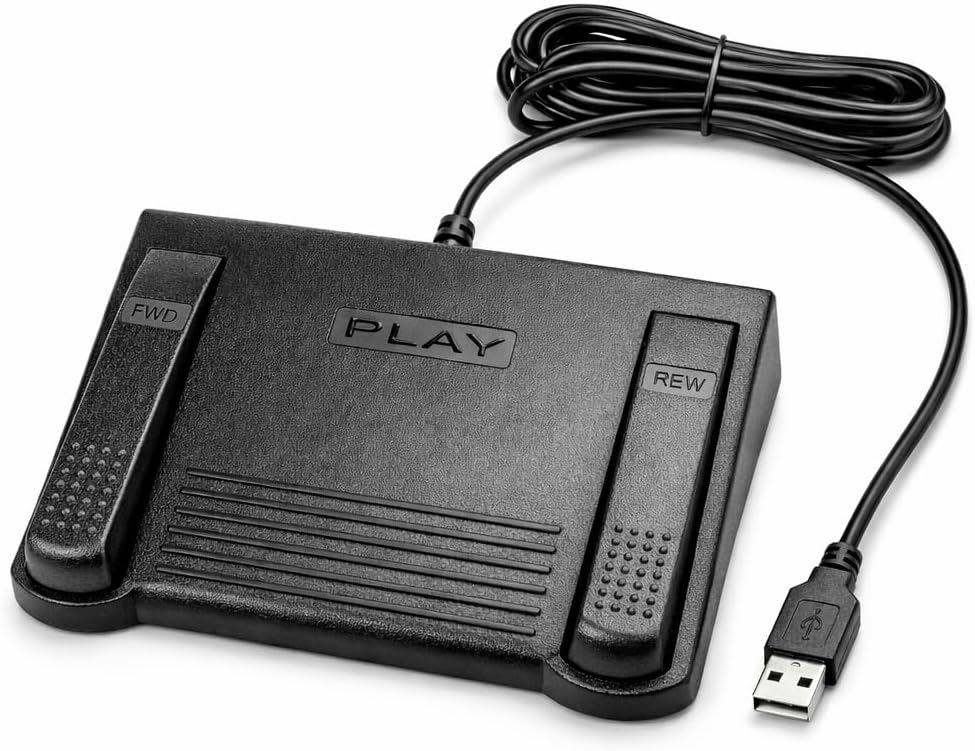


The Infinity 3 USB Foot Pedal Control stands out with its robust build quality. Its heavy-duty micro switches ensure countless hours of trouble-free performance during intensive transcription sessions.
We may earn a commission when you buy through this link, at no additional cost to you.
The ergonomic design features a wide, central sloping play pedal that makes moving between functions effortless. This layout reduces foot strain and maintains workflow continuity throughout long workdays.
While highly durable, the unit lacks advanced customization options found in higher-end models. This trade-off is acceptable for users prioritizing reliability and simplicity over complex programmable functions.
Ideal for transcriptionists needing a dependable tool without complexity. Its sturdy construction and intuitive layout make it a top choice for daily professional use.
The ultra-heavy-duty micro switches are built to withstand constant pressing, ensuring the pedal remains functional over extended periods of heavy transcription work.
The large, sloping play pedal is positioned to minimize foot movement, allowing seamless transitions between play, forward, and rewind functions.
We may earn a commission when you buy through this link, at no additional cost to you.
This digital foot control offers exceptional value with a rechargeable battery providing up to 1000 hours of usage. Its mechanical stop prevents accidental triggering, ensuring precise control during critical transcription moments.
We may earn a commission when you buy through this link, at no additional cost to you.
Built with heavy-duty components designed for 2 million depressions, it guarantees long-lasting performance. The ergonomic sloping play pedal allows comfortable resting during dictation, reducing physical fatigue significantly.
The need for occasional charging may interrupt workflow for some users. However, the extended battery life minimizes this issue, making it a practical choice for most transcription environments.
Best for users seeking reliability without breaking the budget. Its combination of durability, battery power, and compatibility makes it a standout budget-friendly option.
The rechargeable battery supports extensive daily use without needing frequent recharging, keeping your workflow uninterrupted during long transcription sessions.
A mechanical stop prevents the center pedal from triggering accidentally while pressing side pedals, maintaining precise control over playback functions.
We may earn a commission when you buy through this link, at no additional cost to you.
The Philips ACC2330 offers unique toe touch control for enhanced precision. Its wide center pedal avoids unintended presses, allowing focused control over playback functions during complex dictation tasks.
We may earn a commission when you buy through this link, at no additional cost to you.
The design allows you to swing your foot using the heel for easy relaxation during pause times. This ergonomic consideration reduces strain, supporting longer transcription sessions without physical discomfort.
While it provides premium features, it is limited to specific digital systems. This specificity means verifying software compatibility is essential before purchase to ensure seamless integration with your setup.
Ideal for professionals needing advanced foot control. Its ergonomic design and precision features justify the investment for those requiring specialized transcription hardware.
Easy toe touch control enables precise function changes, ensuring accurate playback adjustments without manual intervention or excessive foot movement.
Swinging the foot using the heel facilitates easy relaxation during pauses, helping maintain comfort and efficiency throughout extended work periods.
We may earn a commission when you buy through this link, at no additional cost to you.
This model features clearly labeled buttons including Next Job, Rew/Play, and Record. Designed for certain computer software, it provides specialized control ideal for users needing specific workflow integration beyond basic playback.
We may earn a commission when you buy through this link, at no additional cost to you.
The 5.0 rating highlights its reliability and seamless performance within supported environments. Large buttons ensure easy access, while USB connectivity offers stable, plug-and-play functionality for quick setup.
Its specialized nature limits broader compatibility. Users outside supported software ranges may find it less useful, requiring verification of system requirements before purchase to avoid mismatch issues.
Best for users needing specialized functions like Next Job. Its flawless performance within compatible environments makes it a strong choice for specific workflow setups.
Buttons are clearly labeled from left to right, minimizing confusion and ensuring quick identification of functions during rapid transcription workflows.
Designed to integrate seamlessly with specific software, enabling advanced features like job management and recording that basic pedals lack.
We may earn a commission when you buy through this link, at no additional cost to you.
The Infinity IN-USB3 features a low-profile design with a greater non-slip surface area. This compact form factor saves desk space while ensuring the pedal stays securely in place during active use.
We may earn a commission when you buy through this link, at no additional cost to you.
Its digital control capabilities provide consistent performance through standard USB plug-and-play functionality. The focus on surface area enhances stability, reducing accidental movement during intense transcription sessions.
While the design is practical, it lacks detailed feature differentiation. Users seeking advanced customization may find it less suitable compared to higher-spec models offering more functional options.
Ideal for compact workspaces requiring reliable control. Its stability and minimal design make it a practical choice for standard transcription tasks.
The low profile design maximizes desk space, making it suitable for smaller workstations without sacrificing functional performance or reliability.
A greater non-slip surface area ensures the pedal remains stable during use, preventing unwanted shifts during critical playback adjustments.
We may earn a commission when you buy through this link, at no additional cost to you.
This pedal is exclusively designed for Express Scribe transcription software. Its custom internal control board ensures precise operation without requiring manual configuration, simplifying setup for users committed to this platform.
We may earn a commission when you buy through this link, at no additional cost to you.
The oversized pedal layout allows comfortable movement between functions, supporting low-fatigue operation. Backed by a one-year warranty, it offers reliable performance tailored specifically for Express Scribe users.
Its exclusivity limits broader utility beyond Express Scribe. If your workflow involves other software, this pedal will not be compatible, restricting its long-term value for multi-software users.
Best for dedicated Express Scribe users. Its seamless integration and ease of setup make it a convenient choice for those invested in this software.
Pre-programmed to work immediately with Express Scribe, eliminating the need for manual wizards or complex setup procedures.
Pedals are oversized to support easy transitions between play, forward, and rewind, reducing physical strain during extended use.
We may earn a commission when you buy through this link, at no additional cost to you.
This Infinity pedal delivers hands-free audio playback control to enhance transcription efficiency. Its ergonomic, contoured layout supports natural foot positioning, aiming to minimize strain during long sessions.
We may earn a commission when you buy through this link, at no additional cost to you.
Designed for broad software compatibility, it serves multiple professional environments including medical and legal sectors. The one-year warranty adds confidence in its long-term reliability for daily workloads.
User ratings indicate room for improvement in build quality. While functional for general use, some may find the durability inconsistent compared to higher-rated alternatives in the same category.
Suitable for professionals needing versatile hands-free control. Its ergonomic focus makes it a decent choice for reducing strain during routine transcription work.
Thoughtfully designed contours support natural foot positioning to help minimize strain and fatigue during extended transcription tasks.
Compatible with major platforms, making it suitable for diverse professional environments requiring reliable daily transcription support.
We may earn a commission when you buy through this link, at no additional cost to you.
This triple pedal switch uses quiet optical switches suitable for professional environments. It functions as a standard HID device, allowing extensive customization for transcription and other specialized workflows.
We may earn a commission when you buy through this link, at no additional cost to you.
The wide pedal design supports comfortable use over long periods, with TPU rubber feet ensuring stability on hard floors. Its durability allows it to bear significant weight without compromising functionality.
As a generic tool, it lacks pre-set transcription labels. Users must configure key settings manually, which may be a hurdle for those seeking immediate out-of-box convenience.
Best for users willing to configure their controls. Its quiet operation and versatility make it a versatile choice for specialized transcription needs.
Optical switches operate quietly to minimize noise distractions, maintaining a professional environment during sensitive transcription work.
TPU rubber feet secure the pedal on hard floors, preventing unwanted shifts during active use or frequent foot movements.
We may earn a commission when you buy through this link, at no additional cost to you.
This Philips model features a slim ergonomic design to minimize foot movement and physical strain. Its four pedals can be fully configured using a user-friendly wizard, offering significant customization for varied workflows.
We may earn a commission when you buy through this link, at no additional cost to you.
The anti-slip bottom surface keeps the unit securely positioned during use. USB plug-and-play functionality ensures easy connectivity, while the configurability adapts to specific transcription software requirements.
Full configuration requires initial setup time which may deter users seeking immediate simplicity. The mid-range price reflects its advanced features, balancing cost with functional flexibility.
Ideal for those needing tailored control. Its configurability and ergonomic design make it a strong choice for adaptable transcription environments.
All four pedals can be configured to suit specific workflow needs using a user-friendly wizard, maximizing flexibility.
The slim ergonomic design minimizes foot movement to reduce physical strain during long transcription sessions.
We may earn a commission when you buy through this link, at no additional cost to you.
This model uses mechanical switches for precise actuation, allowing complex macros and key combinations. Dedicated ElfKey software enables customization for transcription and creative workflows, enhancing productivity significantly.
We may earn a commission when you buy through this link, at no additional cost to you.
Support for Windows, Mac, and Linux ensures broad compatibility. The ergonomic wide pedal design supports long-lasting comfort, while TPU rubber feet secure stability during use.
Using advanced features requires downloading and configuring software. This adds initial setup complexity, which may not suit users preferring simple plug-and-play operation without additional tools.
Best for advanced users needing custom macros. Its mechanical precision and software flexibility make it a powerful tool for complex transcription tasks.
Execute complex macros and key combinations without using hands, speeding up workflows in transcription and creative applications.
Compatible with major systems including Windows, Mac, and Linux for flexible integration into diverse technical environments.
We may earn a commission when you buy through this link, at no additional cost to you.
Selecting the right foot pedal involves evaluating several factors that impact usability and efficiency. This section details key considerations for making an informed decision.
Ensure the pedal supports your specific transcription software. Some models work exclusively with certain platforms, while others offer broad compatibility across multiple programs.
Always verify compatibility lists before purchase to avoid setup issues or limited functionality.
Heavy-duty micro switches are essential for long-term use. Look for models rated for millions of depressions to ensure the pedal withstands daily intensive workloads without failure.
Durable switches reduce maintenance costs and prevent interruptions during critical transcription sessions.
Pedals with wide surfaces and sloping layouts minimize foot strain. Features like swing mechanisms or relaxed positioning allow for comfortable use over extended periods.
Prioritize models that reduce physical fatigue to maintain productivity throughout the workday.
USB connectivity is standard for stability and plug-and-play functionality. Ensure your system has available ports and that the cable length suits your desk setup.
Wired connections generally offer more consistent performance than wireless options for professional transcription.
Some pedals offer customizable layouts to match your workflow. Advanced models may include configuration software for mapping specific keys or macros to pedal functions.
Decide if you need basic functions or advanced customization before selecting a model.
Robust construction ensures the pedal stays in place during use. Anti-slip surfaces and stable bases prevent accidental movement that could disrupt workflow.
Check for materials that resist wear and tear for long-term reliability in demanding environments.
Professional-grade pedals often come with warranties covering parts and labor. A one-year warranty is common and adds confidence to the investment.
Review warranty terms to ensure coverage aligns with your usage frequency and expectations.
Quiet switches are crucial for shared environments or phone-based dictation. Optical or silent mechanical switches reduce noise distractions during critical moments.
Prioritize silent models if noise control is essential for your professional setting.
Connect the pedal to your computer using the USB port and install any required software. Launch your transcription application and test the default functions like play, rewind, and fast forward.
For advanced models, use configuration tools to map specific keys to match your workflow preferences. Ensure the pedal remains flat on a stable surface to maintain consistent responsiveness.
Keep the pedal clean by wiping it with a dry cloth regularly. Avoid spilling liquids on the unit to protect the internal switches from damage.
Not all pedals support every software. Some are designed exclusively for platforms like Express Scribe, while others offer broad compatibility. Always check the manufacturer's supported list before purchasing.
Most modern pedals are plug-and-play. Advanced models require downloadable software like ElfKey to map specific keys. Follow the provided instructions to configure macros or custom functions.
Optical switches operate silently and reduce wear over time. Mechanical switches offer tactile feedback but may produce more noise. Choose based on your preference for sound versus feel.
Many pedals support macOS, but some require specific drivers or software. Verify system compatibility on the manufacturer's website to ensure seamless integration with your operating system.
Quality pedals are rated for millions of depressions, often lasting years of daily use. Heavy-duty components ensure reliability, but proper care and clean environments extend lifespan further.
Most USB pedals function without drivers due to HID standards. Some specialized models need configuration tools. Check the product description to determine if additional software is necessary for your use case.
The Infinity 3 USB Foot Pedal Control remains the top overall choice for its reliability and ergonomic design. The VEC in-USB-2 offers exceptional value with its rechargeable battery, while the Philips ACC2330 provides premium features for specialized needs.
Prioritize compatibility with your current software and ergonomic comfort to ensure long-term satisfaction. A well-chosen pedal reduces fatigue and enhances workflow efficiency during daily transcription tasks.
Prices and availability can change quickly. Always verify current pricing and stock details directly through official retailers before finalizing your purchase decision.