
Hamile for iPad Case
4.5Editor score
180 hour battery life
7 color backlight
Honeycomb heat dissipation
Finding the right keyboard case for your 8th Generation iPad can transform it into a powerful productivity tool. Whether you are a student, professional, or creative, a good case offers protection, typing comfort, and versatile viewing angles.
We compared ten top-rated models based on compatibility, build quality, battery life, and typing experience. Each option balances features like backlit keys, trackpads, and pencil holders to suit different workflows and budgets.
This guide highlights key specs, pros, and cons for every pick to help you decide quickly. Prices and availability change frequently, so please verify details on the product pages before making your final purchase decision.
4.5Editor score
4.5Editor score

4.4Editor score
As an Amazon Associate we earn from qualifying purchases.
Below is a side-by-side comparison of all ten keyboard cases analyzed in this guide. Each entry highlights essential specifications to help you identify the model that best matches your usage needs and preferences.


The FINTIE Backlit Keyboard Case stands out as a top performer for its balance of features and affordability. With a high rating and extensive battery life, it suits users needing reliable typing over long sessions.
We may earn a commission when you buy through this link, at no additional cost to you.
Its 420mAh battery supports up to 230 hours of use, eliminating frequent charging needs. The mechanical scissor keys offer quiet and responsive typing, while the 7-color backlight enhances visibility in low light.
However, it lacks a trackpad, meaning you must rely on touch input for cursor control. The stand provides only three fixed angles, which may not suit every ergonomic preference.
This case is ideal for students and casual users who want a solid typing accessory without spending too much. Its durability and ease of use make it a strong contender in this category.
The built-in battery lasts significantly longer than most competitors, ensuring uninterrupted work during travel or long study sessions without constant recharging.
Mechanical scissor keys reduce noise and provide tactile feedback, making it comfortable to type documents or emails for extended periods.
We may earn a commission when you buy through this link, at no additional cost to you.
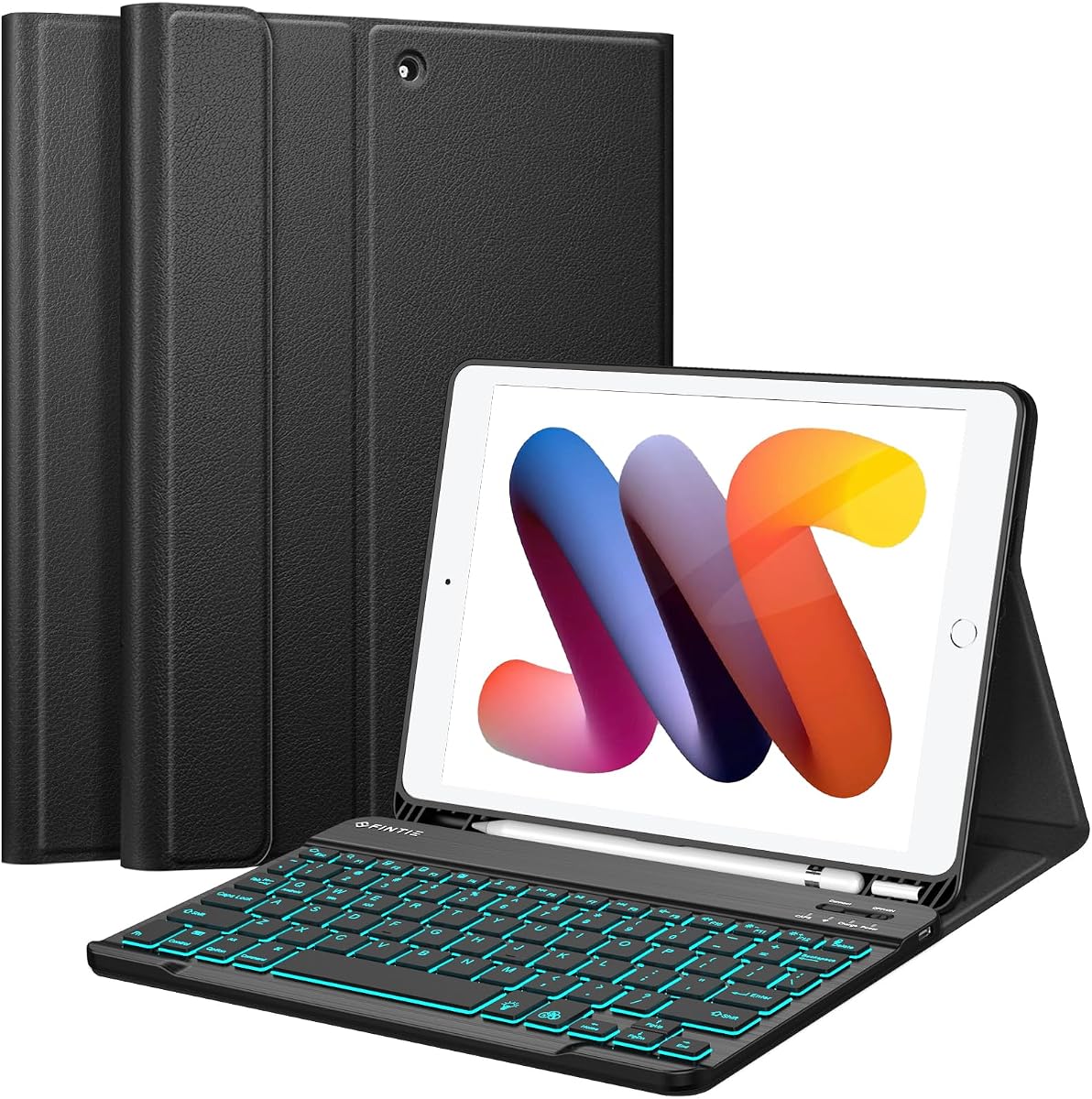
The Hamile Keyboard Case offers exceptional value for budget-conscious buyers seeking core functionality. It combines reliable performance with smart design elements like heat dissipation and ample battery life.
We may earn a commission when you buy through this link, at no additional cost to you.
Its honeycomb grid pattern helps prevent overheating, extending the tablet's lifespan. The 400mAh battery provides up to 180 hours of use, and the 7-color backlight ensures visibility in any environment.
While it lacks advanced features like a trackpad, the magnetic detachable design adds versatility. You can remove the keyboard for reading or sketching tasks easily.
This case is perfect for users who prioritize basic typing utility and protection over premium features. It delivers solid reliability at a very competitive price point.
The internal honeycomb design actively dissipates heat, protecting your iPad from thermal stress during prolonged use or charging.
The magnetic keyboard can be easily removed, allowing flexible use cases beyond typing, such as drawing or media consumption.
We may earn a commission when you buy through this link, at no additional cost to you.
The typecase Touch Keyboard Case delivers a premium experience with its built-in trackpad and versatile 360-degree hinge. It transforms the iPad into a true laptop alternative with multi-gesture navigation.
We may earn a commission when you buy through this link, at no additional cost to you.
Its RGB LED backlight offers 10 color choices for personalization. The patented hinge allows use in multiple modes, including typing, viewing, and native tablet form, enhancing workflow flexibility.
The price is higher than basic options, reflecting the added trackpad and build quality. Some users may find it slightly bulkier than simpler models.
Ideal for professionals and power users, this case maximizes the iPad's potential. Its comprehensive features justify the investment for those needing advanced control and productivity.
The precision trackpad supports multi-gesture controls, allowing faster document editing and web browsing without lifting your hands from the typing area.
The rotating hinge enables seamless transitions between typing and viewing modes, adapting to any task or environment effortlessly.
We may earn a commission when you buy through this link, at no additional cost to you.
TUNKARMOR Keyboard Case stands out for including a Bluetooth mouse, making it a complete computing solution. It offers full 360-degree protection and adjustable viewing angles for versatile use.
We may earn a commission when you buy through this link, at no additional cost to you.
The detachable keyboard and mouse combo provides flexibility. The backlight options ensure usability in dark environments, while the honeycomb grid helps manage heat during extended use.
The added mouse increases overall weight slightly compared to keyboard-only cases. Some users might prefer a lighter setup for travel.
This case is ideal for those wanting an all-in-one package. The inclusion of a mouse adds significant value for tasks requiring precise cursor control.
Including a Bluetooth mouse allows for efficient cursor navigation, reducing reliance on touch inputs for complex tasks.
Full edge coverage and anti-slip slots safeguard your iPad from scratches and drops, ensuring long-term durability.
We may earn a commission when you buy through this link, at no additional cost to you.
The Divufus Keyboard Case is notable for its robust warranty and strong multi-system compatibility. It supports iOS, Android, and Windows systems seamlessly, making it versatile for cross-platform users.
We may earn a commission when you buy through this link, at no additional cost to you.
Its honeycomb design helps prevent overheating, and the non-slip rubber lining keeps the tablet secure. The full shortcut keys enhance productivity by providing quick access to common functions.
Battery life is modest at 80 hours, requiring more frequent charging than competitors. The lack of backlight limits utility in low-light conditions.
This case suits users who value reliability and cross-platform functionality. The warranty adds peace of mind for long-term use.
Switching between iOS, Android, and Windows modes is simple, catering to users working across different devices.
The non-slip lining prevents sliding during typing, ensuring a stable and comfortable working posture.
We may earn a commission when you buy through this link, at no additional cost to you.
The Logitech Slim Folio offers reliability through its durable build and efficient power management. It uses replaceable coin cell batteries, promising up to four years of life on minimal replacements.
We may earn a commission when you buy through this link, at no additional cost to you.
The keyboard features large, well-spaced keys with iOS shortcuts for media control. Its slim profile adds minimal bulk while providing solid protection against bumps and spills.
Users may find the non-rechargeable batteries inconvenient over time. The lack of backlight reduces usability in dark settings.
This case is ideal for those prioritizing simplicity and longevity. It is a practical choice for consistent daily use without tech-heavy features.
Replacing coin cell batteries is straightforward, ensuring consistent power without frequent charging interruptions.
Dedicated iOS shortcut keys streamline access to essential functions, enhancing workflow efficiency.
We may earn a commission when you buy through this link, at no additional cost to you.
The KBCASE Keyboard Case offers a sleek design with practical functionality. Its detachable keyboard and lightweight build make it easy to carry and use in various settings.
We may earn a commission when you buy through this link, at no additional cost to you.
The honeycomb pattern aids heat dissipation, extending the tablet's life. Multiple viewing angles support both typing and media consumption comfortably.
The light blue finish adds a stylish touch, though color options are limited. Features are basic compared to premium models.
This case fits users seeking a balance of style and utility. Its affordability and reliability make it a strong contender for everyday use.
The light blue finish provides a modern look, appealing to users who value design alongside functionality.
The slim profile and detachable keyboard allow easy storage in bags for on-the-go productivity.
We may earn a commission when you buy through this link, at no additional cost to you.
The Dexnor Keyboard Case features a distinctive floating cantilever stand that offers customizable viewing angles. Its built-in trackpad and backlight enhance usability for typing and navigation.
We may earn a commission when you buy through this link, at no additional cost to you.
The aluminum alloy hinge provides sturdy support, transforming the tablet into a stable workstation. The 650mAh battery supports up to 200 hours of use, reducing recharge frequency.
The design adds some bulk and weight compared to simpler cases. The price reflects the advanced features included.
This case is perfect for users needing ergonomic flexibility. The trackpad and stand design offer a professional workstation experience.
The floating stand allows precise adjustment for optimal comfort during typing or media consumption.
The aluminum alloy hinge ensures a secure bond between keyboard and case for consistent stability.
We may earn a commission when you buy through this link, at no additional cost to you.
The INFILAND Keyboard Case supports multiple modes for flexible usage scenarios. Its trackpad and backlight provide laptop-like convenience and visibility in various environments.
We may earn a commission when you buy through this link, at no additional cost to you.
The zero-lag magnetic keyboard ensures responsive typing. The pencil holder keeps stylus tools secure, supporting creative work alongside typing.
Some users may prefer a more minimalist design. The price is higher than basic models but justified by features.
This case suits professionals needing versatility. Its combination of trackpad and backlight enhances productivity and ease of use.
Magnetic connectivity ensures instant key response without delays, enhancing typing speed and accuracy.
Fold or detach the keyboard for different tasks, adapting quickly to reading, writing, or viewing needs.
We may earn a commission when you buy through this link, at no additional cost to you.
The KBCASE Touchpad Keyboard Case offers a rotatable design with a built-in trackpad for enhanced control. Its hardshell design protects all sides of the tablet effectively.
We may earn a commission when you buy through this link, at no additional cost to you.
The 360-degree swivel allows flexible viewing angles for various tasks. The touchpad enables cursor control without touching the screen, improving workflow efficiency.
Build quality is solid but not premium. The color options are limited, which may not appeal to all users.
This case fits budget-minded buyers seeking trackpad functionality. Its versatility and protection make it a practical everyday solution.
The 360-degree swivel enables easy transitions between typing, reading, and drawing modes without removing the case.
The integrated trackpad provides laptop-style navigation, reducing reliance on touch gestures for multitasking.
We may earn a commission when you buy through this link, at no additional cost to you.
Selecting the right keyboard case depends on your specific needs and budget. This guide outlines the essential factors to consider for a well-informed decision.
Ensure the case matches your iPad's model number starting with 'A'. Most 8th generation iPads use A2270, A2428, A2429, or A2430. Mismatched cases may not align with ports or buttons.
Always verify the model number on the back of your device before purchasing to guarantee perfect fit and functionality.
Decide between fixed or detachable keyboards. Detachable options offer flexibility for reading or drawing without the keyboard obstructing the screen.
Fixed keyboards provide more stability but limit versatility. Choose based on whether you prioritize typing-only or multi-mode usage.
Backlit keys are crucial for low-light environments. Look for adjustable colors and brightness levels to match your preferences.
Not all cases include backlighting. If you work in dim settings, prioritize models with this feature to maintain typing accuracy.
Cases with trackpads mimic laptop navigation for efficient multitasking. Others include separate Bluetooth mice for greater precision.
Consider whether you need cursor control integrated into the case or prefer a standalone mouse accessory.
Battery life varies from 80 to 230 hours. Longer life means less frequent charging and uninterrupted use during travel.
Check charging method; USB-C is standard for faster recharging. Avoid models with short battery cycles if you need all-day usage.
Multiple viewing angles enhance ergonomics. Fixed angles offer stability, while rotating hinges allow flexible positioning.
Select a stand design that supports both typing and media consumption comfortably to suit your workflow.
Look for materials like PU leather and TPU with heat dissipation features. Honeycomb designs help prevent overheating and extend tablet life.
Prioritize full edge coverage and anti-slip properties for maximum protection against drops and bumps.
Prices range from $20 to $80. Higher prices often include advanced features like trackpads and longer warranties.
Balance your budget with required features. Check warranty terms for peace of mind regarding defects or failures.
Pair the keyboard via Bluetooth by enabling Bluetooth on your iPad and putting the keyboard in pairing mode. Refer to the manual for specific button combinations.
Clean the case regularly with a soft, dry cloth to avoid dust accumulation. Avoid liquids or harsh chemicals that could damage the keys or interior.
Store the keyboard flat when detached to prevent bending. Keep the charging cable accessible to maintain battery health during extended periods of non-use.
Not all cases fit every iPad. Ensure the product explicitly lists compatibility with 8th Gen models like A2270 or A2428. Mismatched cases will not align ports or buttons properly.
Most cases include a pencil holder slot designed for 1st Gen Apple Pencils. Check the product details to confirm compatibility with your specific stylus model.
Battery life ranges from 80 to 230 hours per charge. Usage frequency and backlight settings affect overall duration. Look for USB-C charging for convenience.
Most keyboards are detachable for independent use. Verify the product description to confirm magnetic separation and standalone functionality.
Ensure Bluetooth is enabled and the keyboard is in pairing mode. Try resetting the connection by removing the device from your iPad's Bluetooth list and re-pairing.
Yes, premium options include precision trackpads for laptop-like cursor control. These models enhance multitasking efficiency significantly.
Some kits include a separate Bluetooth mouse. These are useful for tasks requiring precise cursor control beyond trackpad capabilities.
Most backlit cases offer multiple colors and brightness levels. Adjust settings using function keys to suit your environment.
This guide highlighted ten top keyboard cases with varied features like backlights, trackpads, and long battery life to meet diverse needs.
Prioritize compatibility, battery performance, and typing comfort when choosing. The FINTIE model offers great value, while premium options include advanced navigation tools.
Prices and availability change frequently. Always verify model numbers and current pricing on Amazon before purchasing to ensure satisfaction.