
Cooler Master Q300L V1 Micro-ATX PC Case, High Airflow, Transparent Panel
4.5Editor score
Modular I/O panel
Open thermal design
Magnetic dust filters
This guide compares the top 10 horizontal PC cases for home theater and desktop setups, evaluating cooling, size, and build quality for optimal performance.
Horizontal PC cases offer a sleek profile ideal for home theater setups and compact desktops. They maximize space efficiency while supporting powerful hardware in a low footprint design.
We analyzed ten top models based on airflow, component compatibility, and build quality. Each selection balances aesthetics with performance to suit diverse user needs and preferences.
Every pick highlights key strengths and trade-offs to help you decide. Note that availability and pricing may shift, so verify details before purchasing your next system.
4.5Editor score

4.5Editor score

4.8Editor score
This side-by-side comparison highlights the unique strengths of each model. Review the specs to find the perfect fit for your hardware and layout needs.


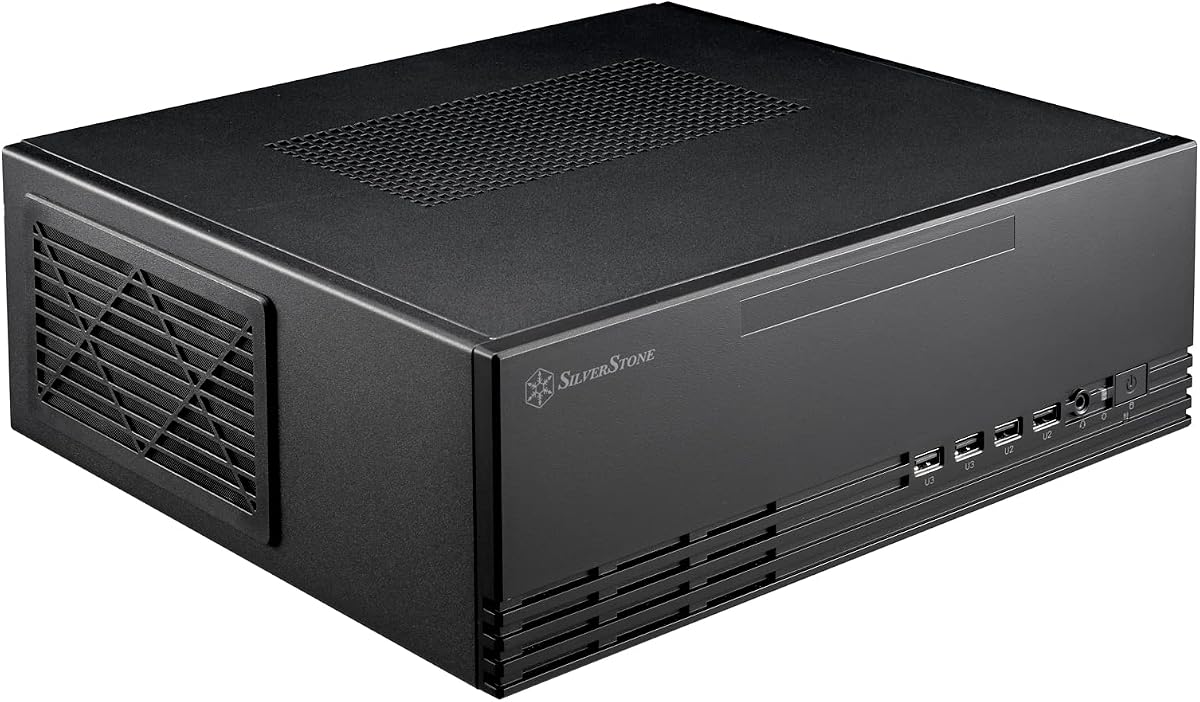
The Silverstone GD09 stands out as a top contender for horizontal builds. With a 4.5 rating, it delivers reliable performance for home theater and media centers.
We may earn a commission when you buy through this link, at no additional cost to you.
Its positive air pressure design ensures efficient cooling while minimizing dust accumulation. The 358mm depth allows components to fit comfortably inside standard AV cabinets.
Some users note limited space for complex cable routing. However, this trade-off is acceptable given the focus on streamlined media PC functionality.
Ideal for AV enthusiasts seeking a clean, low-profile setup. The GD09 balances aesthetics with practical cooling in a single sleek chassis.
Positive air pressure draws cool air in and pushes hot air out efficiently, reducing fan noise in living room settings.
The 358mm depth and rackmount compatibility ensure seamless integration with existing home theater furniture.
We may earn a commission when you buy through this link, at no additional cost to you.
The QUBE 540 offers a rare dual orientation design for horizontal setups. Rated 4.4, it provides flexibility for users switching between desktop and tower modes.
We may earn a commission when you buy through this link, at no additional cost to you.
Its mesh front panel supports high-end GPUs up to 415mm. The reversible I/O panel simplifies setup when changing case direction.
Tempered glass panels can show fingerprints easily. This is a minor downside given the impressive cooling and layout flexibility.
Perfect for gamers who want versatility without sacrificing aesthetics. The QUBE 540 adapts to both living room and desk environments effortlessly.
Reversible I/O and movable handles let you customize orientation without compromising accessibility or cable management.
With 415mm clearance, this case accommodates the latest flagship graphics cards even when positioned horizontally.
We may earn a commission when you buy through this link, at no additional cost to you.
The Grandia 11 brings liquid cooling to compact horizontal builds. With a 4.5 rating, it supports 240mm radiators without sacrificing home theater aesthetics.
We may earn a commission when you buy through this link, at no additional cost to you.
A fully meshed front panel enhances airflow for demanding workloads. The stereo-shaped chassis fits easily into AV cabinets.
Its price is higher than basic SFF models. However, the cooling flexibility justifies the cost for serious users.
Recommended for builders needing quiet liquid cooling in a small case. The Grandia 11 delivers performance and style for media systems.
240mm radiator support enables efficient heat dissipation for high-TDP CPUs without adding noise to your living space.
The stereo profile and mesh intake ensure components stay cool while maintaining a clean visual look.
We may earn a commission when you buy through this link, at no additional cost to you.
The Lian Li B4 combines elegance with functionality. Rated 4.5, it features a real wood finish that elevates any desk or shelf.
We may earn a commission when you buy through this link, at no additional cost to you.
It supports GPUs up to 358mm and allows dual orientation. Pre-installed slim fans help maintain quiet operation right out of the box.
Care is needed to maintain the wood finish. Still, the design remains a standout for minimalist builds.
Perfect for users prioritizing style in compact cases. The B4 brings luxury materials into the world of small form factor PCs.
Black walnut or white beech finishes give this case a furniture-like presence unmatched by metal alternatives.
Despite its small size, it accommodates modern GPUs and 360mm AIOs for solid gaming performance.
We may earn a commission when you buy through this link, at no additional cost to you.
The Q300L V1 delivers strong value for budget-conscious builders. With a 4.5 rating, it offers extensive customization and airflow features.
We may earn a commission when you buy through this link, at no additional cost to you.
Its modular I/O panel can be placed at the front, top, or bottom. Perforated sides ensure excellent heat dissipation.
Basic build quality may lack polish. However, the flexibility compensates for those prioritizing function over form.
Great for entry-level horizontal setups needing expansion. The Q300L V1 provides essential features without unnecessary costs.
Move the I/O panel to suit your layout, whether horizontal on a shelf or vertical on a desk.
Open thermal design promotes maximum airflow at a fraction of the price of premium chassis.
We may earn a commission when you buy through this link, at no additional cost to you.
The G300 is built for portable gaming. Rated 4.4, it fits flagship GPUs in a 16.8L chassis perfect for LAN parties.
We may earn a commission when you buy through this link, at no additional cost to you.
Its aluminum mesh ensures airflow while the military-grade handle supports transport. Horizontal PSU placement reduces cable interference.
Power supply choice is limited to compact units. But the portability makes this a top choice for travelers.
Ideal for gamers on the move. The G300 combines power and portability in a durable, stylish chassis.
Vibration-dampened base and reinforced handle make moving your rig safe and easy between locations.
Despite its size, the G300 accepts powerful graphics cards and supports dual thermal architectures.
We may earn a commission when you buy through this link, at no additional cost to you.
The A3-mATX ranks among the best premium options. With a 4.8 rating, it supports huge GPUs and radiators in a compact 26.3L space.
We may earn a commission when you buy through this link, at no additional cost to you.
Steel mesh panels enable exceptional cooling. A walnut wood front adds a premium look to minimal setups.
Building inside can be tricky due to density. But the performance potential justifies the challenge for enthusiasts.
Best for builders wanting flagship parts in small form. The A3-mATX proves small cases can handle serious loads.
360mm radiator support and mesh panels ensure high-end CPUs stay cool even during heavy loads.
Wood accents provide elegance while modular internals support advanced cooling and cable layouts.
We may earn a commission when you buy through this link, at no additional cost to you.
The GD09B-C modernizes the classic GD09 with USB Type-C. Rated 4.3, it brings newer connectivity to an established HTPC design.
We may earn a commission when you buy through this link, at no additional cost to you.
Positive air pressure keeps the system quiet and clean. Quick filters simplify maintenance for media centers.
Older design limits cooling compared to mesh cases. Still, it remains a solid pick for AV cabinets.
Recommended for users needing USB-C convenience. The GD09B-C offers a bridge between classic design and modern ports.
Front USB Type-C ensures compatibility with modern drives and peripherals without opening the case.
Classic HTPC features like rackmount ears maintain compatibility with existing AV rack setups.
We may earn a commission when you buy through this link, at no additional cost to you.
The GD09B remains a staple for aluminum HTPC builds. With a 4.3 rating, it offers reliable performance for home cinema systems.
We may earn a commission when you buy through this link, at no additional cost to you.
Its aluminum chassis resists wear and heat. The 358mm depth ensures compatibility with deep AV cabinets.
Older models lack USB Type-C and modern airflow. Yet, it is a dependable choice for basic media PCs.
Best for traditionalists needing a durable chassis. The GD09B proves classic designs still have a place in modern setups.
Aluminum body offers lasting protection and thermal stability for long-term media center use.
Standard rackmount compatibility ensures this case works with existing equipment racks and cabinets.
We may earn a commission when you buy through this link, at no additional cost to you.
The Milo 11 is ideal for ultra-thin setups. Rated 4.1, it fits on desks or shelves with minimal footprint.
We may earn a commission when you buy through this link, at no additional cost to you.
At 10.35L, it supports TFX power supplies. This makes it perfect for office or basic media PCs.
TXF power supplies are less common and pricier. But the slim form factor is unmatched in this category.
Best for users needing extreme compactness. The Milo 11 offers a clean, low-profile solution for light computing needs.
With only 10.35L volume, the Milo 11 takes up less space than most laptops.
Supports slim optical drives for legacy media needs while keeping the profile sleek and professional.
We may earn a commission when you buy through this link, at no additional cost to you.
Selecting the right horizontal case depends on your components and space. Consider size, cooling, and orientation options carefully.
Measure your furniture or rack to ensure the case fits. Horizontal cases vary significantly in depth and height.
Check that the case fits your intended cabinet or shelf without obstruction.
Ensure the case supports your motherboard form factor. Some models accept ATX while others only fit Micro-ATX.
Verify GPU and CPU cooler clearance to avoid installation issues.
Horizontal setups can restrict airflow. Look for mesh panels or positive pressure designs to maintain performance.
Prioritize cases with multiple fan mounts for efficient heat dissipation.
Some horizontal cases require specific PSU types like TFX or SFX. Standard ATX units may not fit in slim models.
Check power supply support before purchasing to avoid incompatibility.
Certain cases offer dual horizontal and vertical mounting. This adds flexibility if you move the system often.
Ensure handles or supports are included for safe handling in both positions.
Finishes like wood or aluminum affect how the case blends with decor. Choose a style that matches your environment.
Consider material durability for long-term use in high-traffic areas.
Front ports like USB Type-C can improve convenience for media PCs. Older models may lack these connections.
Check I/O placement to ensure easy access when the case is horizontal.
Horizontal setups limit cable routing space. Look for modular I/O panels or removable brackets to tidy cables.
Proper cable management improves airflow and reduces dust buildup.
Place the case on a stable, flat surface. Ensure vents are not blocked by walls or cabinets.
Clean dust filters monthly to maintain airflow. Use compressed air for internal fans and components.
Avoid placing heavy objects on the case. Horizontal setups are more prone to stress on the chassis corners.
Not all builds fit due to height or orientation constraints. Always check GPU clearance and motherboard form factor before purchasing.
They can be if airflow is restricted. Look for mesh designs and positive pressure to keep noise levels manageable.
Many modern cases do. Check manufacturer specs for maximum GPU length before selecting a build.
It depends on the model. Some accept standard ATX while others require TFX or SFX units.
Use modular I/O panels and zip ties to route cables along the case sides. Leave space around components for airflow.
They work well if airflow is sufficient. Vertical towers usually cool better, but quality horizontal cases can handle gaming loads.
We reviewed ten top horizontal cases ranging from budget options to premium builds. Each offers unique strengths for home theater or office setups.
Prioritize cooling and component fit to ensure stability. A well-designed case protects your investment and improves longevity.
Always check current availability and specs before buying. Prices and features may shift as new models launch.