
Redragon K585
4.4Editor score
42-key layout
Hot-swappable switches
USB pass-through port
Discover the top 10 gaming keypads for 2026. Compare features, ergonomics, and performance to find the perfect one-handed keyboard for your setup.
Gaming keypads offer a streamlined solution for players seeking enhanced control without the bulk of a full keyboard. These specialized devices focus on essential keys and macros, allowing for faster reaction times and improved comfort during extended sessions.
To compile this list, we analyzed performance metrics, ergonomic design, and customization options across the market. We considered user feedback, switch types, and connectivity methods to ensure each recommendation meets high standards for reliability and functionality.
Each pick highlights unique strengths, from budget-friendly options to premium ergonomic designs. While prices fluctuate regularly, these selections represent the best value and performance available today for competitive and casual gamers alike.
4.4Editor score

4.3Editor score

4.3Editor score
This side-by-side comparison highlights the core specifications and unique features of each top-rated gaming keypad to help you make an informed decision.




The Razer Tartarus V2 stands out as a top contender with its balance of comfort and customization. Its 32 programmable keys and mecha-membrane switches provide a satisfying tactile feel without the noise of mechanical switches.
We may earn a commission when you buy through this link, at no additional cost to you.
A unique feature is the 8-way directional thumbpad, which allows for natural movement controls akin to console gaming. This ergonomic addition reduces finger strain during long sessions and integrates seamlessly into your workflow.
While it lacks wireless connectivity, the wired connection ensures zero latency. The software offers deep customization but may feel overwhelming for casual users. Still, the balance of features makes it a strong choice for dedicated gamers.
Ideal for MMO players and streamers who need quick access to complex commands. The integration with Razer Chroma adds immersion, syncing lighting with games and devices for a cohesive setup experience.
The soft-cushioned keys and wrist support reduce fatigue, allowing for longer gaming sessions without discomfort or strain on your hand.
Razer Hypershift enables remapping any key combination to execute complex commands, perfect for executing quick moves in competitive titles effortlessly.
We may earn a commission when you buy through this link, at no additional cost to you.
The Redragon K585 offers impressive value with its 42-key layout and hot-swappable switches. This flexibility allows you to customize the feel without soldering, making it a favorite among enthusiasts on a budget.
We may earn a commission when you buy through this link, at no additional cost to you.
With seven onboard macro keys, you can bind combos for MMOs instantly. The USB pass-through port keeps your desk clean by letting you plug in your mouse or headset directly into the keypad.
Build quality is mostly plastic, which may feel less premium than other options. However, the durability is sufficient for regular use. The RGB lighting is vibrant, with 16.8 million colors to match your setup.
Best suited for budget-conscious gamers who want performance without breaking the bank. It is an excellent entry point into one-handed gaming peripherals while maintaining high functionality and customization options.
The upgraded socket accepts almost any 3-pin or 5-pin switch, letting you tune the feel of your keypad to match your preferences easily.
Binding multiple commands to macro keys means ability rotations fire with a single press, saving you from fumbling for multiple keys during intense moments.
We may earn a commission when you buy through this link, at no additional cost to you.
The AZERON Cyborg II is a premium device designed for players seeking advanced analog control. Its Hall Effect thumbstick replaces traditional WASD, offering 360-degree movement precision that enhances gameplay in compatible titles.
We may earn a commission when you buy through this link, at no additional cost to you.
This keypad features 30 mappable inputs without connection matrices, ensuring each button registers independently. The 3D printed design allows for customization, though the medium size might feel small for larger hands.
While the price is high, the innovation justifies the investment for serious competitors. The software enables fine-tuning of sensitivity and zones, creating a tailored experience that standard keypads cannot match.
Ideal for FPS gamers who want precision movement and macro control on one device. It transforms your left hand into a controller, allowing you to focus entirely on your mouse and gameplay strategy.
The Hall Effect thumbstick eliminates stick drift and supports 360-degree movement, providing smoother and more precise navigation than traditional digital keys.
Adjustable parts ensure a perfect fit for your hand, reducing strain during extended sessions with a design meant for maximum comfort and control.
We may earn a commission when you buy through this link, at no additional cost to you.
The Redragon K585 PRO brings wireless freedom to the popular K585 design. With Bluetooth and 2.4GHz connectivity, you can place it anywhere on your desk without cable clutter while maintaining a reliable connection.
We may earn a commission when you buy through this link, at no additional cost to you.
It retains the 42-key layout and hot-swappable switches, giving you the same customization options as the wired version. The battery lasts between 15 to 20 hours, enough for long gaming sessions before needing a recharge.
Charging is an added step but ensures a clean setup. The detachable wrist rest helps you adjust the footprint to your preference. This model is perfect for users who prioritize desk cleanliness and mobility.
Best for gamers who want to cut the cord without sacrificing performance. Its versatility and feature set make it a compelling choice for those who value both convenience and functionality in their peripherals.
BT and 2.4GHz connectivity let you set the keypad anywhere on your desk, reducing cable clutter for a cleaner and more organized battlestation.
With up to 20 hours of continuous play on a single charge, you can game all day without worrying about frequent recharges or interruptions.
We may earn a commission when you buy through this link, at no additional cost to you.
The RedThunder One Handed Gaming Keyboard is designed for portability and ease of use. Its compact 35-key layout saves desk space while providing essential controls, making it ideal for small setups or LAN parties.
We may earn a commission when you buy through this link, at no additional cost to you.
With built-in macro recording keys, you can set up complex sequences quickly using simple key combinations. The device is driver-free, meaning you can plug it in and start playing immediately without installing software.
The RGB lighting offers static and breath modes, providing visual flair without complexity. While it lacks advanced software customization, its straightforward functionality appeals to gamers who want simplicity and reliability.
Best for travelers or those with limited desk space. Its plug-and-play nature ensures you can take it anywhere, making it a versatile choice for both home gaming and on-the-go sessions.
The portable design and small size make it easy to carry and save space, perfect for gamers with limited room or who travel frequently.
Macro recording is done directly on the keyboard without drivers, allowing you to bind essential commands quickly and easily for better gameplay flow.
We may earn a commission when you buy through this link, at no additional cost to you.
The Keychron C0 HE is built for high-level competitive gameplay with Rapid Trigger Hall Effect switches. These magnetic switches detect inputs based on real-time travel, enabling faster resets and consistent performance for rapid key presses.
We may earn a commission when you buy through this link, at no additional cost to you.
With an 8K polling rate, this keypad offers sub-millisecond response times perfect for shooters like Valorant or CS2. The web-based configurator simplifies customization, requiring no installation and working seamlessly across Windows and macOS systems.
The 35-key layout keeps essential commands within reach without clutter. While the price is higher, the technology ensures tournament-grade performance. It is a great investment for players who demand the fastest response possible.
Ideal for competitive FPS players and creators needing precise control. The adjustable actuation allows you to fine-tune sensitivity, ensuring your movements are captured exactly as intended without delay or missed inputs.
Powered by Hall Effect switches, each key supports adjustable actuation enabling finer control and faster response even during rapid high-frequency inputs.
Customize key mapping and RGB lighting through a browser-based configurator, eliminating the need for software installation and ensuring cross-platform compatibility.
We may earn a commission when you buy through this link, at no additional cost to you.
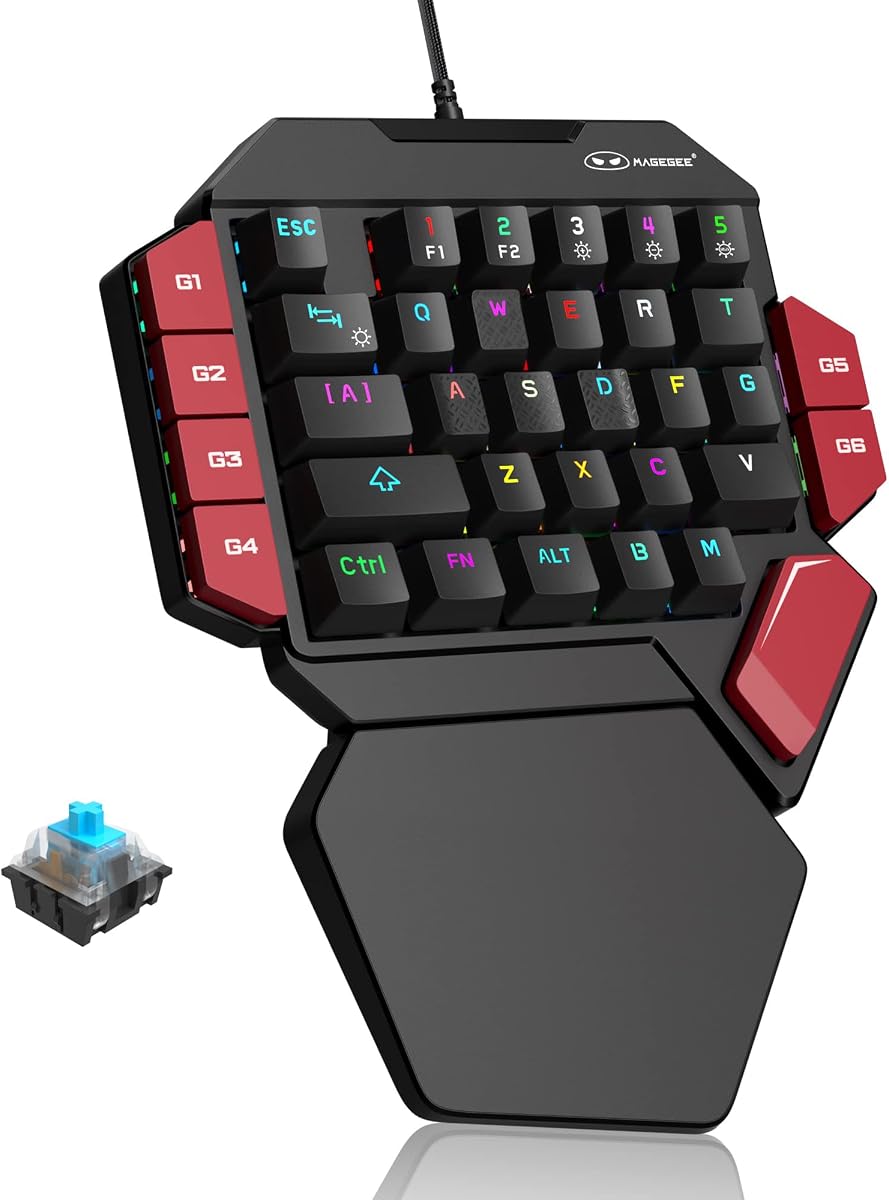
The MageGee One Handed Professional Gaming Keyboard offers a tactile mechanical experience at a budget price. With blue switches, every press delivers a loud click and strong mechanical feeling, providing precise feedback for gaming and typing.
We may earn a commission when you buy through this link, at no additional cost to you.
Six dedicated macro keys allow you to record complex sequences easily. The RGB lighting modes are customizable, adding a vibrant look to your setup. A large palm rest supports your wrist, reducing fatigue during long sessions.
While the switches are loud, which may not suit quiet environments, they are durable and satisfying to use. The plug-and-play functionality ensures quick setup without driver issues. It is a solid choice for mechanical enthusiasts.
Best for gamers who prefer the distinct feel of mechanical switches. Its affordability and tactile feedback make it a great entry point into mechanical gaming peripherals without compromising on core performance features.
All 35 keys are non-conflict blue switches providing a crisp paragraph feeling and strong mechanical feedback that enhances both typing and gaming precision.
Pressing specific function keys starts recording macros, allowing you to capture commands quickly and replay them effortlessly whenever needed in your game.
We may earn a commission when you buy through this link, at no additional cost to you.
The AJAZZ AK029 is an ultra-compact keypad with 29 keys that saves significant desk space. Its Hall Effect switches eliminate physical contact, ensuring zero debounce delay and instant tap registration for tournament-grade performance.
We may earn a commission when you buy through this link, at no additional cost to you.
With an 8KHz polling rate, response times are incredibly fast. The web-based driver opens directly in your browser, making customization simple without admin rights. The aluminum-reinforced build feels rigid and stable under your fingers.
While the key count is smaller than others, it is enough for essential commands. The 20 RGB modes add style, and the sound-dampening structure ensures crisp keystrokes. It is a modern, efficient option for competitive players.
Best for gamers prioritizing portability and speed. Its compact footprint frees up mouse space, ideal for low-sensitivity FPS play, while the Hall Effect technology ensures precise and consistent input tracking.
Bingyu Hall Effect magnetic switches allow precise actuation adjustment with zero debounce delay, ensuring every tap registers instantly for consistent competitive performance.
Full web-based driver opens directly in browser requiring no installation or admin rights, making remapping keys and adjusting settings quick and hassle-free.
We may earn a commission when you buy through this link, at no additional cost to you.
The Razer Tartarus V2 Mecha-Membrane Gaming Keypad offers excellent integration with the Razer ecosystem. Its fully programmable keys and thumbpad allow for extensive customization, syncing lighting with games and other Chroma-compatible devices.
We may earn a commission when you buy through this link, at no additional cost to you.
The mecha-membrane switches provide a soft-cushioned feel that reduces finger fatigue during long sessions. It supports 16.8 million colors and individual key lighting, adding a visually stunning element to your setup.
While it is priced higher than some competitors, the build quality and software depth justify the cost. The wired connection ensures reliability, making it ideal for players who prioritize performance and immersion over wireless options.
Ideal for those already invested in Razer hardware. The unified ecosystem allows seamless control and visual consistency across your devices, enhancing both functionality and aesthetic appeal in your gaming environment.
Razer Hypershift allows remapping all keys and combinations to execute complex commands, giving you full control to adapt the device to your needs.
Fully syncs with popular games, Philips Hue, and over 30 partners, creating a unified visual experience that reacts dynamically to your gameplay moments.
We may earn a commission when you buy through this link, at no additional cost to you.
The Redragon RM104 offers wireless versatility with its tri-mode connectivity supporting Bluetooth, 2.4GHz, and USB-C. Its multifunction knob allows quick volume adjustments and RGB cycling, streamlining your control options for audio and lighting.
We may earn a commission when you buy through this link, at no additional cost to you.
With a 4000mAh battery, it supports long gaming sessions without frequent recharges. The software allows full customization of buttons and macros, making it adaptable for various apps and games. It is compatible with both Windows and macOS systems.
Although larger than a standard keypad, it retains compactness compared to full keyboards. The build quality ensures reliable performance, and the anti-ghosting technology supports accurate input during intense gaming scenarios.
Ideal for users seeking a versatile wireless option that can double as a main keyboard or peripheral. Its smart features and battery life make it a reliable choice for both work and play environments.
Rotate to adjust volume, press for instant mute, and hold to cycle RGB modes providing smoother control than any standalone keyboard shortcuts.
Enjoy seamless switching between Bluetooth, 2.4GHz wireless, and USB-C keeping your desk clean while working flawlessly alongside your other Redragon gear.
We may earn a commission when you buy through this link, at no additional cost to you.
Choosing the right gaming keypad requires evaluating key features like switches, connectivity, and ergonomics. This guide breaks down the essential factors to consider.
Switches determine the tactile feel and durability of your keypad. Mechanical switches offer distinct feedback, while membrane options provide quieter operation. Hall Effect switches offer advanced precision without physical contact.
Select a switch type that matches your preference for sound and tactile response during gameplay.
Wired connections ensure zero latency, which is crucial for competitive gaming. Wireless options offer freedom of movement but require battery management. Some models offer tri-mode connectivity for maximum flexibility.
Choose wired for performance and wireless for cleanliness based on your setup needs.
Key counts range from 29 to over 40, affecting customization possibilities. Fewer keys save space but limit macros. Ensure the layout accommodates your most-used commands efficiently.
Balance key count with your desk space and macro requirements.
Comfort is vital for long gaming sessions. Look for wrist rests and thumbpads that reduce strain. The device should fit comfortably in your hand to prevent fatigue.
Prioritize ergonomic features to maintain comfort during extended use.
Robust software allows deep customization of keybindings and macros. Some devices use web-based config toators for easy access. Ensure the software is intuitive and compatible with your OS.
Choose a keypad with software that supports your specific automation needs.
Materials like aluminum or reinforced plastic affect durability. A solid internal structure prevents flexing and ensures consistent keystrokes. Check reviews for long-term reliability.
Opt for sturdy builds to ensure longevity and stable performance.
RGB lighting enhances immersion and allows for visual personalization. Look for per-key lighting if you want to color-code specific functions. Sync capabilities can improve the overall aesthetic experience.
Select lighting options that match your style and functional needs.
Budget models offer basic functionality, while premium devices provide advanced features like Hall Effect switches. Determine what features are essential versus nice-to-have to find the best value.
Assess features against cost to get the best performance for your budget.
To use your gaming keypad effectively, start by installing any required software or drivers. Configure your macro keys and remap essential commands to match your playstyle for optimal efficiency.
Clean the device regularly using compressed air to remove dust from underneath keys. Wipe the surface with a dry cloth to avoid moisture damage and maintain a smooth feel.
If your device is wireless, monitor battery levels and charge it before depletion. Store it in a dry, cool place when not in use to preserve electronic components and extend its lifespan.
A gaming keypad reduces clutter and provides quick access to essential macros. It helps improve reaction times and keeps your hand in a comfortable position during long sessions.
Yes, they are excellent for MMOs due to their programmable macro keys. You can bind complex ability rotations to single keys, making combat smoother and easier to manage.
Most gaming keypads function as standard keyboards, making them compatible with almost all PC games. Some features like specific macros may need setup within game settings.
Absolutely. Most models come with software allowing you to remap keys and create custom macros. This customization ensures the device adapts to your specific playstyle and needs.
Modern wireless keypads offer reliable performance with low latency. Just ensure you keep them charged for uninterrupted use, especially during competitive matches.
Hall Effect switches use magnets instead of physical contact to register inputs. This allows for faster response times and adjustable actuation points for precise control.
Yes, their compact one-handed design significantly reduces the footprint compared to full keyboards. This frees up room for mouse movement, which is crucial for FPS games.
Use compressed air to blow out dust and debris from between keys. A dry microfiber cloth works best for wiping the surface without causing moisture damage.
Our top picks cover a range of budgets and preferences. The Razer Tartarus V2 offers excellent all-around performance while the Redragon K585 provides great value for budget gamers.
Prioritize features like switch type and connectivity based on your playstyle. If you need precision, consider Hall Effect switches. For comfort, look for ergonomic wrist rests.
Prices and availability can change frequently. We recommend checking current listings and reviews before purchasing to ensure you get the best deal and latest model.