
Digital Calendar 10.1 Inch Wall Plan
4.2Editor score
Affordable price point
Easy wall mounting setup
Basic meal and task lists
Finding the right digital meal planning calendar can transform how your household manages time and food. These smart devices combine scheduling, grocery lists, and chore tracking into one centralized display. They reduce stress by keeping everyone on the same page throughout busy weeks.
Our team evaluated ten leading models based on screen size, sync capabilities, and ease of use. We looked at how well they integrate with existing apps and whether they offer useful tools for kids and meal prep. Each option brings unique strengths to different family needs.
Every pick includes detailed specs and real-world usage insights to guide your decision. Note that product availability and pricing fluctuate regularly on major retail platforms. We recommend checking current listings before purchasing to ensure you get the best deal available now.
4.2Editor score

4.4Editor score

4.4Editor score
As an Amazon Associate we earn from qualifying purchases.
This side-by-side comparison highlights key specifications across all ten selected models to help you identify the right fit for your home organization needs quickly and efficiently.




This digital meal planning calendar leads our list with its expansive 15.6 inch touchscreen and robust family command center capabilities. Rated 4.4 stars by users, it excels at integrating schedules meal plans and chores into one seamless interface. The real-time sync ensures everyone stays updated without extra effort or monthly costs.
We may earn a commission when you buy through this link, at no additional cost to you.
Its standout quality lies in the combination of practical tools and engaging features for children. The built-in chore chart transforms daily tasks into a gamified experience where kids earn points for completion. This interactive approach reduces parental nagging and fosters responsibility while keeping the household organized efficiently.
While the device performs well, it does require a dedicated power outlet which may limit placement options slightly. The included mounting hardware is functional but not premium, so wall installation might need additional support for a perfect fit. These are minor trade-offs given the extensive functionality offered.
Families seeking a comprehensive hub for managing busy lives will find this model ideal. It suits multi-generational homes where grandparents need visibility into events too. For those wanting a reliable digital meal planning calendar that grows with family needs, this is our top recommendation.
Real-time syncing with Google and iCloud means schedules update instantly for everyone, eliminating confusion about appointments or dinners.
The digital chore chart uses a reward system that motivates children to complete tasks independently, reducing household friction.
We may earn a commission when you buy through this link, at no additional cost to you.
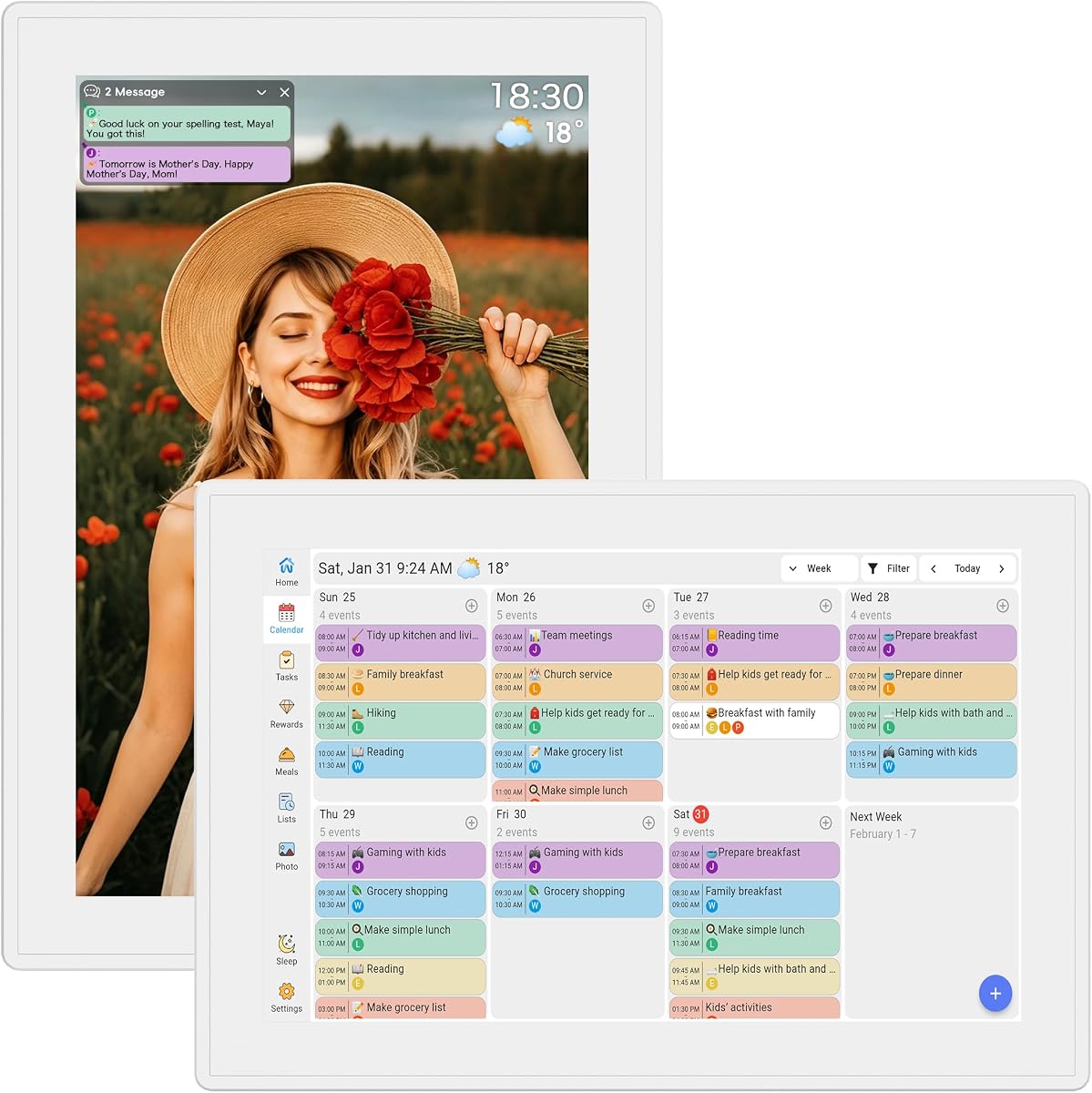
This model offers an accessible entry point into smart family organization with a compact 10.1 inch display. Users rate it 4.2 stars for its straightforward setup and ability to sync essential calendars quickly. It handles basic meal planning and task lists effectively without overwhelming complexity.
We may earn a commission when you buy through this link, at no additional cost to you.
Key strengths include its user-friendly interface and automatic syncing with major email platforms. You can upload photos to turn the screen into a memory slideshow adding warmth to your space. The task tracker helps monitor progress on household duties which supports better home management habits.
The smaller screen means less detail visible at once compared to larger models. Photo features are functional but lack advanced enhancements like AI restoration. Still these limitations are acceptable for the price point and core utility provided to families.
Ideal for budget-conscious buyers needing core scheduling tools, this device delivers value. It works well for smaller households or secondary rooms where space is limited. Choose this if you want essential digital meal planning features without a high investment.
Priced lower than competitors, it provides essential syncing and task tracking to help families stay organized on a budget.
Wall mountable design lets you position it in high-traffic areas for maximum visibility and family coordination.
We may earn a commission when you buy through this link, at no additional cost to you.
This electronic family calendar planner stands out for its robust chore tracking and dual-band connectivity. Rated 4.4 stars, it syncs instantly with multiple calendar services to keep everyone aligned. The interactive touchscreen encourages children to check off tasks directly which builds independence.
We may earn a commission when you buy through this link, at no additional cost to you.
Its integrated meal planner and to-do list simplify daily routines by centralizing essential information. You can map out weekly menus and grocery needs in one spot to reduce decision fatigue. Color-coded profiles ensure you never mix up schedules across different family members.
While it lacks advanced entertainment apps or premium add-ons, its core planning tools are solid. The compact design fits easily on counters or desks though wall mounting is also supported. These are minor concessions given the focus on organization and habit building.
Families focused on teaching kids responsibility and managing daily tasks will appreciate this device. It suits those wanting a dedicated planning hub without complex extras. If you prioritize chore tracking and fast syncing, this model is a strong contender.
Dual-band Wi-Fi ensures updates happen instantly across devices so you never miss a scheduled event or meal change.
Interactive chore chart offers a paperless way to manage duties while keeping kids motivated with immediate feedback.
We may earn a commission when you buy through this link, at no additional cost to you.
Rated an impressive 4.7 stars, this calendar delivers high-definition clarity and free app syncing. The 15.6 inch Full HD touchscreen makes viewing schedules from across the room easy and clear. It manages appointments school schedules and activities without needing paid subscriptions.
We may earn a commission when you buy through this link, at no additional cost to you.
Features like personalized member colors and visual reminders help simplify busy family routines significantly. You can add or edit events from a smartphone for instant updates on the display. This ensures the entire household stays coordinated effortlessly and efficiently.
The display focuses on planning rather than entertainment apps which some users might miss. It also requires a constant power source for continuous operation. These trade-offs are acceptable considering the superior screen quality and user satisfaction ratings.
Perfect for households needing a clear central display for schedules, this is a top choice. It suits those prioritizing readability and reliability over extra features. If you want a large digital meal planning calendar that keeps everyone informed, pick this.
The Full HD touchscreen offers crystal-clear visibility for schedules and photos ensuring easy viewing from any angle.
Free Whale Framely App provides full family calendar management without monthly costs adding long-term value.
We may earn a commission when you buy through this link, at no additional cost to you.
This premium hub combines shared schedules with interactive chore charts for busy families. Rated 4.4 stars, it connects seamlessly to major platforms like Google and iCloud within minutes. The sleek display fits naturally into kitchens or home offices providing a modern organization solution.
We may earn a commission when you buy through this link, at no additional cost to you.
Its premium status shines through exclusive features like Disney Mode with animations and avatars for kids. The Magic Import feature allows easy event addition enhancing convenience. These extras elevate the experience beyond standard planning tools significantly.
The higher price point and optional subscription for full features might deter budget shoppers. However, the build quality and unique family engagement tools justify the investment. It is designed for those who value aesthetics and advanced usability.
Families seeking a high-end digital meal planning calendar with engaging extras will love this model. It suits users who want style and smart features combined. If you prioritize premium quality and fun elements, this is the ideal pick.
Disney Mode brings unique animations and avatars that make household routines feel fun and motivating for children.
Magic Import makes adding events and photos effortless enhancing the user experience significantly.
We may earn a commission when you buy through this link, at no additional cost to you.
This smart organizer delivers full functionality without any hidden fees or subscriptions. Rated 4.4 stars, it syncs calendars and generates automatic grocery lists to simplify meal prep. The interactive chore list turns routines into fun games that kids enjoy and parents appreciate.
We may earn a commission when you buy through this link, at no additional cost to you.
Key strengths include automatic grocery list generation and recipe upload capabilities that save shopping time. You can view weekly menus beautifully on the screen reducing last-minute takeout decisions. Smart sleep mode conserves energy when the device is idle.
The smaller screen may not offer the same visual impact as larger models. Photo features are functional but lack advanced enhancements like AI restoration. These are minor trade-offs given the significant savings on ongoing subscription costs.
Ideal for cost-conscious buyers who want all-inclusive planning tools, this device offers great value. It suits households needing basic but effective management features. If you prefer no ongoing fees and reliable meal planning, choose this option.
Every feature comes fully unlocked with zero hidden fees ensuring long-term savings for families.
Recipe uploads and automatic list generation streamline shopping so you never forget essentials.
We may earn a commission when you buy through this link, at no additional cost to you.
This family command center offers a massive 21.5 inch touchscreen for comprehensive organization. Rated 4.6 stars, it combines calendars meal plans and even fridge inventory management. AI recipes can generate meal ideas based on available ingredients reducing waste and decision fatigue.
We may earn a commission when you buy through this link, at no additional cost to you.
Features like App Center access to Netflix and Spotify transform the device into an entertainment hub too. The four built-in speakers allow music playback during cooking sessions. It syncs with multiple services including TeamSnap to keep sports schedules organized.
Its size requires ample space which might not fit smaller kitchens or desks easily. The price point is higher but justified by the advanced AI and entertainment features. These trade-offs are acceptable for users needing a full digital ecosystem.
Families needing deep integration like inventory tracking and entertainment will find this unmatched. It suits tech-savvy households wanting a central smart hub. If you prioritize size and advanced capabilities, this is the top choice.
AI Quick Entry scans receipts to track food expiration reducing waste and simplifying meal planning.
Built-in apps for music and video transform the kitchen into a lively space during cooking.
We may earn a commission when you buy through this link, at no additional cost to you.
This planner blends functionality with a warm wood-grain design that fits various decor styles. Rated 4.5 stars, it uses Magic Import to capture events from photos or voice commands quickly. The auto brightness and sleep modes adjust viewing based on ambient light conditions.
We may earn a commission when you buy through this link, at no additional cost to you.
Key strengths include shared lists and meal planning features that reduce stress on weeknights. Everyone can see what is on the menu and what needs picking up. Real-time syncing with calendars ensures everyone stays on the same page without confusion.
It lacks extensive app support compared to more advanced systems. The included stand is functional but not premium. These minor limitations are acceptable given the stylish appearance and ease of daily use.
Families wanting a stylish hub that integrates well with home aesthetics will appreciate this device. It suits households needing practical organization without looking too tech-heavy. If you prioritize design and basic smart features, this is ideal.
The warm wood-grain design blends naturally into kitchens or entryways avoiding a sterile tech look.
Magic Import lets you speak or snap photos to import events simplifying the setup process.
We may earn a commission when you buy through this link, at no additional cost to you.
This model earns a perfect 5.0 rating for its user-friendly approach to family organization. It combines shared calendars with color-coded schedules for clarity. The interactive reward system uses stars to motivate children making daily tasks feel engaging and achievable.
We may earn a commission when you buy through this link, at no additional cost to you.
Features like customizable reward charts and rotating photo galleries keep memories alive while managing schedules. Real-time weather forecasts help plan daily activities effectively. It supports multiple calendar platforms ensuring all appointments stay synced easily.
It uses a US-style plug which may limit international use without an adapter. Advanced features are limited compared to larger models. These are acceptable trade-offs for a device designed for simplicity and gift-giving.
Ideal for parents or grandparents looking for an easy organization gift, this is a top choice. It suits households needing straightforward planning tools. If you want high satisfaction and reliable daily use, this is the option.
Customizable charts with stars encourage positive reinforcement helping kids build responsibility independently.
Rotating photo galleries ensure cherished moments stay visible on screen even during idle times.
We may earn a commission when you buy through this link, at no additional cost to you.
This smart planner offers unique dual-mode switching between simple calendar and Android app modes. Rated 4.4 stars, it supports downloading additional apps from Google Play for custom functionality. The built-in Google Gemini voice assistant simplifies task checking and weather updates.
We may earn a commission when you buy through this link, at no additional cost to you.
Features like custom layouts and widgets for smart home controls add significant versatility. Anti-glare HD clarity ensures comfortable viewing from various angles. Syncing is free and requires no monthly subscription for core features.
The Android mode adds complexity which may require initial setup learning. It is less streamlined than devices focusing solely on planning. These trade-offs are acceptable for users wanting customizable tech integration.
Families wanting a customizable smart hub with app expansion options will love this model. It suits tech enthusiasts who want control over their display. If you prioritize app freedom and voice control, this is the top pick.
Dual modes let you switch between simple scheduling and fully customizable Android apps for maximum flexibility.
Built-in Google Gemini allows checking schedules and weather verbally for hands-free operation.
We may earn a commission when you buy through this link, at no additional cost to you.
Selecting the right model involves balancing screen size, features, and budget. This guide breaks down key factors to help you prioritize what matters most for your household needs.
Screen size determines visibility and ease of use across different rooms. Larger displays like 15.6 or 21.5 inches allow multiple people to view schedules at once from a distance. Resolution clarity ensures text and images remain sharp for quick reading.
Prioritize larger screens for kitchen walls and smaller ones for desks or nightstands.
Sync capabilities ensure your device connects with existing calendar apps like Google or iCloud. Real-time updates mean changes made on phones reflect immediately on the wall display. Some models support multiple platforms for broader compatibility.
Check that the device supports your primary email and calendar services to avoid extra logins.
Subscription costs vary by model with some requiring monthly fees for full access. Most devices work well without plans but premium features like AI or Disney modes often need them. Always read details on locked features before buying.
Choose models with zero hidden fees if you want complete access without recurring expenses.
Chore chart features engage children by gamifying daily tasks with rewards or points. Look for interactive elements like tapping to complete tasks or earning stars. These tools reduce nagging and promote household responsibility naturally.
Select models with built-in reward systems if you have young kids needing structure.
Meal planning tools simplify grocery shopping by generating lists from menus. Some devices allow recipe uploads or AI suggestions based on ingredients you have. Integrated lists reduce last-minute decisions and wasted food.
Look for automatic list generation if you want to streamline your weekly food prep.
Photo frame mode turns the display into a slideshow of memories when not in use. This adds warmth to your home decor while keeping the device useful. Storage capacity and AI restoration features vary between models.
Check storage limits if you plan to use the screen primarily for displaying family photos.
Installation options include wall mounting or desktop stands depending on space. Some models include hardware while others require separate purchases. Power requirements may limit placement to areas near outlets.
Verify if the box includes necessary mounting parts before purchasing for your chosen spot.
App and smart home integration expands the device beyond planning into entertainment or control. Android models allow downloading Google Play apps while others offer built-in widgets for lights. Voice assistants add hands-free convenience for queries.
Choose devices with app flexibility if you want the display to act as a central hub.
Begin by plugging the device into a power outlet and connecting it to your home Wi-Fi network. Follow the setup wizard to link existing calendar accounts like Google or iCloud so data starts syncing immediately. Create family member profiles to color-code events for clarity.
Add events directly on the touchscreen or via the companion app to keep schedules current. Use meal planning tools to input weekly menus and generate grocery lists. Check the device daily to review tasks and update plans as needed.
Clean the screen with a soft dry cloth to remove dust and smudges. Avoid harsh chemicals that could damage the finish. Regularly check for software updates to ensure security and new features are available.
Most features require an active internet connection to sync data between devices. Offline mode may display existing data but updates cannot happen without internet. Ensure stable Wi-Fi is available in the device location for full functionality.
Yes most models allow multiple profiles with unique colors for each member. Everyone can view and edit schedules through their own login or the shared screen. This ensures coordination without confusing overlapping events.
The device will lose display power and reset once electricity returns. Any unsaved changes might be lost if the sync didn't complete. Always ensure updates are confirmed online before shutting down for safety.
Basic planning and syncing often work without subscriptions. However premium add-ons like AI recipe generation or entertainment modes typically require paid plans. Review the product details carefully before purchase.
Yes many models automatically cycle photos when not in active use. You can disable scheduling features if you prefer to use it solely as a digital frame. This keeps memories visible in your home daily.
Most devices are ready to use within minutes of plugging them in. Connect to Wi-Fi and sign into accounts to start syncing immediately. Detailed guides are usually included for quick configuration steps.
Some models feature built-in voice assistants for checking schedules or weather. This allows hands-free updates while cooking or doing chores. Compatibility depends on the specific device model and software version.
We highlighted ten models ranging from budget-friendly options to premium hubs. Each offers distinct advantages whether you need large screens or interactive chore tools. Prioritize features that match your family routine for maximum benefit.
Consider what matters most such as app integration or zero subscription fees. A device that aligns with your habits will encourage consistent daily use. Don't overlook design elements that fit your home decor style.
Always check current pricing and availability before making your final decision. These devices are popular and stock levels can change quickly online. Finding the right deal ensures you get the best value for your needs.