
Learning Resources Code & Go Robot Mouse
4.5Editor score
Starts At Age Four
Maze Building Included
Simple Button Programming
Discover the top coding toys for kids in October 2026. This guide compares ten educational robots and STEM kits designed to teach programming skills effectively
Coding toys have revolutionized how children learn technology by turning abstract concepts into tangible play experiences. These educational tools introduce logic, sequencing, and problem-solving skills without requiring a computer screen. Parents and educators increasingly seek devices that balance fun with rigorous STEM learning outcomes for young minds.
We analyzed ten leading products based on build quality, educational value, ease of use, and user feedback. Each item was evaluated for its ability to engage children across different age groups and skill levels. Our selection process prioritizes kits that offer progressive learning paths and durable construction for long-term play.
Every pick in this guide showcases unique features that cater to specific learning styles and interests. Whether you need a screen-free option or a robotics kit with app integration, this list covers the essentials. Please note that product availability and pricing may change frequently on retailer websites.
4.5Editor score

4.1Editor score

4.6Editor score
This table provides a side-by-side overview of all ten selected coding toys to help you compare key features at a glance. We have condensed the specifications to highlight the most relevant details for your purchasing decision.




The Thames & Kosmos My Robotic Pet stands out as a top choice for families seeking a screen-free coding experience. With a rating of 4.1 stars, this kit transforms a simple toy into a sophisticated educational tool. It teaches children how to build, code, and play with a robotic reptile that responds to physical cards rather than digital screens.
We may earn a commission when you buy through this link, at no additional cost to you.
This product excels in its engineering design, featuring articulated eyes, torso, and leg joints that mimic real reptile movements. The color sensor and infrared technology allow kids to program actions using colored cards, fostering logical thinking without the distraction of a tablet. The three play modes offer variety, ensuring that the toy remains engaging over time.
While the build process is detailed and might require adult assistance for children under twelve, this adds to the learning value. The time investment ensures that kids understand the mechanics behind the robot. Some users might find the assembly challenging, but the comprehensive manual guides them through every step successfully.
This toy is ideal for young engineers who enjoy tactile learning and want to understand robotics basics. It bridges the gap between physical play and computational thinking effectively. We recommend it for parents who prioritize screen-free education and hands-on STEM activities for their children.
The inclusion of the 48-page manual ensures that learning continues beyond simple play. It covers assembly, coding concepts, and even touches on biomimicry. This depth makes it a valuable resource for home schooling or weekend projects.
Furthermore, the robot's ability to camouflage and react to touch in different modes keeps interest high. Children can switch between coding, wild, and pet modes easily. This versatility supports diverse learning goals from programming logic to observational science.
Using physical cards reduces eye strain and keeps kids engaged with the physical world.
Building the robot teaches structural integrity and mechanical joints in a fun way.
We may earn a commission when you buy through this link, at no additional cost to you.
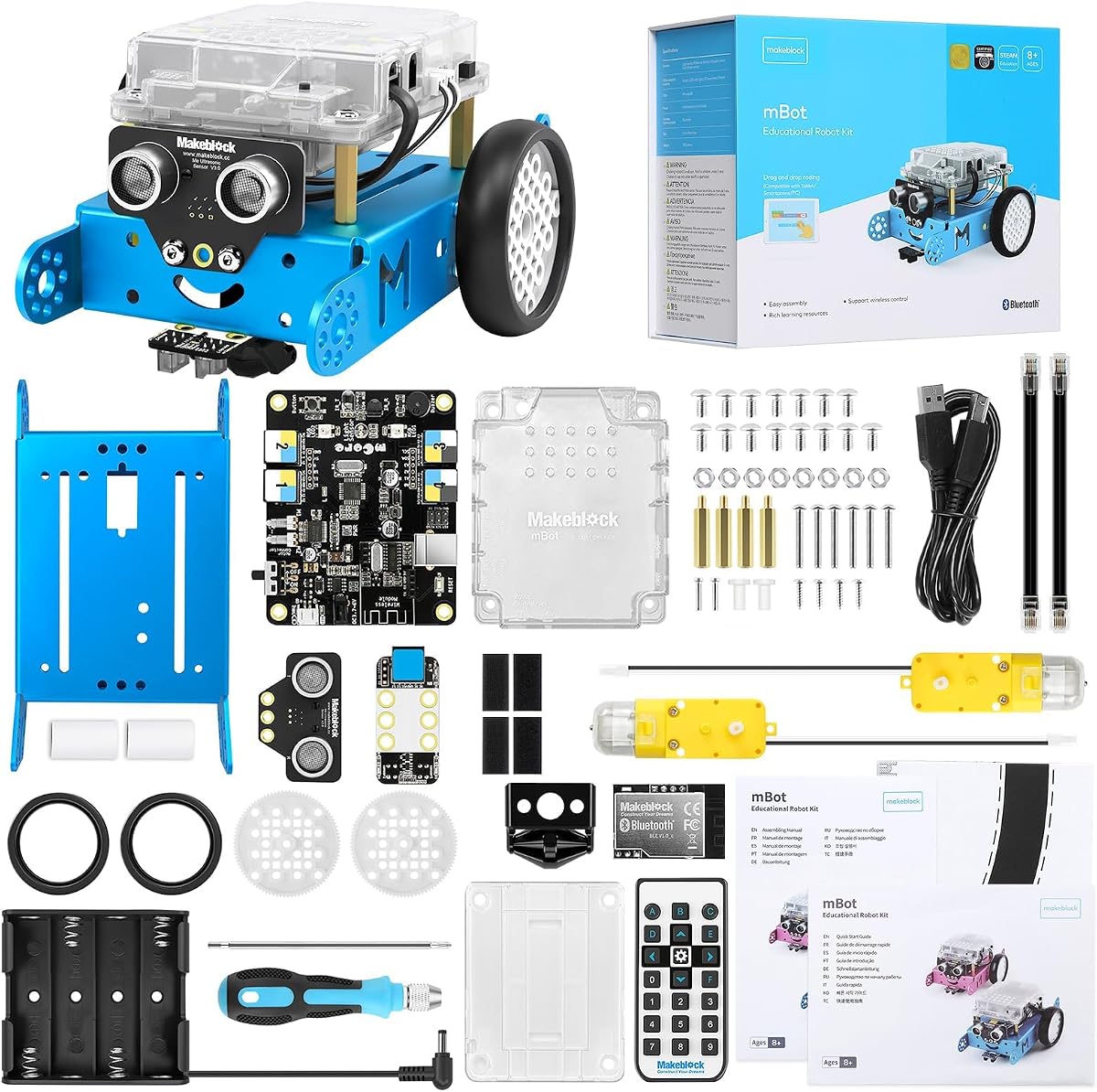
The Makeblock mBot is a powerful entry-level coding robot designed for kids aged 8 to 12. It receives high praise for its ability to grow with the child's skills, starting with Scratch and moving towards Arduino programming. This progression helps solidify coding concepts as the child matures.
We may earn a commission when you buy through this link, at no additional cost to you.
Its ease of assembly is a major selling point, often taking just 15 minutes to build. The metal materials and open-source system allow for extensive customization and durability. This robust design means it can withstand active play and repeated experiments without falling apart quickly.
Parents should note that batteries are not included, which is a common oversight in robot kits. While the remote controller adds value, it requires a specific battery type that might not be readily available. These minor inconveniences are outweighed by the extensive educational value provided.
This kit is perfect for children ready to move beyond simple block-based coding into more complex logic. The compatibility with LEGO parts encourages creative building beyond the standard robot form. It serves as an excellent gateway to serious robotics and engineering projects.
The rich tutorial support and coding cards ensure that kids can learn step-by-step without getting stuck. Whether they want to play a car or write their own software, the resources are there to support them. This flexibility makes it a top contender for STEM education.
Additionally, the multi-functions like line-following and obstacle avoidance provide immediate feedback on code. Seeing the robot react to the environment reinforces the logic they are writing. This immediate cause-and-effect loop is crucial for effective learning.
Transitioning from Scratch to Arduino prepares kids for real-world software development.
The open-source nature allows for endless modifications and upgrades.
We may earn a commission when you buy through this link, at no additional cost to you.
The Sphero Mini packs a surprising amount of educational fun into a tiny ball shape. With a 4.6 rating, it is celebrated for its portability and ability to teach coding through interactive games. It is an excellent choice for families who want coding fun without needing a large desk space.
We may earn a commission when you buy through this link, at no additional cost to you.
Powered by the Sphero Edu app, it supports drag-and-drop blocks and even JavaScript. This range allows younger kids to play while older ones learn syntax. The Drive Mode offers simple joystick control, making it accessible for immediate fun without coding.
While the battery life is limited to about an hour, this is typical for active robots of this size. It does require a mobile device to function, which is a trade-off for its compact design. However, the included cones and pins make it ready for obstacle courses right out of the box.
This robot is best for kids who enjoy gaming and want to see their code in action instantly. The ability to control it with tilt or draw on the screen adds a fun physical dimension. It bridges the gap between gaming and engineering seamlessly.
The app integration allows for structured lessons that can be followed at home or school. These lessons cover topics like loops and conditions in a playful context. Such structured learning ensures that play time translates into real skill acquisition.
Furthermore, its small size makes it great for travel or play in limited spaces. Kids can use it in a living room or a classroom without needing a massive area. This flexibility ensures it gets used often.
Using the robot as a controller for arcade games makes coding feel like play.
Older kids can write real code using JavaScript for advanced control.
We may earn a commission when you buy through this link, at no additional cost to you.
The Learning Resources Code & Go Robot Mouse is an outstanding budget-friendly option for introducing young children to coding. Rated 4.5 stars, it focuses on sequencing and problem-solving without any digital distractions. This makes it perfect for toddlers and preschoolers learning early logic.
We may earn a commission when you buy through this link, at no additional cost to you.
The mouse moves based on buttons pressed on its back, teaching cause and effect. The included maze grids and walls allow for endless layout variations. Children can build a 20 by 20-inch board and guide Colby the mouse through mazes.
While it lacks the complexity of a full robot, its simplicity is its greatest strength. The screen-free nature ensures focus remains on the logic puzzle. It also functions well in classrooms for small group rotations and STEM centers.
This toy is highly recommended for parents looking for an affordable entry into STEM education. It does not require a subscription or app, keeping costs low. The durability of the plastic parts ensures it can handle rough play.
The activity cards included provide structured challenges to prevent boredom. As children master the basics, they can create their own complex paths. This progression helps build confidence in problem-solving skills over time.
Additionally, the tactile feedback of the buttons helps with fine motor skills development. It combines physical play with logical thinking in a way that is easy for young kids to grasp. It is a reliable tool for early education.
Teaching sequencing at age four sets a strong foundation for future coding.
The durable design allows for repeated use in school environments.
We may earn a commission when you buy through this link, at no additional cost to you.
TEACH TECH Mech-5 is a unique mechanical coding robot that focuses on physical engineering and movement. With a 4.5 rating, it appeals to kids aged 10 and up who enjoy building complex structures. It emphasizes understanding how machines work through hands-on assembly.
We may earn a commission when you buy through this link, at no additional cost to you.
The robot can throw, lift, kick, and draw based on how coding buttons are snapped onto the wheel. This tactile programming method offers a refreshing alternative to digital code. It helps visualize the connection between physical inputs and mechanical outputs.
The build process is detailed and requires time, which can be seen as a challenge or a feature. It teaches patience and precision, essential traits for engineers. The mission-based approach ensures that the build has a clear purpose and outcome.
This kit is ideal for future engineers who want to understand the mechanics behind robotics. It moves beyond software to explore gears, levers, and structural design. The focus on building makes it a comprehensive STEM experience.
Because it does not require a device, it encourages focus on the physical machine. This helps kids understand the limitations and capabilities of the hardware itself. It is a great tool for teaching the physical side of technology.
The ability to perform distinct actions like throwing or drawing adds a fun element to the coding. It keeps engagement high as kids see tangible results from their coding choices. The detailed instructions ensure a successful build experience.
Kids learn how gears and levers translate code into physical action.
The assembly requires accuracy, teaching attention to detail.
We may earn a commission when you buy through this link, at no additional cost to you.
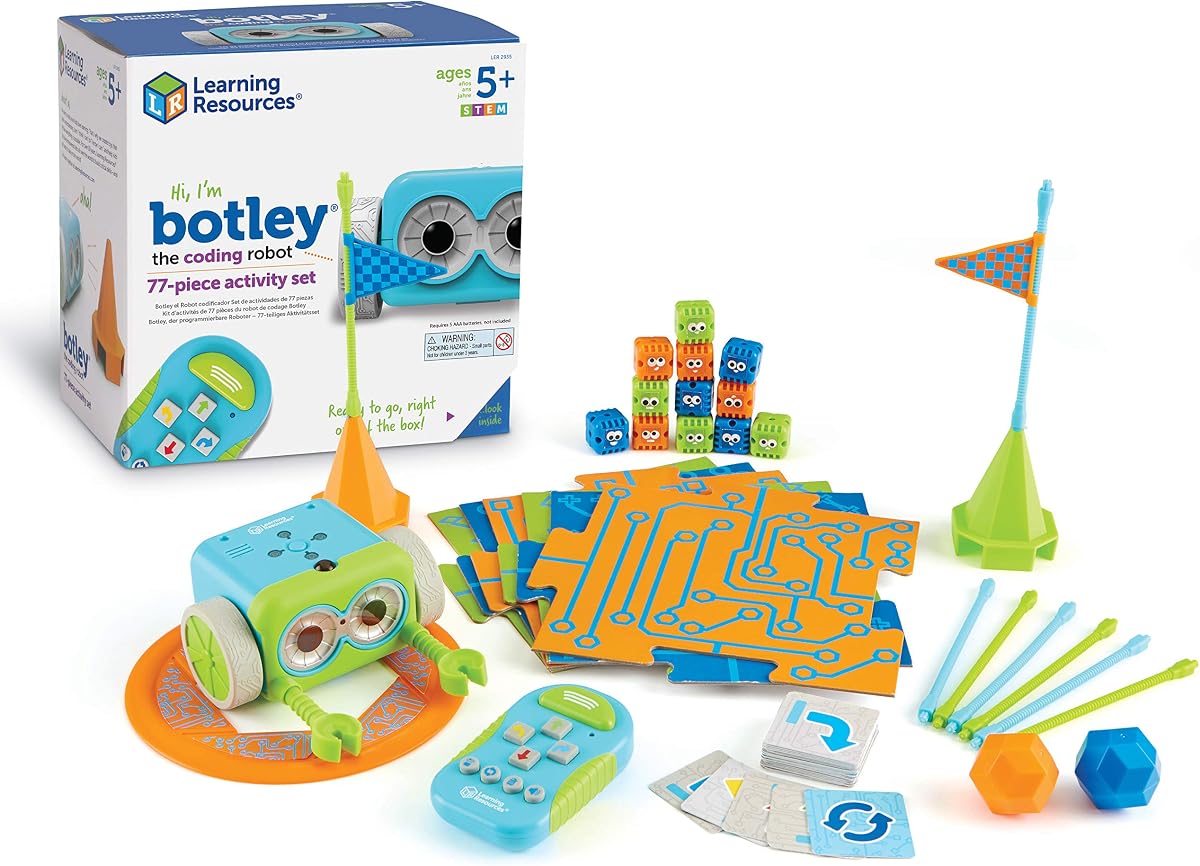
Botley is a classic choice for early coding skills, designed specifically for kids aged 5 and up. It carries a strong 4.6 rating for its screen-free approach that encourages problem-solving. The 77-piece set ensures plenty of accessories to build mazes and obstacles.
We may earn a commission when you buy through this link, at no additional cost to you.
The robot can detect objects and avoid them automatically, adding a layer of safety and complexity. It can also follow black lines and loop commands, which introduces basic programming concepts effectively. The remote programmer makes it easy to send commands without a screen.
While it requires several AAA batteries to operate, the value provided by the set justifies the cost. The hidden features and secret codes keep older kids engaged even after they master the basics. It is a versatile toy that grows with the child.
This robot is perfect for introducing the concept of algorithms in a playful way. It allows children to write sequences of commands and see them play out. The lack of a screen ensures that focus remains on the logic rather than entertainment.
The detachable arms allow for carrying objects, adding a layer of interaction to the play. This feature helps in understanding how robots can be used to perform tasks. It transforms simple coding into practical problem-solving.
The inclusion of activity cards provides a structured path for learning. These cards suggest challenges that children can solve using the robot. This structure is helpful for parents who want to guide the learning process without needing technical expertise.
Understanding loops helps kids write efficient and repeated actions.
The sensor technology introduces kids to environmental awareness.
We may earn a commission when you buy through this link, at no additional cost to you.
The Ozobot Evo is a versatile coding robot suitable for both home and classroom environments. With a rating of 4.6, it offers a dual mode of play: screen-free color coding and online block coding. This flexibility makes it adaptable to various learning styles.
We may earn a commission when you buy through this link, at no additional cost to you.
The kit includes color code markers that allow kids to draw paths for the robot to follow. This creative aspect merges art with technology. Additionally, the online platform offers over 700 free lessons covering STEAM and core subjects.
The durability of the robot and its zip case make it ideal for educational institutions. It can withstand the rigors of classroom use while remaining organized for teachers. The five skill levels ensure that children can start simple and advance to complex coding.
While the price is higher than some entry-level toys, the educational resources justify the investment. The lesson plans are comprehensive and align with standard curriculum. This makes it a practical choice for schools looking for a long-term tool.
The ability to grow with the child's skills ensures long-term value. As they progress, they can move from simple lines to complex programs. This scalability prevents the need for multiple purchases as skills develop.
Furthermore, the color coding system provides a tangible link between the drawn path and the robot's action. It helps kids understand how inputs translate to outputs in real time. This visual learning is crucial for early developers.
The lessons are designed to support school science and tech standards.
Drawing paths encourages creativity alongside logical coding.
We may earn a commission when you buy through this link, at no additional cost to you.
Botley 2.0 builds on the success of the original by adding sensors and more complex movement capabilities. It holds a 4.5 rating for its ability to support multi-step coding paths and object sensing. This makes it a great step up for kids ready for more challenges.
We may earn a commission when you buy through this link, at no additional cost to you.
The robot can detect objects and react to them, adding interactivity. It can also make 45-degree turns and handle obstacle courses more easily. The inclusion of lights and sounds makes the coding experience more engaging.
With 78 pieces in the kit, there are ample resources for creating custom mazes. The stackable obstacles allow for building vertical structures. This versatility keeps the toy fresh as children invent new stories and adventures.
This version is perfect for children who have mastered basic sequencing and are ready for loops and conditionals. The secret codes offer hidden features that reward exploration. It encourages curiosity and experimentation.
The remote programmer remains simple to use, maintaining accessibility for younger kids. This balance of simplicity and advanced features ensures broad appeal. It supports growth without overwhelming the child.
Parents can use this to introduce the concept of feedback loops in programming. Seeing the robot react to an object teaches them how sensors work. This is a valuable lesson for future robotics and automation understanding.
Object sensing teaches how systems respond to their environment.
Custom obstacles allow kids to build narratives around coding.
We may earn a commission when you buy through this link, at no additional cost to you.
Dash is a premium robot that is ready to use right out of the box with no assembly required. With a rating of 4.6, it is highly regarded for its interactive features like voice commands and obstacle navigation. It provides a seamless entry into robotics.
We may earn a commission when you buy through this link, at no additional cost to you.
The five supported apps allow for a wide range of coding activities from basic paths to complex logic. Kids can make Dash sing, dance, and respond to their voice. This interactivity makes the robot feel like a true companion.
The extended battery life supports up to five hours of active play, which is exceptional. This ensures that a single charge lasts for multiple play sessions. It reduces frustration caused by frequent charging cycles.
This robot is ideal for tech-savvy families who want a plug-and-play experience. The lack of assembly means learning starts immediately. It is also widely used in schools, ensuring reliability and educational quality.
The voice command feature is particularly engaging for younger kids who want to give verbal orders. It demonstrates the integration of natural language processing in a simple way. This adds a layer of modern tech to the play.
Dash's durability and design ensure it remains a favorite for a long time. The accessories support creative building and customization. It stands out as a top choice for premium coding toys.
Voice commands introduce kids to modern AI concepts safely.
Different apps offer varied learning pathways and challenges.
We may earn a commission when you buy through this link, at no additional cost to you.
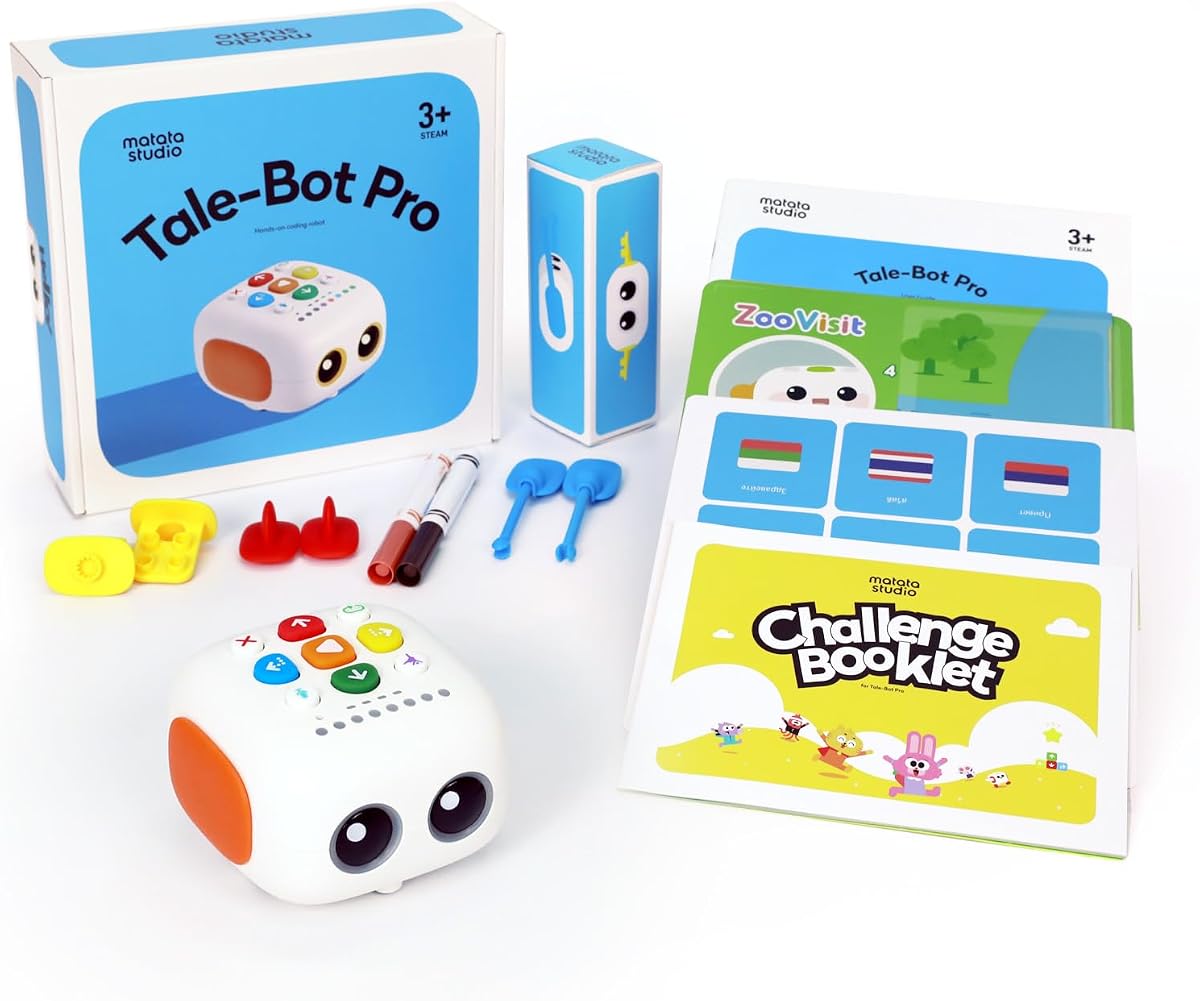
TaleBot Pro is specifically designed for children aged 3 to 5, making it an excellent starter toy. With a high rating of 4.7, it focuses on storytelling and basic sequencing. It provides voice feedback to guide children through their coding journey.
We may earn a commission when you buy through this link, at no additional cost to you.
The interactive map allows kids to build stories and command the robot to follow paths. This integrates language skills with coding logic. It supports 10 languages, making it accessible for diverse families.
The voice recording feature lets kids hear their own stories told by the robot. This boosts creativity and self-expression. It transforms coding into a narrative game that is highly engaging for young children.
This robot is perfect for families looking to introduce STEM concepts without any screen time. The tactile buttons and physical map keep focus on the real world. It is easy to use and requires no technical knowledge from parents.
Compatibility with Lego blocks allows for building custom tracks and scenes. This extends the play value beyond the provided map. It encourages construction skills alongside coding basics.
The simple command structure teaches loops and sequences without complex syntax. As children grow, they can move to more advanced kits. It is a gentle and effective introduction to programming logic.
Recording and playing back stories enhances verbal communication skills.
Building tracks with Lego encourages structural creativity.
We may earn a commission when you buy through this link, at no additional cost to you.
Selecting the right coding toy depends on your child's age, interests, and learning goals. This guide outlines key factors to consider before making a purchase.
Coding toys are often designed for specific age groups to match cognitive development. Toys for toddlers focus on sequencing and simple buttons, while older kids benefit from block-based coding or text languages. Choosing a toy that is too complex can lead to frustration, whereas one that is too simple may not hold their attention.
Decide if you want a robot that requires a tablet or one that operates independently. Screen-free options encourage focus on the physical robot and coding logic without digital distractions. However, screen-based toys often offer more advanced software and lesson plans that deepen learning.
Children can be rough with toys, so durability is crucial for long-term use. Look for robots made with metal or high-quality plastic components. Robust designs are particularly important for classroom settings or shared play environments.
The best coding toys come with structured lessons or activity cards to guide play. These resources ensure that children learn specific programming concepts rather than just playing randomly. Comprehensive guides help parents understand how to support the learning process at home.
Some robots allow for expansion with additional modules or parts. This feature extends the life of the toy as the child learns new skills. Check if the system is compatible with other blocks or kits to maximize investment.
Consider whether the toy uses rechargeable batteries or disposable ones. Disposable batteries can add up in cost over time, so rechargeable options are more economical. Always check if batteries are included or need to be purchased separately.
Determine the level of coding required to operate the toy. Simple button programming is great for beginners, while block coding or text-based systems are better for older kids. The toy should offer a path to grow in complexity as skills improve.
Always read the assembly instructions carefully to ensure the robot functions correctly. Improper assembly can lead to movement issues or damage to internal parts.
Keep the coding cards and accessories organized to prevent loss. A dedicated box or bin works well to store small pieces like maze grids and blocks.
Charge or replace batteries as needed to maintain consistent performance. Regular maintenance ensures the robot remains responsive and ready for play.
Yes, most coding toys are designed with intuitive interfaces and manuals that make them easy to set up. You do not need to be a programmer to help your child use them effectively. The guides often explain the basic concepts needed to get started.
Many of these toys are specifically designed for classroom use with durable construction and lesson plans. They help teachers introduce STEM concepts in a hands-on way. Check the product details for specific classroom suitability.
Not all coding robots require internet access. Screen-free models like the Botley or Code & Go Robot Mouse work entirely offline. However, app-enabled robots need connectivity for downloads and lessons.
Battery life varies by model, but most offer between one to five hours of play. Some require rechargeable batteries while others use disposable ones. Check the product specifications for exact usage times.
Many platforms allow for add-on packs or new models that build on basic skills. While direct upgrades may not exist, learning the basics prepares kids for advanced kits. Some brands have compatible ecosystems for expansion.
Many toys offer adjustable volume and tactile feedback options. Models without screens may be better for children who prefer physical interaction. It is always good to review the specific sensory features of the toy.
Our top picks like the Thames & Kosmos Robotic Pet and Makeblock mBot offer exceptional value for different needs. They balance educational depth with fun to ensure children stay engaged in STEM learning.
Prioritize a toy that matches your child's current age and technical comfort. Starting with a simpler model can build confidence before moving to complex programming tools.
Remember to check current prices and availability on retailer sites before buying. The market changes quickly, so verifying details ensures you get the best deal today.