
Omada AX3000 Wireless Access Point
4.5Editor score
Free cloud management included
Wi-Fi 6 speeds up to 2976 Mbps
Supports PoE+ and passive PoE
This guide compares the top 10 commercial wireless router options for businesses, highlighting speed, security, and manageability features for modern offices.
Choosing the right commercial wireless router is critical for maintaining a reliable and secure business network. High performance and robust security features ensure your operations run smoothly without interruption or vulnerability to cyber threats.
We evaluated ten leading commercial wireless routers based on speed, scalability, security protocols, and management capabilities. Our analysis focuses on models that deliver consistent performance for dense environments and support advanced business networking needs.
Each product entry details key specifications, strengths, and limitations to help you make an informed decision. Prices and availability may change, so always verify current offers before purchasing to ensure you get the best value for your setup.
4.5Editor score

4.2Editor score

4.6Editor score
The following table provides a side-by-side comparison of the top 10 commercial wireless routers. Use this to quickly identify key specifications like Wi-Fi generation, port options, and unique features.





The ASUS ExpertWiFi EBR63 is a top-rated wireless router designed for business environments. With a rating of 4.2 stars, it stands out for its balance of performance and management tools suitable for small to medium businesses.
We may earn a commission when you buy through this link, at no additional cost to you.
Key strengths include the ability to separate devices into up to five SSIDs and a customizable guest portal that fits your brand. The included free subscription to AiProtection Pro ensures your network remains secure against threats without extra costs.
While it offers robust security and management, physical port limitations may require a switch for larger setups. The reliance on an app for some features might also limit advanced users who prefer web interfaces.
This router is ideal for businesses needing scalable, secure WiFi with minimal administrative overhead. It is a strong recommendation for offices prioritizing ease of use and integrated security features.
Separating devices into multiple SSIDs helps prioritize traffic and keep guest access secure from internal business data.
The free AiProtection Pro subscription provides enterprise-grade threat protection directly within the router software.
We may earn a commission when you buy through this link, at no additional cost to you.
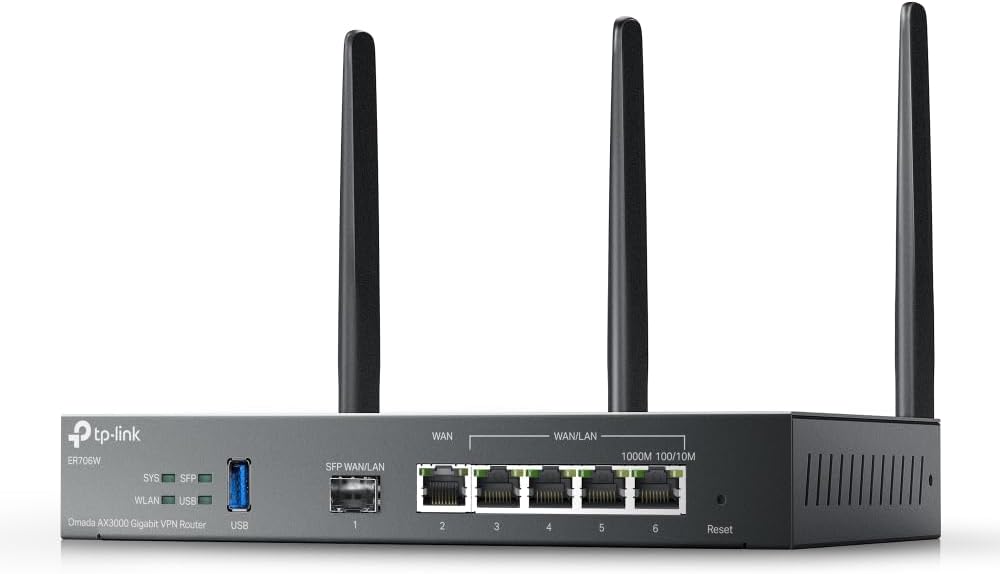
The Omada ER706W combines a wireless router with strong VPN and multi-WAN capabilities. Its 4.1-star rating reflects its robust performance for businesses requiring reliable internet redundancy and secure remote access.
We may earn a commission when you buy through this link, at no additional cost to you.
Load balancing across up to five WAN ports ensures high utilization of broadband connections and reduces downtime risks. The inclusion of multiple VPN protocols like WireGuard and OpenVPN supports secure access for remote employees.
However, the management interface may present a learning curve compared to consumer routers. Users should be prepared for initial configuration efforts to fully utilize the advanced network features available.
This router is suited for businesses with multiple internet lines needing failover protection. It is a solid choice for IT managers who require flexibility in routing and security protocols.
Supporting multiple WAN ports allows you to balance traffic and maintain connectivity if one line fails.
Built-in VPN protocols enable secure connections for employees working outside the office without extra hardware.
We may earn a commission when you buy through this link, at no additional cost to you.
The Ruckus R750 is an access point built for ultra-dense environments like stadiums or large conference centers. With a 4.3-star rating, it delivers reliable performance where many devices connect simultaneously.
We may earn a commission when you buy through this link, at no additional cost to you.
Its BeamFlex+ adaptive antenna technology maximizes signal coverage and throughput even with interference. This ensures consistent speeds for clients in crowded spaces where other routers might struggle with congestion.
The cost and requirement for a controller may be barriers for smaller setups. Businesses should evaluate their scale before committing to this high-performance enterprise-grade hardware.
It is best for venues needing to support hundreds of concurrent users reliably. IT administrators prioritizing density and performance will find this AP worth the investment.
BeamFlex+ dynamically adjusts antenna patterns to maintain signal strength in challenging radio environments.
Designed for density, it handles massive numbers of connections without significant latency or dropouts.
We may earn a commission when you buy through this link, at no additional cost to you.
The Ruckus R670 is an access point offering cutting-edge Wi-Fi 7 capabilities for modern deployments. Its high price reflects the advanced throughput and security features it brings to enterprise environments.
We may earn a commission when you buy through this link, at no additional cost to you.
With six spatial streams and a 5GbE port, it handles high-bandwidth applications like 8K streaming or large data transfers easily. The integration of Zigbee and BLE supports smart building technologies beyond just connectivity.
The cost and setup complexity limit its suitability to large organizations. It is not a solution for basic needs but rather for forward-looking enterprises requiring maximum throughput.
For businesses planning for the future, this access point is an excellent choice. It ensures compatibility with the latest devices and standards for years to come.
Wi-Fi 7 technology delivers significantly higher speeds and lower latency for demanding enterprise applications.
Built-in Zigbee and BLE allow the AP to act as a hub for smart building sensors and devices.
We may earn a commission when you buy through this link, at no additional cost to you.
The NETGEAR Orbi 970 Series is a premium mesh system designed for large-scale WiFi coverage. With a 4.6-star rating, it leads in speed and reliability for expansive properties.
We may earn a commission when you buy through this link, at no additional cost to you.
Its quad-band technology reserves a dedicated channel for backhaul, ensuring satellites do not slow down the network. The inclusion of 10 Gig ports future-proofs the network for high-speed fiber connections.
The high price point makes it an investment best suited for those needing top-tier performance. Users should ensure their internet plan matches the router's capabilities to fully utilize its speed.
This mesh system is ideal for large campuses or estates needing seamless roaming. It delivers consistent high-speed connections throughout every corner of the space.
A reserved wireless band for communication between units keeps client traffic fast and uninterrupted.
10 Gig ports ensure wired devices can take full advantage of multi-gigabit internet speeds.
We may earn a commission when you buy through this link, at no additional cost to you.
The Omada EAP650 is a cost-effective access point that delivers strong Wi-Fi 6 performance. Its 4.5-star rating highlights its value and reliability for business environments.
We may earn a commission when you buy through this link, at no additional cost to you.
Free cloud management allows for centralized control without buying hardware controllers. The sleek design blends into modern offices while delivering speeds up to 2976 Mbps for connected devices.
While powerful, advanced users may need to configure settings manually to maximize performance. The dependency on PoE requires compatible switches or injectors for power delivery.
This access point is ideal for small to medium offices needing reliable WiFi. It offers a balance of features and price that fits tight budgets well.
Manage all access points through the cloud or app without additional hardware investment or maintenance.
Wi-Fi 6 technology ensures efficient handling of multiple devices without significant speed drops.
We may earn a commission when you buy through this link, at no additional cost to you.
The Ubiquiti U6+ is a reliable wireless access point for creating business networks. With a 4.6-star rating, it is popular for its ease of use and stable connectivity.
We may earn a commission when you buy through this link, at no additional cost to you.
Its design supports PoE+ power, making installation simple without needing extra outlets. The wall-mountable form factor ensures it fits discreetly in any environment while providing strong signal coverage.
Users must use a UniFi controller for management, which adds complexity for small setups. This requirement may limit flexibility for those wanting a plug-and-play router experience.
It is best for users already invested in the Ubiquiti ecosystem. It provides high throughput and reliability for environments needing consistent WiFi performance.
PoE+ allows for single-cable installation, simplifying deployment in areas without power outlets.
Encryption features protect sensitive business data from unauthorized access on the wireless network.
We may earn a commission when you buy through this link, at no additional cost to you.
The TP-Link BE6500 brings next-generation Wi-Fi 7 technology to a budget-friendly price. Its 4.3-star rating reflects strong performance for users needing faster speeds.
We may earn a commission when you buy through this link, at no additional cost to you.
Features like Multi-Link Operation improve latency and reliability by transmitting across bands. The 2.5 Gbps ports ensure that wired connections do not bottleneck the high-speed wireless capabilities.
Users should note that it uses EasyMesh rather than TP-Link's Deco system. This might limit expansion options if you are already using other TP-Link mesh products.
This router is ideal for households needing modern speed on a budget. It offers a solid entry point into Wi-Fi 7 without the premium cost of high-end models.
MLO reduces latency by allowing devices to connect across multiple bands simultaneously.
Designed with security in mind, it meets CISA Secure-by-Design standards for safer operation.
We may earn a commission when you buy through this link, at no additional cost to you.
The NETGEAR Nighthawk WiFi 7 router delivers exceptional speed for busy homes or offices. With a 4.3-star rating, it offers reliable performance for high-demand applications.
We may earn a commission when you buy through this link, at no additional cost to you.
Tri-band design ensures the 6 GHz band is dedicated to the fastest devices. Multi-gig wired ports allow for future-proofing your network against faster internet plans.
The investment is significant for a single router. Users should ensure their internet plan supports these speeds to avoid underutilization of the hardware.
It is ideal for power users who need top-tier performance. This router handles heavy loads and gaming demands effectively.
A dedicated 6 GHz band ensures minimal interference for modern high-speed devices.
2.5 Gig ports provide fast wired connections for gaming PCs and high-performance devices.
We may earn a commission when you buy through this link, at no additional cost to you.
The ASUS RT-BE88U is a powerhouse router designed for users needing maximum wired and wireless speeds. It combines Wi-Fi 7 with 10G ports for high throughput.
We may earn a commission when you buy through this link, at no additional cost to you.
Its dual 10G ports allow for 34G of wired capacity, ideal for NAS or multi-gigabit internet. AI WAN detection helps maintain always-on connectivity by detecting primary internet line issues automatically.
The high price and physical size mean it is not for casual users. It is a tool for power users and small businesses needing extreme performance.
For those needing the fastest speeds available, this router is an excellent choice. It ensures your network is ready for future internet and device demands.
Two 10G ports allow for ultra-fast wired connections to servers or NAS devices.
AI WAN detection automatically switches to backup connections to ensure uninterrupted internet access.
We may earn a commission when you buy through this link, at no additional cost to you.
Selecting the right commercial wireless router requires evaluating several key factors. Understanding these will help you choose a model that meets your specific business needs.
Wi-Fi 6 and Wi-Fi 7 offer significant speed and efficiency improvements. Look for AX3000 or higher ratings to support multiple devices without lag. Ensure the router supports Multi-Link Operation for best Wi-Fi 7 performance.
Choose Wi-Fi 7 for future-proofing, or Wi-Fi 6 for cost-effective efficiency.
Commercial routers must handle dense device connections. Check for ratings stating support for 100 to 200 devices. This ensures stability during peak business hours when traffic is highest.
Select a model that matches your office size and device density.
Security is critical for business networks. Look for built-in protection like AiProtection Pro or HomeShield. Ensure support for WPA3 encryption and VPN protocols to secure remote access.
Prioritize routers with free subscriptions to enterprise-grade security tools.
Ease of management saves IT time. Evaluate options with cloud management or intuitive apps. Support for multiple SSIDs allows separation of guest and internal traffic effectively.
Choose a system that offers centralized control and remote monitoring.
Consider the number and speed of LAN ports. Multi-gigabit ports like 2.5G or 10G are essential for high-speed internet plans. SFP slots allow for fiber connectivity in some business models.
Ensure your wired ports match your modem and local network requirements.
Business needs may grow. Look for support for mesh systems like AiMesh or Omada SDN. This allows adding access points without replacing your main router.
Select a router that supports expanding your network easily.
Prices vary from budget to premium. Higher cost often brings better hardware and longer warranties. Check for 5-year warranties to ensure long-term protection.
Balance initial costs with potential maintenance and replacement fees.
Separate guest networks are vital for security. Look for customizable portals and dedicated SSIDs. This keeps guest traffic isolated from internal business data.
Prioritize routers offering flexible guest access controls.
Start by placing your router in a central, elevated location away from walls and metal objects to ensure optimal signal distribution.
Regularly update firmware through the app or web interface to benefit from the latest security patches and performance improvements.
Use the guest network features to isolate visitor devices and maintain the security of your internal business network.
Wi-Fi 6 is currently the most cost-effective choice for most offices. However, Wi-Fi 7 offers future-proofing with higher speeds and lower latency for demanding environments.
Yes, many models support mesh networks like AiMesh or Omada SDN. This allows you to expand coverage by adding access points without complex cabling.
Most commercial routers allow multiple SSIDs. You can create a separate guest network with its own password and access rules to ensure data isolation.
VPNs secure remote access for employees. This ensures that sensitive company data remains encrypted when accessed over public networks.
High-end commercial routers support up to 200 devices or more. Ensure you choose a model that meets your office density to prevent slowdowns.
Some systems like Omada require a controller for full management. Others like ASUS allow standalone operation. Check the product details for management requirements.
We reviewed ten top models ranging from budget access points to high-end mesh systems. Each offers unique strengths for different business needs and scales.
Prioritize security, speed, and management features that match your current and future infrastructure plans.
Remember to check current availability and pricing before purchasing to ensure the best deal for your setup.