
Raywego 49 Inch Curved Ultrawide Gaming Monitor
4.6Editor score
DQHD 5120×1440 Resolution
165Hz Refresh Rate
1500R Curved Display
Choosing the right display for your simulation setup is critical for immersion and performance. A 49 inch ultrawide monitor provides a panoramic view that wraps around your field of vision, making you feel like you are actually in the cockpit. These screens replace dual monitor setups with a seamless experience.
We evaluated ten top models based on refresh rates, panel types, and curvature to find the best options for sim racers. Each product offers unique features like high dynamic range, fast response times, and wide color gamuts. Our comparison helps you navigate the vast options available today.
Every pick highlights key strengths and potential trade-offs so you can make an informed decision for your rig. We focus on specs that matter most for racing simulations without cluttering the review with unnecessary details. Prices and availability may change so always check the current listings before purchasing.
4.6Editor score

4.1Editor score

4.3Editor score
As an Amazon Associate we earn from qualifying purchases.
The following table provides a side-by-side comparison of all ten monitors included in this guide. We highlight the most critical specifications for sim racing such as refresh rates, resolutions, and panel types to help you quickly identify the right model for your needs.





The Raywego 49 inch monitor offers a compelling entry point for sim racers seeking immersion without breaking the bank. It delivers a crisp DQHD resolution with a 165Hz refresh rate that ensures smooth visuals during fast-paced races. The curved design wraps around your view to enhance the feeling of being on the track.
We may earn a commission when you buy through this link, at no additional cost to you.
Its VA panel provides deep blacks and vibrant colors which help distinguish track details in low light conditions. The 1ms response time and Adaptive Sync support reduce motion blur and tearing so you stay focused on the road. This monitor effectively replaces dual screens by providing a seamless workspace for gaming and productivity.
While it lacks some premium features like USB-C or advanced ergonomics the performance is solid for the price. The stand allows basic height and tilt adjustments but may not suit everyone out of the box. For budget conscious buyers this model delivers the wide field of view essential for competitive racing.
We recommend this to beginners or those upgrading from standard monitors who want maximum screen real estate. It balances cost and performance well for a 49 inch ultrawide experience. Check current deals to maximize savings before adding this to your sim racing rig.
The 1500R curvature matches the natural shape of human vision to reduce eye strain during long sessions.
At 165Hz this monitor keeps motion fluid and responsive which is critical for spotting opponents on track.
We may earn a commission when you buy through this link, at no additional cost to you.
This OLED model sets a new standard for visual fidelity in sim racing displays. Its QD-OLED panel delivers true blacks and infinite contrast which make night races and shadows look incredibly realistic. The near instant response time eliminates ghosting so motion remains sharp even at high speeds.
We may earn a commission when you buy through this link, at no additional cost to you.
Gamers benefit from the vibrant color spectrum and HDR capabilities that bring games to life with stunning clarity. The thermal modulation system helps manage heat during extended use to maintain consistent brightness. You get a premium viewing experience that rivals professional broadcast standards.
The main trade-off is the cost and the need for burn-in prevention features which the monitor handles well. Static elements like HUDs are protected by pixel shifting and screen saver options. For those prioritizing image quality above all else this is the top choice in the category.
Ideal for hardcore sim racers who demand the best visual performance and have a higher budget. It is an investment that transforms how you see every turn and straightaway. Ensure your GPU can drive the resolution at high refresh rates before purchasing.
Unlike LCD panels this OLED tech turns off individual pixels to achieve perfect black levels.
The wide color gamut ensures track details and cars are rendered with precision.
We may earn a commission when you buy through this link, at no additional cost to you.
INNOCN brings a well rounded package that balances gaming with productivity features for dual use setups. The USB-C port supports 65W power delivery which simplifies cabling when using a laptop for simulation software. Built-in speakers add convenience without needing external audio gear for quick sessions.
We may earn a commission when you buy through this link, at no additional cost to you.
Color accuracy is strong with 99 percent sRGB coverage which helps ensure consistent visuals across different content. The height adjustable stand allows you to position the screen comfortably for long racing marathons. PIP and PBP modes let you monitor telemetry alongside the game view easily.
While the 120Hz refresh rate is lower than competitors it remains smooth for most racing titles. The 1800R curve is gentler which may suit those who find deeper curves uncomfortable. This monitor is a practical choice for users who need connectivity versatility.
Consider this model if you use a laptop as part of your racing rig or want a clean desk setup. It offers essential features without unnecessary bloat. Always verify compatibility with your specific laptop model before relying on USB-C video output.
USB-C delivers both video and power so you reduce cable clutter on your desk.
Split screen modes allow you to view chat or telemetry without losing focus on the track.
We may earn a commission when you buy through this link, at no additional cost to you.
The Odyssey G9 stands out for its incredibly fast refresh rate and deep curve that creates unmatched immersion. With 240Hz you get minimal motion blur which is vital for competitive racing where reaction times matter. The 1000R curve fills your peripheral vision so you feel seated in the driver seat.
We may earn a commission when you buy through this link, at no additional cost to you.
Peak brightness of 1000 nits allows HDR content to shine even in bright rooms or direct sunlight. CoreSync technology projects game colors onto your desk to extend immersion beyond the screen edges. Adaptive sync keeps gameplay smooth without screen tearing or stuttering during intense overtakes.
The steep curve takes getting used to if you prefer flatter displays but becomes natural quickly. The high brightness might cause glare in very dim rooms without proper ambient lighting. Still this model sets the bar for high performance ultrawide gaming monitors.
Recommended for enthusiasts who prioritize speed and immersion and have a powerful GPU to drive 240Hz. It is a premium choice that justifies its cost for serious racers. Check the latest model year to ensure you get the best version available.
The 1000R curve mirrors the human eye field of view for the most realistic cockpit feel.
240Hz refresh ensures every frame updates instantly to give you a competitive edge.
We may earn a commission when you buy through this link, at no additional cost to you.
This 2025 model refines the G9 experience with modern features and a 144Hz refresh rate for smooth gameplay. The 1000R curve continues to offer deep immersion for racing sims and productivity alike. HDR600 provides good contrast and brightness for a well rounded visual experience.
We may earn a commission when you buy through this link, at no additional cost to you.
Auto Source Switch ensures you jump into games quickly when turning on your console or PC. The ergonomic stand allows tilt and height adjustments for comfortable viewing during long sessions. AMD FreeSync Premium Pro eliminates tearing and keeps frame times consistent.
It lacks the extreme speed of the 240Hz variant but balances performance with efficiency well. The design remains sleek and premium fitting modern setups without taking up too much space. This is a solid pick for those wanting a current gen Samsung experience.
Choose this if you want a reliable high performance monitor without the extreme 240Hz price. It suits both racing and general use effectively. Verify GPU requirements to run this resolution comfortably at 144Hz.
Auto source detection speeds up your workflow by switching inputs when devices wake.
Adjustable stands help maintain proper posture during extended racing sessions.
We may earn a commission when you buy through this link, at no additional cost to you.
CRUA offers a strong mid-tier option that balances performance with cost for sim racing setups. The DQHD resolution and 165Hz refresh rate deliver clear and smooth visuals for most racing games. Its 1500R curve provides a natural wrap around feel without being too extreme.
We may earn a commission when you buy through this link, at no additional cost to you.
Color coverage of 120 percent sRGB ensures tracks and cars appear vivid and accurate. FreeSync support helps prevent screen tearing during high speed overtakes. The adjustable stand supports tilt and height for basic ergonomic needs.
Lack of built-in speakers means you need external audio but this keeps costs down. Controls are accessible though not as refined as premium brands. For a solid midrange pick this monitor covers the essentials well.
Ideal for budget aware gamers who still want a large screen with good color. It fits well in small spaces or on VESA arms. Check your cable setup for compatibility with HDMI 2.1 ports.
Wide sRGB range ensures tracks look vibrant and realistic under different lighting.
VESA compatibility lets you save desk space with a floating mount setup.
We may earn a commission when you buy through this link, at no additional cost to you.
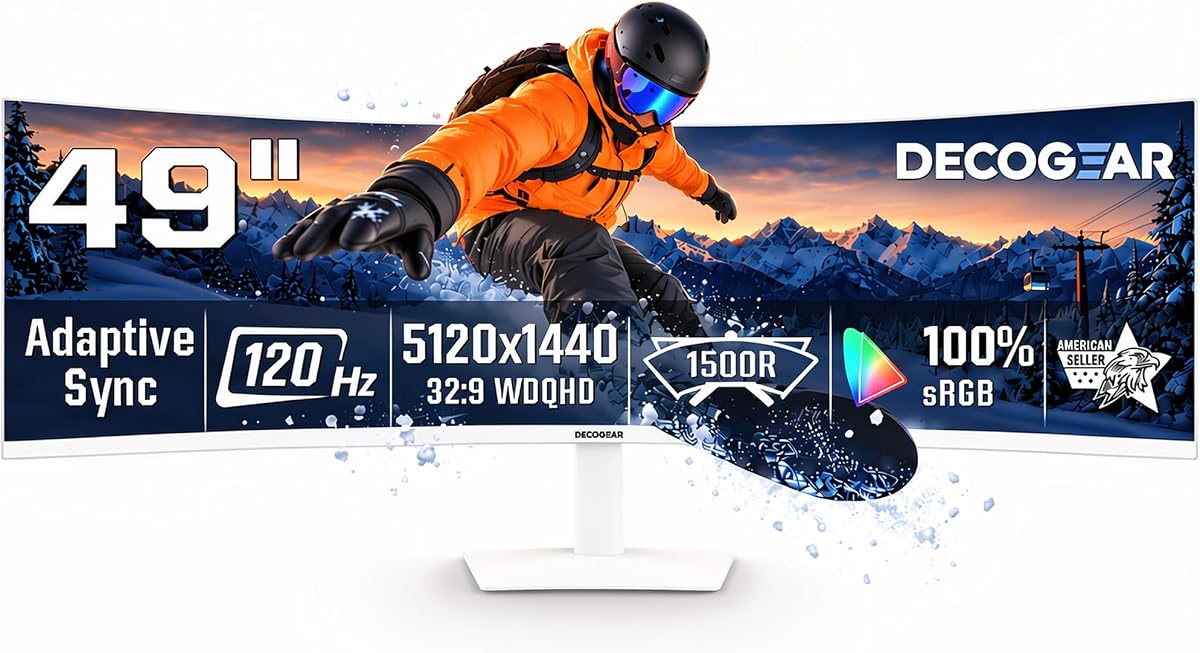
Deco Gear focuses on productivity and multi-device use with KVM switches and USB hubs built in. The 120Hz refresh rate is sufficient for casual gaming and daily use. This setup helps you manage multiple PCs or laptops with a single keyboard and mouse.
We may earn a commission when you buy through this link, at no additional cost to you.
Built-in speakers and USB-C connectivity simplify desk management for home offices or sim setups. The 1500R curve reduces eye strain by aligning with natural vision angles. PIP and PBP modes enable side by side monitoring for streams or telemetry.
While not the fastest for competitive gaming it serves well for mixed use cases. Build quality is functional but lacks premium touches. Ideal for users juggling work and play on one screen.
Select this if you need multi-device control without extra docks or switches. It supports streaming and racing simultaneously with ease. Ensure your system supports 65W USB-C for full functionality.
KVM switch lets you control two computers with one set of peripherals.
USB hub reduces cable clutter by allowing direct device connections.
We may earn a commission when you buy through this link, at no additional cost to you.
The ROG XG49VQ offers a wide aspect ratio with 144Hz refresh and solid ergonomics. Its lower resolution makes it easier to drive on mid-range graphics cards for high frame rates. The 1800R curve ensures comfortable viewing for long gaming sessions.
We may earn a commission when you buy through this link, at no additional cost to you.
ASUS Eye Care reduces blue light and flicker to protect eyes during extended play. GamePlus overlays provide crosshair and timer tools for competitive advantage. The stand supports tilt and height to suit various desk setups.
Vertical resolution is lower than DQHD so UI elements may appear large. It is an older model which might mean limited availability or support. Still it remains a reliable choice for older GPUs.
Choose this if you have a mid tier PC and prioritize frame rates over pixel density. It offers solid performance for classic sim racing titles. Check for updated drivers before setup.
Certified eye care tech reduces strain during long hours of play.
Built-in tools like timers help track race performance without extra apps.
We may earn a commission when you buy through this link, at no additional cost to you.
Z-Edge delivers a 240Hz refresh rate at a competitive price for fast-paced sim racing. DQHD resolution ensures sharp details for track surfaces and textures. Built-in speakers remove the need for separate audio solutions for casual gaming.
We may earn a commission when you buy through this link, at no additional cost to you.
Adaptive Sync keeps motion smooth and responsive without tearing. The 1800R curve balances immersion with comfort for most setups. PIP and PBP allow multitasking during game breaks or streaming.
Brand reputation is smaller than major names so quality assurance might vary. Still reviews point to solid performance for the specs offered. This is a great budget entry into high refresh ultrawides.
Pick this for high frame rate performance without the premium price tag. Ideal for users with strong GPUs. Verify warranty terms before purchase for peace of mind.
240Hz capability at lower cost makes it accessible for competitive racers.
Built-in speakers save desk space and setup time for gaming.
We may earn a commission when you buy through this link, at no additional cost to you.
This OLED variant combines speed with visual fidelity for an elite sim racing experience. 240Hz refresh ensures every frame is sharp even at top speeds. The QD-OLED panel delivers perfect blacks and vibrant colors for stunning realism.
We may earn a commission when you buy through this link, at no additional cost to you.
Design is sleek and modern with minimal bezels. Auto Source Switch keeps you ready to race instantly. HDR True Black enhances dark areas making night racing more immersive.
Cost is significant and settings must be managed to avoid burn-in on static HUDs. It requires a high-end GPU to drive full specs. Still it is one of the finest ultrawides available.
Ideal for enthusiasts seeking the best image quality and speed regardless of cost. Ensure proper ventilation and settings for longevity. This is the pinnacle of ultrawide racing displays.
OLED tech ensures colors and contrast outperform any LCD panel.
Combining 240Hz with OLED pixels creates unmatched motion clarity.
We may earn a commission when you buy through this link, at no additional cost to you.
Selecting the right monitor for sim racing involves balancing resolution refresh rate and panel type to match your setup. This guide breaks down the key factors you should evaluate before purchasing.
49 inch monitors typically offer DQHD 5120×1440 resolution which provides sharp details for track environments. This balance ensures your GPU can render high frame rates while keeping UI elements crisp and readable.
Look for at least DQHD resolution to avoid pixelation that can distract during races.
Higher refresh rates like 144Hz or 240Hz reduce motion blur and make fast movement smoother. Response times under 5ms ensure that input latency stays minimal for responsive steering.
Aim for 144Hz or higher for competitive racing and under 5ms response time for best results.
Curves between 1000R and 1800R affect immersion and comfort. Deep curves like 1000R fill your peripheral vision more but may cause distortion at edges.
Choose 1500R for balanced immersion or 1000R for maximum cockpit feel.
VA panels offer strong contrast and deep blacks ideal for night racing. OLED panels provide perfect blacks and instant response but cost more and risk burn-in.
Pick VA for value or OLED for ultimate image quality if budget allows.
Ensure ports match your PC or console HDMI 2.1 and DisplayPort 1.4 are essential for high refresh rates. USB-C can simplify laptop setups with single cable power.
Verify you have at least DisplayPort or HDMI 2.1 for desired refresh and resolution.
HDR support enhances contrast in bright and dark scenes. Wide color coverage like sRGB or DCI-P3 ensures track details are vibrant and true to life.
Look for DisplayHDR 400 or higher and over 90 percent sRGB coverage.
Adjustable stands with height and tilt help reduce strain during long sessions. VESA mount compatibility allows arm or wall mounting if desk space is limited.
Ensure the stand offers height adjustment for optimal eye alignment.
Driving a 49 inch DQHD display requires a powerful graphics card especially for high refresh rates. Check benchmarks for your specific games to ensure smooth performance.
Use a mid to high range GPU to fully utilize this monitor's specs.
Position the monitor so the center aligns with your eyes to reduce neck strain. Adjust brightness to match ambient light levels to avoid eye fatigue over time.
Use DisplayPort for high refresh rates and enable Adaptive Sync in graphics settings. Adjust OS scaling for sharp UI text since ultrawide screens can render text large.
Keep firmware updated for performance fixes and use built-in screen savers to protect OLED panels from burn-in.
For competitive racing 144Hz to 240Hz is ideal as it reduces motion blur and makes movement smoother. Lower refresh rates like 60Hz or 75Hz can feel sluggish during fast turns.
Yes but a powerful GPU is needed to drive DQHD at high refresh rates. Mid-range cards may struggle unless settings are reduced for higher frame rates.
Curved screens enhance immersion by wrapping around your field of view which helps judge distances better. Most racing enthusiasts prefer curves between 1000R and 1800R for comfort.
Enable pixel shifting and screen saver features. Avoid static HUDs and use task bars that fade when not in use. Lower brightness for dark rooms helps.
Many models support PBP or KVM to switch between inputs easily. This lets you play one game while monitoring telemetry or chatting on another PC.
DisplayPort 1.4 or HDMI 2.1 is required for 240Hz at DQHD. Check your PC and monitor manual to ensure ports support these specs fully.
We reviewed ten 49 inch ultrawide monitors each offering unique benefits from budget value to OLED performance. The Raywego model leads for affordability while Samsung OLED G9 sets the standard for image quality.
Prioritize refresh rate and panel type based on your racing style and budget. A fast refresh rate ensures responsiveness while a good panel delivers immersion through contrast and color.
Check current availability and reviews before purchasing since tech specs and prices change often. Your choice will shape your racing experience for years so choose wisely.